
napari-segmentation-toolbox






Toolbox for viewing, analyzing and correcting (cell) segmentation in 2D, 3D or 4D (t, z, y, x) (virtual) arrays.
This napari plugin was generated with Cookiecutter using @napari's cookiecutter-napari-plugin template.
Installation
You can install napari-segmentation-toolbox via pip:
To install latest development version :
pip install napari-segmentation-toolbox
Usage
The aim is to serve as a toolbox that provides easy access to functionalities from 

- Orthogonal views for 3D data (also available
).
- Copy labels from a 2-5 dimensional array with multiple segmentation options to your current 2-5 dimensional label layer.
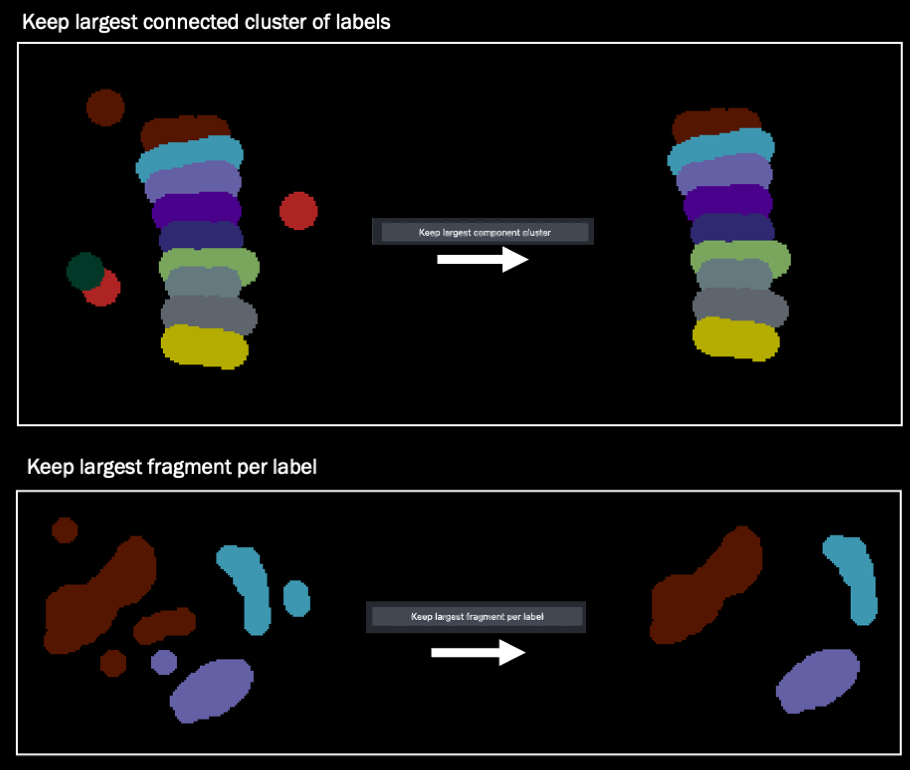
- Label connected components, keep the largest connected cluster of labels, keep the largest fragment per label.
- Smooth labels using a median filter.
- Compute label boundaries.
- Erode/dilate labels (scipy.ndimage and scikit-image).
- Binarize an image or labels layer by applying an intensity threshold.
- Image calculator for mathematical operations between two images.
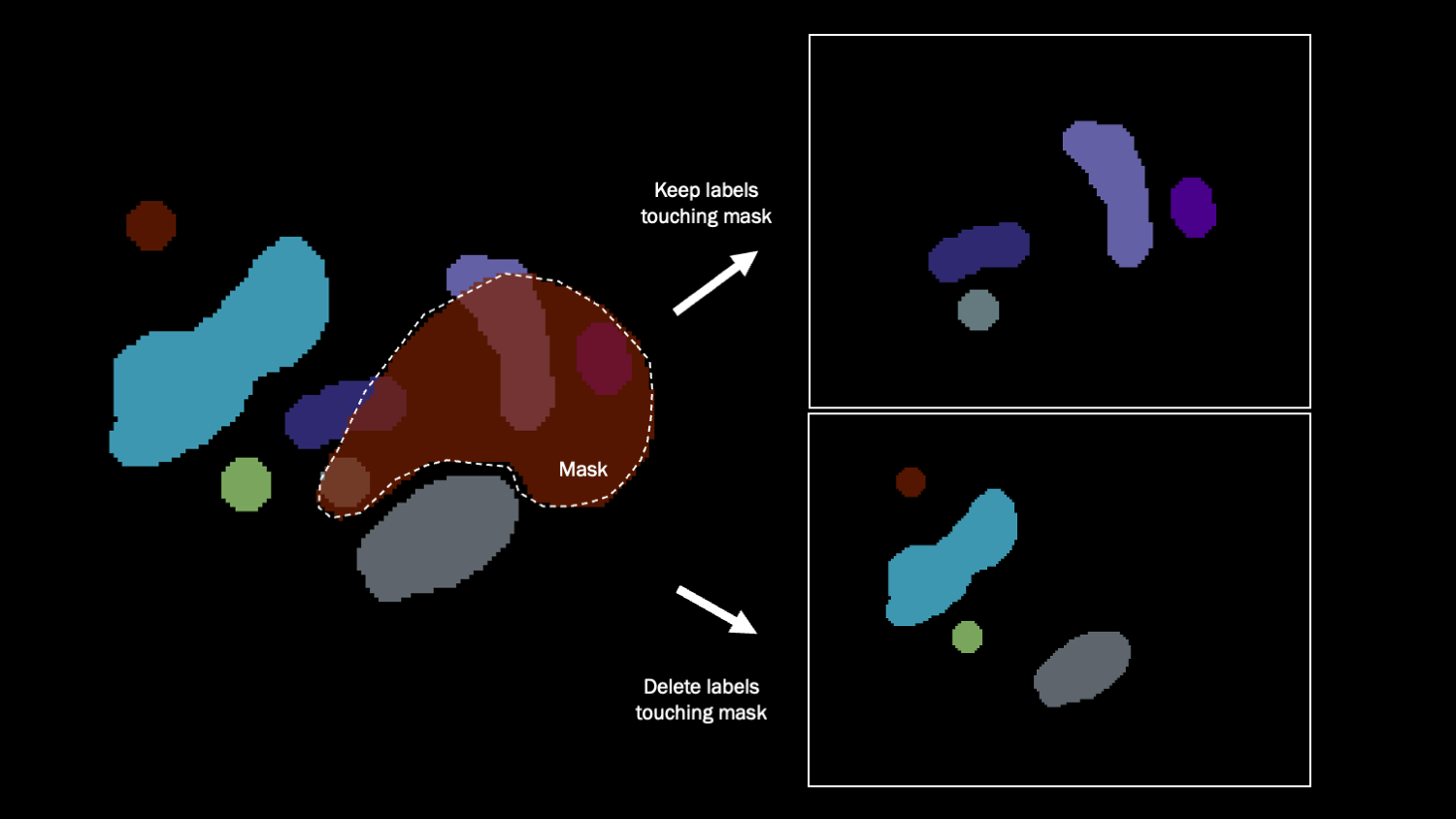
- Select/delete labels using a mask.
- Binary mask interpolation in the z or time dimension.
- Explore label properties in a table widget and a Matplotlib plot.
- Filter and color regions by properties.
Copy labels between different labels layers
|
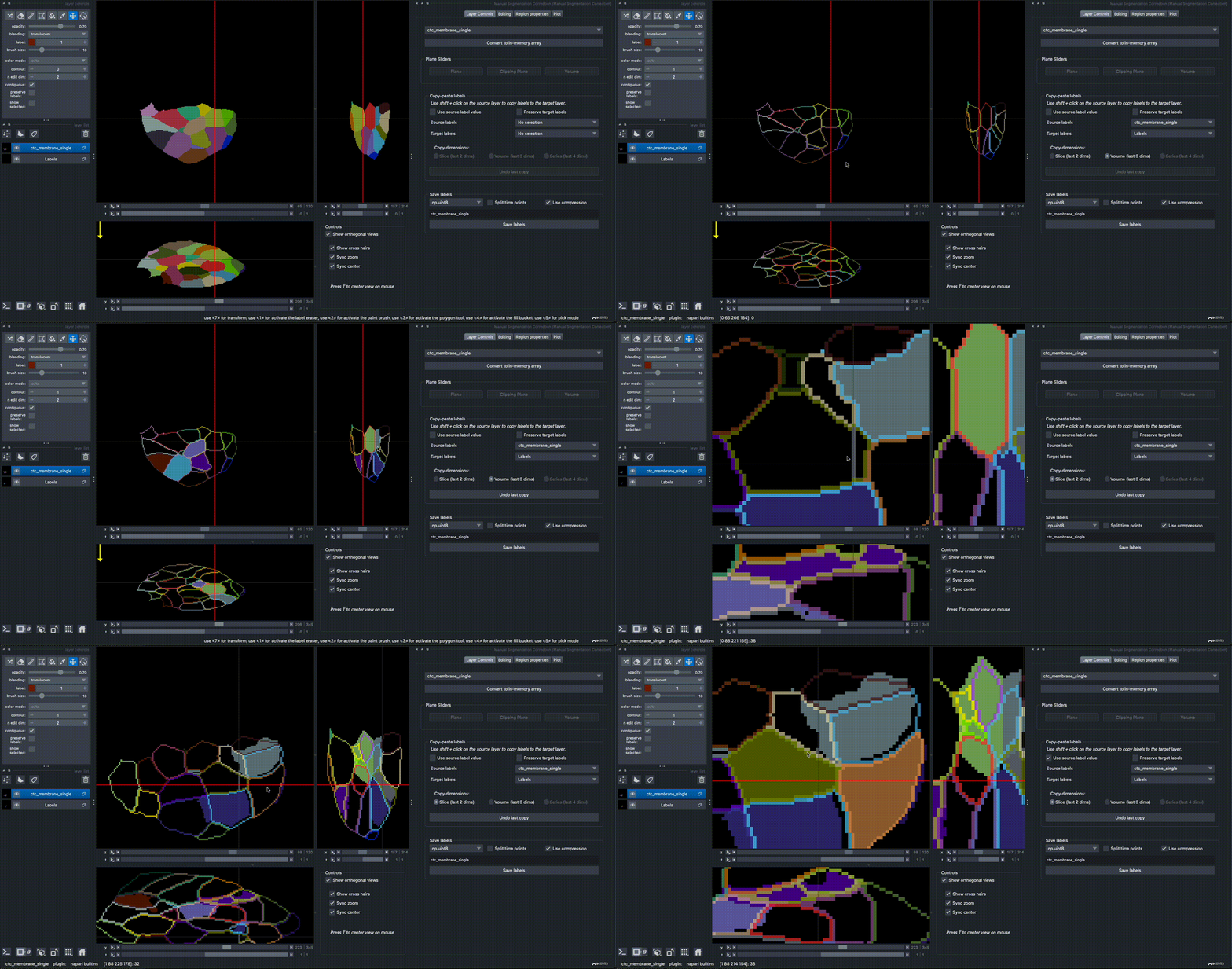
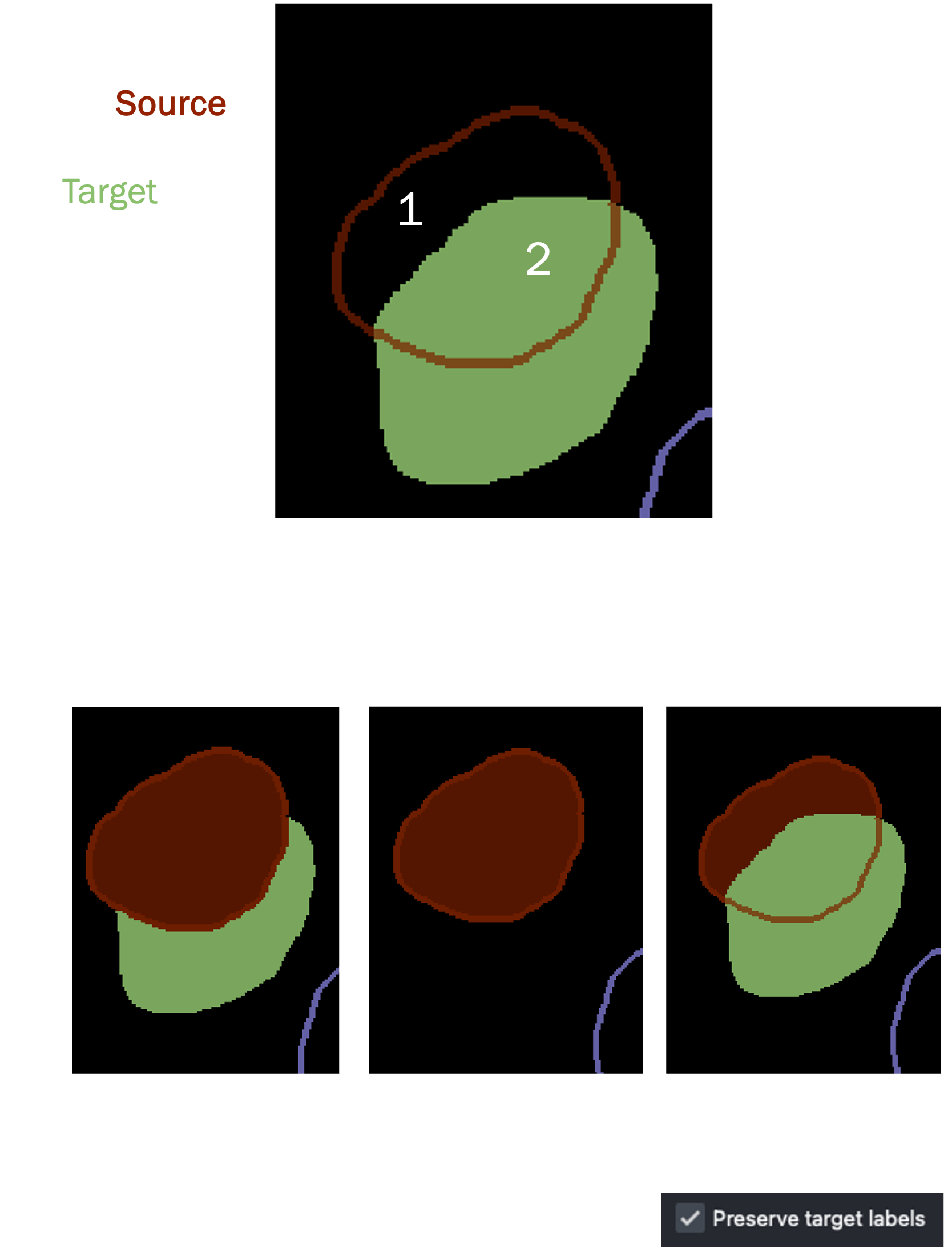
2D/3D/4D labels can be copied from a source layer to a target layer via SHIFT+CLICK. The data in the source layer should have the same shape as the target layer, but can optionally have one extra dimension (e.g. stack multiple segmentation solutions as channels). To copy labels, select a 'source' and a 'target' labels layer in the dropdown. By default, the source layer will be displayed as contours. Select whether to copy a slice, a volume, or a series across time. Checking Use source label value keeps the original label values. Selecting Preserve target labels only allows copying into background (0) regions. Otherwise, SHIFT+CLICK replaces the existing label region. |
|
Connected component analysis
There are shortcut buttons for connected components labeling, keeping the largest cluster of connected labels, and to keep the largest fragment per label.
Select / delete labels that overlap with a binary mask
All labels that share any pixel overlap with the mask are selected or removed.
Binary mask interpolation
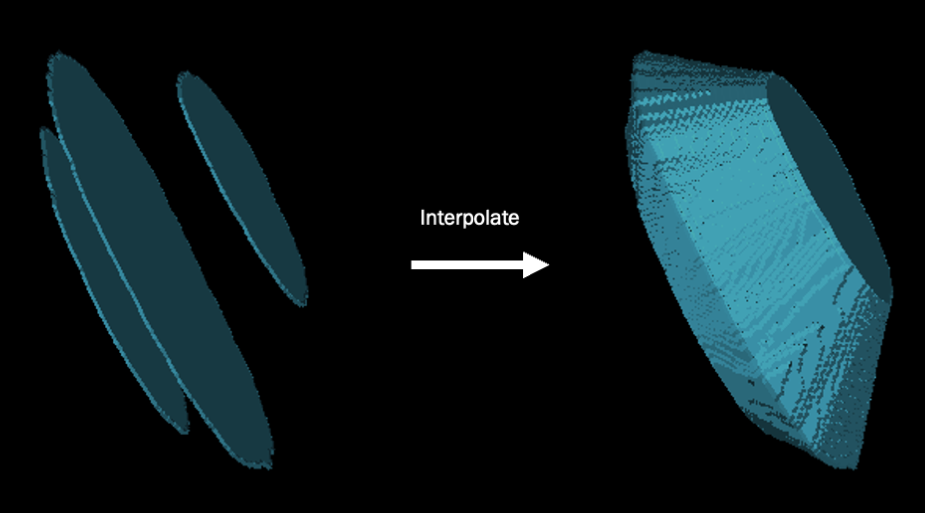
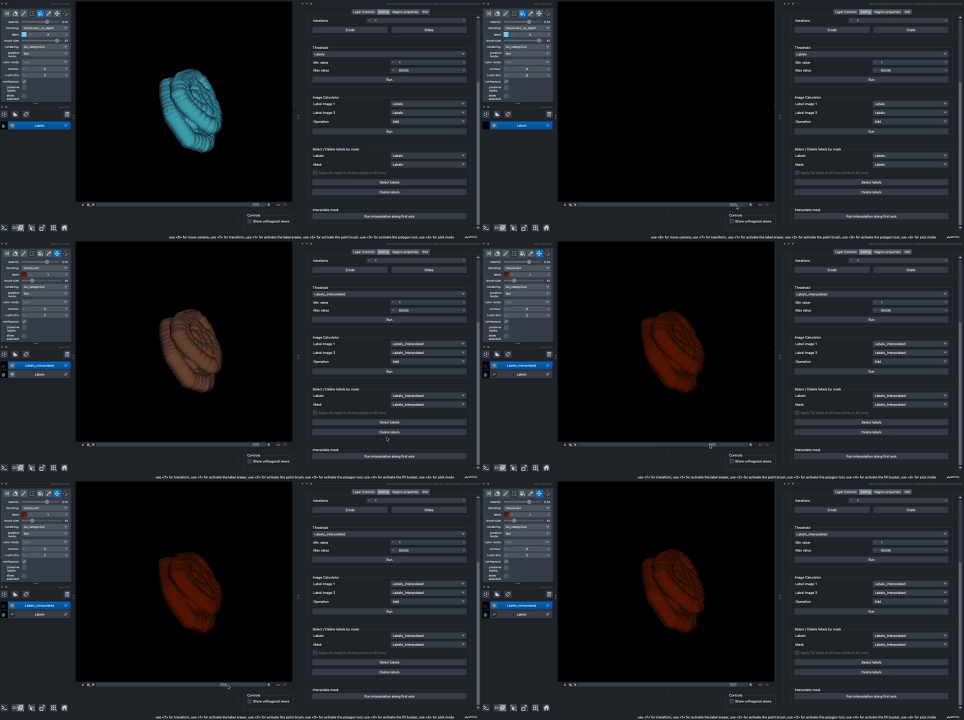
It is possible to interpolate a 3D or 4D mask to fill in the region in between. In 3D, this means creating a 3D volume from slices, in 4D this means creating a time series of a volume that linearly 'morphs' into a different shape.
|
|
Measuring label properties
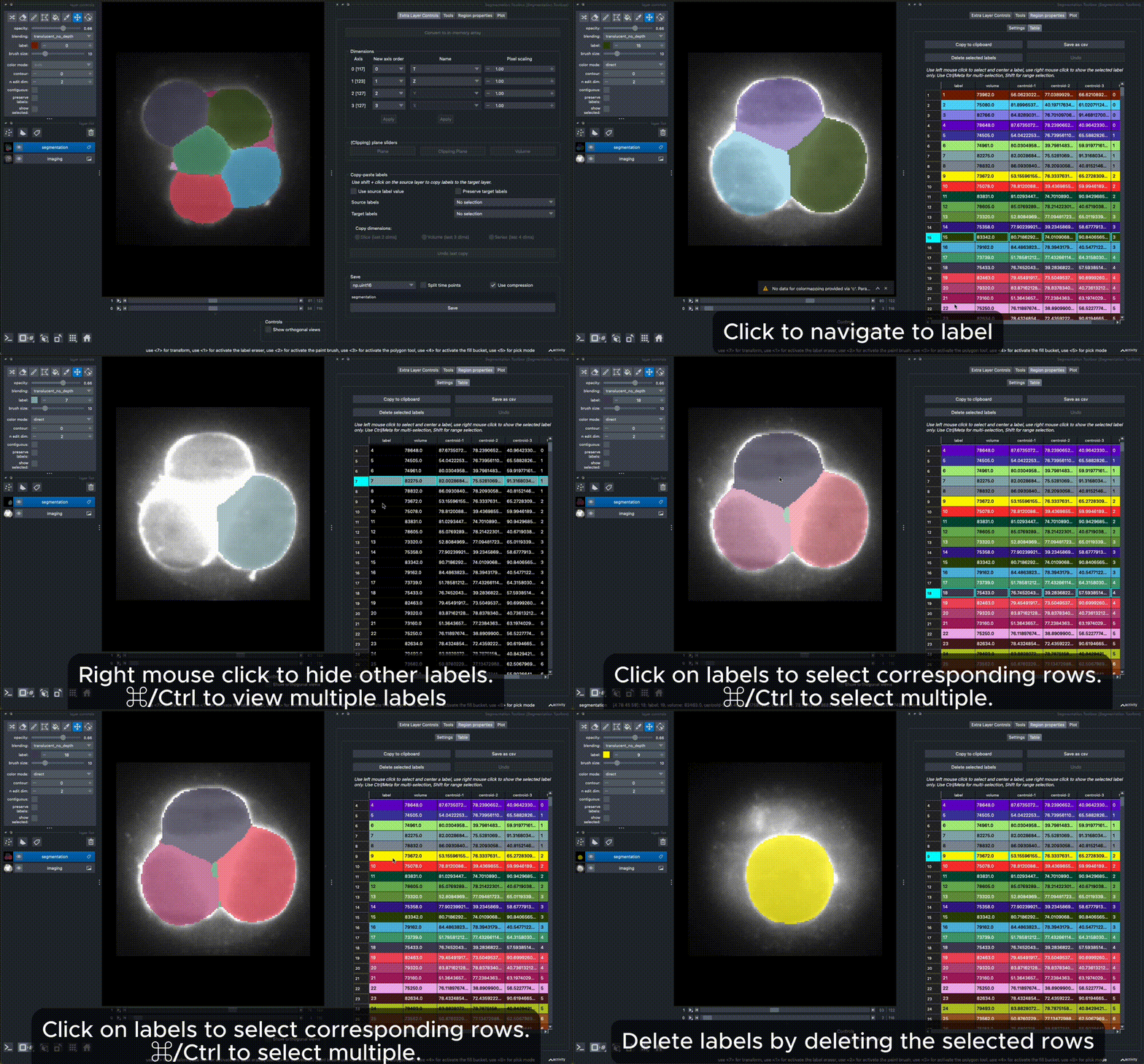
You can measure label properties, including intensity (if a matching image layer is provided), area/volume, perimeter/surface area, circularity/sphericity, ellipse/ellipsoid axes in the 'Region Properties' tab. The plugin uses scikit-image regionprops with extended properties for 3D shapes based on methods from PoreSpy. Make sure you set the dimensions correctly in the 'Extra layer controls' tab, to distinguish between measuring in 2D + time, 3D, and 3D + time, depending on your layer dimensions (2D to 4D). Once finished, a table displays the measurements, and a filter widget allows you to select objects matching a condition. The measurements are also displayed in the 'Plot'-tab for each layer for which you ran the region properties calculation.
See also
This plugin has taken inspiration from other napari plugins with similar and more advanced functionalities for measuring features, such as:


Contributing
Contributions are very welcome. Tests can be run with tox, please ensure the coverage at least stays the same before you submit a pull request.
License
Distributed under the terms of the BSD-3 license, "napari-segmentation-toolbox" is free and open source software
Issues
If you encounter any problems, please file an issue along with a detailed description.
1 maintainer

Metadata
1 maintainer
Release files for napari-segmentation-toolbox 0.0.7
For a detailed explanation of source distributions (sdists) and built distributions (wheels), please see the package formats documentation.
Source distribution (sdist)
| File | Size | Uploaded | Provenance | Actions |
|---|---|---|---|---|
| napari_segmentation_toolbox-0.0.7.tar.gz | 112.2 kB | Without provenance | Details for napari_segmentation_toolbox-0.0.7.tar.gz |
Built distribution (wheel)
| File | Interpreter | ABI | Platform | Actions Reset |
|---|---|---|---|---|
| napari_segmentation_toolbox-0.0.7-py3-none-any.whl | Python 3 | none | any | Details for napari_segmentation_toolbox-0.0.7-py3-none-any.whl |
Total release size: 246.2 kB
Release files / napari_segmentation_toolbox-0.0.7.tar.gz
| Download URL | napari_segmentation_toolbox-0.0.7.tar.gz |
|---|---|
| Size | 112.2 kB |
| Tags | Source |
|
SHA-256 checksum How to use checksums |
435842084f5e62720136378877a4456d6a44a9e4399360ae5b1def3f1f4481ba
|
|
BLAKE2b-256 checksum How to use checksums |
9e62e637881bb8a70aec456dd7afab4cd54b269fafbf49538835d43b582b750b
|
| Upload date | |
|
Uploaded using Trusted Publishing? What is trusted publishing? |
No |
| Uploaded via |
twine/6.2.0 CPython/3.14.3
|
Release files / napari_segmentation_toolbox-0.0.7-py3-none-any.whl
| Download URL | napari_segmentation_toolbox-0.0.7-py3-none-any.whl |
|---|---|
| Size | 133.9 kB |
| Tags | Python 3 |
|
SHA-256 checksum How to use checksums |
10e6be2c50ebe2c19e6a3003ee3750520eb483f6766b087785fb132d8d7bc5a4
|
|
BLAKE2b-256 checksum How to use checksums |
1dd7ccc80576bae95683ad5d141a7011937e83133ff7d9be677a056159bdb4ee
|
| Upload date | |
|
Uploaded using Trusted Publishing? What is trusted publishing? |
No |
| Uploaded via |
twine/6.2.0 CPython/3.14.3
|
Security for napari-segmentation-toolbox 0.0.7
Provenance
Provenance describes where a file came from. On PyPI, provenance is shared via attestations, which provide a verifiable record of the build or publishing details. View details, limitations and caveats.
No provenance found
None of the files in this release were uploaded with provenance metadata.
A note on package security
PyPI is a repository for distributing packages, not a service for auditing them. While third-party security researchers and our staff do their best to detect and remove malicious packages, PyPI cannot guarantee the quality, security or suitability of any given package.
To learn more about protecting yourself from malicious actors, visit our package security documentation.














