
Toolbox for viewing, analyzing, and manually correcting (cell) segmentation in napari.

Project description
napari-segmentation-toolbox






Toolbox for viewing, analyzing and correcting (cell) segmentation in 2D, 3D or 4D (t, z, y, x) (virtual) arrays.
This napari plugin was generated with Cookiecutter using @napari's cookiecutter-napari-plugin template.
Installation
You can install napari-segmentation-toolbox via pip:
To install latest development version :
pip install napari-segmentation-toolbox
Usage
The aim is to serve as a toolbox that provides easy access to functionalities from 

- Orthogonal views for 3D data (also available
).
- Copy labels from a 2-5 dimensional array with multiple segmentation options to your current 2-5 dimensional label layer.
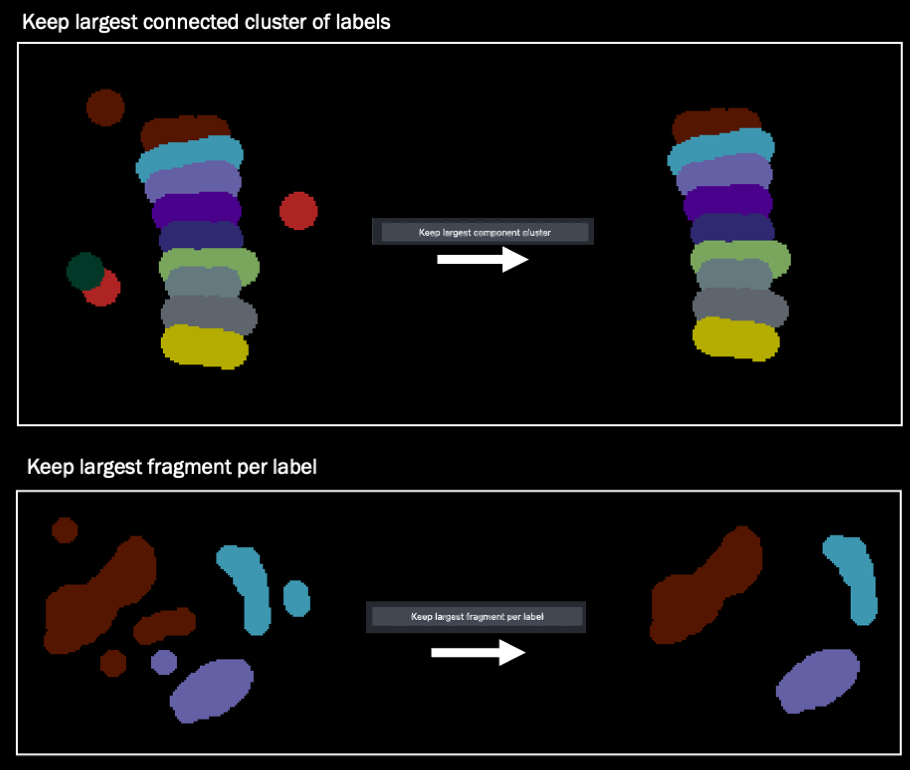
- Label connected components, keep the largest connected cluster of labels, keep the largest fragment per label.
- Smooth labels using a median filter.
- Compute label boundaries.
- Erode/dilate labels (scipy.ndimage and scikit-image).
- Binarize an image or labels layer by applying an intensity threshold.
- Image calculator for mathematical operations between two images.
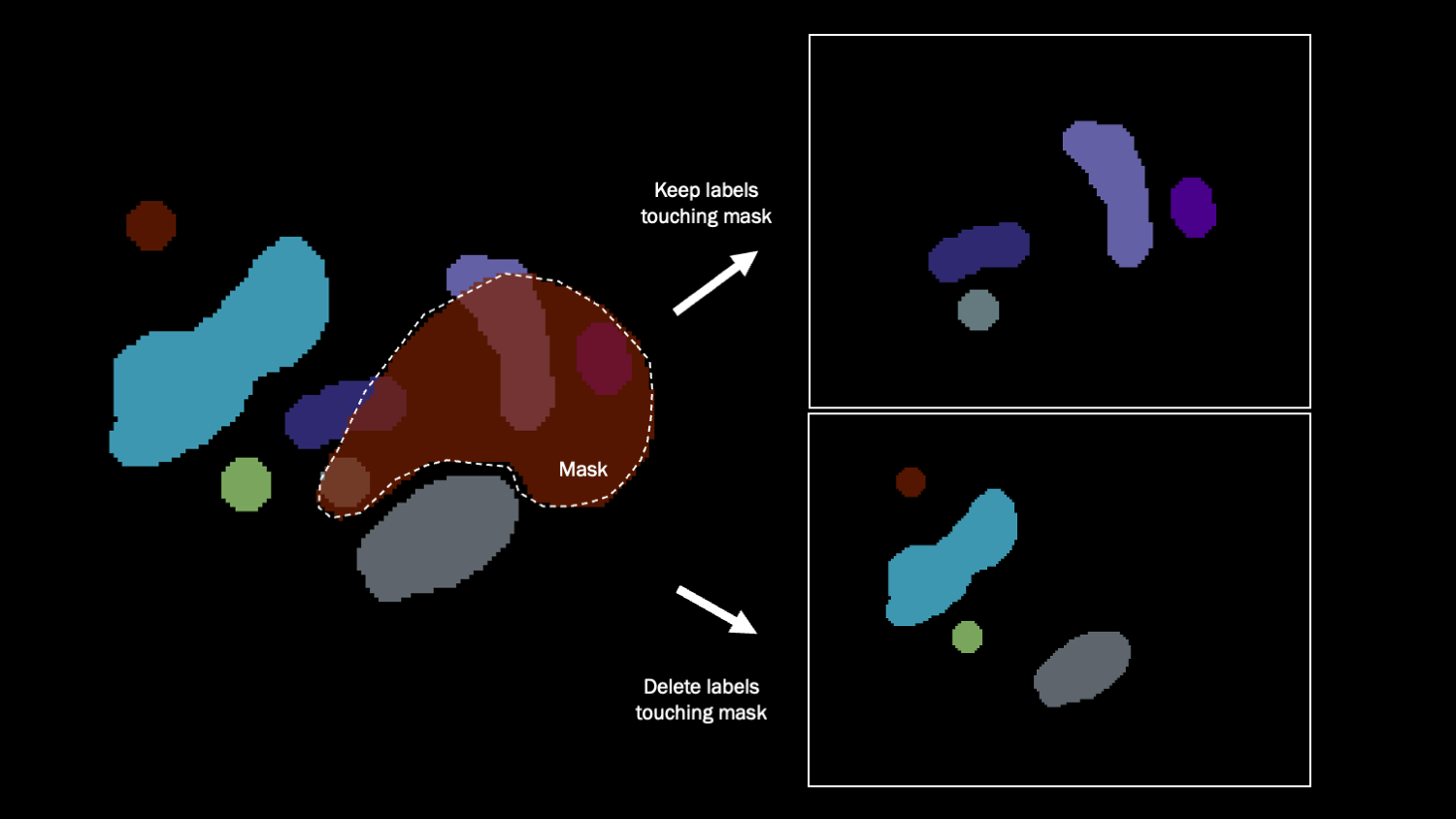
- Select/delete labels using a mask.
- Binary mask interpolation in the z or time dimension.
- Explore label properties in a table widget and a Matplotlib plot.
- Filter and color regions by properties.
Copy labels between different labels layers
|
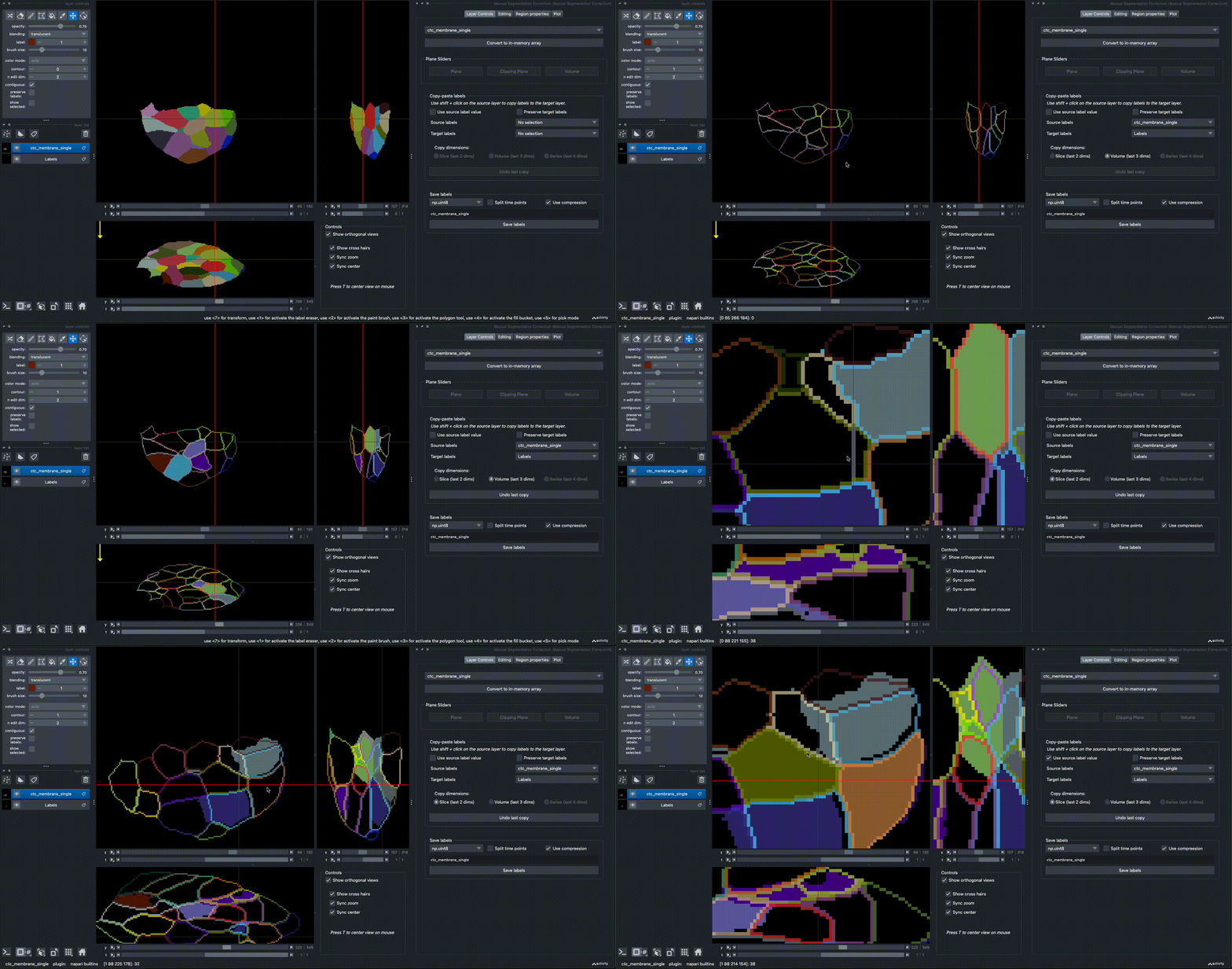
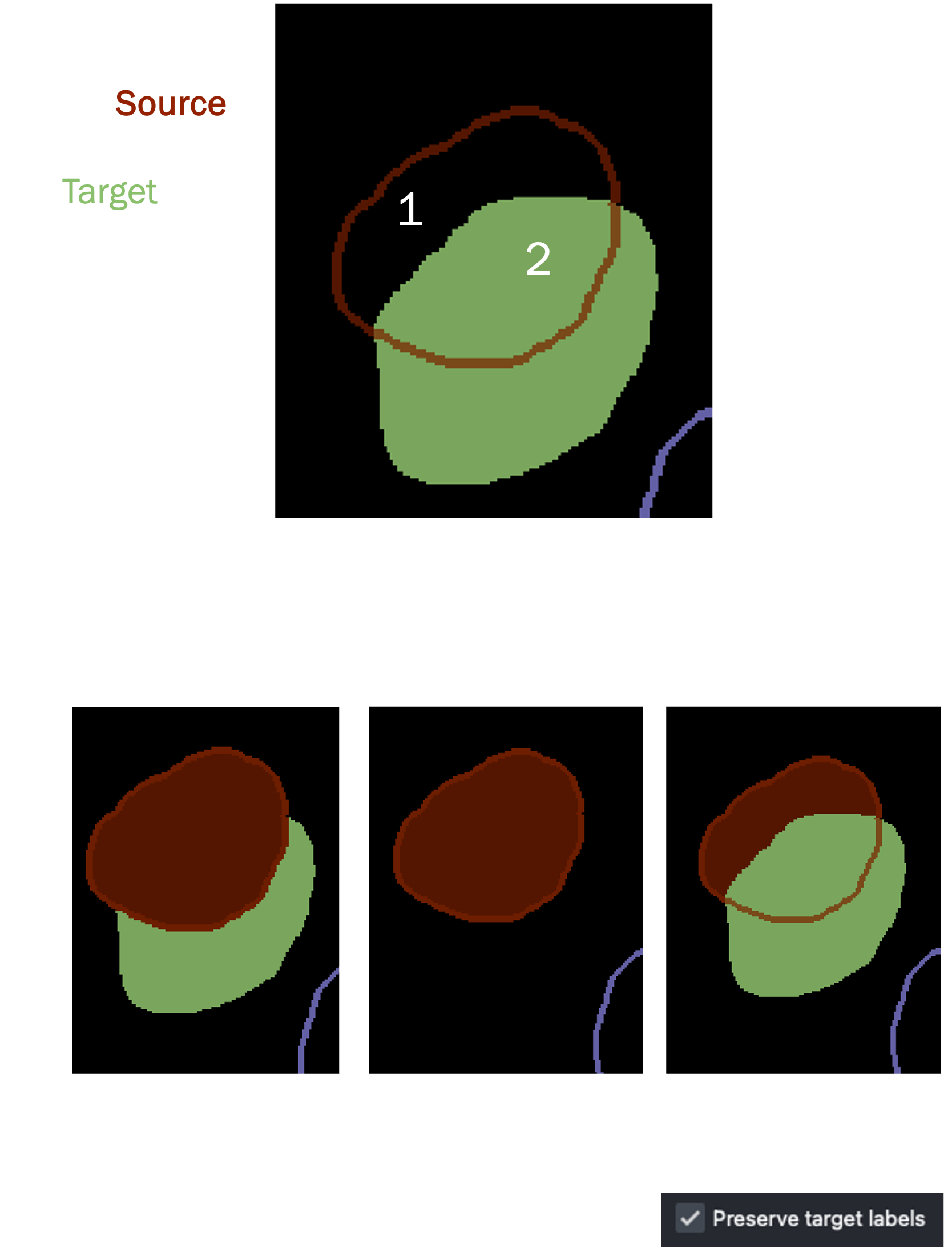
2D/3D/4D labels can be copied from a source layer to a target layer via SHIFT+CLICK. The data in the source layer should have the same shape as the target layer, but can optionally have one extra dimension (e.g. stack multiple segmentation solutions as channels). To copy labels, select a 'source' and a 'target' labels layer in the dropdown. By default, the source layer will be displayed as contours. Select whether to copy a slice, a volume, or a series across time. Checking Use source label value keeps the original label values. Selecting Preserve target labels only allows copying into background (0) regions. Otherwise, SHIFT+CLICK replaces the existing label region. |
|
Connected component analysis
There are shortcut buttons for connected components labeling, keeping the largest cluster of connected labels, and to keep the largest fragment per label.
Select / delete labels that overlap with a binary mask
All labels that share any pixel overlap with the mask are selected or removed.
Binary mask interpolation
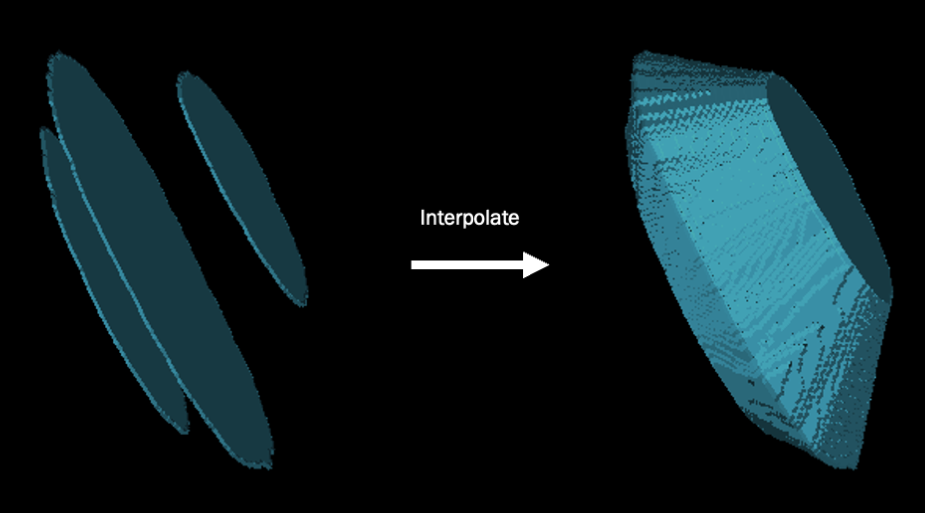
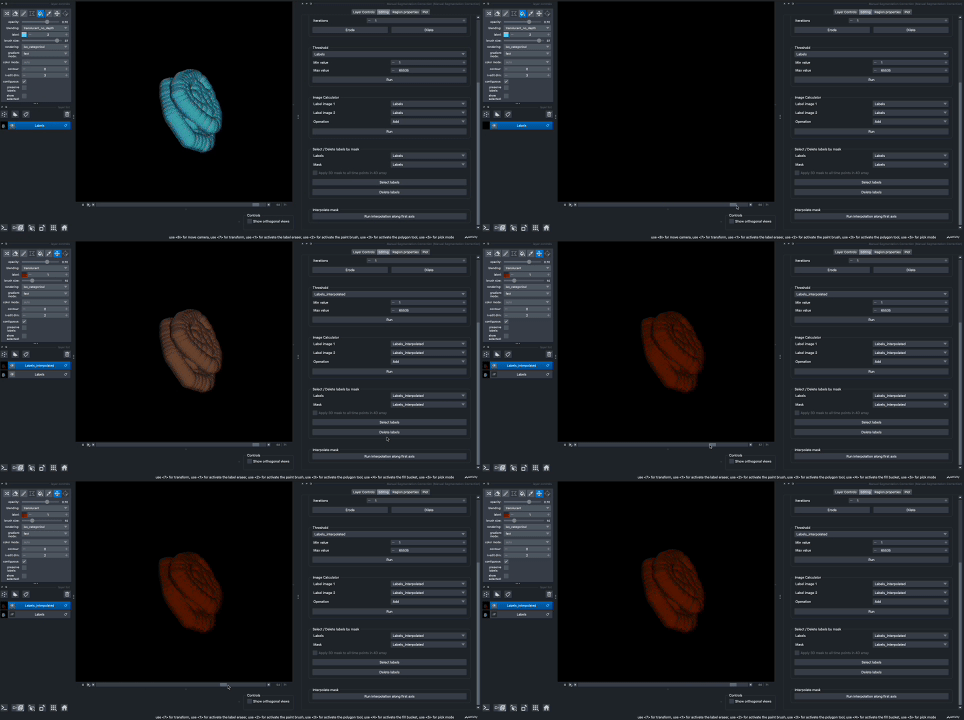
It is possible to interpolate a 3D or 4D mask to fill in the region in between. In 3D, this means creating a 3D volume from slices, in 4D this means creating a time series of a volume that linearly 'morphs' into a different shape.
|
|
Measuring label properties
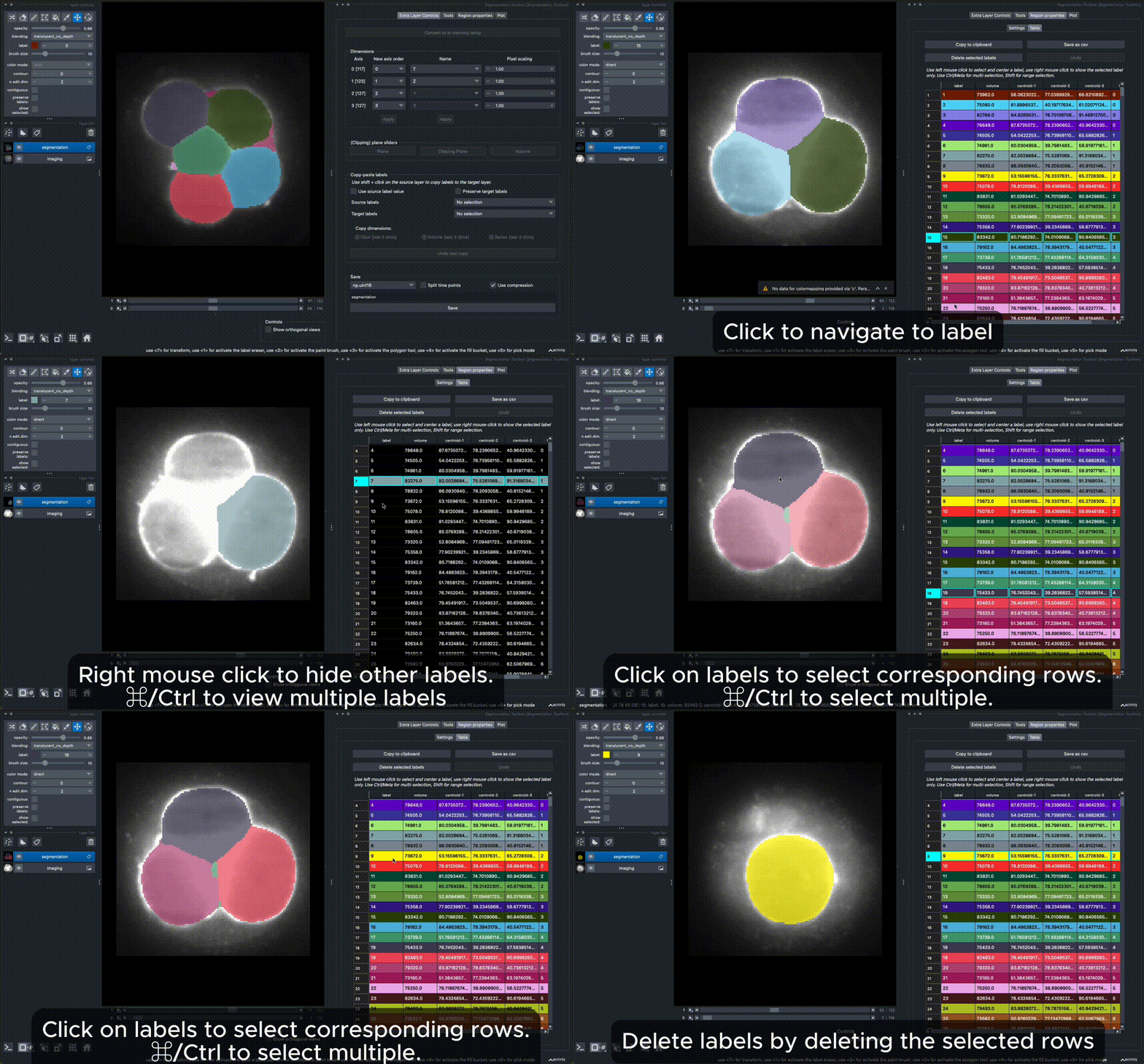
You can measure label properties, including intensity (if a matching image layer is provided), area/volume, perimeter/surface area, circularity/sphericity, ellipse/ellipsoid axes in the 'Region Properties' tab. The plugin uses scikit-image regionprops with extended properties for 3D shapes based on methods from PoreSpy. Make sure you set the dimensions correctly in the 'Extra layer controls' tab, to distinguish between measuring in 2D + time, 3D, and 3D + time, depending on your layer dimensions (2D to 4D). Once finished, a table displays the measurements, and a filter widget allows you to select objects matching a condition. The measurements are also displayed in the 'Plot'-tab for each layer for which you ran the region properties calculation.
See also
This plugin has taken inspiration from other napari plugins with similar and more advanced functionalities for measuring features, such as:


Contributing
Contributions are very welcome. Tests can be run with tox, please ensure the coverage at least stays the same before you submit a pull request.
License
Distributed under the terms of the BSD-3 license, "napari-segmentation-toolbox" is free and open source software
Issues
If you encounter any problems, please file an issue along with a detailed description.


Download files
Download the file for your platform. If you're not sure which to choose, learn more about installing packages.
Source Distribution
Built Distribution
Filter files by name, interpreter, ABI, and platform.
If you're not sure about the file name format, learn more about wheel file names.
Copy a direct link to the current filters
File details
Details for the file napari_segmentation_toolbox-0.0.5.tar.gz.
File metadata
- Download URL: napari_segmentation_toolbox-0.0.5.tar.gz
- Upload date:
- Size: 111.3 kB
- Tags: Source
- Uploaded using Trusted Publishing? No
- Uploaded via: twine/6.2.0 CPython/3.14.2
File hashes
| Algorithm | Hash digest | |
|---|---|---|
| SHA256 |
58c26a2e1d368436049fca724ec6838230049840fa53e3d605ac7918795ddbf7
|
|
| MD5 |
1574c4642b0d927a6698b886fbc17c8d
|
|
| BLAKE2b-256 |
14721d5383e8591171471fc96b45724c98bc904ed349bb6d1b2f9b8fea0621cd
|
File details
Details for the file napari_segmentation_toolbox-0.0.5-py3-none-any.whl.
File metadata
- Download URL: napari_segmentation_toolbox-0.0.5-py3-none-any.whl
- Upload date:
- Size: 133.0 kB
- Tags: Python 3
- Uploaded using Trusted Publishing? No
- Uploaded via: twine/6.2.0 CPython/3.14.2
File hashes
| Algorithm | Hash digest | |
|---|---|---|
| SHA256 |
fb016e92a5b305d95ff27c9319916bbb585ab1b9098c72717f9dcf999526cee2
|
|
| MD5 |
710ba3f9e30f90f72874828ddcb9edf3
|
|
| BLAKE2b-256 |
b24688fb5250f4c08fe650f7723cea25f86d7c57a4bfed7c4fc38a6133c14ddc
|






