
napari-signal-classifier






A napari plugin that classifies annotated signals stored in a table in the .features of a Labels layer using scikit-learn RandomForest classifier.
It also provides a sub-signal classifier that can be used to classify sub-signals inside time-series. First it detects sub-sginals with a template matching algorithm and then classifies them also using scikit-learn RandomForest classifier.
This plugin employs and works in synergy with the napari-signal-selector plugin. Take a look at it to see how to annotate signals in a plotter linked to a napari Labels layer with the .features attribute.
Usage
Napari Signal Classifier
After having annotated signals in the .features of a Labels layer (check the napari-signal-selector plugin), you can train a signal classifier and predict the labels of unannotated signals.
Open the "Signal Classifier Widget" from the napari in "Layers > Classify > Signal / Time-series > Train and Predict Signal Classifier". The widget will appear in the right panel of napari.
Choose the Labels layer containing the annotated signals to classify (the annotations should have been previsouly done with the napari-signal-selector plugin). Choose the classifier (currently only RandomForest is implemented). Optionally provide a path to a folder where to save the trained model, select the number of trees (estimators) of the RandomForest, the random state for reproducibility, and the training percentage (the percentage of annotated signals that will be used for training, the rest will be used for testing the model and showing the accuracy, intially 80%). Finally click on "Train and Predict".
Several signal features will be calculated automatically from the signals in the .features of the Labels layer, a RandomForest classifier will be trained on the annotated signals, and the labels of unannotated signals will be predicted. The predicted labels will be stored in a new column in the .features of the Labels layer called "Predictions". The accuracy of the model on the test set will be printed in the napari console.
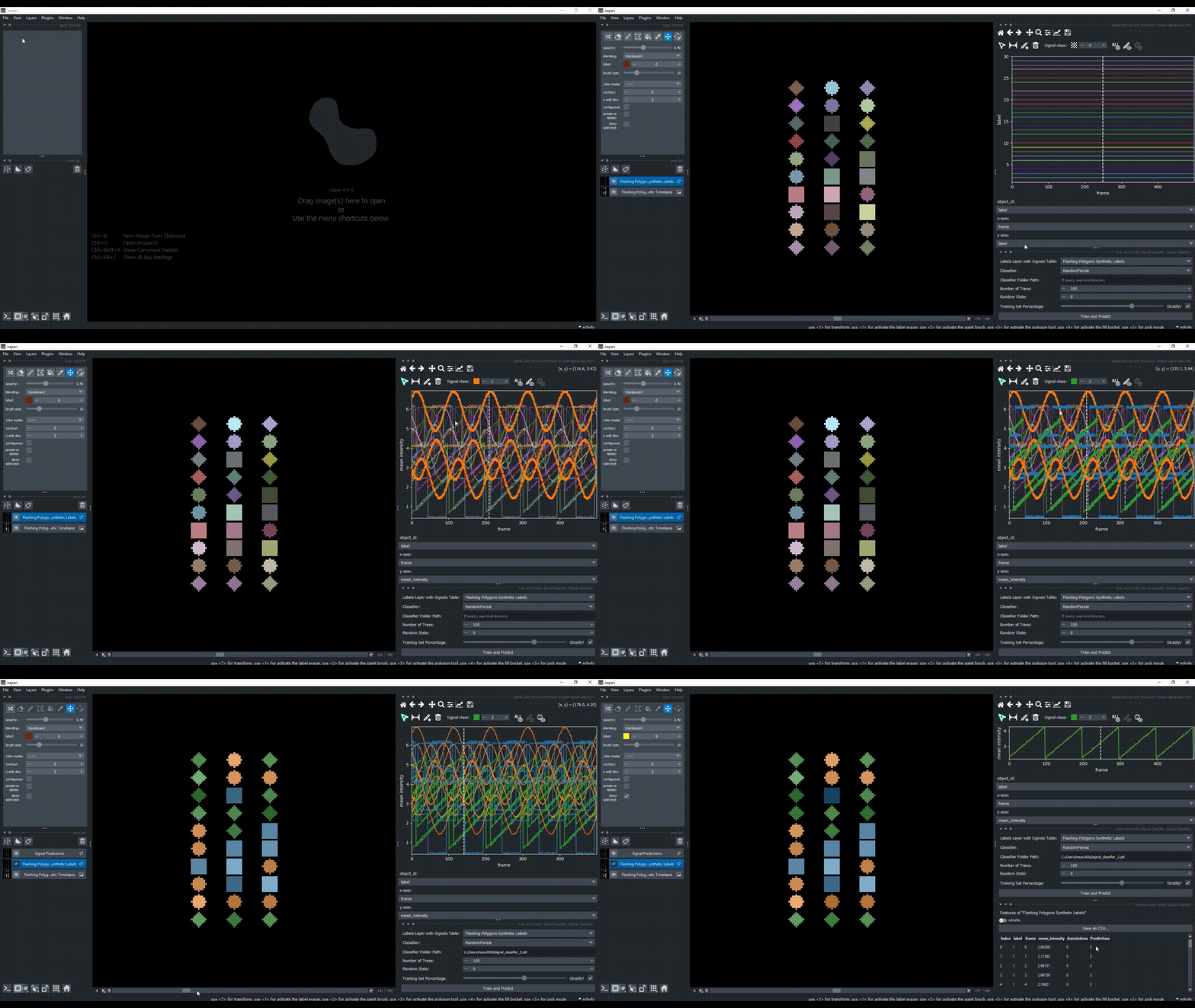
The resulting .features table can be viewed via the native napari features table widget ("Layers > Visualize > Features Table Widget") and exported to a CSV file from there for further analysis.
Napari Sub-Signal Classifier
After having annotated signals in the .features of a Labels layer (check the napari-signal-selector plugin), you can train a sub-signal classifier to classify sub-signals inside time-series.
Open the "Sub-Signal Classifier Widget" from the napari in "Layers > Classify > Signal / Time-series > Train and Predict Sub-Signal Classifier". The widget will appear in the right panel of napari.
Choose the same parameters as the Signal Classifier Widget, plus a few additional parameters related to sub-signal detection and merging: the detection threshold for the template matching algorithm (default 0.8), the detrend option (default False) and smooth factor (default 0) for the template generation and the merging overlap threshold (default 0.5) for merging overlapping detected sub-signals. Finally click on "Train and Predict".
A signal template for each class will be generated by the median sub-signal of annotated sub-signals and a cross-correlation based template matching algorithm will be used to detect sub-signals in unannotated time-series. Several signal features will be calculated automatically from the detected sub-signals, a RandomForest classifier will be trained on the annotated sub-signals, and the detected unannotated sub-signals will be predicted. The predicted labels will be stored in a new column in the .features of the Labels layer called "Predictions". The accuracy of the model on the test set will be printed in the napari console.
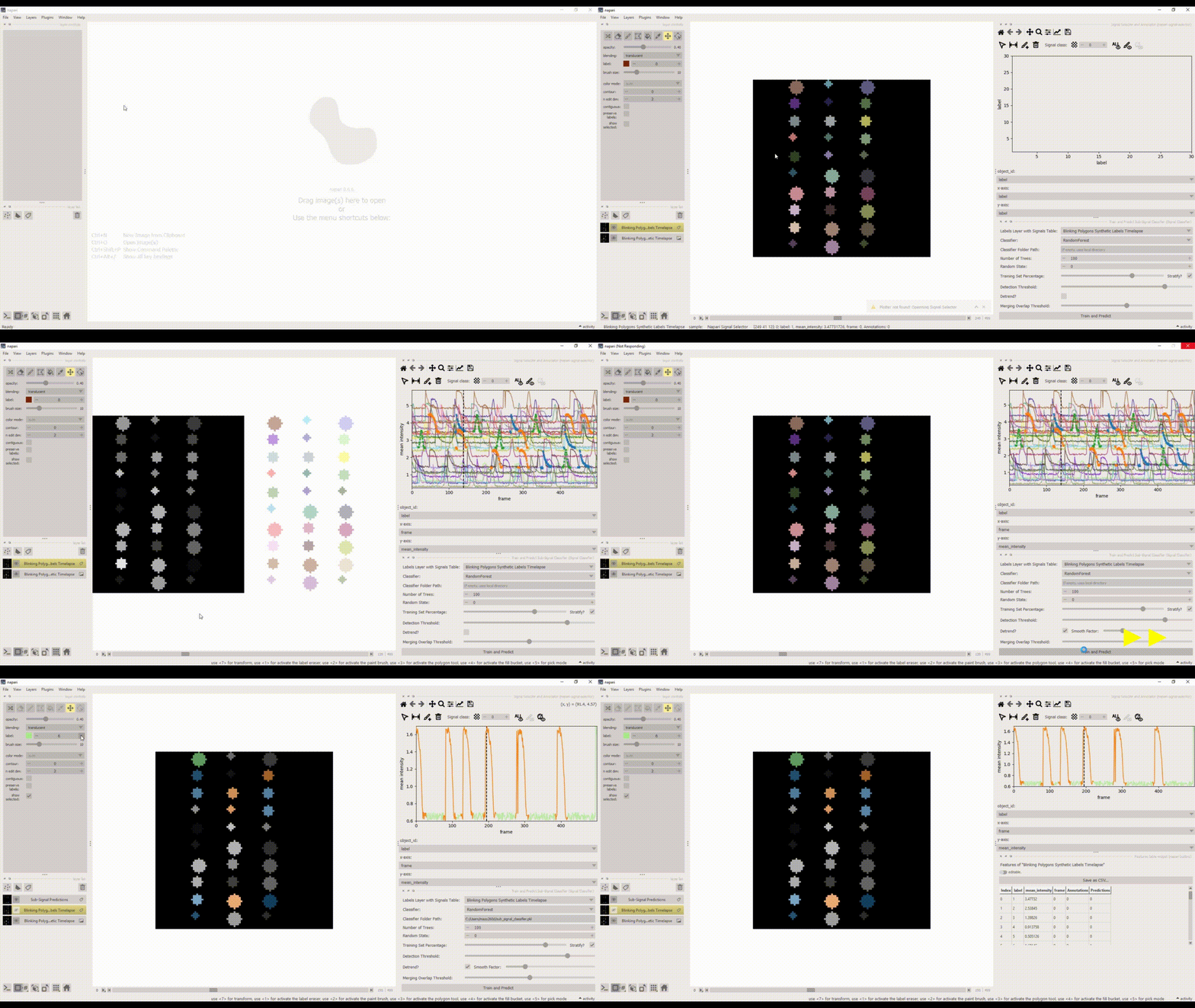
Again, the resulting .features table can be viewed via the native napari features table widget ("Layers > Visualize > Features Table Widget") and exported to a CSV file from there for further analysis.
This napari plugin was generated with Cookiecutter using @napari's cookiecutter-napari-plugin template.
Installation
You can install napari-signal-classifier via pip:
pip install napari-signal-classifier
To install latest development version :
pip install git+https://github.com/zoccoler/napari-signal-classifier.git
Contributing
Contributions are very welcome. Tests can be run with tox, please ensure the coverage at least stays the same before you submit a pull request.
License
Distributed under the terms of the BSD-3 license, "napari-signal-classifier" is free and open source software
Issues
If you encounter any problems, please file an issue along with a detailed description.
1 maintainer

Metadata
1 maintainer
Release files for napari-signal-classifier 0.0.1
For a detailed explanation of source distributions (sdists) and built distributions (wheels), please see the package formats documentation.
Source distribution (sdist)
| File | Size | Uploaded | |
|---|---|---|---|
| napari_signal_classifier-0.0.1.tar.gz | 5.4 MB | Details |
Built distribution (wheel)
| File | Interpreter | ABI | Platform | Reset |
|---|---|---|---|---|
| napari_signal_classifier-0.0.1-py3-none-any.whl | Python 3 | none | any | Details |
Total release size: 5.5 MB
Release files / napari_signal_classifier-0.0.1.tar.gz
| Download URL | napari_signal_classifier-0.0.1.tar.gz |
|---|---|
| Size | 5.4 MB |
| Tags | Source |
|
SHA-256 checksum How to use checksums |
6f9da27f298b6f467452136d06a7e1b28c06c6e668d0e87cb2b8e9dfe8b64e5d
|
|
BLAKE2b-256 checksum How to use checksums |
a3d5f7c69b08bad4fc3b2b56ff65a8c4e9c9fbd76eaa69fdc5d2c7d04fa89ea9
|
| Upload date | |
|
Uploaded using Trusted Publishing? What is trusted publishing? |
Yes |
| Uploaded via |
twine/6.1.0 CPython/3.13.7
|
Provenance
Provenance describes where a file came from. On PyPI, provenance is shared via attestations, which provide a verifiable record of the build or publishing details. View details, limitations and caveats.


PyPI Publish Attestation
PyPI verified that this artifact, at this checksum, originated from the publisher listed below.
Signed by GitHub Actions, verified by PyPI on Nov 26, 2025.
Transparency logRelease files / napari_signal_classifier-0.0.1-py3-none-any.whl
| Download URL | napari_signal_classifier-0.0.1-py3-none-any.whl |
|---|---|
| Size | 34.4 kB |
| Tags | Python 3 |
|
SHA-256 checksum How to use checksums |
892d124dfe338b6444dd9aa2b61b6f1e3529798ac5f4f079ea2cbb2a97aab4d1
|
|
BLAKE2b-256 checksum How to use checksums |
a32cc8cd29da77a5d3a5cfe6e6918df6dc9beb10bed827694e00afbc8d2df1d9
|
| Upload date | |
|
Uploaded using Trusted Publishing? What is trusted publishing? |
Yes |
| Uploaded via |
twine/6.1.0 CPython/3.13.7
|
Provenance
Provenance describes where a file came from. On PyPI, provenance is shared via attestations, which provide a verifiable record of the build or publishing details. View details, limitations and caveats.
PyPI Publish Attestation
PyPI verified that this artifact, at this checksum, originated from the publisher listed below.
Signed by GitHub Actions, verified by PyPI on Nov 26, 2025.
Transparency log












