
A simple plugin to label image

Project description
napari-simpleannotate






A simple plugin to label image
This napari plugin was generated with Cookiecutter using @napari's cookiecutter-napari-plugin template.
Installation
You can install napari-simpleannotate via pip:
pip install napari-simpleannotate
To install latest development version :
pip install git+https://github.com/hiroalchem/napari-simpleannotate.git
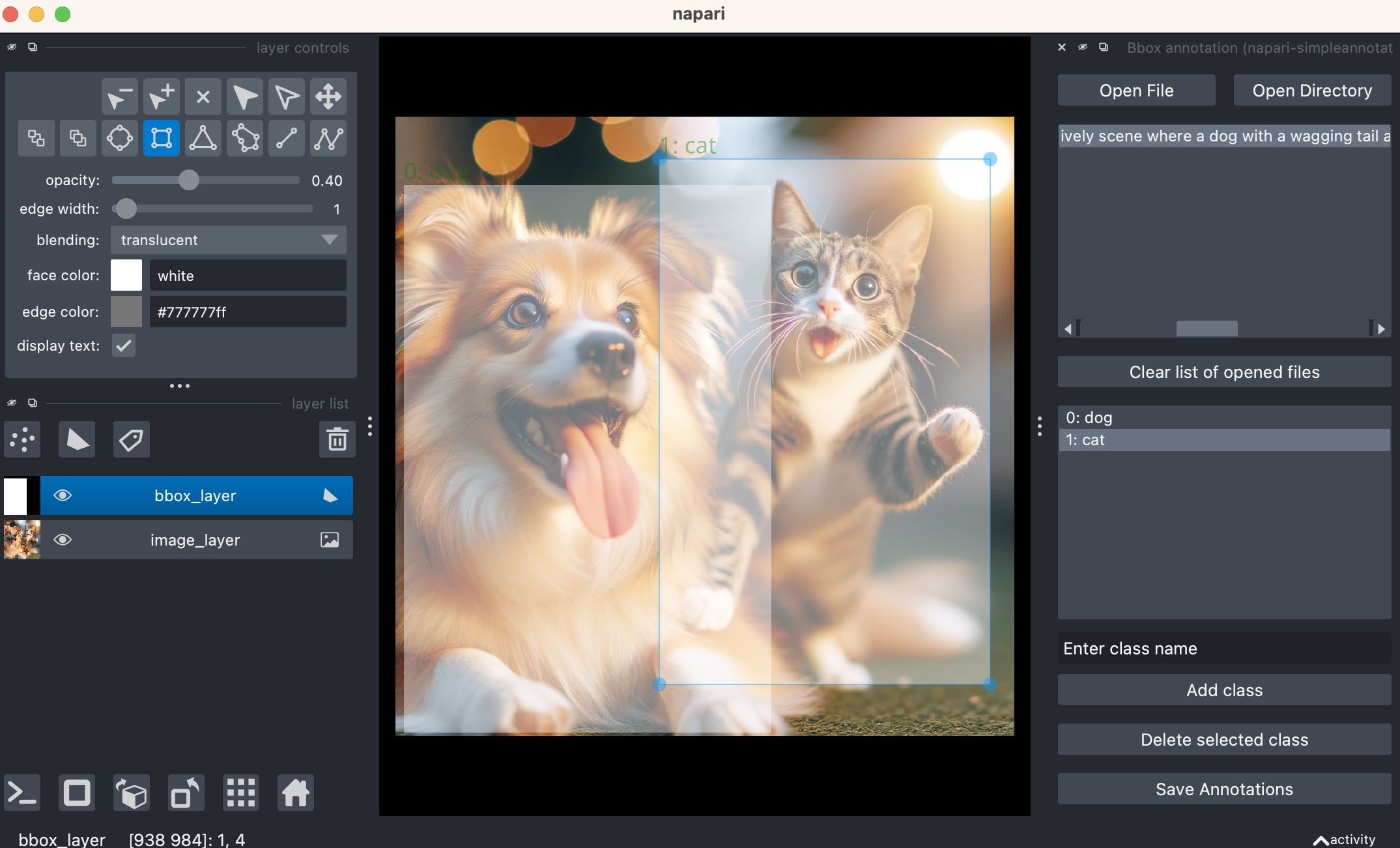
How to use
-
Opening Files or Directories:
- Click the
Open Filebutton to open an image file. - Click the
Open Directorybutton to open a directory containing images. - If there's a
class.yamlin the directory of the selected file or within the selected directory, it will be automatically detected. A popup will appear, giving you the option to load it.
- Click the
-
Class Management:
- Enter the class name in the textbox and click the
Add classbutton to add a class. When adding a class name, a number is automatically assigned to it. This number will be used when saving annotations. - Select a class from the class list and click the
Delete selected classbutton to remove it.
- Enter the class name in the textbox and click the
-
Annotating Images:
- Use napari's rectangle tool to annotate the images. If you have a class selected, the annotation will automatically be assigned to that class.
- For existing rectangles, you can change their class by selecting the rectangle and then choosing a different class from the list.
-
Saving Annotations:
- Click the
Save Annotationsbutton to save the annotations in YOLO format. - Along with saving the annotations, the
class.yamlwill also be saved. If aclass.yamlalready exists and its content is different from the current one, a popup will appear asking for confirmation to overwrite it.
- Click the
Contributing
Contributions are very welcome. Tests can be run with tox, please ensure the coverage at least stays the same before you submit a pull request.
License
Distributed under the terms of the BSD-3 license, "napari-simpleannotate" is free and open source software
Issues
If you encounter any problems, please file an issue along with a detailed description.
Release history Release notifications | RSS feed


Download files
Download the file for your platform. If you're not sure which to choose, learn more about installing packages.
Source Distribution
Built Distribution
Filter files by name, interpreter, ABI, and platform.
If you're not sure about the file name format, learn more about wheel file names.
Copy a direct link to the current filters
File details
Details for the file napari-simpleannotate-0.0.3.tar.gz.
File metadata
- Download URL: napari-simpleannotate-0.0.3.tar.gz
- Upload date:
- Size: 12.2 kB
- Tags: Source
- Uploaded using Trusted Publishing? No
- Uploaded via: twine/4.0.2 CPython/3.10.12
File hashes
| Algorithm | Hash digest | |
|---|---|---|
| SHA256 |
08bba922f7c5ec6243f4ec13b06d099814d7ee03c2c9986de9352081effe4ca5
|
|
| MD5 |
2d307dd1eae044fb5cdc3548fb524f3a
|
|
| BLAKE2b-256 |
e1ab360cf80c72d474db39bfe459219f49fbb4fc2b45cb441f5656769ff3b2c8
|
File details
Details for the file napari_simpleannotate-0.0.3-py3-none-any.whl.
File metadata
- Download URL: napari_simpleannotate-0.0.3-py3-none-any.whl
- Upload date:
- Size: 10.7 kB
- Tags: Python 3
- Uploaded using Trusted Publishing? No
- Uploaded via: twine/4.0.2 CPython/3.10.12
File hashes
| Algorithm | Hash digest | |
|---|---|---|
| SHA256 |
ae228501a251dc9b8117da894f0bb1c804e6bb7a13c3b3ea25979206124e1a60
|
|
| MD5 |
2216eda99d77b4c430319ab51c758518
|
|
| BLAKE2b-256 |
1274f736cb74206027c02fa89779a54d51a1f38fdc3792649f8a6480b14db7f8
|






