
This release is a pre-release and may not be stable for production use.

VIPP — Visual Image Processing Platform
Design inspectable bioimage workflows with visual feedback at every stage.
Visual image processing made approachable through visual workflows for reproducible bioimage analysis.




VIPP is an open-source, napari-native platform for building bioimage analyses as visual graphs. Connect image, mask, label and table nodes, inspect parameters and intermediate results, compare processing routes on the same input, and then move from representative samples to collection-wide execution.
Build and run workflows from the available nodes without writing Python. Save them as versioned JSON, export them as Python, and retain the source, axes, calibration, parameters, outputs and implementation provenance needed to understand how results were produced.
Alpha software: workflows and parameters may still change. Validate every analysis on representative data before scientific interpretation or publication.
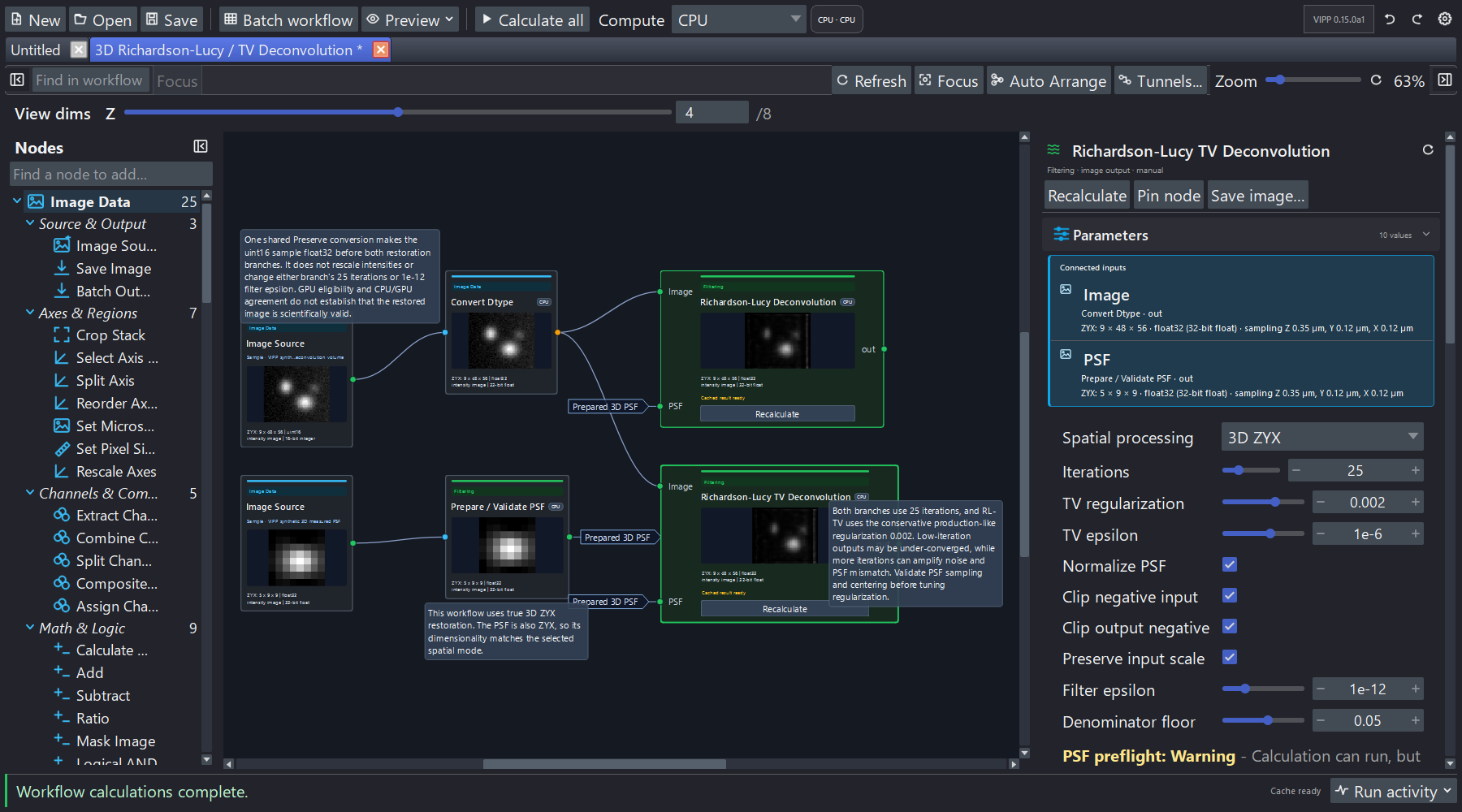
A calculated 3D deconvolution workflow with the node catalogue, thumbnail previews and selected-node inspector visible together.
Why VIPP
- See each transformation. Inspect images, histograms, tables, metadata and parameters while designing the workflow.
- Iterate locally. Recalculate one stage without repeatedly running every later step.
- Compare approaches. Apply different processing routes to the same input and inspect the consequences side by side.
- Check before scaling. Test representative samples before running the workflow across an image collection.
- Keep the analysis record. Save the graph, export Python, define batch outputs and preserve execution provenance.
- Accelerate selected operations. Dedicated GPU implementations are available for supported filtering, restoration, segmentation and measurement operations.
Install
For this version, use the
v0.16.0a6 release page.
| Platform | Recommended route |
|---|---|
| Windows 64-bit | Download VIPP-Setup-0.16.0a6-Windows-x86_64-UNSIGNED.exe from the release page. The setup application creates and manages a dedicated VIPP environment. A supported 64-bit Python is a separate prerequisite. |
| macOS Apple Silicon | Download VIPP-0.16.0a6-macOS-arm64-UNSIGNED.pkg. The package is self-contained and CPU-only. |
| macOS Intel | Download VIPP-0.16.0a6-macOS-x86_64-UNSIGNED.pkg. The package is self-contained and CPU-only. |
| Linux or an existing Python environment | Use the manual installation below. CPU execution is supported. |
The desktop installers are unsigned alpha builds. Download them only from the official release, verify the matching SHA-256 file, and follow the Quick Start for the exact platform instructions.
For a manual installation, use a dedicated CPython 3.12 or 3.13 environment. On Windows or Linux:
python -m pip install "napari[pyqt6]>=0.6" "napari-vipp==0.16.0a6"
vipp
On macOS, replace "napari[pyqt6]>=0.6" with "napari[pyside6]>=0.6".
The macOS route is CPU-only.
Inside an existing napari session, open:
Plugins > VIPP Workflow (napari-vipp)
Try A Bundled Workflow
No external data is needed for the first run:
- Launch VIPP, open the workflow-actions (…) menu beside Save, and select Open example….
- Open Red-Channel Label Cleanup.
- Select the nodes from left to right. Inspect their parameters, previews, histograms, metadata and outputs.
- Change a parameter and compare the affected stages. Use Calculate where a computationally intensive node requires an explicit run.
- Pin an output into napari for full-resolution inspection, then save the workflow as JSON.
Next, open Deterministic Batch & Provenance for a self-contained example of collection processing and reproducibility artifacts. See the example workflow index for more starting points.
Analysis Coverage
| Goal | Available building blocks |
|---|---|
| Prepare images | Intensity transforms, background correction, filtering, denoising, channel handling, axis operations, masks and volume regions of interest. |
| Segment structures | Global and local thresholds, edges, watershed, binary morphology, label cleanup and connected-component operations. |
| Align images | Calibrated translation, rigid and affine registration, fixed-reference or previous-frame whole-volume time-series alignment, reusable transforms and valid-coverage comparison. |
| Detect and follow observations | Fixed-size 2D/3D template matching, peak detection, per-frame spot detection, bounded position-based tracking and read-only trajectory review. |
| Quantify results | Object and intensity measurements, calibrated 3D mesh morphology, skeleton and network analysis, colocalisation, object association and table composition. |
| Restore images | Measured or generated point-spread functions, Richardson–Lucy and RL–TV deconvolution in 2D and 3D. |
| Reuse analyses | Workflow JSON, generated Python, explicit batch outputs, collection manifests and execution provenance. |
VIPP reads OME-TIFF, ImageJ TIFF, TIFF, local OME-Zarr 0.4/0.5, NPY/NPZ and common 2D image formats. Optional readers add formats including ND2 and CZI. The I/O guide documents the complete matrix, metadata behavior and limitations.
Most graph operations currently materialize their inputs in memory. Plan cache, preview and output choices deliberately for large z-stacks and OME-Zarr data. See Cache and memory.
GPU Acceleration (Optional)
VIPP is fully usable on CPU on Windows, Linux and macOS. Selected computationally intensive operations offer dedicated GPU acceleration on qualified NVIDIA systems. VIPP records the implementation that ran, and a GPU request that cannot be honored falls back visibly to CPU.
The current public GPU route uses native 64-bit Windows, CPython 3.12, CUDA 13 and an NVIDIA GPU with compute capability 7.5 or newer. Performance depends on the operation, data and hardware. See the GPU Guide for installation, supported operation families, qualification and benchmarking.
Reproducibility And Scientific Traceability
VIPP keeps workflow structure, parameters and intermediate decisions visible during interactive design. Saved and batch-run workflows can retain source identity, semantic axes, physical calibration, selected outputs and the actual CPU or GPU implementation used.
This record supports reproducibility, but it does not establish biological validity automatically. Users remain responsible for checking assumptions, parameter choices and results on suitable controls and representative data. Read the scientific integrity boundaries and scientific behavior requirements.
Documentation
The VIPP manual is the single home for user instructions. Select a version in the manual to match your installation.
- Quick Start — installers, manual setup and the first workflow
- User Guide — graph authoring, inspection, batch processing and export
- Example workflows — bundled starting points by analysis task
- Image import and export — formats, metadata and collection inputs
- GPU Guide — acceleration, qualification and benchmarking
- Measurement workflows — quantitative analysis patterns
- Architecture — execution and scientific-integrity contracts
- Troubleshooting — common problems and support
Development And Support
Implementation context stays with the code: contributing, architecture, planning and roadmap, repository documentation, and changelog. See documentation ownership before editing a guide.
python -m venv .venv
.venv\Scripts\Activate.ps1
python -m pip install -e ".[dev]"
python -m npe2 validate src/napari_vipp/napari.yaml
python -m ruff check .
python -m pytest
Read CONTRIBUTING.md before opening a pull request. Ask usage questions in GitHub Discussions, use SUPPORT.md for help, report vulnerabilities privately through SECURITY.md, and follow the Code of Conduct.
Acknowledgments
This work is based on research supported in part by the National Research Foundation (NRF) of South Africa through the Thuthuka Post PhD Track (Grant No. TTK240321210363).
Opinions, findings, conclusions and recommendations expressed are those of the authors, and the NRF accepts no liability in this regard.
Citation And License
If VIPP contributes to your work, acknowledge napari-vipp and link to this
repository. Citation metadata is available in CITATION.cff. A
DOI or manuscript citation will be added when available.
napari-vipp is distributed under the BSD 3-Clause License. See LICENSE for the full terms.
1 maintainer

Metadata
1 maintainer
Release files for napari-vipp 0.16.0a6
For a detailed explanation of source distributions (sdists) and built distributions (wheels), please see the package formats documentation.
Source distribution (sdist)
| File | Size | Uploaded | Provenance | |
|---|---|---|---|---|
| napari_vipp-0.16.0a6.tar.gz | 9.6 MB | Without provenance | Details |
Built distribution (wheel)
| File | Interpreter | ABI | Platform | Reset |
|---|---|---|---|---|
| napari_vipp-0.16.0a6-py3-none-any.whl | Python 3 | none | any | Details |
Total release size: 12.2 MB
Release files / napari_vipp-0.16.0a6.tar.gz
| Download URL | napari_vipp-0.16.0a6.tar.gz |
|---|---|
| Size | 9.6 MB |
| Tags | Source |
|
SHA-256 checksum How to use checksums |
d66491f6cceb18c9e7bfc1102a39272dd29fa387a28c5ab7fbb013ca511f23ef
|
|
BLAKE2b-256 checksum How to use checksums |
3aa86ceb137a713437fb0956f6cfca950971943bcbfaf2b3c25f7a3ea1fedf34
|
| Upload date | |
|
Uploaded using Trusted Publishing? What is trusted publishing? |
No |
| Uploaded via |
twine/7.0.0 CPython/3.13.16
|
Release files / napari_vipp-0.16.0a6-py3-none-any.whl
| Download URL | napari_vipp-0.16.0a6-py3-none-any.whl |
|---|---|
| Size | 2.6 MB |
| Tags | Python 3 |
|
SHA-256 checksum How to use checksums |
b50d86683ea84110d5892350ee9fcb2eae255ab0258c48fc1e14bc7f15a35d80
|
|
BLAKE2b-256 checksum How to use checksums |
1cc2b5b8cf183c782c9c07882eca35f79a91687f7a756b7f1e928520b4d789eb
|
| Upload date | |
|
Uploaded using Trusted Publishing? What is trusted publishing? |
No |
| Uploaded via |
twine/7.0.0 CPython/3.13.16
|
Security for napari-vipp 0.16.0a6
Provenance
Provenance describes where a file came from. On PyPI, provenance is shared via attestations, which provide a verifiable record of the build or publishing details. View details, limitations and caveats.
No provenance found
None of the files in this release were uploaded with provenance metadata.
A note on package security
PyPI is a repository for distributing packages, not a service for auditing them. While third-party security researchers and our staff do their best to detect and remove malicious packages, PyPI cannot guarantee the quality, security or suitability of any given package.














