
# napari-svetlana







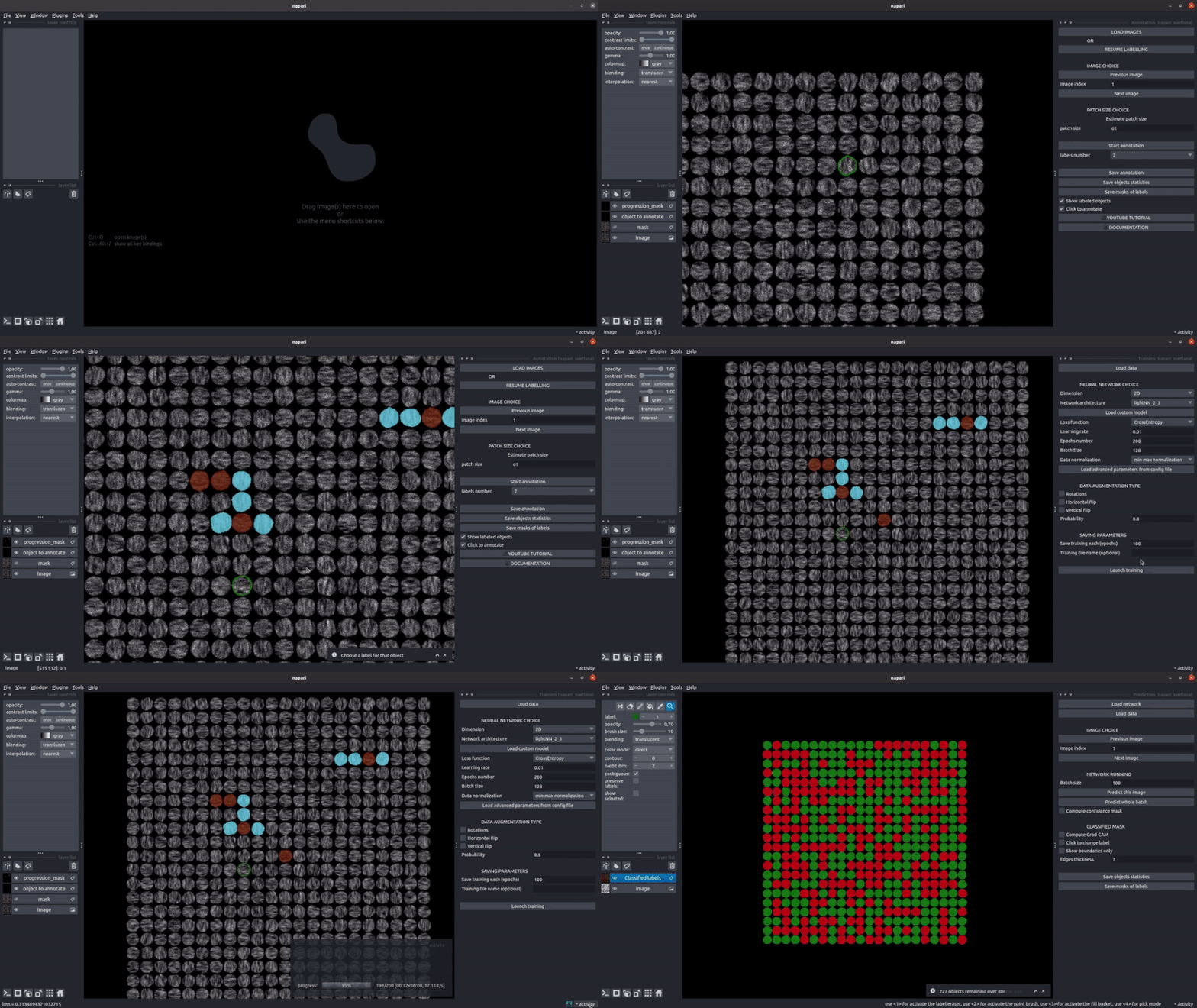
The aim of this plugin is to classify the output of a segmentation algorithm. The inputs are :
- A folder of raw images
- Their segmentation masks where each ROI has its own label.
Svetlana can process 2D, 3D and multichannel image. If you want to use it to work on cell images, we strongly recommend the use of Cellpose for the segmentation part, as it provides excellent quality results and a standard output format accepted by Svetlana (labels masks).
If you use this plugin please cite the paper:
Cazorla, C., Weiss, P., & Morin, R. (2024). Svetlana: a Supervised Segmentation Classifier for Napari.
@article{cazorla2024svetlana,
  title={Svetlana a supervised segmentation classifier for Napari},
  author={Cazorla, Cl{\'e}ment and Morin, Renaud and Weiss, Pierre},
  journal={Scientific Reports},
  volume={14},
  number={1},
  pages={11604},
  year={2024},
  publisher={Nature Publishing Group UK London}
}
This napari plugin was generated with Cookiecutter using @napari's cookiecutter-napari-plugin template.
Installation
First install Napari in a Python 3.9 Conda environment following these instructions :
conda create -n svetlana_env python=3.9
conda activate svetlana_env
conda install pip
python -m pip install "napari[all]"==0.4.17
Then, you can install napari_svetlana via pip, or directly from the Napari plugin manager (see Napari documentation):
pip install napari_svetlana
WARNING:
If you have a Cuda compatible GPU on your computer, some computations may be accelerated using Cupy. Unfortunately, Cupy needs Cudatoolkit to be installed. This library can only be installed via Conda while the plugin is a pip plugin, so it must be installed manually for the moment:
conda install cudatoolkit=11.5
Also note that the library (Cucim) that we use to improve these performances, computing morphological operations on GPU is unfortunately only available for Linux systems. Hence, if you are a Windows user, this installation is not necessary.
Tutorial
Many advanced features are available in Svetlana, such as data augmentation or contextual information reduction, to optimize the performance of your classifier. Thus, we strongly encourage you to check our Youtube tutorial and our documentation. A button called TRY ON DEMO IMAGE is available in the annotation plugin and enables you to apply the YouTube tutorial to the same test images to learn how to use the plugin. Feel free to try it to test all the features that Svetlana offers.
Similar Napari plugins
Joel Luethi developed a similar method for objects classification called napari feature classifier. Also, apoc by Robert Haase is available in Napari for pixels and objects classification.
Contributing
Contributions are very welcome.
License
Distributed under the terms of the BSD-3 license, "napari_svetlana" is free and open source software
Acknowledgements
The method was developed by Clément Cazorla, Renaud Morin and Pierre Weiss. And the plugin was written by Clément Cazorla. The project is co-funded by Imactiv-3D and CNRS.
Issues
If you encounter any problems, please file an issue along with a detailed description.
1 maintainer

Metadata
1 maintainer
Release files for napari-svetlana 1.6.1
For a detailed explanation of source distributions (sdists) and built distributions (wheels), please see the package formats documentation.
Source distribution (sdist)
| File | Size | Uploaded | Provenance | Actions |
|---|---|---|---|---|
| napari_svetlana-1.6.1.tar.gz | 110.4 kB | Without provenance | Details for napari_svetlana-1.6.1.tar.gz |
Built distribution (wheel)
| File | Interpreter | ABI | Platform | Actions Reset |
|---|---|---|---|---|
| napari_svetlana-1.6.1-py3-none-any.whl | Python 3 | none | any | Details for napari_svetlana-1.6.1-py3-none-any.whl |
Total release size: 253.0 kB
Release files / napari_svetlana-1.6.1.tar.gz
| Download URL | napari_svetlana-1.6.1.tar.gz |
|---|---|
| Size | 110.4 kB |
| Tags | Source |
|
SHA-256 checksum How to use checksums |
21d17f04b4a0fa762c6b31cfaa43b1e968481b10740ee472b31625df67807b18
|
|
BLAKE2b-256 checksum How to use checksums |
20409a332838496766201d55b6e2e3c23ca0bb19348526c60d1699a8733c0fdd
|
| Upload date | |
|
Uploaded using Trusted Publishing? What is trusted publishing? |
No |
| Uploaded via |
twine/6.1.0 CPython/3.10.14
|
Release files / napari_svetlana-1.6.1-py3-none-any.whl
| Download URL | napari_svetlana-1.6.1-py3-none-any.whl |
|---|---|
| Size | 142.6 kB |
| Tags | Python 3 |
|
SHA-256 checksum How to use checksums |
0e9d049fe09f076e167a60c91de0c397d8a98e293d7d6649b0b0c84fc6250281
|
|
BLAKE2b-256 checksum How to use checksums |
0d95b948f759277de4c82132b3f86663ef632eccad133441280d01d9924588e9
|
| Upload date | |
|
Uploaded using Trusted Publishing? What is trusted publishing? |
No |
| Uploaded via |
twine/6.1.0 CPython/3.10.14
|
Security for napari-svetlana 1.6.1
Provenance
Provenance describes where a file came from. On PyPI, provenance is shared via attestations, which provide a verifiable record of the build or publishing details. View details, limitations and caveats.
No provenance found
None of the files in this release were uploaded with provenance metadata.
A note on package security
PyPI is a repository for distributing packages, not a service for auditing them. While third-party security researchers and our staff do their best to detect and remove malicious packages, PyPI cannot guarantee the quality, security or suitability of any given package.
To learn more about protecting yourself from malicious actors, visit our package security documentation.














