

Computer Use for Agentic Process Automation!




The official Narada Python SDK that helps you launch browsers and run tasks with Narada UI agents.
Installation
pip install narada
Quick Start
Important: The first time Narada opens the automated browser, you will need to manually install the Narada Enterprise extension and log in to your Narada account.
After installation and login, create a Narada API Key (see this link for instructions) and set the following environment variable:
export NARADA_API_KEY=<YOUR KEY>
That's it. Now you can run the following code to create a browser environment and ask an agent to download a file for you from arxiv:
import asyncio

from narada import Agent, AgentKind, BrowserEnvironment


async def main() -> None:
    # Create the browser environment. It initializes lazily on the first action.
    env = BrowserEnvironment()
    agent = Agent(environment=env)
    mini_agent = Agent(environment=env, kind=AgentKind.OPERATOR_MINI)

    try:
        # Run a task in this browser environment.
        response = await agent.run(
            prompt='Search for "LLM Compiler" on Google and open the first arXiv paper on the results page, then open the PDF. Then download the PDF of the paper.',
            # Optionally generate a GIF of the agent's actions.
            generate_gif=True,
        )

        print("Response:", response.model_dump_json(indent=2))

        # Use the product's lower-cost tier when appropriate.
        mini_response = await mini_agent.run(prompt="Summarize the completed task.")
        print("Mini response:", mini_response.model_dump_json(indent=2))
    finally:
        await env.close()


if __name__ == "__main__":
    asyncio.run(main())
AgentKind.OPERATOR_MINI and AgentKind.CORE_AGENT_MINI select the lower-cost Mini variants of
their respective product agents. Named Agent Studio workflows continue to use their persisted Agent
steps.
This would then result in the following trajectory:
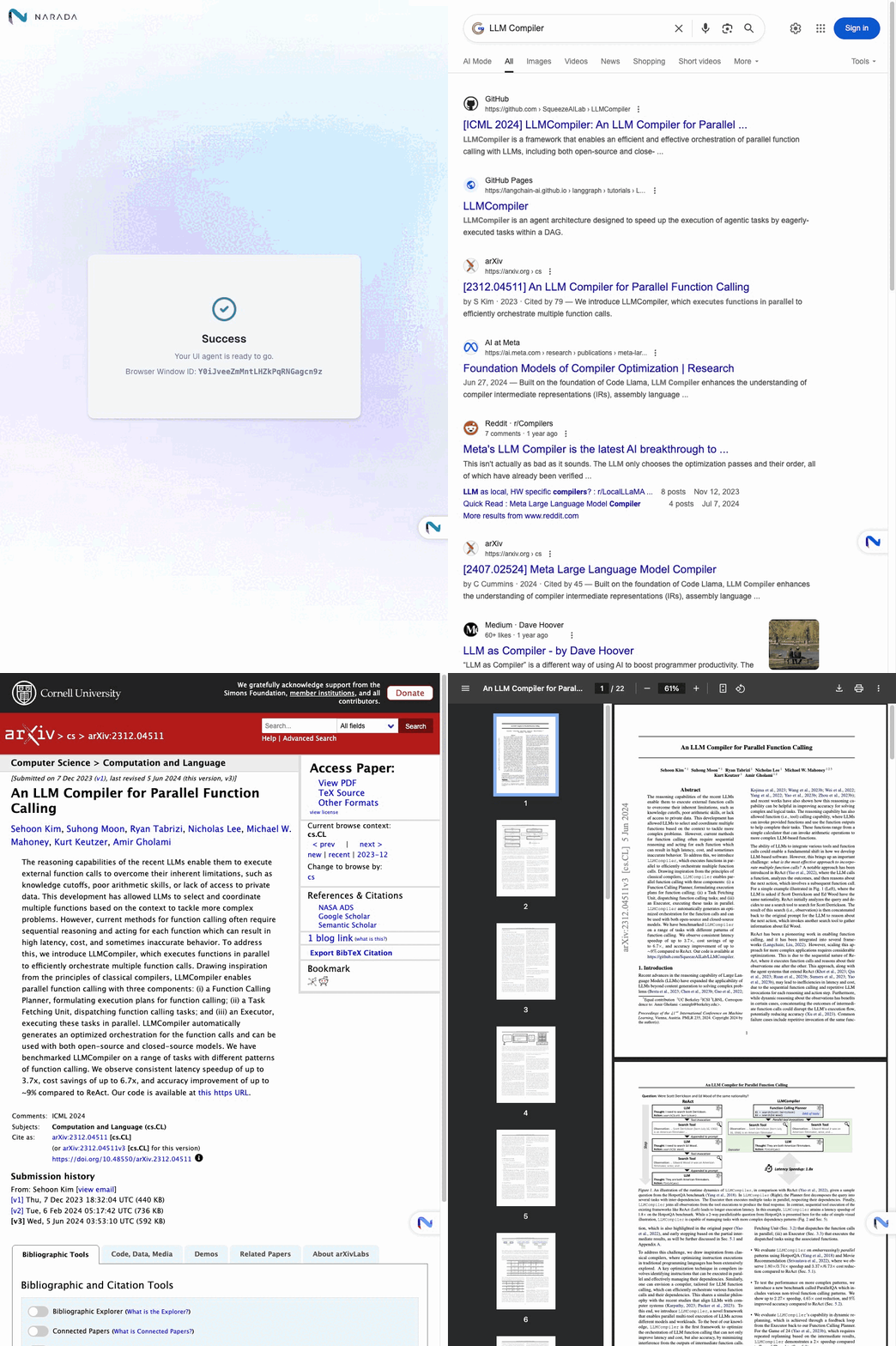
You can use the SDK to launch browsers and run automated tasks using natural language instructions. For more examples and code samples, please explore the examples/ folder in this repository.
Migration note
This version introduces a non-backward-compatible, agent-centered API:
- Create an execution target with an environment, such as
BrowserEnvironment,CloudBrowserEnvironment,RemoteBrowserEnvironment, orLambdaEnvironment. - Create an
Agent(environment=env, kind=...)and callawait agent.run(prompt=...). - Browser actions such as
go_to_url,agentic_selector, and sheet operations are now methods onAgent. - Environments keep lifecycle/bookkeeping APIs such as
start(),close(),browser_window_id, andcloud_browser_session_id.
Features
- Natural Language Control: Send instructions in plain English to control browser actions
- Parallel Execution: Run multiple browser tasks simultaneously across different windows
- Error Handling: Built-in timeout handling and retry mechanisms
- Action Recording: Generate GIFs of agent actions for debugging and documentation
- Async Support: Full async/await support for efficient operations
Key Capabilities
- Web Search & Navigation: Automatically search, click links, and navigate websites
- Data Extraction: Extract information from web pages using AI understanding
- Form Interaction: Fill out forms and interact with web elements
- File Operations: Download files and handle web-based documents
- Vector Stores: Discover managed Agent Studio stores or attach an Amazon Bedrock Knowledge Base
- Multi-window Management: Coordinate tasks across multiple browser instances
Vector Stores
Attach a managed Agent Studio vector store to an agent run without copying its provider-side ID:
Managed vector-store paths are canonical and owner-qualified, using the format
/owner@email.com/path/to/store.
env = BrowserEnvironment()
store = await env.vector_stores.get(
    path="/owner@example.com/Knowledge/Product documentation"
)
response = await Agent(environment=env, kind=AgentKind.PRODUCTIVITY).run(
    "Answer from the attached knowledge base and cite source filenames.",
    vector_stores=[store],
)
See the managed and external examples in
examples/04_extending_the_agent/.
Logging
The SDK logs through standard logging loggers named after its modules, such as
narada.environment, all under the narada logger. It installs no handlers and leaves levels and
propagation alone, so Narada records go wherever your application's logging configuration sends
them. Without any configuration, Python prints warnings and errors to stderr.
To print Narada logs as [narada.<module>.<function>:<line>] <message>, call enable_logging:
import logging

import narada

narada.enable_logging(logging.DEBUG)
If your application configures logging itself, Narada records propagate to its handlers. Pass
narada.LOG_FORMAT to your formatter to use the same format there:
logging.basicConfig(level=logging.INFO, format=narada.LOG_FORMAT)
logging.getLogger("narada").setLevel(logging.DEBUG)
Use one approach or the other: enable_logging adds its own handler, so combining it with root
handlers prints each Narada record twice.
Time profiling
At DEBUG level, the SDK logs how long each high-level step took, such as launching Chrome,
connecting over CDP, waiting for the Narada extension, submitting an agent request, and waiting for
its result:
[narada.environment._launch_browser_once:1515] Time profile: action=start phase=launch_chrome outcome=ok elapsed_ms=412
[narada.environment._initialize_launched_browser:1585] Time profile: action=start phase=connect_cdp attempt=1 outcome=ok elapsed_ms=96
[narada.environment._ensure_initialized:697] Time profile: action=start phase=total environment=BrowserEnvironment outcome=ok elapsed_ms=6184
[narada.environment._dispatch_request:1035] Time profile: action=agent_run phase=wait_for_completion request_id=... outcome=ok elapsed_ms=41230
action is the SDK operation (start, agent_run, extension_action, or close), phase is
the step within it, and outcome is ok or the name of the exception that ended the step. Each
record also carries these values as a narada_time_profile dictionary attribute for structured log
handlers.
License
This project is licensed under the Apache 2.0 License.
Support
For questions, issues, or support, please contact: support@narada.ai
Citation
We appreciate it if you could cite Narada if you found it useful for your project.
@software{narada_ai2025,
  author = {Narada AI},
  title = {Narada AI: Agentic Process Automation for Enterprise},
  year = {2025},
  publisher = {GitHub},
  url = {https://github.com/NaradaAI/narada-python-sdk}
}
Metadata
Release files for narada 0.2.17
For a detailed explanation of source distributions (sdists) and built distributions (wheels), please see the package formats documentation.
Source distribution (sdist)
| File | Size | Uploaded | |
|---|---|---|---|
| narada-0.2.17.tar.gz | 59.5 kB | Details |
Built distribution (wheel)
| File | Interpreter | ABI | Platform | Reset |
|---|---|---|---|---|
| narada-0.2.17-py3-none-any.whl | Python 3 | none | any | Details |
Total release size: 97.8 kB
Release files / narada-0.2.17.tar.gz
| Download URL | narada-0.2.17.tar.gz |
|---|---|
| Size | 59.5 kB |
| Tags | Source |
|
SHA-256 checksum How to use checksums |
245e5c1b5d92b930a64a199a24d5d503883839dfbf4f47cbe7417a2e933f27bf
|
|
BLAKE2b-256 checksum How to use checksums |
40356b51e0275539b03930ef29a2d1d088a156bc8ec9a06fc34f9e9e24f7435f
|
| Upload date | |
|
Uploaded using Trusted Publishing? What is trusted publishing? |
No |
| Uploaded via |
uv/0.12.19 {"installer":{"name":"uv","version":"0.12.19","subcommand":["publish"]},"python":null,"implementation":{"name":null,"version":null},"distro":{"name":"macOS","version":null,"id":null,"libc":null},"system":{"name":null,"release":null},"cpu":null,"openssl_version":null,"setuptools_version":null,"rustc_version":null,"ci":null}
|
Release files / narada-0.2.17-py3-none-any.whl
| Download URL | narada-0.2.17-py3-none-any.whl |
|---|---|
| Size | 38.3 kB |
| Tags | Python 3 |
|
SHA-256 checksum How to use checksums |
befb344e69acd6d97f1e25be3d8d6d5941afa7f3aab83807fe0a32388fa3333a
|
|
BLAKE2b-256 checksum How to use checksums |
6cd643e815fdf804884941e5e653d74003ad93dcde8031a34efc80604f51b5d9
|
| Upload date | |
|
Uploaded using Trusted Publishing? What is trusted publishing? |
No |
| Uploaded via |
uv/0.12.19 {"installer":{"name":"uv","version":"0.12.19","subcommand":["publish"]},"python":null,"implementation":{"name":null,"version":null},"distro":{"name":"macOS","version":null,"id":null,"libc":null},"system":{"name":null,"release":null},"cpu":null,"openssl_version":null,"setuptools_version":null,"rustc_version":null,"ci":null}
|














