

Computer Use for Agentic Process Automation!




The official Narada Python SDK that helps you launch browsers and run tasks with Narada UI agents.
Installation
pip install narada
Quick Start
Important: The first time Narada opens the automated browser, you will need to manually install the Narada Enterprise extension and log in to your Narada account.
After installation and login, create a Narada API Key (see this link for instructions) and set the following environment variable:
export NARADA_API_KEY=<YOUR KEY>
That's it. Now you can run the following code to create a browser environment and ask an agent to download a file for you from arxiv:
import asyncio

from narada import Agent, BrowserEnvironment


async def main() -> None:
    # Create the browser environment. It initializes lazily on the first action.
    env = BrowserEnvironment()
    agent = Agent(environment=env)

    try:
        # Run a task in this browser environment.
        response = await agent.run(
            prompt='Search for "LLM Compiler" on Google and open the first arXiv paper on the results page, then open the PDF. Then download the PDF of the paper.',
            # Optionally generate a GIF of the agent's actions.
            generate_gif=True,
        )

        print("Response:", response.model_dump_json(indent=2))
    finally:
        await env.close()


if __name__ == "__main__":
    asyncio.run(main())
This would then result in the following trajectory:
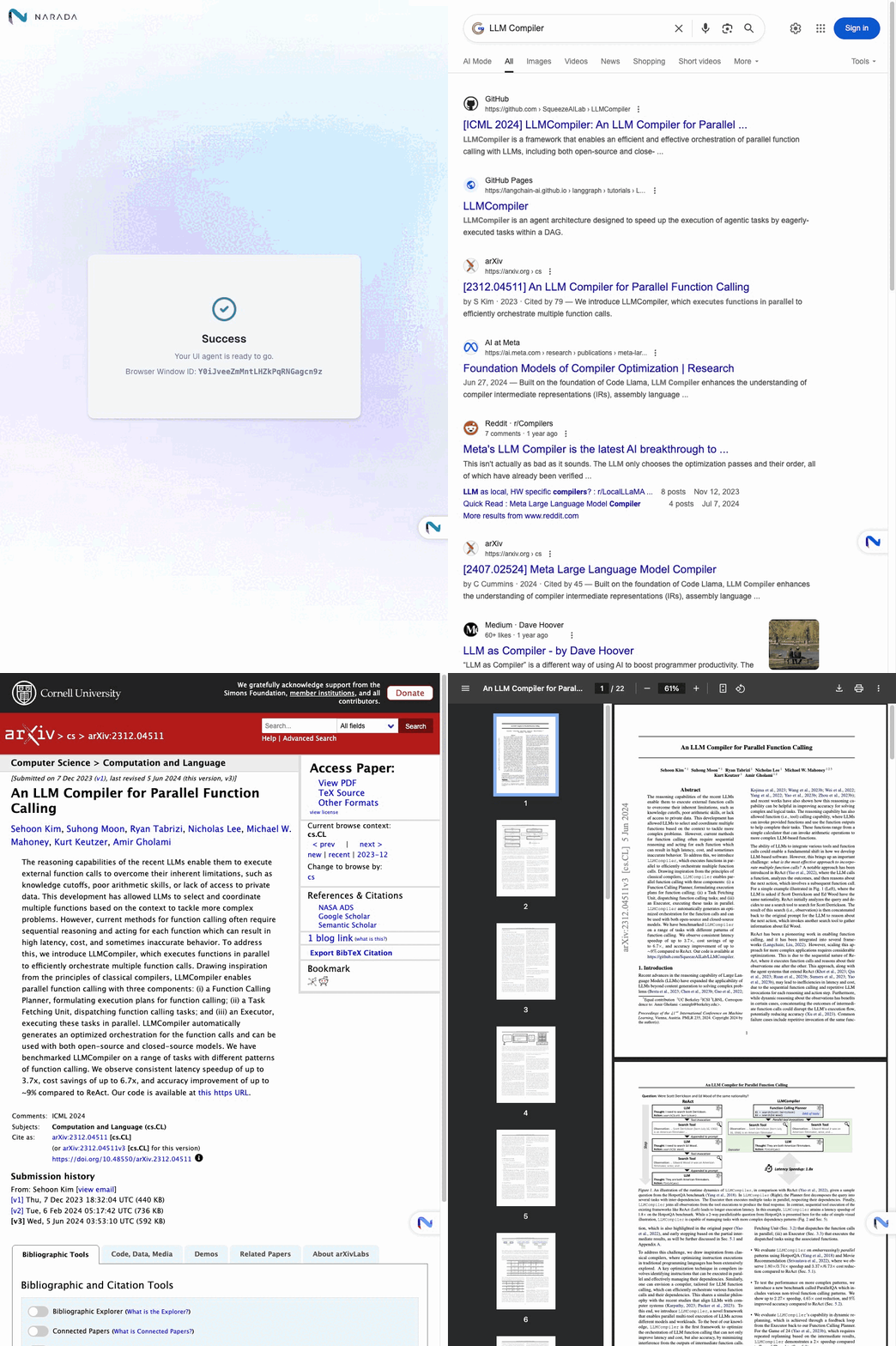
You can use the SDK to launch browsers and run automated tasks using natural language instructions. For more examples and code samples, please explore the examples/ folder in this repository.
Migration note
This version introduces a non-backward-compatible, agent-centered API:
- Create an execution target with an environment, such as
BrowserEnvironment,CloudBrowserEnvironment,RemoteBrowserEnvironment, orLambdaEnvironment. - Create an
Agent(environment=env, kind=...)and callawait agent.run(prompt=...). - Browser actions such as
go_to_url,agentic_selector, and sheet operations are now methods onAgent. - Environments keep lifecycle/bookkeeping APIs such as
start(),close(),browser_window_id, andcloud_browser_session_id.
Features
- Natural Language Control: Send instructions in plain English to control browser actions
- Parallel Execution: Run multiple browser tasks simultaneously across different windows
- Error Handling: Built-in timeout handling and retry mechanisms
- Action Recording: Generate GIFs of agent actions for debugging and documentation
- Async Support: Full async/await support for efficient operations
Key Capabilities
- Web Search & Navigation: Automatically search, click links, and navigate websites
- Data Extraction: Extract information from web pages using AI understanding
- Form Interaction: Fill out forms and interact with web elements
- File Operations: Download files and handle web-based documents
- Multi-window Management: Coordinate tasks across multiple browser instances
License
This project is licensed under the Apache 2.0 License.
Support
For questions, issues, or support, please contact: support@narada.ai
Citation
We appreciate it if you could cite Narada if you found it useful for your project.
@software{narada_ai2025,
  author = {Narada AI},
  title = {Narada AI: Agentic Process Automation for Enterprise},
  year = {2025},
  publisher = {GitHub},
  url = {https://github.com/NaradaAI/narada-python-sdk}
}
Metadata
Release files for narada 0.2.9
For a detailed explanation of source distributions (sdists) and built distributions (wheels), please see the package formats documentation.
Source distribution (sdist)
| File | Size | Uploaded | |
|---|---|---|---|
| narada-0.2.9.tar.gz | 47.6 kB | Details |
Built distribution (wheel)
| File | Interpreter | ABI | Platform | Reset |
|---|---|---|---|---|
| narada-0.2.9-py3-none-any.whl | Python 3 | none | any | Details |
Total release size: 79.4 kB
Release files / narada-0.2.9.tar.gz
| Download URL | narada-0.2.9.tar.gz |
|---|---|
| Size | 47.6 kB |
| Tags | Source |
|
SHA-256 checksum How to use checksums |
08bb46429a71f1640bbe142b2ffc38cc3f10e27095a33507e98d9ee4af5294a5
|
|
BLAKE2b-256 checksum How to use checksums |
1928b6a4c93d3f70bc6b59f52efeee6a109bef711549c1c6e3000ea78d348d26
|
| Upload date | |
|
Uploaded using Trusted Publishing? What is trusted publishing? |
No |
| Uploaded via |
uv/0.11.29 {"installer":{"name":"uv","version":"0.11.29","subcommand":["publish"]},"python":null,"implementation":{"name":null,"version":null},"distro":{"name":"macOS","version":null,"id":null,"libc":null},"system":{"name":null,"release":null},"cpu":null,"openssl_version":null,"setuptools_version":null,"rustc_version":null,"ci":null}
|
Release files / narada-0.2.9-py3-none-any.whl
| Download URL | narada-0.2.9-py3-none-any.whl |
|---|---|
| Size | 31.8 kB |
| Tags | Python 3 |
|
SHA-256 checksum How to use checksums |
775271b19623070a11cf3893af86539728899bcd489feb77698c0fb5d5f3fa57
|
|
BLAKE2b-256 checksum How to use checksums |
bb9f71ab8c8ce68bff4cdd0c9abe9e96625bedd0739eed5745c927bd4cdc120a
|
| Upload date | |
|
Uploaded using Trusted Publishing? What is trusted publishing? |
No |
| Uploaded via |
uv/0.11.29 {"installer":{"name":"uv","version":"0.11.29","subcommand":["publish"]},"python":null,"implementation":{"name":null,"version":null},"distro":{"name":"macOS","version":null,"id":null,"libc":null},"system":{"name":null,"release":null},"cpu":null,"openssl_version":null,"setuptools_version":null,"rustc_version":null,"ci":null}
|














