







| Branch | Version | Status |
|---|---|---|
master |
 |
 |
nightly |
 |
 |
develop |
 |
 |
| Platform | Rust | Python |
|---|---|---|
Linux (x86_64) |
1.84.0+ | 3.11+ |
macOS (arm64) |
1.84.0+ | 3.11+ |
Windows (x86_64) |
1.84.0+ | 3.11+ |

- Docs: https://nautilustrader.io/docs/
- Website: https://nautilustrader.io
- Support: support@nautilustrader.io
Introduction
NautilusTrader is an open-source, high-performance, production-grade algorithmic trading platform, providing quantitative traders with the ability to backtest portfolios of automated trading strategies on historical data with an event-driven engine, and also deploy those same strategies live, with no code changes.
The platform is AI-first, designed to develop and deploy algorithmic trading strategies within a highly performant and robust Python-native environment. This helps to address the parity challenge of keeping the Python research/backtest environment consistent with the production live trading environment.
NautilusTrader's design, architecture, and implementation philosophy holds software correctness and safety at the highest level, with the aim of supporting Python-native, mission-critical, trading system backtesting and live deployment workloads.
The platform is also universal and asset-class-agnostic - with any REST, WebSocket or FIX API able to be integrated via modular adapters. Thus, it can handle high-frequency trading operations for any asset classes including FX, Equities, Futures, Options, CFDs, Crypto and Betting - across multiple venues simultaneously.
Features
- Fast: Core is written in Rust with asynchronous networking using tokio.
- Reliable: Type safety and thread safety through Rust. Redis-backed performant state persistence (optional).
- Portable: OS independent, runs on Linux, macOS, and Windows. Deploy using Docker.
- Flexible: Modular adapters mean any REST, WebSocket, or FIX API can be integrated.
- Advanced: Time in force
IOC,FOK,GTD,AT_THE_OPEN,AT_THE_CLOSE, advanced order types and conditional triggers. Execution instructionspost-only,reduce-only, and icebergs. Contingency order lists includingOCO,OTO. - Customizable: Add user-defined custom components, or assemble entire systems from scratch leveraging the cache and message bus.
- Backtesting: Run with multiple venues, instruments and strategies simultaneously using historical quote tick, trade tick, bar, order book and custom data with nanosecond resolution.
- Live: Use identical strategy implementations between backtesting and live deployments.
- Multi-venue: Multiple venue capabilities facilitate market-making and statistical arbitrage strategies.
- AI Training: Backtest engine fast enough to be used to train AI trading agents (RL/ES).

nautilus - from ancient Greek 'sailor' and naus 'ship'.
The nautilus shell consists of modular chambers with a growth factor which approximates a logarithmic spiral. The idea is that this can be translated to the aesthetics of design and architecture.
Why NautilusTrader?
- Highly performant event-driven Python: Native binary core components.
- Parity between backtesting and live trading: Identical strategy code.
- Reduced operational risk: Enhanced risk management functionality, logical accuracy, and type safety.
- Highly extendable: Message bus, custom components and actors, custom data, custom adapters.
Traditionally, trading strategy research and backtesting might be conducted in Python using vectorized methods, with the strategy then needing to be reimplemented in a more event-driven way using C++, C#, Java or other statically typed language(s). The reasoning here is that vectorized backtesting code cannot express the granular time and event dependent complexity of real-time trading, where compiled languages have proven to be more suitable due to their inherently higher performance, and type safety.
One of the key advantages of NautilusTrader here, is that this reimplementation step is now circumvented - as the critical core components of the platform have all been written entirely in Rust or Cython. This means we're using the right tools for the job, where systems programming languages compile performant binaries, with CPython C extension modules then able to offer a Python-native environment, suitable for professional quantitative traders and trading firms.
Why Python?
Python was originally created decades ago as a simple scripting language with a clean straight forward syntax. It has since evolved into a fully fledged general purpose object-oriented programming language. Based on the TIOBE index, Python is currently the most popular programming language in the world. Not only that, Python has become the de facto lingua franca of data science, machine learning, and artificial intelligence.
The language out of the box is not without its drawbacks however, especially in the context of implementing large performance-critical systems. Cython has addressed a lot of these issues, offering all the advantages of a statically typed language, embedded into Pythons rich ecosystem of software libraries and developer/user communities.
What is Rust?
Rust is a multi-paradigm programming language designed for performance and safety, especially safe concurrency. Rust is blazingly fast and memory-efficient (comparable to C and C++) with no garbage collector. It can power mission-critical systems, run on embedded devices, and easily integrates with other languages.
Rust’s rich type system and ownership model guarantees memory-safety and thread-safety deterministically — eliminating many classes of bugs at compile-time.
The project increasingly utilizes Rust for core performance-critical components. Python language binding is handled through Cython and PyO3, with static libraries linked at compile-time before the wheel binaries are packaged, so a user does not need to have Rust installed to run NautilusTrader.
This project makes the Soundness Pledge:
“The intent of this project is to be free of soundness bugs. The developers will do their best to avoid them, and welcome help in analyzing and fixing them.”
[!NOTE]
MSRV: NautilusTrader relies heavily on improvements in the Rust language and compiler. As a result, the Minimum Supported Rust Version (MSRV) is generally equal to the latest stable release of Rust.
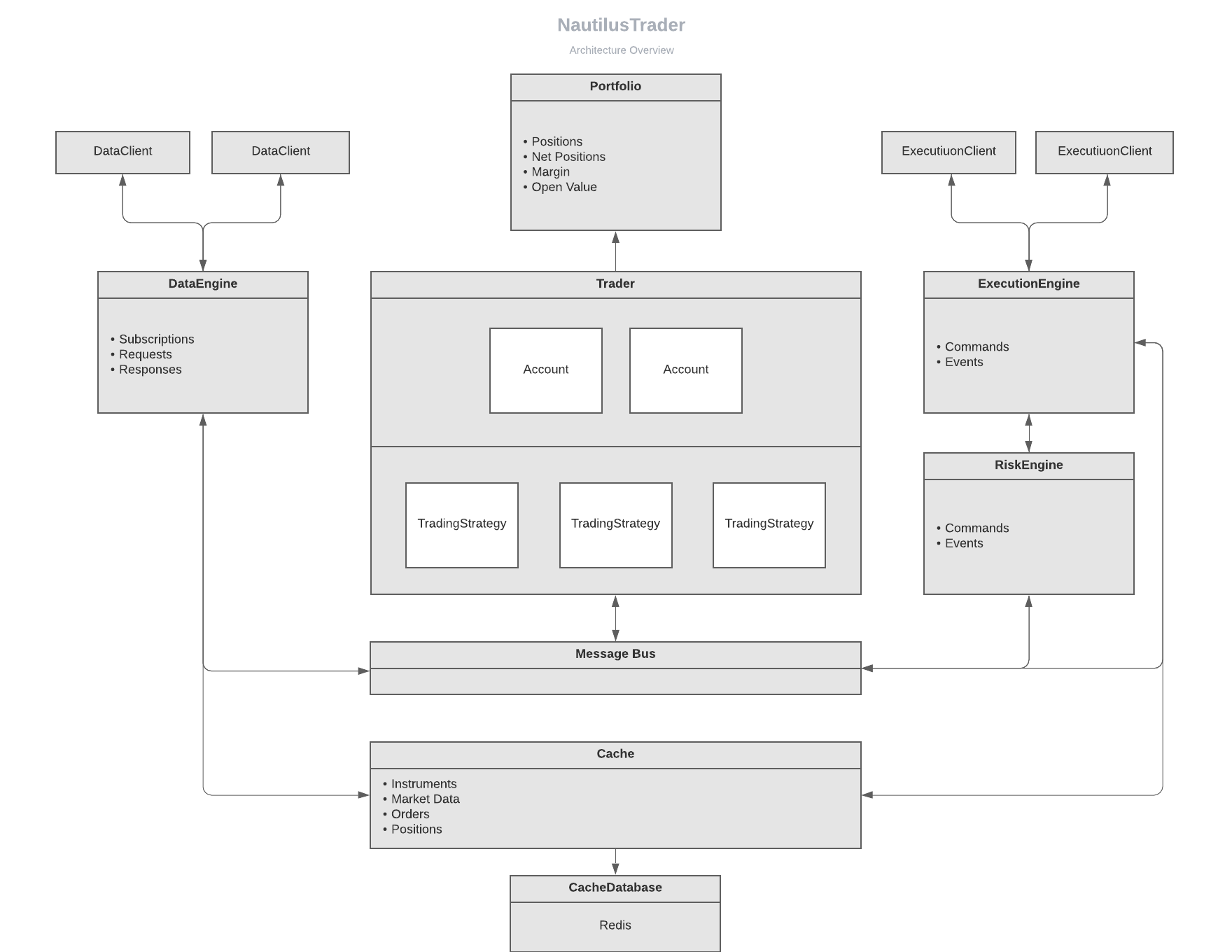
Architecture (data flow)
Integrations
NautilusTrader is modularly designed to work with adapters, enabling connectivity to trading venues and data providers by converting their raw APIs into a unified interface.
The following integrations are currently supported:
| Name | ID | Type | Status | Docs |
|---|---|---|---|---|
| Betfair | BETFAIR |
Sports Betting Exchange |  |
Guide |
| Binance | BINANCE |
Crypto Exchange (CEX) | |
Guide |
| Binance US | BINANCE |
Crypto Exchange (CEX) | |
Guide |
| Binance Futures | BINANCE |
Crypto Exchange (CEX) | |
Guide |
| Bybit | BYBIT |
Crypto Exchange (CEX) | |
Guide |
| Databento | DATABENTO |
Data Provider | |
Guide |
| dYdX | DYDX |
Crypto Exchange (DEX) | |
Guide |
| Interactive Brokers | INTERACTIVE_BROKERS |
Brokerage (multi-venue) | |
Guide |
| OKX | OKX |
Crypto Exchange (CEX) |  |
Guide |
| Polymarket | POLYMARKET |
Prediction Market (DEX) | |
Guide |
| Tardis | TARDIS |
Data Provider | |
Guide |
- ID: The default client ID for the integrations adapter clients.
- Type: The type of integration (often the venue type).
Status
building: Under construction and likely not in a usable state.beta: Completed to a minimally working state and in a 'beta' testing phase.stable: Stabilized feature set and API, the integration has been tested by both developers and users to a reasonable level (some bugs may still remain).
See the Integrations documentation for further details.
Branches
We aim to maintain a stable, passing build across all branches.
master: Reflects the source code for the latest released version.nightly: Includes experimental and in-progress features, merged from thedevelopbranch daily at 14:00 UTC and also when required.develop: The most active branch, frequently updated with new commits, including experimental and in-progress features.
[!NOTE]
Our roadmap aims to achieve a stable API for version 2.x (likely after the Rust port). Once this milestone is reached, we plan to implement a formal release process, including deprecation periods for any API changes. This approach allows us to maintain a rapid development pace for now.
Versioning and releases
NautilusTrader is still under active development. Some features may be incomplete, and while the API is becoming more stable, breaking changes can occur between releases. We strive to document these changes in the release notes on a best-effort basis.
We aim to follow a weekly release schedule, though experimental or larger features may cause delays.
Installation
From PyPI
We recommend using the latest supported version of Python and setting up nautilus_trader in a virtual environment to isolate dependencies
To install the latest binary wheel (or sdist package) from PyPI using Pythons pip package manager:
pip install -U nautilus_trader
From the Nautech Systems package index
The Nautech Systems package index (packages.nautechsystems.io) is PEP-503 compliant and hosts both stable and development binary wheels for nautilus_trader.
This enables users to install either the latest stable release or pre-release versions for testing.
Stable wheels
Stable wheels correspond to official releases of nautilus_trader on PyPI, and use standard versioning.
To install the latest stable release:
pip install -U nautilus_trader --index-url=https://packages.nautechsystems.io/simple
Development wheels
Development wheels are published from both the develop and nightly branches for Linux and macOS,
allowing users to test features and fixes ahead of stable releases.
This process also helps preserve compute resources and ensures easy access to the exact binaries tested in CI pipelines, while adhering to PEP-440 versioning standards:
developwheels use the version formatdev{date}+{build_number}(e.g.,1.208.0.dev20241212+7001).nightlywheels use the version formata{date}(alpha) (e.g.,1.208.0a20241212).
[!WARNING]
We don't recommend using development wheels in production environments, such as live trading controlling real capital.
Installation commands
By default, pip installs the latest stable release. Adding the --pre flag ensures that pre-release versions, including development wheels, are considered.
To install the latest available pre-release (including development wheels):
pip install -U nautilus_trader --pre --index-url=https://packages.nautechsystems.io/simple
To install a specific development wheel (e.g., 1.208.0a20241212 for December 12, 2024):
pip install nautilus_trader==1.208.0a20241212 --index-url=https://packages.nautechsystems.io/simple
Available versions
You can view all available versions of nautilus_trader on the package index.
To programmatically fetch and list available versions:
curl -s https://packages.nautechsystems.io/simple/nautilus-trader/index.html | grep -oP '(?<=<a href=")[^"]+(?=")' | awk -F'#' '{print $1}' | sort
Branch updates
developbranch wheels (.dev): Are built and published continuously with every merged commit.nightlybranch wheels (a): Are built and published daily whendevelopbranch is automatically merged at 14:00 UTC (if there are changes).
Retention policies
developbranch wheels (.dev): Only the most recent wheel build is retained.nightlybranch wheels (a): Only the 3 most recent wheel builds are retained.
From Source
Installation from source requires the Python.h header file, which is included in development releases such as python-dev.
You'll also need the latest stable rustc and cargo to compile the Rust libraries.
For MacBook Pro M1/M2, make sure your Python installed using pyenv is configured with --enable-shared:
PYTHON_CONFIGURE_OPTS="--enable-shared" pyenv install <python_version>
See the PyO3 user guide for more details.
It's possible to install from source using pip if you first install the build dependencies
as specified in the pyproject.toml. We highly recommend installing using poetry as below.
-
Install rustup (the Rust toolchain installer):
- Linux and macOS:
curl https://sh.rustup.rs -sSf | sh
- Windows:
- Download and install
rustup-init.exe - Install "Desktop development with C++" with Build Tools for Visual Studio 2019
- Download and install
- Verify (any system):
from a terminal session run:
rustc --version
- Linux and macOS:
-
Enable
cargoin the current shell:- Linux and macOS:
source $HOME/.cargo/env
- Windows:
- Start a new PowerShell
- Linux and macOS:
-
Install clang (a C language frontend for LLVM):
- Linux:
sudo apt-get install clang
- Windows:
- Add Clang to your Build Tools for Visual Studio 2019:
- Start | Visual Studio Installer | Modify | C++ Clang tools for Windows (12.0.0 - x64…) = checked | Modify
- Enable
clangin the current shell:[System.Environment]::SetEnvironmentVariable('path', "C:\Program Files (x86)\Microsoft Visual Studio\2019\BuildTools\VC\Tools\Llvm\x64\bin\;" + $env:Path,"User")
- Add Clang to your Build Tools for Visual Studio 2019:
- Verify (any system):
from a terminal session run:
clang --version
- Linux:
-
Install poetry (or follow the installation guide on their site):
curl -sSL https://install.python-poetry.org | python3 - -
Clone the source with
git, and install from the projects root directory:git clone --branch develop --depth 1 https://github.com/nautechsystems/nautilus_trader cd nautilus_trader poetry install --only main --all-extras
[!NOTE]
The
--branch developflag clones only the develop branch, and--depth 1fetches just the latest commit for a faster, lightweight clone.
See the Installation Guide for other options and further details.
Redis
Using Redis with NautilusTrader is optional and only required if configured as the backend for a cache database or message bus. See the Redis section of the Installation Guide for further details.
Makefile
A Makefile is provided to automate most installation and build tasks for development. It provides the following targets:
make install: Installs inreleasebuild mode withmain,devandtestdependencies then installs the package using poetry (default).make install-debug: Same asmake installbut withdebugbuild mode.make install-just-deps: Installs just themain,devandtestdependencies (does not install package).make build: Runs the build script inreleasebuild mode (default).make build-debug: Runs the build script indebugbuild mode.make build-wheel: Runs the Poetry build with a wheel format inreleasemode.make build-wheel-debug: Runs the Poetry build with a wheel format indebugmode.make clean: CAUTION removes all non-source artifacts from the repository.make docs: Builds the documentation HTML using Sphinx.make pre-commit: Runs the pre-commit checks over all files.make ruff: Runs ruff over all files using thepyproject.tomlconfig (with autofix).make pytest: Runs all tests withpytest(except performance tests).make pytest-coverage: Same asmake pytestand additionally runs with test coverage and produces a report.
[!TIP]
Running
make build-debugto compile after changes to Rust or Cython code is currently the most efficient workflow when developing.
Examples
Indicators and strategies can be developed in both Python and Cython. For performance and latency-sensitive applications, we recommend using Cython. Below are some examples:
- indicator example written in Python.
- indicator examples written in Cython.
- strategy examples written in both Python and Cython.
- backtest examples using a
BacktestEnginedirectly.
Docker
Docker containers are built using the base image python:3.12-slim with the following variant tags:
nautilus_trader:latesthas the latest release version installed.nautilus_trader:nightlyhas the head of thenightlybranch installed.jupyterlab:latesthas the latest release version installed along withjupyterlaband an example backtest notebook with accompanying data.jupyterlab:nightlyhas the head of thenightlybranch installed along withjupyterlaband an example backtest notebook with accompanying data.
The container images can be pulled as follows:
docker pull ghcr.io/nautechsystems/<image_variant_tag> --platform linux/amd64
You can launch the backtest example container by running:
docker pull ghcr.io/nautechsystems/jupyterlab:nightly --platform linux/amd64
docker run -p 8888:8888 ghcr.io/nautechsystems/jupyterlab:nightly
Then open your browser at the following address:
http://127.0.0.1:8888/lab
[!WARNING]
NautilusTrader currently exceeds the rate limit for Jupyter notebook logging (stdout output). As a result, the
log_levelin the examples is set toERROR. Lowering this level to see more logging will cause the notebook to hang during cell execution. We are investigating a fix, which may involve either raising the configured rate limits for Jupyter or throttling the log flushing from Nautilus.
Development
We aim to provide the most pleasant developer experience possible for this hybrid codebase of Python, Cython and Rust. See the Developer Guide for helpful information.
Testing with Rust
cargo-nextest is the standard Rust test runner for NautilusTrader. You can install it by running:
cargo install cargo-nextest
[!TIP]
Rust tests will only pass when run via
cargo-nextest.
Contributing
Thank you for considering contributing to NautilusTrader! We welcome any and all help to improve the project. If you have an idea for an enhancement or a bug fix, the first step is to open an issue on GitHub to discuss it with the team. This helps to ensure that your contribution will be well-aligned with the goals of the project and avoids duplication of effort.
Once you're ready to start working on your contribution, make sure to follow the guidelines outlined in the CONTRIBUTING.md file. This includes signing a Contributor License Agreement (CLA) to ensure that your contributions can be included in the project.
[!NOTE]
Pull requests should target the
developbranch (the default branch). This is where new features and improvements are integrated before release.
Thank you again for your interest in NautilusTrader! We look forward to reviewing your contributions and working with you to improve the project.
Community
Join our community of users and contributors on Discord to chat and stay up-to-date with the latest announcements and features of NautilusTrader. Whether you're a developer looking to contribute or just want to learn more about the platform, all are welcome on our server.
License
The source code for NautilusTrader is available on GitHub under the GNU Lesser General Public License v3.0. Contributions to the project are welcome and require the completion of a standard Contributor License Agreement (CLA).
NautilusTrader is developed and maintained by Nautech Systems, a technology company specializing in the development of high-performance trading systems. Although the project utilizes the Rust programming language and benefits from its ecosystem, Nautech Systems is not affiliated with the Rust Foundation, and this project is not an official work of the Rust Foundation. For more information, visit https://nautilustrader.io.
Copyright (C) 2015-2025 Nautech Systems Pty Ltd. All rights reserved.


1 maintainer

Download files
Download the file for your platform. If you're not sure which to choose, learn more about installing packages.
Source Distribution
Built Distributions
Filter files by name, interpreter, ABI, and platform.
If you're not sure about the file name format, learn more about wheel file names.
Copy a direct link to the current filters
File details
Details for the file nautilus_trader-1.210.0.tar.gz.
File metadata
- Download URL: nautilus_trader-1.210.0.tar.gz
- Upload date:
- Size: 1.7 MB
- Tags: Source
- Uploaded using Trusted Publishing? No
- Uploaded via:
poetry/1.8.5 CPython/3.11.11 Linux/6.8.0-1017-azure
File hashes
| Algorithm | Hash digest | |
|---|---|---|
| SHA256 |
a2201138a689d02b16d20c7f64874daa51219bd0b43583ca42c87e7d68e856d4
|
|
| MD5 |
fcda5b2336c6e34458abb36a09d0a902
|
|
| BLAKE2b-256 |
9e984ed65cb4f6333fd90510d9868cdac77cc2160af69e70e6b8bdebc91d3970
|
File details
Details for the file nautilus_trader-1.210.0-cp312-cp312-win_amd64.whl.
File metadata
- Download URL: nautilus_trader-1.210.0-cp312-cp312-win_amd64.whl
- Upload date:
- Size: 33.8 MB
- Tags: CPython 3.12, Windows x86-64
- Uploaded using Trusted Publishing? No
- Uploaded via:
poetry/1.8.5 CPython/3.12.8 Windows/2022Server
File hashes
| Algorithm | Hash digest | |
|---|---|---|
| SHA256 |
265b56c29f92851cab0911aa4f4e8b3bd19a049daef4dd97983b2d856601cbbc
|
|
| MD5 |
f0aea492529b811eb7de167076cb2803
|
|
| BLAKE2b-256 |
0b8682434ad0533d9028def186f72123f664b4e13432af6716b33fc8b82b1276
|
File details
Details for the file nautilus_trader-1.210.0-cp312-cp312-manylinux_2_39_x86_64.whl.
File metadata
- Download URL: nautilus_trader-1.210.0-cp312-cp312-manylinux_2_39_x86_64.whl
- Upload date:
- Size: 65.6 MB
- Tags: CPython 3.12, manylinux: glibc 2.39+ x86-64
- Uploaded using Trusted Publishing? No
- Uploaded via:
poetry/1.8.5 CPython/3.12.8 Linux/6.8.0-1017-azure
File hashes
| Algorithm | Hash digest | |
|---|---|---|
| SHA256 |
103c5a850ecc79e04aae265488051e281979b1e490498e90a7ce422db6b54b8d
|
|
| MD5 |
9c40d2152cf6ecebe93524f6acda6ec0
|
|
| BLAKE2b-256 |
2833ae376c65d396316ccdd8dd8246ff52cb26bb43e2c2d0716cb207f9a7cc40
|
File details
Details for the file nautilus_trader-1.210.0-cp312-cp312-manylinux_2_35_x86_64.whl.
File metadata
- Download URL: nautilus_trader-1.210.0-cp312-cp312-manylinux_2_35_x86_64.whl
- Upload date:
- Size: 65.8 MB
- Tags: CPython 3.12, manylinux: glibc 2.35+ x86-64
- Uploaded using Trusted Publishing? No
- Uploaded via:
poetry/1.8.5 CPython/3.12.8 Linux/6.5.0-1025-azure
File hashes
| Algorithm | Hash digest | |
|---|---|---|
| SHA256 |
d5d5812fd05651fab6af45bf9e6b7d8fa2c91767ec88017c15638743ae6443d1
|
|
| MD5 |
ff37dfc25fdf94eba83152688001d4a1
|
|
| BLAKE2b-256 |
4e010b3e37fd4c5a59e4459d37f37d471ca0ec78bb75b501a3c15f15a6677b70
|
File details
Details for the file nautilus_trader-1.210.0-cp312-cp312-macosx_14_0_arm64.whl.
File metadata
- Download URL: nautilus_trader-1.210.0-cp312-cp312-macosx_14_0_arm64.whl
- Upload date:
- Size: 59.7 MB
- Tags: CPython 3.12, macOS 14.0+ ARM64
- Uploaded using Trusted Publishing? No
- Uploaded via:
poetry/1.8.5 CPython/3.12.8 Darwin/23.6.0
File hashes
| Algorithm | Hash digest | |
|---|---|---|
| SHA256 |
b438f7451ca74883476b8789ba50a1ec3f07b03699b1c99ac931a06566d8d7b4
|
|
| MD5 |
105d77231787856edcaea10b606bdae0
|
|
| BLAKE2b-256 |
236b1e0ee0b68c865fa677daac979f9329b4302bfb26f2828f07363d8af7b93a
|
File details
Details for the file nautilus_trader-1.210.0-cp311-cp311-win_amd64.whl.
File metadata
- Download URL: nautilus_trader-1.210.0-cp311-cp311-win_amd64.whl
- Upload date:
- Size: 33.7 MB
- Tags: CPython 3.11, Windows x86-64
- Uploaded using Trusted Publishing? No
- Uploaded via:
poetry/1.8.5 CPython/3.11.9 Windows/10
File hashes
| Algorithm | Hash digest | |
|---|---|---|
| SHA256 |
7b4f7fd4c36e507eb401fb7f79da9fc1e21765a8f222f1e05225fbb7b3b8a746
|
|
| MD5 |
cf221167ab572513eeb1c08bafd93c96
|
|
| BLAKE2b-256 |
667ac5fbb459e4658a83685c513888dbe9022f0d205ebb99670b2afcc386c17d
|
File details
Details for the file nautilus_trader-1.210.0-cp311-cp311-manylinux_2_39_x86_64.whl.
File metadata
- Download URL: nautilus_trader-1.210.0-cp311-cp311-manylinux_2_39_x86_64.whl
- Upload date:
- Size: 65.2 MB
- Tags: CPython 3.11, manylinux: glibc 2.39+ x86-64
- Uploaded using Trusted Publishing? No
- Uploaded via:
poetry/1.8.5 CPython/3.11.11 Linux/6.8.0-1017-azure
File hashes
| Algorithm | Hash digest | |
|---|---|---|
| SHA256 |
441e1c6021eddc03e7e766e4c97346ae56bc5009709ea8c75b5fc1e85477e336
|
|
| MD5 |
85467584b8a7642114796df93641e305
|
|
| BLAKE2b-256 |
02c2fbda3edecc227fbe086138faa623a0e93fe83b999131ab85075099e1f1d2
|
File details
Details for the file nautilus_trader-1.210.0-cp311-cp311-manylinux_2_35_x86_64.whl.
File metadata
- Download URL: nautilus_trader-1.210.0-cp311-cp311-manylinux_2_35_x86_64.whl
- Upload date:
- Size: 65.4 MB
- Tags: CPython 3.11, manylinux: glibc 2.35+ x86-64
- Uploaded using Trusted Publishing? No
- Uploaded via:
poetry/1.8.5 CPython/3.11.11 Linux/6.5.0-1025-azure
File hashes
| Algorithm | Hash digest | |
|---|---|---|
| SHA256 |
c21f8293db4577bb9ac1668ccb9adf652c9e0b27a443419bd976b3767d68d450
|
|
| MD5 |
20113ae18e2916db255eb8aa8bd16cc3
|
|
| BLAKE2b-256 |
b1449c4137d2c408b7c4141a3c526c596b4fcc133b2d51191760c71c0a5ee030
|
File details
Details for the file nautilus_trader-1.210.0-cp311-cp311-macosx_14_0_arm64.whl.
File metadata
- Download URL: nautilus_trader-1.210.0-cp311-cp311-macosx_14_0_arm64.whl
- Upload date:
- Size: 59.4 MB
- Tags: CPython 3.11, macOS 14.0+ ARM64
- Uploaded using Trusted Publishing? No
- Uploaded via:
poetry/1.8.5 CPython/3.11.9 Darwin/23.6.0
File hashes
| Algorithm | Hash digest | |
|---|---|---|
| SHA256 |
e0d6fff4061b6c9f7526a037b6ea97c64bcb59b3632bb9c328788f0da40d96e3
|
|
| MD5 |
71eb6fee181de402e666d310a7367fea
|
|
| BLAKE2b-256 |
9b359be28025f13debc007e8a44faf176cab7e748a850ba9cfa8550d460f26cb
|







