
NLP Text Preprocessing Utility Package
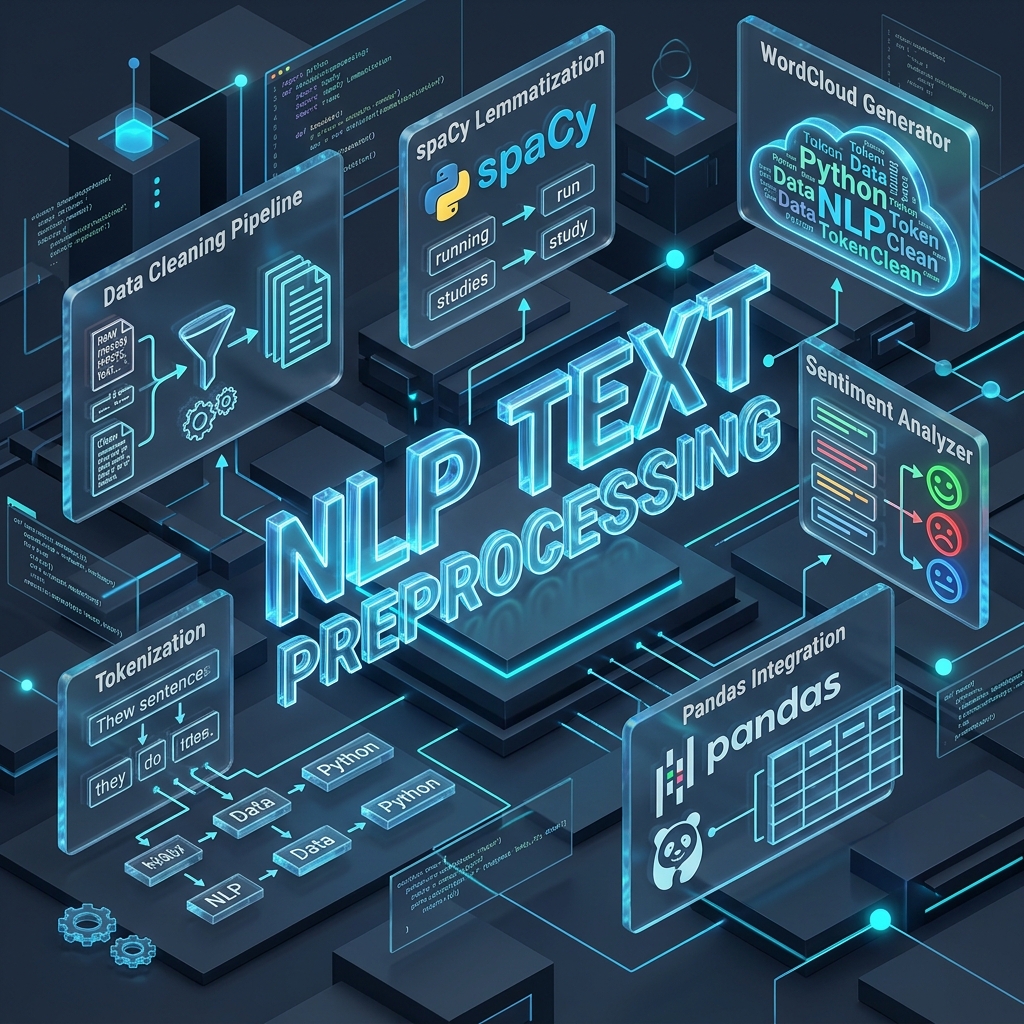




Table of Contents
- Package Overview
- Key Features
- Architecture Diagram
- Quickstart and Setup
- Pipeline Automation Engine
- Complete API Reference
- Code Examples
- Troubleshooting and Resource Setup
- License and Author
Package Overview
nlp_text_preprocessing is a modular Python library designed to streamline text cleaning, feature extraction, linguistic analysis, content moderation, and visualization for Natural Language Processing (NLP) pipelines and Machine Learning workflows.
Maintained by Uditya Narayan Tiwari.
It provides over 60 single-purpose functions and an extensible Pipeline Engine with defensive guards so None, NaN and missing values are treated as empty text, which makes it convenient to run over Pandas DataFrame columns and raw text datasets.
Key Features
- Safe Inputs:
None,NaN,pd.NAand bytes are handled by every function (treated as empty text). - Pipeline Automation Engine: Chain cleaning steps by name or custom functions via
Pipeline(['to_lower_case', 'remove_urls', 'lemmatize']). - Light Import, Lazy Models:
import nlp_text_preprocessingloads no heavy library and downloads nothing. spaCy, TextBlob and NLTK data are loaded on first use and cached. - Advanced Cleaning: Remove emojis, phone numbers, PII mask, URLs, emails, HTML, retweets, special symbols, and expand contractions/hashtags.
- Feature & Readability Extraction: Extract word counts, sentence counts, readability scores (Flesch Ease), punctuation density, capital ratios, and full batch statistics.
- Linguistic Utilities: Named Entity Recognition (NER), POS tagging, dependency parsing, language detection, keyword extraction, synonyms, antonyms, and n-grams.
- Safety & Moderation: Profanity detection/censoring, toxicity scores, and spam signal detection.
- Visualization: Generate and save custom WordClouds to disk or display interactively.
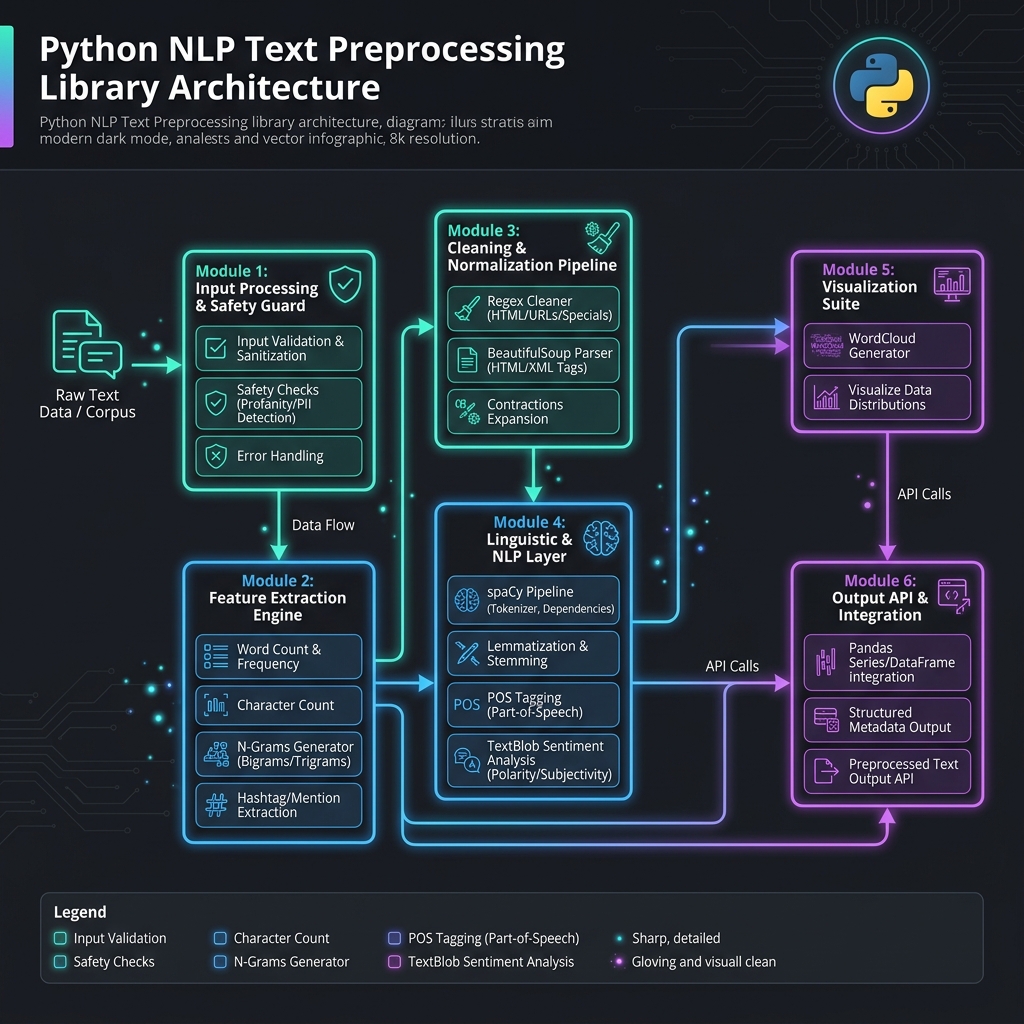
Architecture Diagram
The package integrates spaCy, NLTK, TextBlob, BeautifulSoup4, and WordCloud through a unified API surface:
Quickstart and Setup
1. Installation
pip install nlp-text-preprocessing            # core
pip install "nlp-text-preprocessing[viz]"     # + wordcloud, matplotlib (get_wordcloud)
pip install "nlp-text-preprocessing[pandas]"  # + pandas (text_stats_batch, Pipeline.run_series)
pip install "nlp-text-preprocessing[all]"     # everything optional
2. Downloading Required Corpora and Models
Nothing is downloaded behind your back. Run the one-time setup, which fetches the NLTK data (punkt_tab, wordnet, omw-1.4) and the spaCy model en_core_web_sm:
import nlp_text_preprocessing as tp

tp.download_nltk_packages()                 # one-time setup
tp.check_resources(verbose=True)            # see what is installed / missing
sentiment_analysis(x, method="naive_bayes") additionally needs the movie_reviews corpus:
tp.download_nltk_packages(include_sentiment_corpus=True).
Set the environment variable NLP_TEXT_PREPROCESSING_AUTO_DOWNLOAD=1 if you want the spaCy model to be downloaded automatically on first use.
Pipeline Automation Engine
The Pipeline class allows chaining cleaning and transformation steps cleanly:
import nlp_text_preprocessing as tp

# 1. Create default zero-config pipeline
pipe = tp.Pipeline.default()

# 2. Or build a custom step pipeline
pipe = tp.Pipeline([
    'to_lower_case',
    'expand_hashtags',
    'remove_urls',
    'remove_emails',
    'remove_extra_whitespace',
    'lemmatize'
])

# Process single text
clean_result = pipe.run("Check out #MachineLearning at https://example.com!")

# Process batch list or Pandas Series
clean_batch = pipe.run_batch(["Text 1", "Text 2"])
clean_series = pipe.run_series(df['text_column'])

# Generate diff report of changes
report = tp.diff_report(raw_texts, clean_batch)
Complete API Reference
Below is the complete reference guide for all functions available in the library:
1. General Feature Extraction
| Function | Parameters | Return Type | Description |
|---|---|---|---|
word_count(x) |
x: str |
int |
Returns total whitespace-separated word count. |
char_count(x) |
x: str |
int |
Returns total characters excluding spaces. |
avg_word_len(x) |
x: str |
float |
Returns average word length (0.0 for empty inputs). |
stop_words_count(x) |
x: str |
int |
Returns count of stop words (case-insensitive). |
sentence_count(x) |
x: str |
int |
Returns total number of sentences. |
avg_sentence_len(x) |
x: str |
float |
Returns average sentence length in words. |
punctuation_density(x) |
x: str |
float |
Returns proportion of punctuation characters in text. |
capital_ratio(x) |
x: str |
float |
Returns proportion of uppercase words relative to total words. |
unique_word_ratio(x) |
x: str |
float |
Returns lexical diversity ratio (unique words / total words). |
readability_score(x) |
x: str |
float |
Calculates Flesch Reading Ease score. |
hashtags_count(x) |
x: str |
int |
Returns count of hashtag tokens (#tag). |
mentions_count(x) |
x: str |
int |
Returns count of user handle mentions (@user). |
numerics_count(x) |
x: str |
int |
Returns count of numeric tokens. |
upper_case_count(x) |
x: str |
int |
Returns count of uppercase words. |
text_stats(x) |
x: str |
dict |
Returns a dictionary containing all extracted feature statistics at once. |
text_stats_batch(df, col) |
df, col |
DataFrame |
Returns a DataFrame of stats for a pandas DataFrame column. |
2. Text Cleaning and Normalization
| Function | Parameters | Return Type | Description |
|---|---|---|---|
to_lower_case(x) |
x: str |
str |
Converts input text to lowercase. |
contraction_to_expansion(x) |
x: str |
str |
Expands contractions using contractions dictionary. |
remove_emails(x) |
x: str |
str |
Removes email addresses from text. |
count_emails(x) |
x: str |
int |
Counts email addresses present in text. |
remove_urls(x) |
x: str |
str |
Removes http(s)://, ftp:// and www. URLs (trailing punctuation is kept). |
count_urls(x) |
x: str |
int |
Counts URLs present in text. |
remove_rt(x) |
x: str |
str |
Removes retweet headers (RT @user:). |
count_rt(x) |
x: str |
int |
Counts retweet occurrences in text. |
remove_html_tag(x) |
x: str |
str |
Strips HTML/XML tags using BeautifulSoup. |
remove_accented_chars(x) |
x: str |
str |
Strips accents (café -> cafe); non-Latin scripts are kept. |
remove_mentions(x) |
x: str |
str |
Removes user handle mentions (@username). |
remove_special_chars(x) |
x: str |
str |
Strips punctuation and symbols (well-known -> well known). |
remove_repeated_chars(x) |
x: str |
str |
Shortens elongated words (soooo -> soo); digits and punctuation are untouched. |
remove_stop_words(x, keep_negations=True) |
x: str |
str |
Removes stop words (case-insensitive); negations like not are kept by default. |
remove_emojis(x) |
x: str |
str |
Strips emoji (flags, skin tones and ZWJ sequences included). |
extract_emojis(x) |
x: str |
list[str] |
Returns list of emojis found in text. |
emoji_to_text(x) |
x: str |
str |
Converts emojis to descriptive text (e.g. 😂 -> face_with_tears_of_joy). |
remove_phone_numbers(x) |
x: str |
str |
Strips phone numbers (international formats; dates and decimals are ignored). |
count_phone_numbers(x) |
x: str |
int |
Counts phone numbers present in text. |
mask_pii(x, token='[REDACTED]') |
x: str |
str |
Redacts emails, card numbers, US SSNs and phone numbers. |
remove_extra_whitespace(x) |
x: str |
str |
Collapses consecutive spaces, tabs, and newlines to a single space. |
expand_hashtags(x) |
x: str |
str |
Splits hashtags (#MachineLearning2024 -> Machine Learning 2024). |
normalize_unicode_punctuation(x) |
x: str |
str |
Replaces smart quotes, em-dashes, and ellipsis with ASCII equivalents. |
remove_numbers(x) |
x: str |
str |
Removes standalone numbers; digits inside words (3rd, H2O) stay. |
remove_currency_symbols(x) |
x: str |
str |
Strips every Unicode currency symbol. |
normalize_whitespace_and_casing(x) |
x: str |
str |
Canonical combination of lowercasing and whitespace collapse. |
clean_text(text, remove_stopwords=False) |
text: str |
str |
End-to-end cleaning (HTML, URLs, emails, lower-case, contractions, punctuation, lemmatization). |
3. Linguistic and Morphological Processing
| Function | Parameters | Return Type | Description |
|---|---|---|---|
convert_to_base(x) |
x: str |
str |
Lemmatizes nouns and verbs via spaCy while keeping other POS tags. |
lemmatize(x) |
x: str |
str |
Performs full lemmatization across all tokens via spaCy. |
extract_entities(x) |
x: str |
list[tuple] |
Extracts named entities (text, label) using spaCy. |
extract_pos_tags(x) |
x: str |
list[tuple] |
Extracts full POS tag breakdown (token, pos, tag) using spaCy. |
get_dependency_tree(x) |
x: str |
list[tuple] |
Extracts dependency parse tree (token, dep, head) using spaCy. |
detect_language(x) |
x: str |
str |
Language code ('en', 'fr', 'hi', ...) via langdetect; 'unknown' if undetectable. |
keyword_extraction(x, top_n) |
x: str, top_n: int |
list[str] |
Extracts top N keywords by term frequency. |
text_similarity(x1, x2) |
x1, x2 |
float |
Calculates token Jaccard similarity between two texts (0.0 to 1.0). |
get_synonyms(word) |
word: str |
list[str] |
Sorted WordNet synonyms. |
get_antonyms(word) |
word: str |
list[str] |
Sorted WordNet antonyms. |
chunk_noun_phrases(x) |
x: str |
list[dict] |
spaCy noun chunks with exact character start/end offsets. |
correct_spelling(x) |
x: str |
str |
Corrects misspelled words (TextBlob); punctuation, case, URLs and acronyms are preserved. |
get_noun_phrase(x) |
x: str |
list[str] |
Extracts noun phrases from text. |
n_grams(x, n=2) |
x: str, n: int |
list[tuple] |
Word-level n-grams as tuples. |
singularize_words(x) |
x: str |
str |
Converts plural nouns (NNS) into singular forms. |
pluralize_words(x) |
x: str |
str |
Converts singular nouns (NN) into plural forms. |
4. Safety, Moderation and Sentiment
| Function | Parameters | Return Type | Description |
|---|---|---|---|
detect_profanity(x) |
x: str |
bool |
Returns True if text contains profanity words. |
censor_profanity(x) |
x: str |
str |
Censors profanity words with asterisks (****). |
detect_toxicity(x) |
x: str |
float |
Calculates baseline toxicity score (0.0 to 1.0). |
detect_spam_signals(x) |
x: str |
dict |
Returns spam flags for excessive caps, punctuation, and URL density. |
sentiment_analysis(x, method='pattern') |
x: str |
str |
'pos' / 'neg' / 'neu'. Default is instant; method='naive_bayes' is the legacy opt-in model. |
polarity_subjectivity(x) |
x: str |
dict |
Returns fast pattern-based sentiment polarity (-1.0 to 1.0) and subjectivity. |
emotion_detection(x) |
x: str |
dict |
Calculates lexicon-based emotion counts (joy, anger, sadness, fear). |
5. Visualization Suite
| Function | Parameters | Return Type | Description |
|---|---|---|---|
get_wordcloud(x, save_path=None, show=True) |
x: str, save_path: str, show: bool |
WordCloud |
Generates a WordCloud object, with optional file saving and GUI toggle options. |
Code Examples
1. Basic Text Cleaning
import nlp_text_preprocessing as tp

raw_text = "Check out https://example.com! Contact support@company.org or RT @user 'I'm loving #NLP'."
cleaned = tp.clean_text(raw_text)

print(cleaned)
# Output: check out contact support company org or i am love nlp
2. Pipeline Engine Usage
import nlp_text_preprocessing as tp

# Build custom pipeline
pipe = tp.Pipeline(['to_lower_case', 'expand_hashtags', 'remove_urls', 'remove_extra_whitespace'])

text = "Check out #MachineLearning at https://example.com!"
print(pipe.run(text))
# Output: check out machine learning at!
3. Pandas DataFrame Integration
All functions seamlessly support Pandas .apply() and handle missing values (NaN/None):
import pandas as pd
import nlp_text_preprocessing as tp

df = pd.DataFrame({
    'text': [
        "I'm loving this NLP package! #awesome",
        "Contact me at info@test.com or visit https://test.com",
        None
    ]
})

# Apply end-to-end text cleaning
df['clean_text'] = df['text'].apply(tp.clean_text)

# Extract word counts safely
df['word_count'] = df['text'].apply(tp.word_count)
4. Batch Feature Extraction
Extract full feature matrices directly into Pandas columns:
import pandas as pd
import nlp_text_preprocessing as tp

df = pd.DataFrame({'text': ["Hello #world! Visit https://example.com", "Contact user@test.com"]})

# Extract all summary stats into a new DataFrame
stats_df = tp.text_stats_batch(df, 'text')
print(stats_df)
5. WordCloud Generation
import nlp_text_preprocessing as tp

text = "python natural language processing machine learning text mining data science spaCy nltk textblob"

# Save directly to disk without opening interactive GUI window
tp.get_wordcloud(text, save_path="wordcloud.png", show=False)
Troubleshooting and Resource Setup
If a function reports a missing NLTK corpus or spaCy model, check what is missing and install it:
import nlp_text_preprocessing as tp
tp.check_resources(verbose=True)
tp.download_nltk_packages()
Or manually download spaCy model via terminal:
python -m spacy download en_core_web_sm
License and Author
- Author: Uditya Narayan Tiwari
- License: MIT License (LICENSE)
1 maintainer

Metadata
1 maintainer
Release files for nlp-text-preprocessing 0.3.0
For a detailed explanation of source distributions (sdists) and built distributions (wheels), please see the package formats documentation.
Source distribution (sdist)
| File | Size | Uploaded | Provenance | Actions |
|---|---|---|---|---|
| nlp_text_preprocessing-0.3.0.tar.gz | 1.6 MB | Without provenance | Details for nlp_text_preprocessing-0.3.0.tar.gz |
Built distribution (wheel)
| File | Interpreter | ABI | Platform | Actions Reset |
|---|---|---|---|---|
| nlp_text_preprocessing-0.3.0-py3-none-any.whl | Python 3 | none | any | Details for nlp_text_preprocessing-0.3.0-py3-none-any.whl |
Total release size: 1.6 MB
Release files / nlp_text_preprocessing-0.3.0.tar.gz
| Download URL | nlp_text_preprocessing-0.3.0.tar.gz |
|---|---|
| Size | 1.6 MB |
| Tags | Source |
|
SHA-256 checksum How to use checksums |
a0d2325d2219fb96cfe988d1730982db34baf91bddb34dc93298292fffb3b113
|
|
BLAKE2b-256 checksum How to use checksums |
5db28a546702465b21cbe42e56fd9f59c5bd4351dac7f4871c3d27e5e5916938
|
| Upload date | |
|
Uploaded using Trusted Publishing? What is trusted publishing? |
No |
| Uploaded via |
twine/7.0.0 CPython/3.12.10
|
Release files / nlp_text_preprocessing-0.3.0-py3-none-any.whl
| Download URL | nlp_text_preprocessing-0.3.0-py3-none-any.whl |
|---|---|
| Size | 25.7 kB |
| Tags | Python 3 |
|
SHA-256 checksum How to use checksums |
7d6e93e47ad82ca371c126d59b625c78aeb186447cf3515c7f7a34dd417a8499
|
|
BLAKE2b-256 checksum How to use checksums |
478b658d6adcc39987ec752b45be10bbcfb2c25df58e7c61a1d4e9cbff716817
|
| Upload date | |
|
Uploaded using Trusted Publishing? What is trusted publishing? |
No |
| Uploaded via |
twine/7.0.0 CPython/3.12.10
|
Security for nlp-text-preprocessing 0.3.0
Provenance
Provenance describes where a file came from. On PyPI, provenance is shared via attestations, which provide a verifiable record of the build or publishing details. View details, limitations and caveats.
No provenance found
None of the files in this release were uploaded with provenance metadata.
A note on package security
PyPI is a repository for distributing packages, not a service for auditing them. While third-party security researchers and our staff do their best to detect and remove malicious packages, PyPI cannot guarantee the quality, security or suitability of any given package.
To learn more about protecting yourself from malicious actors, visit our package security documentation.














