
A Model Context Protocol (MCP) server for Norman Finance API

Project description

Norman MCP Server
Your finances, inside your AI assistant.
Norman connects your accounting, invoicing, and VAT filing directly to Claude, Cursor, and any MCP-compatible AI.




https://mcp.norman.finance/mcp
Claude · ChatGPT · Cursor · n8n · Any MCP Client
What you can do
Invoicing — Create, send, and track invoices including recurring and ZUGFeRD e-invoices
Bookkeeping — Categorize transactions, match receipts, and verify entries
Client Management — Maintain your client database and contact details
Tax Filing — Generate Finanzamt previews, file VAT returns, and track deadlines
Company Overview — Check your balance, revenue, and financial health at a glance
Documents — Upload and attach receipts, invoices, and supporting files
👀 See it in action
|
Filing a VAT return 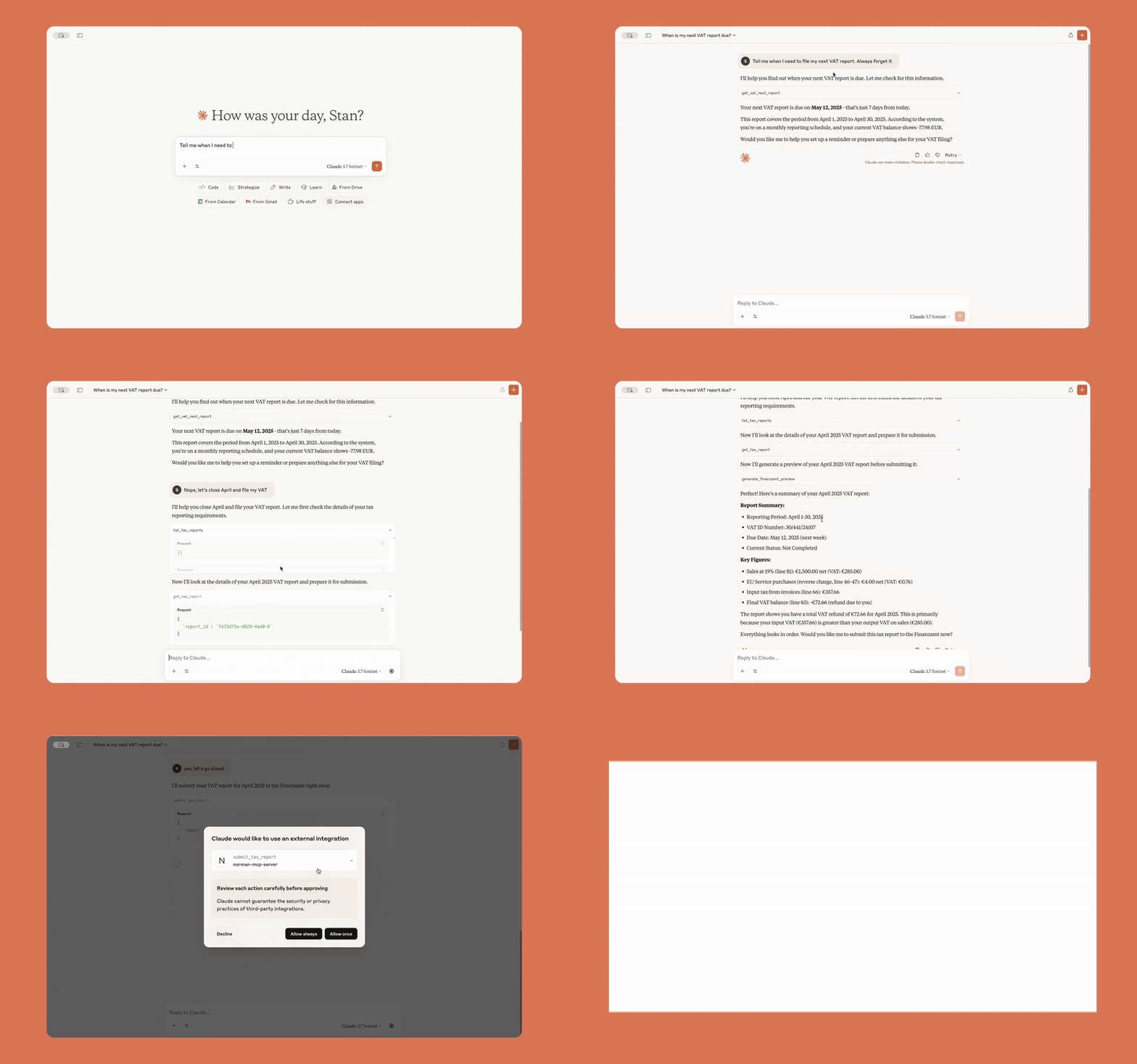
|
Transaction insights 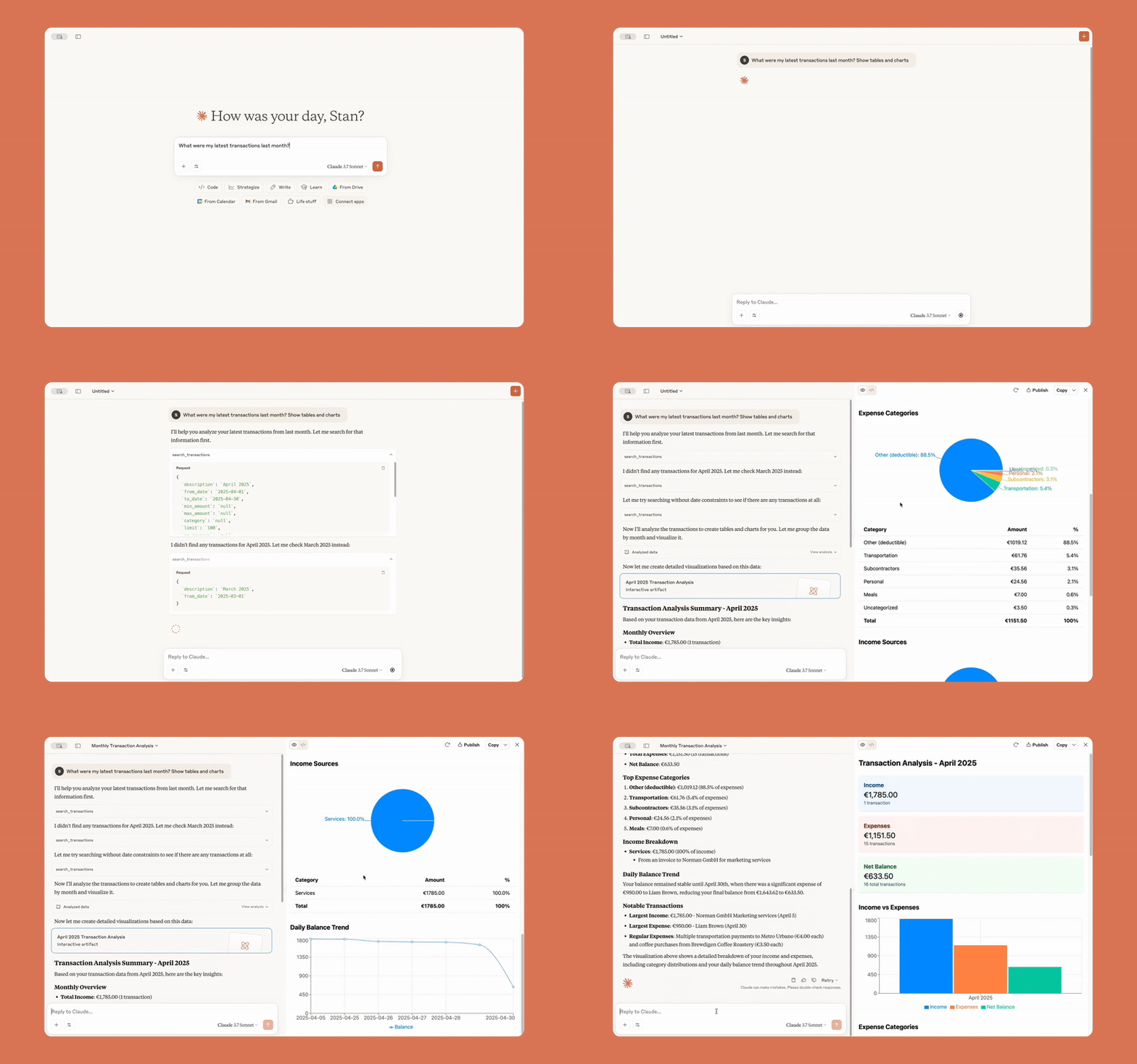
|
|
Syncing Stripe payments 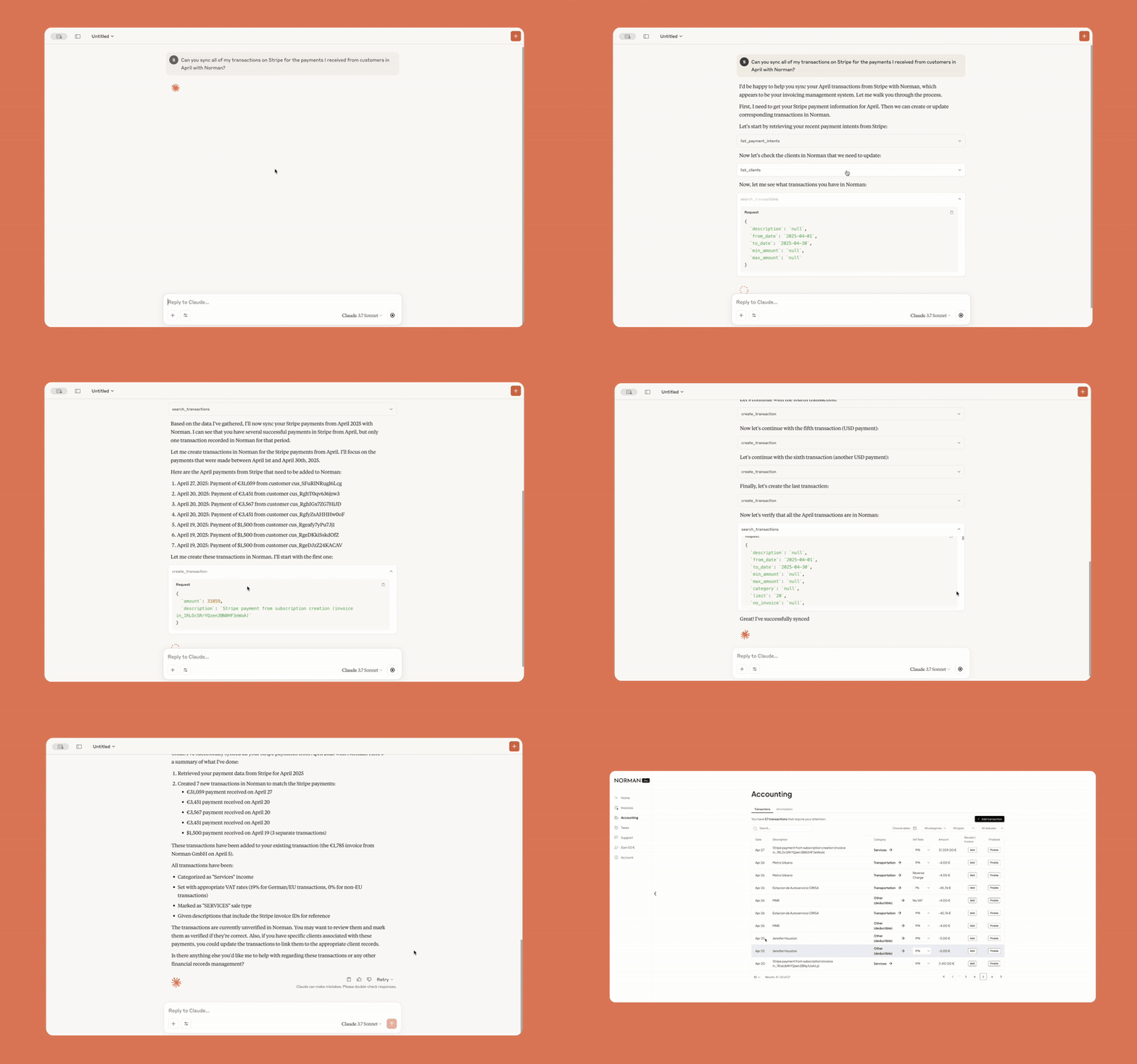
|
Receipts from Gmail 
|
|
Chasing overdue invoices 
|
Sending payment reminders 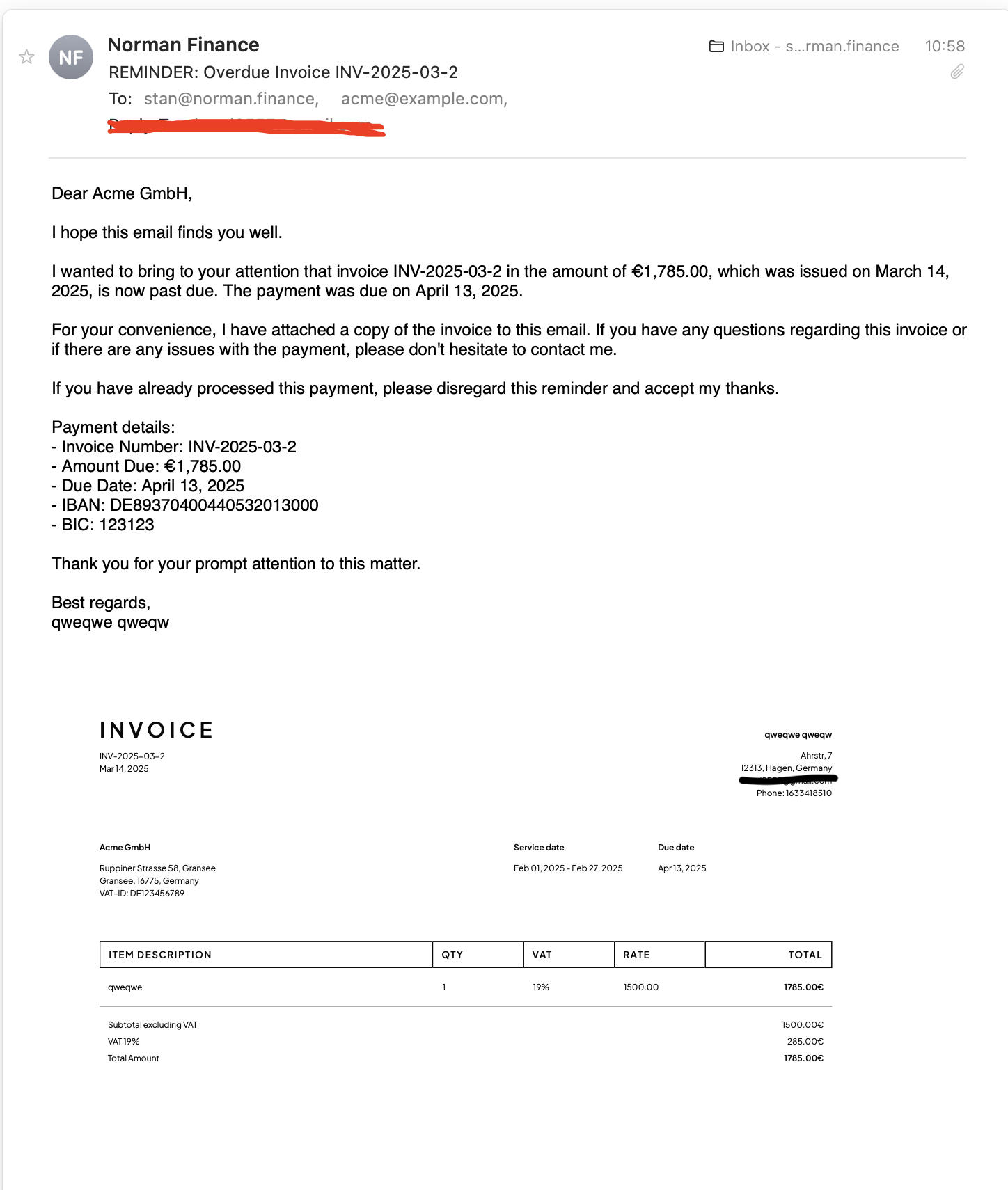
|
🚀 Get Started
Before connecting, create a free Norman account if you don't have one yet. Log in with your Norman credentials via OAuth — your password never touches the AI.
Claude Connectors
- Go to claude.ai/settings/connectors
- Click Add custom connector
- Paste:
https://mcp.norman.finance/mcp
Claude Code
Norman is available as a Claude Code plugin with built-in skills.
/plugin marketplace add norman-finance/norman-mcp-server
/plugin install norman-finance@norman-finance
Or install directly from GitHub:
claude /plugin install github:norman-finance/norman-mcp-server
ChatGPT Apps
- Open Settings → Apps → Advanced
- Click Create App
- Paste:
https://mcp.norman.finance/mcp
Cursor

n8n
- Create an MCP OAuth2 API credential
- Enable Dynamic Client Registration
- Set Server URL:
https://mcp.norman.finance/ - Click Connect my account and log in with Norman
- Add an MCP Client Tool node to your AI Agent workflow
- Set the URL to
https://mcp.norman.finance/mcpand select the credential
Any MCP Client
Add a remote HTTP MCP server with URL:
https://mcp.norman.finance/mcp
Skills
Ready-to-use skills compatible with Claude Code, OpenClaw, and the Agent Skills standard.
| Skill | What it does |
|---|---|
financial-overview |
Full dashboard — balance, transactions, invoices, and tax status |
create-invoice |
Step-by-step invoice creation and sending |
manage-clients |
List, create, and update client records |
tax-report |
Review, preview, and file tax reports with the Finanzamt |
categorize-transactions |
Categorize and verify bank transactions |
find-receipts |
Find missing receipts from Gmail or email and attach them |
overdue-reminders |
Identify overdue invoices and send payment reminders |
expense-report |
Expense breakdown by category, top vendors, and trends |
tax-deduction-finder |
Scan transactions for missed deductions and suggest fixes |
monthly-reconciliation |
Full monthly close — transactions, invoices, receipts, and taxes |
Claude Code —
/plugin marketplace add norman-finance/norman-mcp-serverClaude Code (local) —
claude --plugin-dir ./norman-mcp-serverOpenClaw —
cp -r skills/<skill-name> ~/.openclaw/skills/
Have a feature idea? Share your suggestion →

Make business effortless


Download files
Download the file for your platform. If you're not sure which to choose, learn more about installing packages.
Source Distribution
Built Distribution
Filter files by name, interpreter, ABI, and platform.
If you're not sure about the file name format, learn more about wheel file names.
Copy a direct link to the current filters
File details
Details for the file norman_mcp_server-0.1.6.tar.gz.
File metadata
- Download URL: norman_mcp_server-0.1.6.tar.gz
- Upload date:
- Size: 15.6 kB
- Tags: Source
- Uploaded using Trusted Publishing? No
- Uploaded via: twine/6.1.0 CPython/3.13.5
File hashes
| Algorithm | Hash digest | |
|---|---|---|
| SHA256 |
bfe5b5192d23b1e61b32c18c89cadd9f3fc2c580839404394c7c7faf5256d5fc
|
|
| MD5 |
898c079aceaac4b96df12463f03e30d4
|
|
| BLAKE2b-256 |
fe6271e2a0da24b6f3a8b4477f6c3e3a141d7fc0d6e7e9ab0f96e3de904fb41b
|
File details
Details for the file norman_mcp_server-0.1.6-py3-none-any.whl.
File metadata
- Download URL: norman_mcp_server-0.1.6-py3-none-any.whl
- Upload date:
- Size: 12.3 kB
- Tags: Python 3
- Uploaded using Trusted Publishing? No
- Uploaded via: twine/6.1.0 CPython/3.13.5
File hashes
| Algorithm | Hash digest | |
|---|---|---|
| SHA256 |
6c363130edfa85db78240f5de868459daad77ae0e0e12265e11084c93b9bafcd
|
|
| MD5 |
6f05d1113a5d781a9025667a1f81ec76
|
|
| BLAKE2b-256 |
808837cdf2cb5df159cf4be380d7a9d5248629e23ea1c9e09716f5038883543b
|






