
A TUI paging application with enhanced support for tabular data and real-time streaming

Project description
Nothing-less (nless)






Nless is a TUI paging application (based on the awesome Textual library) with vi-like keybindings.
Read the full documentation — tutorials, keybinding reference, configuration, and more.
Nless has enhanced functionality for parsing tabular data:
- inferring file delimiters
- delimiter swapping on the fly
- regex-based parsing of raw logs into tabular data using Python's regex engine
- filtering
- sorting
- searching
- real-time event parsing.
Getting started
Dependencies
- python>=3.13 OR
- brew
Installation
pip install nothing-less
OR
brew install mpryor/tap/nless
Usage
- pipe the output of a command to nless to parse the output
$COMMAND | nless - read a file with nless
nless $FILE_NAME - redirect a file into nless
nless < $FILE_NAME - Once output is loaded, press
?to view the keybindings
Demos
Basic functionality
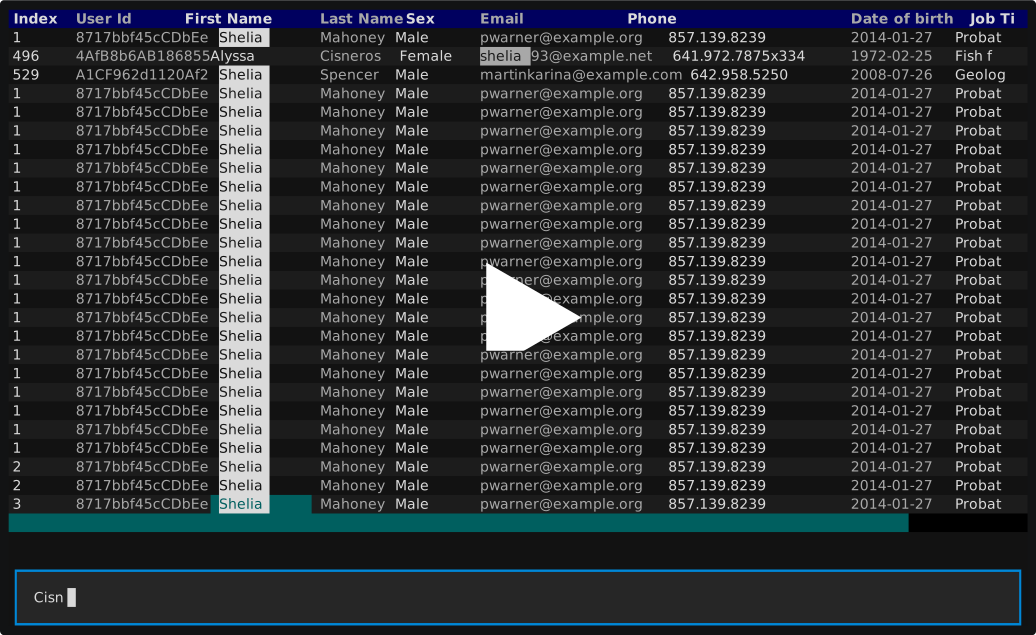
The below demo shows basic functionality:
- starting with a search
/ - applying that search
& - filtering the selected column by the value within the selected cell
F - swapping the delimiter
D(rawand,)
Streaming functionality
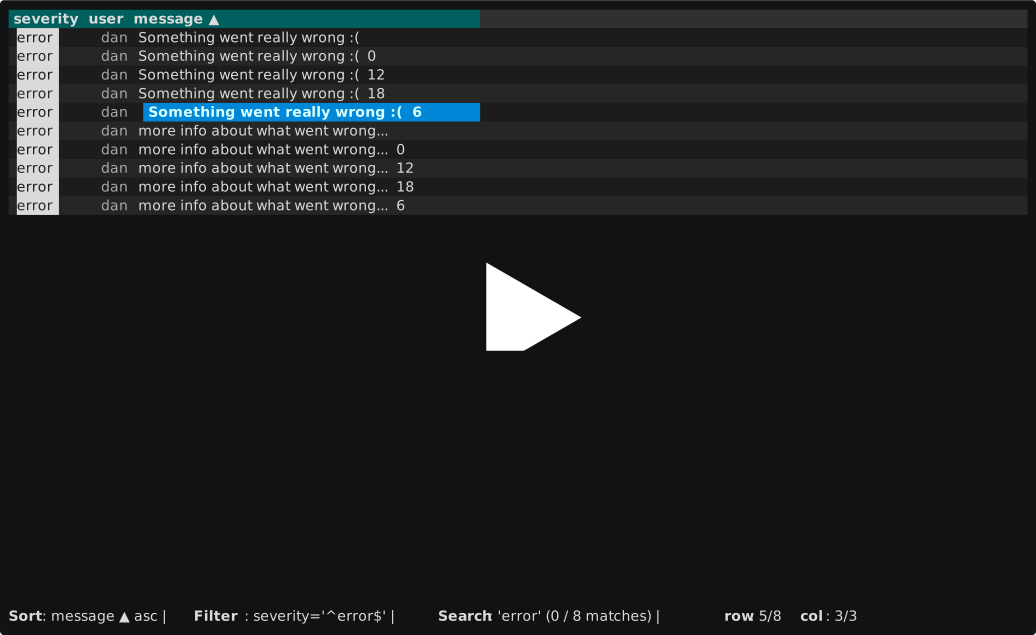
The below demo showcases some of nless's features for handling streaming input, and interacting with unknown delimitation:
- The nless view stays up-to-date as new log lines arrive on stdin (allows pipeline commands, or redirecting a file into nless)
- Showcases using a custom (Python engine) regex, example -
{(?P<severity>.*)}\((?P<user>.*)\) - (?P<message>.*)- to parse raw logs into tabular fields. - Sorts, filters, and searches on those fields.
- Flips the delimiter back to raw, sorts, searches, and filters on the raw logs
Why nless?
As a kubernetes engineer, I frequently need to interact with streaming tabular data. k get pods -w, k get events -w, etc. I wanted a TUI tool to quickly dissect and analyze this data - and none of the existing alternatives had exactly what I wanted. So I decided to build my own tool, integrating some of my favorite features from other similar tools.
This project is not meant to replace any of the tools mentioned in the alternatives section. Instead, it's meant to bring its own unique set of features to complement your workflow:
- Streaming support - stay up-to-date as new data arrives on stdin, with arrival timestamps and time window filtering
- Delimiter inference - no configuration needed; nless infers the delimiter from your data and auto-switches on mismatch
- Vi-like keybindings - familiar to any Vim user, minimize keypresses to analyze a dataset
- Kubernetes-friendly - built for K8s use-cases like parsing streams from kubectl
- Tabular data toolkit - filter, sort, search, pivot, and reshape data on the fly
- JSON & log parsing - convert unstructured data streams into tabular data
Features
- Buffers - mutating actions create a new buffer, letting you jump up and down your analysis history
- Delimiter swapping - swap between CSV, TSV, space-aligned, JSON, regex with named capture groups, and raw mode on the fly with
D - Column delimiters - split a column into more columns using JSON, regex, or string delimiters with
d - Filtering - filter by column (
f/F), exclude (e/E), across all columns (|), or from a search (&) - Sorting - toggle ascending/descending sort on any column with
s - Searching - search (
/), search by cell value (*), navigate matches (n/p) - Pivoting - group records by composite key with
U, focused summary view, dive into grouped data withenter - Column management - show/hide columns (
C), reorder columns (</>) - JSON extraction - promote nested JSON fields to columns with
J - Shell commands - run a shell command and pipe its output into a new buffer with
! - Tail mode - keep the cursor at the bottom as new data arrives with
t - Output - write buffer contents to a file or stdout (
W), copy cell values (y) - Themes - 10 built-in color themes (Dracula, Nord, Gruvbox, etc.) plus custom theme support, switch with
T - Arrival timestamps - every row records when it was received; toggle the
_arrivalcolumn withA - Time window filtering - show only recent rows with
@(e.g.5m,1h); append+for rolling windows - Raw pager mode -
--rawor auto-detected; a fast virtual-rendering pager for unstructured text, handling million-line files without columnar overhead - Excluded lines - view lines that failed to parse or were removed by filters with
~, with chained accumulation across buffers
Full keybinding reference
Buffers:
[1-9]- select the buffer at the corresponding indexL- select the next bufferH- select the previous bufferq- close the current active buffer, or the program if all buffers are closedN- create a new buffer from the original datar- rename the current buffer
Groups:
}- switch to the next buffer group{- switch to the previous buffer groupR- rename the current groupO- open a file in a new buffer group
Navigation:
h- move cursor leftl- move cursor rightj- move cursor downk- move cursor up0- jump to first column$- jump to final columng- jump to first rowG- jump to final roww- move cursor rightb/B- move cursor leftctrl+u- page upctrl+d- page downc- select a column to jump the cursor to
Column visibility:
C- prompt for a regex filter to selectively display columns, orallto see all columns>- move the current column one to the right<- move the current column one to the leftA- toggle the_arrivalmetadata column showing when each row was received
Pivoting:
U- mark the selected column as part of a composite key to group records by, adding acountcolumn pinned to the leftenter- while over a composite key column, dive into the data behind the pivot
Filtering:
f- filter the current column and prompt for a filterF- filter the current column by the highlighted celle- exclude from the current column and prompt for a valueE- exclude the current column by the highlighted cell|- filter ALL columns and prompt for a filter&- apply the current search as a filter across all columns@- set a time window to show only recent rows (e.g.5m,1h); append+for rolling
Searching:
/- prompt for a search value and jump to the first match*- search all columns for the current highlighted cell valuen- jump to the next matchp- jump to previous match
Output:
W- prompt for a file to write the current buffer to (-writes to stdout)y- copy the contents of the currently highlighted cell to the clipboard
Shell Commands:
!- run a shell command and pipe its output into a new buffer
Tail Mode:
t- toggle tail modex- reset new-line highlights
Themes & Keymaps:
T- open the theme selectorK- open the keymap selector
Excluded Lines:
~- view excluded lines (parse failures + filtered rows), with chained accumulation
Sorting:
s- toggle ascending/descending sort on the current column
JSON:
J- select a JSON field under the current cell to add as a column
Delimiter/file parsing:
D- swap the delimiter on the fly (common delimiters, regex with named capture groups,raw,json, ord- split a column into more columns using a columnar delimiter (json, regex with named capture groups, or any string)
Help:
?- show the help screen with all keybindings
See the full keybinding reference and tutorials for more.
Contributing
Contributions are welcome! Please open an issue or a pull request - check out the contributing guidelines for more information.
Alternatives
Shout-outs to all of the below wonderful tools! If my tool doesn't have what you need, they likely will:
Release history Release notifications | RSS feed


Download files
Download the file for your platform. If you're not sure which to choose, learn more about installing packages.
Source Distribution
Built Distribution
Filter files by name, interpreter, ABI, and platform.
If you're not sure about the file name format, learn more about wheel file names.
Copy a direct link to the current filters
File details
Details for the file nothing_less-1.6.0.tar.gz.
File metadata
- Download URL: nothing_less-1.6.0.tar.gz
- Upload date:
- Size: 85.3 kB
- Tags: Source
- Uploaded using Trusted Publishing? No
- Uploaded via: twine/6.1.0 CPython/3.13.7
File hashes
| Algorithm | Hash digest | |
|---|---|---|
| SHA256 |
051a202d544ba8e454beda0c587e17694c66a37b23ed9343fdc6f0c8c58cb594
|
|
| MD5 |
0bba40e5fa03e99b6c6f9049b4e5219e
|
|
| BLAKE2b-256 |
edb3f9e9b6f2cd63ec06b7312fe2bc2ef135704dbec261312e7f56c875d98ae0
|
File details
Details for the file nothing_less-1.6.0-py3-none-any.whl.
File metadata
- Download URL: nothing_less-1.6.0-py3-none-any.whl
- Upload date:
- Size: 97.7 kB
- Tags: Python 3
- Uploaded using Trusted Publishing? No
- Uploaded via: twine/6.1.0 CPython/3.13.7
File hashes
| Algorithm | Hash digest | |
|---|---|---|
| SHA256 |
c842c00d8b24a57ed090d72a7ef86fb02954d06419f721704c99b54c68390061
|
|
| MD5 |
e40e5beb75f780c67aaa4ace5fff2376
|
|
| BLAKE2b-256 |
a4d2054ec143228a7a75d92f24ebb2bee40448f3ab2301836c8a58a9ac04c53b
|






