
Notion Client extension to import notion Database into pandas Dataframe

Project description
Notion2Pandas




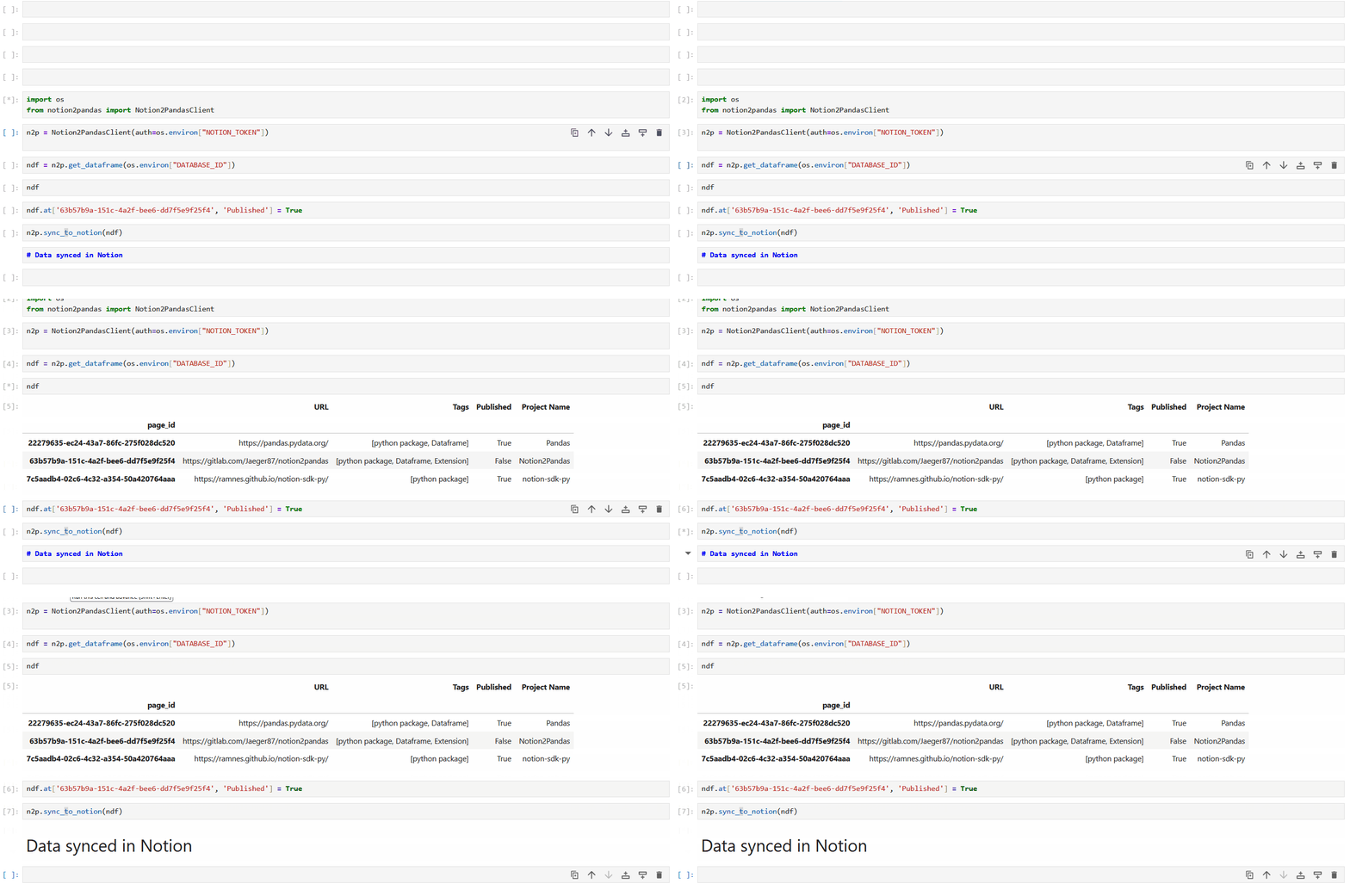
Notion2Pandas is a Python 3 package that extends the capabilities of the excellent notion-sdk-py by Ramnes. It enables the seamless import of a Notion database into a pandas dataframe and vice versa, requiring just a single line of code.
Installation
pip install notion2pandas
Quick Start
Synchronous Client
from notion2pandas import Notion2PandasClient
import os

# Create client
n2p = Notion2PandasClient(auth=os.environ["NOTION_TOKEN"])

# Import database to NotionDataFrame
ndf = n2p.get_dataframe(os.environ["DATABASE_ID"])

# Work with your data
ndf.loc[ndf['Status'] == 'Todo', 'Status'] = 'In Progress'

# Save changes back to Notion
n2p.sync_to_notion(ndf)
Asynchronous Client
from notion2pandas import AsyncNotion2PandasClient
import os

# Create async client
async_n2p = AsyncNotion2PandasClient(auth=os.environ["NOTION_TOKEN"])

# Import database to NotionDataFrame (concurrent processing)
ndf = await async_n2p.get_dataframe(os.environ["DATABASE_ID"])

# Work with your data
ndf.loc[ndf['Status'] == 'Todo', 'Status'] = 'In Progress'

# Save changes back to Notion (concurrent updates)
await async_n2p.sync_to_notion(ndf)
For more complete, real-world examples, see the examples folder.
Usage
Choosing Between Sync and Async
Use the synchronous client (Notion2PandasClient) when:
- Working in Jupyter notebooks or simple scripts
- You prefer straightforward, blocking code
Use the asynchronous client (AsyncNotion2PandasClient) when:
- You need concurrent operations for better performance
- Working with large databases or multiple data sources
- Your application is already async
Basic Usage (Sync)
from notion2pandas import Notion2PandasClient

# Create client
n2p = Notion2PandasClient(auth=os.environ["NOTION_TOKEN"])

# Get database as NotionDataFrame
ndf = n2p.get_dataframe(os.environ["DATABASE_ID"])

# Work with your data
ndf.loc[ndf['Status'] == 'Todo', 'Priority'] = 'High'

# Sync changes back to Notion
n2p.sync_to_notion(ndf)
Basic Usage (Async)
from notion2pandas import AsyncNotion2PandasClient

# Create async client
async_n2p = AsyncNotion2PandasClient(auth=os.environ["NOTION_TOKEN"])

# Get database as NotionDataFrame (with concurrent page fetching)
ndf = await async_n2p.get_dataframe(os.environ["DATABASE_ID"])

# Work with your data
ndf.loc[ndf['Status'] == 'Todo', 'Priority'] = 'High'

# Sync changes back to Notion (concurrent updates)
await async_n2p.sync_to_notion(ndf)
Configuring Concurrent Requests (Async Only)
Control the number of concurrent API requests to balance speed and rate limits:
# Conservative (safer for rate limits)
async_n2p = AsyncNotion2PandasClient(
    auth=os.environ["NOTION_TOKEN"],
    max_concurrent_requests=5
)

# Aggressive (faster, but might hit rate limits)
async_n2p = AsyncNotion2PandasClient(
    auth=os.environ["NOTION_TOKEN"],
    max_concurrent_requests=20
)

# Default is 10 concurrent requests
Working with Filters and Sorts
Sync
filter_params = {
    "filter": {
        "property": "Status",
        "select": {
            "equals": "Published"
        }
    },
    "sorts": [
        {
            "property": "Created",
            "direction": "descending"
        }
    ]
}

ndf = n2p.get_dataframe(
    database_id=os.environ["DATABASE_ID"],
    filter_params=filter_params
)
Async
filter_params = {
    "filter": {
        "property": "Status",
        "select": {
            "equals": "Published"
        }
    }
}

ndf = await async_n2p.get_dataframe(
    database_id=os.environ["DATABASE_ID"],
    filter_params=filter_params
)
Filtering by View
You can also fetch pages using the filters and sorts already configured in a Notion view, without replicating them in code:
# Sync
ndf = n2p.get_dataframe(
    database_id=os.environ["DATABASE_ID"],
    view_id=os.environ["VIEW_ID"]
)

# Async
ndf = await async_n2p.get_dataframe(
    database_id=os.environ["DATABASE_ID"],
    view_id=os.environ["VIEW_ID"]
)
⚠️ Performance warning: the Notion Views API currently returns only page stubs, requiring one additional API request per page. This makes view-based fetching significantly slower than standard
filter_params. Avoid for large datasets.
Filtering Columns (filter_properties)
To reduce payload size and improve performance, you can limit which columns are returned by the Notion API:
# Sync
ndf = n2p.get_dataframe(
    database_id=os.environ["DATABASE_ID"],
    filter_properties=["Name", "Status"]
)

# Async
ndf = await async_n2p.get_dataframe(
    database_id=os.environ["DATABASE_ID"],
    filter_properties=["Name", "Status"]
)
Accepts property names or property IDs. Particularly effective for databases with many or
complex properties (rollups, relations, formulas). Can be combined with filter_params:
ndf = n2p.get_dataframe(
    database_id=os.environ["DATABASE_ID"],
    filter_params=filter_params,
    filter_properties=["Name", "Status"]
)
ℹ️
filter_propertiesis ignored when usingview_id.
NotionDataFrame:
NotionDataFrame extends pandas.DataFrame with Notion-specific features:
Key Features
- page_id as index: Direct access to Notion pages
- Built-in metadata:
database_id,data_source_idstored in the DataFrame - Change tracking: Only modified rows are synced to Notion
Example
# Get data
ndf = n2p.get_dataframe(database_id)

# Check metadata
print(ndf.database_id)  # 'db_xyz789...'
print(ndf.data_source_id)  # 'ds_abc123...'

# Access by page_id (the index)
page_id = ndf.index[0]
ndf.loc[page_id, 'Status'] = 'Done'

# See what changed
changed = ndf.get_changed_rows()
print(f"Changed {len(changed)} rows")

# Add new page
ndf.add_page({
    "Name": "New Task",
    "Status": "Todo",
    "Priority": "High"
})

# Sync only changes
n2p.sync_to_notion(ndf)
NotionDataFrame Methods
get_changed_rows()- Get all modified rowsget_new_rows()- Get rows without page_id (to be created)add_page(data_dict, template=None, timezone=None)- Add a new row with optional template supportinfo_extended()- Detailed info including Notion metadatato_pandas()- Convert to regular DataFrame (loses metadata)
Working with Data Sources (API 2025-09-03)
Starting with Notion API version 2025-09-03, databases can contain multiple data sources. Notion2Pandas fully supports this feature!
Understanding Data Sources
Each Notion database contains one or more data sources. When you don't specify a data source, Notion2Pandas automatically uses the first data source in the database.
Getting Data Source Information
Sync
# Get list of all data sources in a database
data_sources = n2p.get_data_source_ids(database_id)
# Returns: [{'id': 'ds_abc123...', 'name': 'Main Tasks'},
#           {'id': 'ds_def456...', 'name': 'Archive'}]
Async
# Get list of all data sources in a database
data_sources = await async_n2p.get_data_source_ids(database_id)
Working with Specific Data Sources
Sync
# Get a specific data source
ndf = n2p.get_dataframe(
    database_id=os.environ["DATABASE_ID"],
    data_source_id="your_data_source_id"
)

# Sync back to the same data source
n2p.sync_to_notion(ndf)  # data_source_id is stored in ndf
Async
# Get a specific data source
ndf = await async_n2p.get_dataframe(
    database_id=os.environ["DATABASE_ID"],
    data_source_id="your_data_source_id"
)

# Sync back to the same data source
await async_n2p.sync_to_notion(ndf)
Get All Data Sources
Sync
# Get all data sources from a database
all_ndfs = n2p.get_dataframes(database_id)

# Access individual data sources
for ds_id, ndf in all_ndfs.items():
    print(f"Data Source: {ds_id}, Shape: {ndf.shape}")
    # Work with each NotionDataFrame
Async (Concurrent Processing!)
# Get all data sources concurrently
all_ndfs = await async_n2p.get_dataframes(database_id)

# All data sources were fetched in parallel!
for ds_id, ndf in all_ndfs.items():
    print(f"Data Source: {ds_id}, Shape: {ndf.shape}")
Backward Compatibility
All existing code continues to work! If you don't specify a data_source_id, Notion2Pandas
automatically:
- Retrieves all data sources for the database
- Selects the first one
- Logs which data source is being used
Adding and Removing Rows
Adding Rows
Use the add_page() method to add new rows:
Basic Usage (Sync)
# Add a new page/row
ndf.add_page({
    "Name": "New Task",
    "Status": "Todo",
    "Priority": "High",
    "Due Date": "2024-12-31"
})

# Sync to create the page in Notion
n2p.sync_to_notion(ndf)
Basic Usage (Async)
# Add a new page/row
ndf.add_page({
    "Name": "New Task",
    "Status": "Todo"
})

# Sync to create the page in Notion
await async_n2p.sync_to_notion(ndf)
Adding Pages with Templates
You can create pages using Notion templates to automatically populate content and structure:
Using the Default Template
# Create a page using the database's default template
ndf.add_page(
    {"Name": "Q4 Report", "Status": "Draft"},
    template='default'
)

# Sync to Notion (works with both sync and async)
n2p.sync_to_notion(ndf)
# or
await async_n2p.sync_to_notion(ndf)

# The page will be created with all blocks from the default template
Using a Specific Template
# Create a page using a specific template by ID
ndf.add_page(
    {"Name": "Meeting Notes", "Type": "Meeting"},
    template='your_template_id'
)

# Optional: specify timezone for template application
ndf.add_page(
    {"Name": "Project Plan", "Status": "Planning"},
    template='your_template_id',
    timezone='Europe/Rome'
)

# Sync to Notion
n2p.sync_to_notion(ndf)
Important Notes:
- Templates are applied asynchronously by Notion. The page is created immediately, but template content appears within a few seconds.
- Works with both sync and async clients - async version still processes multiple page creations concurrently.
For more information, see the official Notion documentation.
Removing Rows
Sync
# Delete specific pages by page_id
page_ids_to_delete = ['page_id_1', 'page_id_2', 'page_id_3']
n2p.delete_pages(ndf, page_ids_to_delete)
Async
# Delete specific pages by page_id
page_ids_to_delete = ['page_id_1', 'page_id_2', 'page_id_3']
await async_n2p.delete_pages(ndf, page_ids_to_delete)
This method:
- Deletes the pages from Notion
- Removes the rows from the NotionDataFrame
Utility Functions
Notion2Pandas extends the Client ( or AsyncClient) class from notion_client, so all notion_client features are available. Additionally, Notion2Pandas provides convenient wrapper functions:
Database and Data Source Methods
All methods are available in both sync and async versions. Async methods require await.
get_dataframe(database_id, **kwargs)- Get a NotionDataFrame from a database/data sourceget_dataframes(database_id, **kwargs)- Get all data sources as dict of NotionDataFramessync_to_notion(ndf)- Sync NotionDataFrame changes back to Notionget_data_source_ids(database_id)- Get all data sources in a databaseget_database_columns(database_id, data_source_id=None)- Get columns/properties
Page Methods
All methods are available in both sync and async versions. Async methods require await.
create_page(parent_id, properties=None, parent_type='data_source_id', template=None, timezone=None)
update_page(page_id, **kwargs)retrieve_page(page_id)delete_page(page_id)delete_pages(ndf, page_ids)- Delete multiple pages from Notion and NotionDataFrame
Block Methods
All methods are available in both sync and async versions. Async methods require await.
retrieve_block(block_id)retrieve_block_children_list(block_id)update_block(block_id, field, field_value_updated)
Read Write Functions
Notion2Pandas automatically parses Notion data types, but you can customize this behavior. Each Notion data type is associated with a tuple of two functions: one for reading and one for writing.
Example: Custom Date Parsing
Parse only the start date from date ranges:
def date_read_only_start(notion_property):
    return notion_property.get('date').get('start') if notion_property.get(
        'date') is not None else ''


def date_write_only_start(row_value):
    return {'date': {'start': row_value} if row_value != '' else None}, True


# Works for both sync and async clients
n2p.set_lambdas('date', date_read_only_start, date_write_only_start)
# or
async_n2p.set_lambdas('date', date_read_only_start, date_write_only_start)
Function Signatures
Read and write functions can accept up to three arguments:
- Primary argument:
notion_property(read) orrow_value(write) - the data being processed column_name(optional): the column name, useful for column-specific logicn2p(optional): the Notion2PandasClient instance
Return values:
- Read functions: Return the value to insert into the DataFrame
- Write functions: Return a tuple
(value_for_notion, should_update_bool)
⚠️ Important: Arguments must always be in this
order: (notion_property/row_value, column_name, n2p)
Example: Column-Specific Logic
Handle different columns differently:
def relation_read(notion_property: dict, column_name: str) -> list:
    relations = notion_property.get('relation', [])
    relation_ids = [relation.get('id') for relation in relations]

    # Special handling for single-relation columns
    if column_name == 'Primary Project':
        return relation_ids[0] if relation_ids else ''

    # Return list for multi-relation columns
    return relation_ids


def relation_write(row_value, column_name: str):
    if row_value == '' or row_value == []:
        return {"relation": []}, True

    # Single relation
    if column_name == 'Primary Project':
        return {"relation": [{"id": row_value}]}, True

    # Multi relation
    if isinstance(row_value, str):
        return {"relation": [{"id": row_value}]}, True

    relation_ids = [{"id": rel_id} for rel_id in row_value]
    return {"relation": relation_ids}, True


n2p.set_lambdas('relation', relation_read, relation_write)
Rich Text and Title Handling
Notion2Pandas preserves formatting and mentions in rich_text and title fields using
Markdown-like syntax:
- Bold:
**text** - Italic:
*text* - Underline:
<u>text</u> - Strikethrough:
~~text~~ - Code:
<code>text</code> - Color:
<span style="color:{color}">text</span> - Links:
[text](url) - Equations:
$expression$ - Mentions:
- Users:
<notion-user id="{user_id}" name="{name}" /> - Pages:
<notion-page id="{page_id}" title="{title}" href="{url}" />
- Users:
This allows you to edit formatted text in DataFrames while preserving all formatting when writing back to Notion.
💡 Tip: To implement custom parsing, start with the original functions from n2p_read_write.py and modify them.
You can work with these directly as lists:
# Add a tag
tags = ndf.loc[page_id, 'Tags']
tags.append('Machine Learning')
ndf.loc[page_id, 'Tags'] = tags

# Filter rows with specific tag
python_tasks = ndf[ndf['Tags'].apply(lambda x: 'Python' in x if isinstance(x, list) else False)]
Supported Data Types
| Notion Data Type | Function Key | v2.0 Return Type |
|---|---|---|
| Title | title | str |
| Rich Text | rich_text | str |
| Checkbox | checkbox | bool |
| Number | number | int/float |
| Date | date | str (ISO) |
| Date Range | date_range | dict |
| Select | select | str |
| Multi Select | multi_select | list[str] |
| Status | status | str |
| str | ||
| People | people | list[str] |
| Phone Number | phone_number | str |
| URL | url | str |
| Relation | relation | list[str] |
| Rollup | rollup | varies |
| Files | files | list[str] |
| Formula | formula | varies |
| String | string | str |
| Unique ID | unique_id | str |
| Button | button | None |
| Created By | created_by | str |
| Created Time | created_time | str (ISO) |
| Last Edited By | last_edited_by | str |
| Last Edited Time | last_edited_time | str (ISO) |
| Place | place | str |
Adding Page Data to the DataFrame
Sometimes you need data from the Notion page itself (not just database properties). You can add custom columns during DataFrame creation:
Sync Example
from notion2pandas import Notion2PandasClient


def get_cover_page(notion_page):
    """Extract the cover image URL from a Notion page"""
    cover_obj = notion_page.get('cover')
    if cover_obj is None:
        return ''
    cover_type = cover_obj.get('type')
    if cover_type == 'external':
        return cover_obj.get('external').get('url')
    if cover_type == 'file':
        return cover_obj.get('file').get('url')
    return ''


def get_icon_page(notion_page):
    """Extract the icon from a Notion page"""
    icon_obj = notion_page.get('icon')
    if icon_obj is None:
        return ''
    icon_type = icon_obj.get('type')
    if icon_type == 'external':
        return icon_obj.get('external').get('url')
    if icon_type == 'file':
        return icon_obj.get('file').get('url')
    if icon_type == 'emoji':
        return icon_obj.get('emoji')
    return ''


# Define custom columns
custom_page_prop = {
    'icon': get_icon_page,
    'cover': get_cover_page
}

# Create NotionDataFrame with custom columns
n2p = Notion2PandasClient(auth='token')
ndf = n2p.get_dataframe(
    'database_id',
    columns_from_page=custom_page_prop
)
Async Example
from notion2pandas import AsyncNotion2PandasClient

# Use the same custom functions as above

# Define custom columns
custom_page_prop = {
    'icon': get_icon_page,
    'cover': get_cover_page
}

# Create NotionDataFrame with custom columns (processes pages concurrently)
async_n2p = AsyncNotion2PandasClient(auth='token')
ndf = await async_n2p.get_dataframe(
    'database_id',
    columns_from_page=custom_page_prop
)
Important Notes
⚠️ Performance Warning: Using columns_from_page or columns_from_blocks results in:
- One API call per row for
columns_from_page - One API call per row for
columns_from_blocks - Using both means two API calls per row
💡 Async Advantage: The async client processes these calls concurrently, significantly reducing total execution time for large databases.
🔒 Read-Only: Custom columns are read-only. Modifying their values in the NotionDataFrame will not update Notion. Use the appropriate Notion API methods to update this data.
Notion Executor
The _notion_executor method handles all Notion API calls with automatic retry logic for:
- Network issues
- Rate limits
- Internal server errors
- Other transient failures
Configuration (Sync)
n2p = Notion2PandasClient(
    auth=token,
    secondsToRetry=20,  # Wait 20 seconds between retries
    maxAttemptsExecutioner=10  # Try up to 10 times
)
Configuration (Async)
async_n2p = AsyncNotion2PandasClient(
    auth=token,
    secondsToRetry=20,  # Wait 20 seconds between retries
    maxAttemptsExecutioner=10,  # Try up to 10 times
    max_concurrent_requests=10  # Async-specific: concurrent requests limit
)
Default values:
secondsToRetry: 30 secondsmaxAttemptsExecutioner: 3 attemptsmax_concurrent_requests: 10 (async only)
Logging
Both Notion2PandasClient and AsyncNotion2PandasClient use the built-in logger
from NotionClient to provide helpful debug and info messages during execution.
Option 1: Set Log Level (Simple)
import logging
from notion2pandas import Notion2PandasClient, AsyncNotion2PandasClient

# Sync
n2p = Notion2PandasClient(auth="your_token", log_level=logging.DEBUG)

# Async
async_n2p = AsyncNotion2PandasClient(auth="your_token", log_level=logging.DEBUG)
Option 2: Custom Logger (Advanced)
For full control over logging behavior:
import logging
from notion2pandas import Notion2PandasClient

# Create a custom logger
logger = logging.getLogger("notion2pandas")
logger.setLevel(logging.DEBUG)

# Create handler (e.g., output to stdout)
handler = logging.StreamHandler()

# Define custom format
formatter = logging.Formatter("[%(levelname)s] %(asctime)s - %(message)s")
handler.setFormatter(formatter)

# Add handler to logger
logger.addHandler(handler)

# Pass the logger to the client (works for both sync and async)
n2p = Notion2PandasClient(auth="your_token", logger=logger)
Note: If both logger and log_level are provided, the custom logger takes precedence.
Migrating from v1.x
Version 2.0 introduces several improvements and breaking changes. If you're upgrading from v1.x:
Quick Migration Summary
| v1.x | v2.0 |
|---|---|
from_notion_DB_to_dataframe() |
get_dataframe() |
update_notion_DB_from_dataframe() |
sync_to_notion() |
from_notion_database_to_dataframes() |
get_dataframes() |
delete_rows_and_pages() |
delete_pages() |
Returns pd.DataFrame |
Returns NotionDataFrame |
PageID column |
page_id index |
| Manual row appending | ndf.add_page() |
Full Migration Guide
📖 Complete migration guide with examples: MIGRATION-GUIDE.md
📚 v1.x documentation: README-v1.md
All v1.x methods still work with deprecation warnings - you have time to migrate!
Roadmap
Planned features for upcoming releases:
- Managing the 2700 API calls / 15 minutes rate limit
Examples
Real-world scripts covering common use cases are available in the examples folder.
Changelog
View the complete version history on the changelog page.
Support
Notion2Pandas is an open-source project. Contributions are welcome!
- Report Issues: Found a bug? Open an issue
- Propose Changes: Have an improvement? Submit a merge request
- Fork the Project: Disagree with the direction? You're free to fork with our blessing!
All proposals will be evaluated and responded to.
License
This project is open-source and available under the MIT License.
Release history Release notifications | RSS feed


Download files
Download the file for your platform. If you're not sure which to choose, learn more about installing packages.
Source Distribution
Built Distribution
Filter files by name, interpreter, ABI, and platform.
If you're not sure about the file name format, learn more about wheel file names.
Copy a direct link to the current filters
File details
Details for the file notion2pandas-2.3.1.tar.gz.
File metadata
- Download URL: notion2pandas-2.3.1.tar.gz
- Upload date:
- Size: 496.8 kB
- Tags: Source
- Uploaded using Trusted Publishing? No
- Uploaded via: twine/6.2.0 CPython/3.12.12
File hashes
| Algorithm | Hash digest | |
|---|---|---|
| SHA256 |
4de96f35d5e4f7acd31ae6e1635946ad45479365ee666422597f734b141753c2
|
|
| MD5 |
a5fda17190bcaa18e13cee865b236ee5
|
|
| BLAKE2b-256 |
b5bfb3eb15a92daef56fe0adef496c077560ab53453d7cfbbf02cefdedc0f18c
|
File details
Details for the file notion2pandas-2.3.1-py3-none-any.whl.
File metadata
- Download URL: notion2pandas-2.3.1-py3-none-any.whl
- Upload date:
- Size: 47.3 kB
- Tags: Python 3
- Uploaded using Trusted Publishing? No
- Uploaded via: twine/6.2.0 CPython/3.12.12
File hashes
| Algorithm | Hash digest | |
|---|---|---|
| SHA256 |
5799ad0666fe1212314ec8dded2402cd48e74817982204b0e342f56655c2233b
|
|
| MD5 |
f6650bb836ebe92e7cc615c0944162e8
|
|
| BLAKE2b-256 |
f970f368e5158a694200ee248c3507f8f7378bdecf8f3127170f4ab750e9578f
|






