
np-notebooks-launcher
A GUI tool for launching JupyterLab with a filtered, pre-configured version of a Jupyter notebook. Designed for experiment workflows that use the same notebook across different experiment types (e.g. ephys, hab, training).





What it does
-
Reads the first cell of a notebook to find
_-prefixed variables annotated asLiteral,int,floatorbooltypes — these are the configurable parameters: -
Shows a GUI with a dropdown for each variable, pre-populated with the options and default from the notebook:
-
Generates a filtered copy of the notebook with the selected values injected and irrelevant cells removed.
-
Launches JupyterLab with the filtered copy, with the first cell modified:

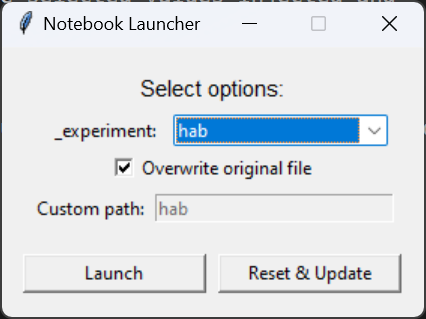

The launcher also has a Reset & Update button which is hard-coded to reset to the latest commit on github.com/alleninstitute/np_notebooks:main and runs uv sync on the repository.
Usage
uvx np-notebook-launcher path/to/notebook.ipynb
How to annotate a notebook
First cell — configurable variables
The first cell of the notebook is special. Any _-prefixed variable with a Literal type annotation will appear as a dropdown in the launcher GUI:
# variables in this cell with underscore-prefix can be injected by launcher:
_experiment: Literal["pretest", "ephys", "opto", "hab", "training"] = "pretest"
- The variable name must start with
_ - The type annotation must be
Literal[opt1, opt2, ...] - A default value must be assigned (
= "pretest") - Supported value types:
str,bool,int,float
When launched, the first cell is replaced with a markdown summary of the injected values.
Cell directives — conditional visibility
Add a directive comment as the first line of any cell to control whether it appears in the filtered notebook.
Code cells:
# /// show-if: _experiment=ephys
Markdown cells:
<!-- /// show-if: _experiment=ephys -->
Directives
| Directive | Behavior |
|---|---|
show-if: <condition> |
Cell is included only when condition is true |
hide-if: <condition> |
Cell is hidden only when condition is true |
Cells with no directive are always included.
Condition syntax
Conditions use and, or, not, and names matching the possible option values of the variable.
The namespace prefix (e.g. _experiment=) is informational — what follows = is the boolean expression.
# /// show-if: _experiment=ephys
# /// show-if: _experiment=(ephys or opto) and not pretest
# /// hide-if: _experiment=training
For a string variable like _experiment = "ephys", the condition context is {"ephys": True, "pretest": False, "hab": False, ...} — each option is a key and only the selected one is True. Unknown names evaluate to False.
Project structure
src/np_notebooks_launcher/__init__.py   # all logic: parsing, filtering, GUI, CLI
notebooks/dynamic_routing.ipynb         # example annotated notebook
tests/test_launcher.py                  # unit + integration tests
pyproject.toml
Development
Install with uv:
uv sync
Run tests:
uv run task test
The entry points np-notebooks-launcher and launch both map to np_notebooks_launcher:main.
Pushing to main triggers CI/CD with publishing to PyPI.
Key functions
| Function | Description |
|---|---|
parse_first_cell_variables(cell) |
Extracts annotated _vars from cell 0 |
parse_cell_directive(cell) |
Reads show-if/hide-if from a cell's first line |
cell_is_visible(cell, ctx) |
Evaluates directive against a context dict |
filter_notebook(nb, ctx, variable_selections) |
Returns a filtered deep copy of the notebook |
generate_filtered_notebook(source, ctx, ...) |
Filters and writes the notebook to disk |
run_launcher(notebook_path) |
Opens the GUI |
1 maintainer

Metadata
1 maintainer
Release files for np-notebooks-launcher 0.1.17
For a detailed explanation of source distributions (sdists) and built distributions (wheels), please see the package formats documentation.
Source distribution (sdist)
| File | Size | Uploaded | Provenance | |
|---|---|---|---|---|
| np_notebooks_launcher-0.1.17.tar.gz | 9.8 kB | Without provenance | Details |
Built distribution (wheel)
| File | Interpreter | ABI | Platform | Reset |
|---|---|---|---|---|
| np_notebooks_launcher-0.1.17-py3-none-any.whl | Python 3 | none | any | Details |
Total release size: 20.0 kB
Release files / np_notebooks_launcher-0.1.17.tar.gz
| Download URL | np_notebooks_launcher-0.1.17.tar.gz |
|---|---|
| Size | 9.8 kB |
| Tags | Source |
|
SHA-256 checksum How to use checksums |
d9ab84eb86e24612ec4a254151a61d3ab4e04583ea83bf7c1ebaaa36ae2bcc04
|
|
BLAKE2b-256 checksum How to use checksums |
8c185beaaae1b41b21243102f93569ae505a81671db14c7ced817a06fc888548
|
| Upload date | |
|
Uploaded using Trusted Publishing? What is trusted publishing? |
Yes |
| Uploaded via |
uv/0.10.9 {"installer":{"name":"uv","version":"0.10.9","subcommand":["publish"]},"python":null,"implementation":{"name":null,"version":null},"distro":{"name":"Ubuntu","version":"24.04","id":"noble","libc":null},"system":{"name":null,"release":null},"cpu":null,"openssl_version":null,"setuptools_version":null,"rustc_version":null,"ci":true}
|
Release files / np_notebooks_launcher-0.1.17-py3-none-any.whl
| Download URL | np_notebooks_launcher-0.1.17-py3-none-any.whl |
|---|---|
| Size | 10.1 kB |
| Tags | Python 3 |
|
SHA-256 checksum How to use checksums |
694f78227ebee2e3e71cb55014089a2480e1316970fcaf1e27a3836d30e70c76
|
|
BLAKE2b-256 checksum How to use checksums |
c26c985eb8eac6270bdeeaa7138dd110dd9fd95e5e4ea6968cb2fd721f9b361b
|
| Upload date | |
|
Uploaded using Trusted Publishing? What is trusted publishing? |
Yes |
| Uploaded via |
uv/0.10.9 {"installer":{"name":"uv","version":"0.10.9","subcommand":["publish"]},"python":null,"implementation":{"name":null,"version":null},"distro":{"name":"Ubuntu","version":"24.04","id":"noble","libc":null},"system":{"name":null,"release":null},"cpu":null,"openssl_version":null,"setuptools_version":null,"rustc_version":null,"ci":true}
|
Security for np-notebooks-launcher 0.1.17
Provenance
Provenance describes where a file came from. On PyPI, provenance is shared via attestations, which provide a verifiable record of the build or publishing details. View details, limitations and caveats.
No provenance found
None of the files in this release were uploaded with provenance metadata.
A note on package security
PyPI is a repository for distributing packages, not a service for auditing them. While third-party security researchers and our staff do their best to detect and remove malicious packages, PyPI cannot guarantee the quality, security or suitability of any given package.














