
A tool to launch JupyterLab with a modified version of a notebook, based on user-specified parameters.
Verified details
These details have been verified by PyPIProject links
GitHub Statistics
Maintainers

Project description
np-notebooks-launcher
A GUI tool for launching JupyterLab with a filtered, pre-configured version of a Jupyter notebook. Designed for experiment workflows that use the same notebook across different experiment types (e.g. ephys, hab, training).





What it does
-
Reads the first cell of a notebook to find
_-prefixed variables annotated asLiteral,int,floatorbooltypes — these are the configurable parameters: -
Shows a GUI with a dropdown for each variable, pre-populated with the options and default from the notebook:
-
Generates a filtered copy of the notebook with the selected values injected and irrelevant cells removed.
-
Launches JupyterLab with the filtered copy, with the first cell modified:

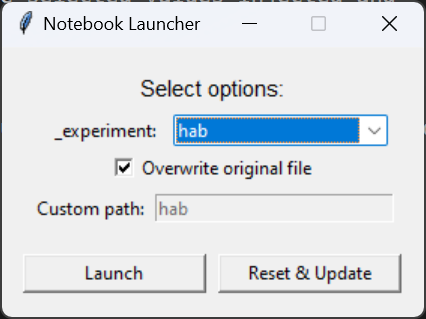

The launcher also has a Reset & Update button which is hard-coded to reset to the latest commit on github.com/alleninstitute/np_notebooks:main and runs uv sync on the repository.
Usage
uvx np-notebook-launcher path/to/notebook.ipynb
How to annotate a notebook
First cell — configurable variables
The first cell of the notebook is special. Any _-prefixed variable with a Literal type annotation will appear as a dropdown in the launcher GUI:
# variables in this cell with underscore-prefix can be injected by launcher:
_experiment: Literal["pretest", "ephys", "opto", "hab", "training"] = "pretest"
- The variable name must start with
_ - The type annotation must be
Literal[opt1, opt2, ...] - A default value must be assigned (
= "pretest") - Supported value types:
str,bool,int,float
When launched, the first cell is replaced with a markdown summary of the injected values.
Cell directives — conditional visibility
Add a directive comment as the first line of any cell to control whether it appears in the filtered notebook.
Code cells:
# /// show-if: _experiment=ephys
Markdown cells:
<!-- /// show-if: _experiment=ephys -->
Directives
| Directive | Behavior |
|---|---|
show-if: <condition> |
Cell is included only when condition is true |
hide-if: <condition> |
Cell is hidden only when condition is true |
Cells with no directive are always included.
Condition syntax
Conditions use and, or, not, and names matching the possible option values of the variable.
The namespace prefix (e.g. _experiment=) is informational — what follows = is the boolean expression.
# /// show-if: _experiment=ephys
# /// show-if: _experiment=(ephys or opto) and not pretest
# /// hide-if: _experiment=training
For a string variable like _experiment = "ephys", the condition context is {"ephys": True, "pretest": False, "hab": False, ...} — each option is a key and only the selected one is True. Unknown names evaluate to False.
Project structure
src/np_notebooks_launcher/__init__.py   # all logic: parsing, filtering, GUI, CLI
notebooks/dynamic_routing.ipynb         # example annotated notebook
tests/test_launcher.py                  # unit + integration tests
pyproject.toml
Development
Install with uv:
uv sync
Run tests:
uv run task test
The entry points np-notebooks-launcher and launch both map to np_notebooks_launcher:main.
Pushing to main triggers CI/CD with publishing to PyPI.
Key functions
| Function | Description |
|---|---|
parse_first_cell_variables(cell) |
Extracts annotated _vars from cell 0 |
parse_cell_directive(cell) |
Reads show-if/hide-if from a cell's first line |
cell_is_visible(cell, ctx) |
Evaluates directive against a context dict |
filter_notebook(nb, ctx, variable_selections) |
Returns a filtered deep copy of the notebook |
generate_filtered_notebook(source, ctx, ...) |
Filters and writes the notebook to disk |
run_launcher(notebook_path) |
Opens the GUI |
Project details
Verified details
These details have been verified by PyPIProject links
GitHub Statistics
Maintainers
Release history Release notifications | RSS feed


Download files
Download the file for your platform. If you're not sure which to choose, learn more about installing packages.
Source Distribution
Built Distribution
Filter files by name, interpreter, ABI, and platform.
If you're not sure about the file name format, learn more about wheel file names.
Copy a direct link to the current filters
File details
Details for the file np_notebooks_launcher-0.1.13.tar.gz.
File metadata
- Download URL: np_notebooks_launcher-0.1.13.tar.gz
- Upload date:
- Size: 9.5 kB
- Tags: Source
- Uploaded using Trusted Publishing? Yes
- Uploaded via: uv/0.10.9 {"installer":{"name":"uv","version":"0.10.9","subcommand":["publish"]},"python":null,"implementation":{"name":null,"version":null},"distro":{"name":"Ubuntu","version":"24.04","id":"noble","libc":null},"system":{"name":null,"release":null},"cpu":null,"openssl_version":null,"setuptools_version":null,"rustc_version":null,"ci":true}
File hashes
| Algorithm | Hash digest | |
|---|---|---|
| SHA256 |
b889ed0833a4502d7e3f75443ad35a86e5b5d4b51805f8edc0a9ce78c9f55c75
|
|
| MD5 |
4d19723cf1a2c20907a16b0eb1b3d5c7
|
|
| BLAKE2b-256 |
870d42369bdd1af5657f94454490cfd68433c6f6fca9d967fe7c03c923be0cea
|
File details
Details for the file np_notebooks_launcher-0.1.13-py3-none-any.whl.
File metadata
- Download URL: np_notebooks_launcher-0.1.13-py3-none-any.whl
- Upload date:
- Size: 9.8 kB
- Tags: Python 3
- Uploaded using Trusted Publishing? Yes
- Uploaded via: uv/0.10.9 {"installer":{"name":"uv","version":"0.10.9","subcommand":["publish"]},"python":null,"implementation":{"name":null,"version":null},"distro":{"name":"Ubuntu","version":"24.04","id":"noble","libc":null},"system":{"name":null,"release":null},"cpu":null,"openssl_version":null,"setuptools_version":null,"rustc_version":null,"ci":true}
File hashes
| Algorithm | Hash digest | |
|---|---|---|
| SHA256 |
ab73189919e83b2a176a8ee02d1bd0bcf9f29d9a1b85a241a094831441da0e64
|
|
| MD5 |
ddfe55befc962ed8dd53e289a566702c
|
|
| BLAKE2b-256 |
ec2975fea5ec1a5d00c36bfea0fab87b4a56375d890fea4af52f268c97e0bc76
|






