

oca-port
Tool helping to port an addon or missing commits of an addon from one branch to another.
Installing
$ pipx install oca-port
$ #OR
$ git clone git@github.com:oca/oca-port.git
$ cd oca-port
$ pipx install .
To automatically apply code patterns with odoo-module-migrator, install library with below syntax:
$ pipx inject --include-deps oca-port git+https://github.com/OCA/odoo-module-migrator.git@master
Using
If the addon does not exist on the target branch, it will assist the user in the migration, following the OCA migration guide.
If the addon already exists on the target branch, it will retrieve commits not fully ported grouped by Pull Request and propose to port them.
Syntax:
$ oca-port <source> <target> <module_path> [options]
$ oca-port --help
GitHub Token
GITHUB_TOKEN can be passed by exposing to environment:
$ export GITHUB_TOKEN=<token>
Alternatively, you can pass the token directly using the --github-token option
If neither method is used, the tool will attempt to obtain the token using the gh client (if it's installed).
Example
To check if an addon could be migrated or to get eligible commits to port:
$ cd <path/to/OCA/cloned_repository>
$ oca-port origin/16.0 origin/18.0 <module_path> --verbose --dry-run
To effectively migrate the addon or port its commits, remove the --dry-run option
so the tool will create a working local branch automatically (called destination)
from the <target> branch:
$ oca-port origin/16.0 origin/18.0 <module_path>
You can control the destination with the --destination option:
$ oca-port origin/16.0 origin/18.0 <module_path> --destination camptocamp/18.0-port-things
Module located in subfolder
The module can be located in a subfolder, and the tool can be used in any kind of repository, e.g:
$ oca-port origin/main origin/18.0-mig --source-version=16.0 --target-version=18.0 --upstream-org=camptocamp ./odoo/local-src/MY_MODULE --verbose --destination sebalix/18.0-mig-MY_MODULE
- parameters
--source-versionand--target-versionare mandatory as soon as thesource/targetparameters cannot be recognized as Odoo versions (hereorigin/mainis hosting a16.0version) --upstream-orgdefaults toOCA, here we set it tocamptocampfor GitHub API requests
Move/rename a module
To move or rename a module, the --move-to parameter can be used:
$ oca-port origin/16.0 origin/18.0 <module_path> --move-to <new_module_path>
NOTE: the rename will be handled thanks to git-filter-repo
so the whole git history will be available in the new folder.
Blacklist
You can also directly blacklist a bunch of PRs on a given branch thanks to the
oca-port-pr tool:
$ oca-port-pr blacklist OCA/wms#250,OCA/wms#251 16.0 shopfloor
You could give a more detailed reason of this blacklist with --reason parameter:
$ oca-port-pr blacklist OCA/wms#250,OCA/wms#251 16.0 shopfloor --reason "Refactored in 16.0, not needed anymore"
And if the module has been moved to another repository, you can specify its remote as well:
$ git remote add new_repo git@github.com:OCA/new-repo.git
$ oca-port-pr blacklist OCA/wms#250,OCA/wms#251 16.0 shopfloor --remote new_repo
Migration of addon
The tool follows the usual OCA migration guide to port commits of an addon, and will invite the user to fullfill the mentionned steps that can't be performed automatically.
Output example:
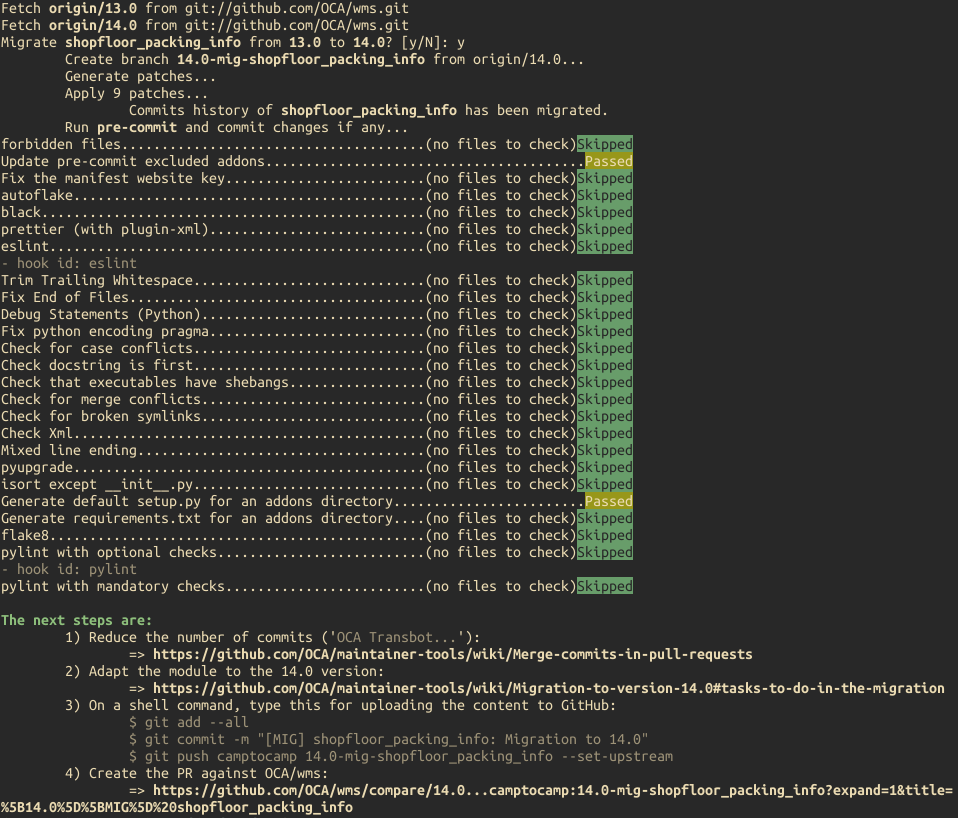
If used with the --non-interactive option, the returned exit code is 100
if an addon could be migrated.
Port of commits/Pull Requests
The tool will ask the user if he wants to open draft pull requests against the upstream repository.
If there are several Pull Requests to port, it will ask the user if he wants to base the next PR on the previous one, allowing the user to cumulate ported PRs in one branch and creating a draft PR against the upstream repository with all of them.
More details here : OCA Days 2022 - Sébastien Alix and Simone Orsi: oca-port:new OCA tool to help with modules migration
Output example (with --verbose):
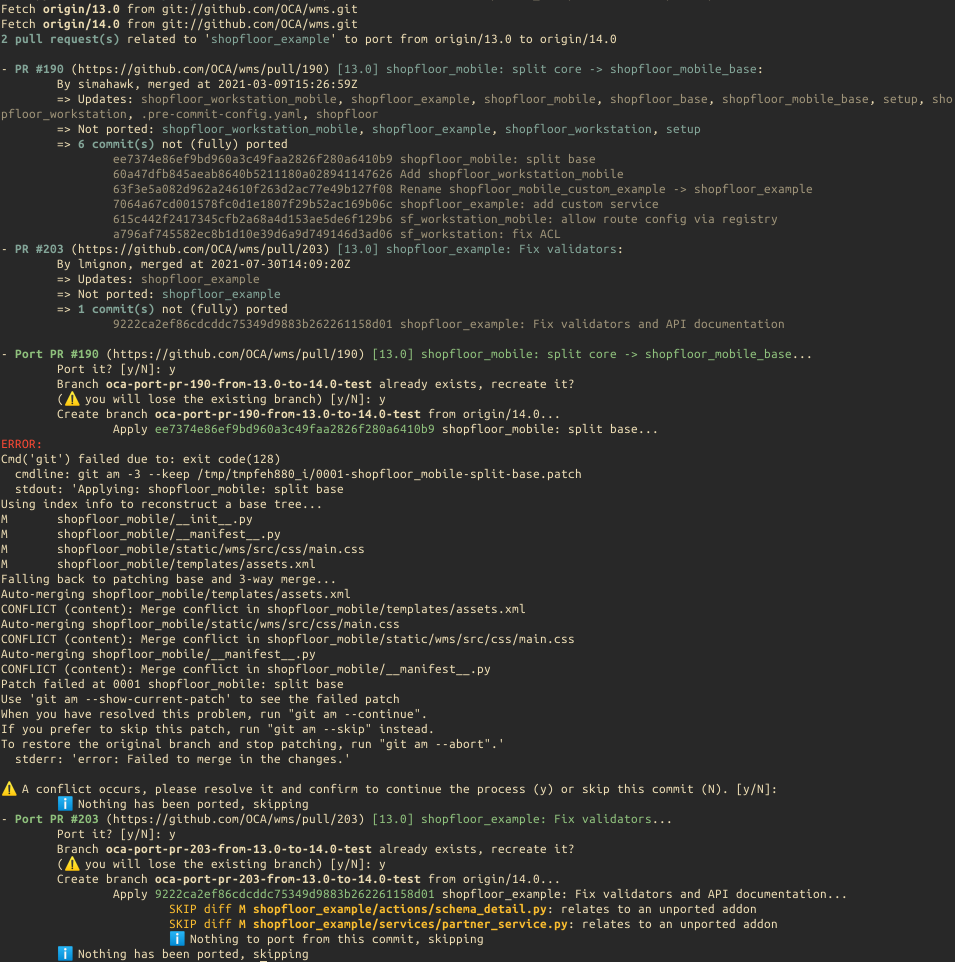
If used with the --non-interactive option, the returned exit code is 110
if some pull requests/commits could be ported.
API
You can also use oca-port as a Python package:
>>> import oca_port,json
>>> app = oca_port.App(
...     source="origin/14.0",
...     target="origin/16.0",
...     addon_path="stock_move_auto_assign",
...     upstream_org="OCA",
...     repo_path="/home/odoo/OCA/stock-logistics-warehouse",
...     output="json",
...     fetch=True,
...     github_token="<TOKEN>"
... )
>>> json_data = app.run()
>>> data = json.loads(json_data)
>>> from pprint import pprint as pp
>>> pp(data)
{'process': 'port_commits',
 'results': {'1631': {'author': 'TDu',
                      'merged_at': '2023-04-04T17:06:03Z',
                      'missing_commits': ['41416c1d7dad15ce4745e07d0541c79e938c2710',
                                          'd43985a443e29641447a3811f2310d54b886ab3d',
                                          '6bd9fcff3e814a6802c7aefadb9c646194cde42b'],
                      'ref': 'OCA/stock-logistics-warehouse#1631',
                      'title': '[14][ADD] stock_move_auto_assign_auto_release '
                               '- backport',
                      'url': 'https://github.com/OCA/stock-logistics-warehouse/pull/1631'}}}
1 maintainer

Metadata
1 maintainer
Release files for oca-port 0.23
For a detailed explanation of source distributions (sdists) and built distributions (wheels), please see the package formats documentation.
Source distribution (sdist)
| File | Size | Uploaded | Provenance | |
|---|---|---|---|---|
| oca_port-0.23.tar.gz | 52.7 kB | With provenance | Details |
Built distribution (wheel)
| File | Interpreter | ABI | Platform | Reset |
|---|---|---|---|---|
| oca_port-0.23-py3-none-any.whl | Python 3 | none | any | Details |
Total release size: 110.5 kB
Release files / oca_port-0.23.tar.gz
| Download URL | oca_port-0.23.tar.gz |
|---|---|
| Size | 52.7 kB |
| Tags | Source |
|
SHA-256 checksum How to use checksums |
85da3c9fb4692a1c7c60d43c4e04de7a67215bdf076e03db08fc15d2bfb1479e
|
|
BLAKE2b-256 checksum How to use checksums |
4cc6336f319655936a4bdfdace60012c8e9f523293cc1aeba279d6a43e839917
|
| Upload date | |
|
Uploaded using Trusted Publishing? What is trusted publishing? |
Yes |
| Uploaded via |
twine/7.0.0 CPython/3.13.16
|
Provenance
Provenance describes where a file came from. On PyPI, provenance is shared via attestations, which provide a verifiable record of the build or publishing details. View details, limitations and caveats.


PyPI Publish Attestation
PyPI verified that this artifact, at this checksum, originated from the publisher listed below.
Signed by GitHub Actions, verified by PyPI on Oct 22, 2026.
Transparency logRelease files / oca_port-0.23-py3-none-any.whl
| Download URL | oca_port-0.23-py3-none-any.whl |
|---|---|
| Size | 57.8 kB |
| Tags | Python 3 |
|
SHA-256 checksum How to use checksums |
f4b6873d02d1b7c6b5e4e9c59d88ff1c62697db37dde929d9fd1c21d0c264b8f
|
|
BLAKE2b-256 checksum How to use checksums |
1fc5f1d5aeb9da50f2496416a4ff7e77ea4fe671c79af57a17361a88f9b23e49
|
| Upload date | |
|
Uploaded using Trusted Publishing? What is trusted publishing? |
Yes |
| Uploaded via |
twine/7.0.0 CPython/3.13.16
|
Provenance
Provenance describes where a file came from. On PyPI, provenance is shared via attestations, which provide a verifiable record of the build or publishing details. View details, limitations and caveats.
PyPI Publish Attestation
PyPI verified that this artifact, at this checksum, originated from the publisher listed below.
Signed by GitHub Actions, verified by PyPI on Oct 22, 2026.
Transparency logSecurity for oca-port 0.23
Provenance
Provenance describes where a file came from. On PyPI, provenance is shared via attestations, which provide a verifiable record of the build or publishing details. View details, limitations and caveats.
Full provenance
All 2 files in this release have been uploaded with provenance metadata.
Attestation for oca_port-0.23.tar.gz
PyPI Publish Attestation
PyPI verified that this artifact, at this checksum, originated from the publisher listed below.
Signed by GitHub Actions, verified by PyPI on Oct 22, 2026.
Transparency logA note on package security
PyPI is a repository for distributing packages, not a service for auditing them. While third-party security researchers and our staff do their best to detect and remove malicious packages, PyPI cannot guarantee the quality, security or suitability of any given package.














