
olmoearth_inferenceX
olmoearth_inferenceX is a Python package for checking a classification map made by an Earth-observation model. It answers three questions about the map: which parts to check first, how wrong the map is, and which part of it can be trusted. It reads the scores the model wrote out, not the model itself, so it needs neither the model's weights nor torch.
Documentation: https://olmoearth-inferencex.readthedocs.io/
What you give it
One raster of the model's scores, taken before the argmax:
- a GeoTIFF or a
.npyarray; - shape
(C, H, W)with one band per class, or(H, W)for a two-class map; - probabilities between 0 and 1 (not 0 to 100), or logits with
--logits.
The class map alone is not enough. Without scores there is nothing to rank by, and only
compare reads a plain class map. The documentation shows
how to write the scores out of a fine-tuned OlmoEarth model.
The package works on windows: square blocks of pixels, 4 x 4 by default (--patch). These
are not rslearn windows. It ranks, samples and counts windows, not pixels. A window's
confidence is how sure the model is of its class: the top class probability, or with
--logits the gap between the two highest logits, averaged over the window's pixels.
For a two-class map, pass logits if you have them: probabilities tie where they reach 0 or 1. For a map of more than two classes, pass probabilities.
Labels are needed for an error rate and for a certified zone. The package picks which windows to label.
Quick start
The package needs Python 3.11 to 3.13.
pip install "olmoearth-inferencex[geo]"    # 1.4.1; without [geo] it reads .npy only, no GeoTIFF
oe-inferencex demo
The demo needs no data. It assesses a real land-cover map shipped with the package, one Dynamic
World tile with expert annotation. It prints what it found and writes
oe_inferencex_demo/review_set.png. A review set is the least confident share of the
windows, here 5%, the ones to check first:
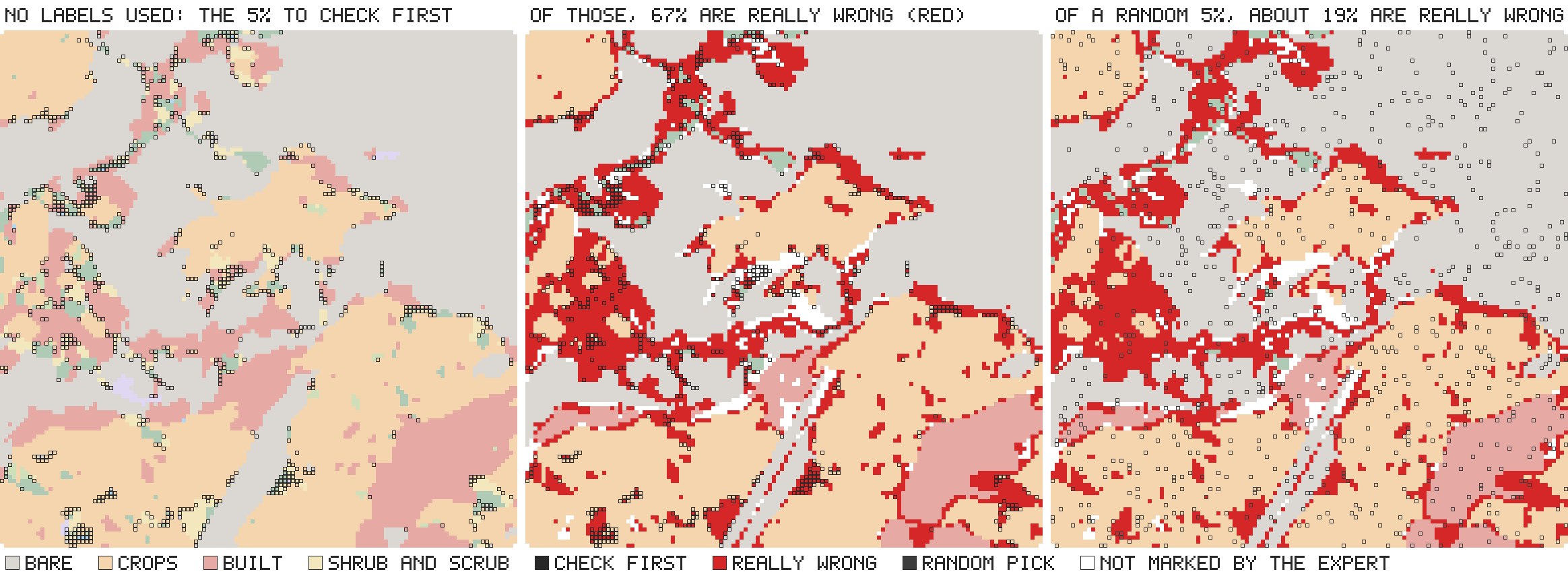
Left: the 5% review set, outlined in black, chosen without labels. Middle: the same windows over the map's errors, in red. 67% of them are wrong, against 19% of the whole map. Right: a random 5% of the windows, for comparison. The review set holds 17% of the map's errors; no 5% of a map that is 19% wrong could hold more than 26%.
The tile was chosen by a rule fixed in advance: the median of 18 eligible tiles, not the best.
Your own map takes three steps. To try them before you have a map, download the script that writes a test map:
curl -O https://raw.githubusercontent.com/2imi9/olmoearth_inferenceX/main/examples/quickstart_map.py
python quickstart_map.py
It writes three files. scores.tif is a synthetic four-class probability map of 256 x 256
pixels. Of its windows, 7.3% are wrong. other.tif is a second map of the same scene.
truth.tif holds the class that is really there. The lines below were printed on these files,
so you can run each command and compare.
1. Which parts to check first. No labels are needed. Add --logits if the scores are
logits.
$ oe-inferencex assess scores.tif --out audit
4096 windows of 4 px; review sets 1%: 41, 5%: 205, 10%: 410; boundary windows 40.0%
wrote audit/assessment.json, explanation.json, review_set_*.csv, suspicion, boundary
audit/review_set_05pct.csv lists the 5% review set, least confident first, with each
window's pixel and map coordinates. There is one such file for 1% and for 10%.
explanation.json gives the cues of each of those windows: whether it sits on a boundary
between two classes of the map, and whether it is among the least confident 20%.
suspicion.tif is the ranking as a raster.
2. How wrong the map is. This needs labels, and sample picks the windows. The recorded
experiments used 300.
$ oe-inferencex sample scores.tif --budget 300 --design random --out to_label.csv
300 windows to label of 4096 valid (random design); wrote to_label.csv and its .json. Fill the `wrong` column with 1 or 0 per window, then run: oe-inferencex estimate to_label.csv
warning: probability input: confidence ties where probabilities saturate. For two classes, logits avoid the ties; for more than two, keep the probabilities (exp76)
The warning is printed for every probability map. This one has four classes, so keep the probabilities (see What you give it).
Open to_label.csv. For each row, look at the window in imagery or on the ground. Set wrong
to 1 if map_class is not what is there, otherwise to 0, or label blind as item 4 of
Before you trust it describes. Fill every row, keep the row order,
and keep to_label.json beside the CSV. On the test map,
python quickstart_map.py --label to_label.csv does this from truth.tif.
$ oe-inferencex estimate to_label.csv
error rate 7.0%, 95% interval 4.5% to 10.4% (half-width 2.9 points), from 300 labelled windows of 4096; exact hypergeometric interval (simple random sample of a finite map)
wrote to_label_estimate.json
sample does not write a reference_class column. Add one holding the class that is really
in each window, and --per-class gives each class's accuracy. The script adds it on the test
map.
3. Which part can be trusted. The same labels give a certified zone: the most confident
share of the map whose error rate is at most the level --alpha. The statement may be wrong for
at most 10% of the samples that could have been drawn (--delta).
$ oe-inferencex certify to_label.csv --alpha 0.05
the 90% most confident windows (3686 of 4096, confidence margin >= 0.6662) are wrong at most 5% of the time; this statement fails on at most 10% of samples like this one (prefix rule; the exact upper bound on the zone's error rate at that level is 2.4%). Outside the zone nothing is certified.
prefix rule: fixed-sequence testing, valid on any map whatever the shape of its error rate; it stops at the first zone it cannot certify, so it certifies little when the most confident windows hold many errors, where the bonferroni rule can certify more
wrote to_label_zone.json and the window mask to_label_zone.npy
In these lines confidence margin is the window's confidence (for this probability map, the
window mean of the top class probability), and prefix rule is the default test. certify can return nothing: with --alpha 0.01 the same labels gave no zone certified.
It needs a sample drawn with --design random. Without that option sample stratifies by
confidence, which estimate reads and certify refuses.
Two maps of one area, on the same grid:
$ oe-inferencex compare scores.tif other.tif --out diff
507 of 4096 windows differ (12.38%); on a boundary of a 2.6x as often as the agreeing windows
wrote diff/comparison.json, differing_windows.csv, disagreement
The second figure says that the differing windows sit on a class boundary of the first map
2.6 times as often as the agreeing windows. compare does not say which map is right there.
With a raster of labels it does: add --labels truth.tif.
Commands
| Command | The question it answers | Labels |
|---|---|---|
demo |
What does the output look like on a real map? | none |
assess |
Which windows should a reviewer check first? | none |
compare |
Where do two maps of one area differ? With --labels: which map is right there? |
optional |
sample |
Which windows should be labelled? | none |
estimate |
What is the map's error rate, with a 95% interval? With --per-class: how accurate is each class? |
the sample, labelled |
certify |
Which share of the map, most confident first, has an error rate below a chosen level? | the sample, drawn with --design random, labelled |
oe-inferencex <command> --help lists the options.
Usage describes every command,
the files it writes and the Python functions behind it. It also lists
the other inputs the package accepts.
Before you trust it
- It needs the scores, not only the class map.
assessrefuses a class map of several classes. It does not refuse a 0/1 class map, or any class map passed with--logits: it reads the class ids as scores. Read as probabilities, a 0/1 map ties everywhere and the review set follows raster position. Read with--logits, the windows of class 0 come first, so on a coherent map the 5% review set can be all class 0. The warning is only inassessment.json. - Without labels it says where to look, not how wrong the map is. For an error rate, label
the windows that
sampledraws. The review set is not such a sample. It is chosen to hold errors, so its error rate is far above the map's.estimateandcertifyrefuse it, as they refuse any CSV thatsampledid not write. - A model run on inputs it was not trained on can be sure and wrong. An error the model
is sure of is checked last. On PASTIS, a probe trained on radar plus optical and run on
radar alone, as under cloud, was 74% wrong, and 60% of its errors were as confident as a
typical correct window with full input. A probe trained on radar alone was 28% wrong and
ranked its errors with an AUROC of 0.79, against 0.83 with full input; 4% of its errors
reached the same threshold, which is set by the probe trained on both (exp88).
If a model can run with an input missing, compare confidence only between windows read from
the same inputs, unless the model was trained on that input combination. That exception was
tested only for a separate probe trained on the remaining input, not for one model trained
with modality dropout. Given a layer of each pixel's input condition,
assessranks each condition on its own (Input conditions). - The interval and the zone assume the labels are right. They describe agreement with
the reviewer's labels. If the reviewer makes mistakes, the true rate can fall outside them.
Label blind: hide the
map_classcolumn, write the class you see inreference_class, and setwrongwhere the two differ.
Input conditions
--condition, new in 1.4.0, takes a raster of each pixel's input condition, such as a cloud
flag, and gives each condition its own review set, error rate and certified zone. It does not
improve the ranking inside a part read with an input missing.
Usage gives the details.
Use from an agent
oe-inferencex mcp, new in 1.4.0, is a local MCP server through which an
agent such as Claude Code runs these commands on your files. Nothing is hosted. With
uv installed, one line connects it, with nothing else to install:
claude mcp add --scope user oe-inferencex -- uvx --from "olmoearth-inferencex[geo,mcp]" oe-inferencex mcp
Usage gives the configuration for other agents.
Use a strong model. In a pilot on two of Ai2's fine-tuned models (not preregistered), Claude Sonnet's replies kept the tools' numbers and their limits. Claude Haiku's often dropped the limits and advised labelling a review set to get the error rate. The tools refuse that input, so the numbers stay right, but the advice misleads.
To see a result in a minute, write the demo tile into an empty folder, start the agent there and ask the question below:
uvx --from olmoearth-inferencex oe-inferencex demo
Where should I look first in oe_inferencex_demo/sample_probabilities.npy? Use windows of 1 pixel, and grade the order against oe_inferencex_demo/sample_truth.npy.
The agent calls assess. Its answer is the review set of the picture above, graded against
the tile's expert labels.
The tools answer four questions, in this order: where should I look first (assess); how
wrong is the map (sample, then estimate); which part can I trust (certify); and which
of two maps is better, and where do they differ (compare).
Example questions, on the files of the quick start above. Without the package installed,
uv run --with "olmoearth-inferencex[geo]" python quickstart_map.py writes them.
- "Where should I look first in scores.tif?" Uses
assess. The answer is a list of windows to check first, least confident first. It is not an error rate, and the errors the model is sure of come last. It needs the model's per-class scores: a class map alone is refused, or gives an order that is not evidence. - "How wrong is scores.tif? Pick 300 windows at random for me to label." Uses
sample, thenestimate. In between, you setwrongto 1 or 0 on every row of the sample. The answer is an error rate with a 95% interval. No tool labels a window, and the interval assumes your labels are right. - "Which part of scores.tif can I trust at 5% error?" Uses
certify, on the labels of that random sample. The answer is the most confident share of the map that is wrong at most 5% of the time, a statement that fails on at most 10% of samples. It can be nothing: with too few labels, or errors among the most confident windows, it certifies no zone and says why. - "Which is better, scores.tif or other.tif, and where do they differ?" Uses
compare. The answer says where the two maps differ, window by window. Without labels it cannot say which map is better; with truth.tif as labels it says which is right where they differ.
Results and limits
Ai2's published embedding suite has 25 tasks for OlmoEarth Base. A confidence is defined on 24 of them; the other is multi-label. Read through linear probes on those embeddings, confidence got a median 0.68 of the way from a random order of the errors to a perfect one. A review of the least confident 10% found a median 0.214 of the errors, about twice a random 10%. On the sixteen encoders of that suite, under each of ten probe seeds, confidence ranked the errors better than a random order on every task, though barely on some: the lowest AUROC was 0.503, close to chance. Confidence also beat the suite's two baselines, how rare the probe's predicted class is and distance in embedding space, on all 24 tasks for OlmoEarth Base, but those baselines are near chance on this suite. On every encoder it beat them on at least 87.5% of the encoder's tasks. Where the baselines carry information, against ground survey labels (LUCAS), Dynamic World's expert tiles and farmers' crop declarations (EuroCrops), confidence beat them too.
Most of this evidence is linear probes on frozen embeddings, and errors the model is sure of are checked last. The documentation holds the rest:
- what has been measured;
- the known limits;
- how it works;
- the findings, with the record of each experiment.
Development and license
To work on the repository, clone it, then run uv sync and uv run pytest. The experiments
also require uv sync --extra encoder --extra geo. One test runs the quick start on the test
map and compares what the commands print with the lines on this page.
- License: Apache License 2.0 (LICENSE).
- Citation: CITATION.cff.
- Questions and suggestions: GitHub issues.
1 maintainer

Metadata
1 maintainer
Release files for olmoearth-inferencex 1.4.1
For a detailed explanation of source distributions (sdists) and built distributions (wheels), please see the package formats documentation.
Source distribution (sdist)
| File | Size | Uploaded | |
|---|---|---|---|
| olmoearth_inferencex-1.4.1.tar.gz | 419.3 kB | Details |
Built distribution (wheel)
| File | Interpreter | ABI | Platform | Reset |
|---|---|---|---|---|
| olmoearth_inferencex-1.4.1-py3-none-any.whl | Python 3 | none | any | Details |
Total release size: 839.5 kB
Release files / olmoearth_inferencex-1.4.1.tar.gz
| Download URL | olmoearth_inferencex-1.4.1.tar.gz |
|---|---|
| Size | 419.3 kB |
| Tags | Source |
|
SHA-256 checksum How to use checksums |
ee7fdc65d780a291614abb17ce98bda0db2b26c0558f4a17624b614cc89a35f6
|
|
BLAKE2b-256 checksum How to use checksums |
cb04754ce768ee08878b9671a85cb0911740123be8a9d9861a87fd7d462e9cac
|
| Upload date | |
|
Uploaded using Trusted Publishing? What is trusted publishing? |
Yes |
| Uploaded via |
uv/0.12.22 {"installer":{"name":"uv","version":"0.12.22","subcommand":["publish"]},"python":null,"implementation":{"name":null,"version":null},"distro":{"name":"Ubuntu","version":"24.04","id":"noble","libc":null},"system":{"name":null,"release":null},"cpu":null,"openssl_version":null,"setuptools_version":null,"rustc_version":null,"ci":true}
|
Release files / olmoearth_inferencex-1.4.1-py3-none-any.whl
| Download URL | olmoearth_inferencex-1.4.1-py3-none-any.whl |
|---|---|
| Size | 420.2 kB |
| Tags | Python 3 |
|
SHA-256 checksum How to use checksums |
3e0abf1682212a2b8b526b9a4e50549ea95fde83e03cd1e96bca5d09211ccd2b
|
|
BLAKE2b-256 checksum How to use checksums |
4e13a8e54faae81a5ae547ca6203d7e4205b61cf2641505c4b4e6e4a694f1798
|
| Upload date | |
|
Uploaded using Trusted Publishing? What is trusted publishing? |
Yes |
| Uploaded via |
uv/0.12.22 {"installer":{"name":"uv","version":"0.12.22","subcommand":["publish"]},"python":null,"implementation":{"name":null,"version":null},"distro":{"name":"Ubuntu","version":"24.04","id":"noble","libc":null},"system":{"name":null,"release":null},"cpu":null,"openssl_version":null,"setuptools_version":null,"rustc_version":null,"ci":true}
|














