






Open, interoperable, and queryable microscopy images with OME Arrow
OME-Arrow uses Open Microscopy Environment (OME) specifications through Apache Arrow for fast, queryable, and language agnostic bioimage data.
📐 Benchmark results that inform OME Arrow's design decisions are available in the ome-arrow-benchmarks repository.
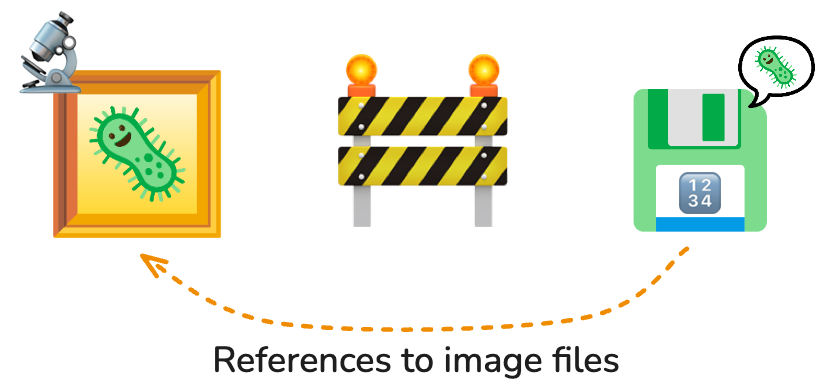
Images are often left behind from the data model, referenced but excluded from databases.

OME-Arrow brings images back into the story.
OME Arrow enables image data to be stored alongside metadata or derived data such as single-cell morphology features. Images in OME Arrow are composed of mutlilayer structs so they may be stored as values within tables. This means you can store, query, and build relationships on data from the same location using any system which is compatible with Apache Arrow (including Parquet) through common data interfaces (such as SQL and DuckDB).
Project focus
This package is intentionally dedicated to work at a per-image level and not large batch handling (though it may be used for those purposes by users or in other projects).
- For visualizing OME Arrow and OME Parquet data in Napari, please see the
napari-ome-arrowNapari plugin. - For more comprehensive handling of many images and features in the context of the OME Parquet format please see the
CytoDataFrameproject (and relevant example notebook).
Installation
Install OME Arrow from PyPI or from source:
# install from pypi
pip install ome-arrow

# install directly from source
pip install git+https://github.com/wayscience/ome-arrow.git
Quick start
See below for a quick start guide. Please also reference an example notebook: Learning to fly with OME-Arrow.
from ome_arrow import OMEArrow

# Ingest a tif image through a convenient OME Arrow class
# We can also ingest OME-Zarr or NumPy arrays.
oa_image = OMEArrow(
    data="your_image.tif"
)

# Access the OME Arrow struct itself
# (compatible with Arrow-compliant data storage).
oa_image.data

# Show information about the image.
oa_image.info()

# Display the image with matplotlib.
oa_image.view(how="matplotlib")

# Display the image with pyvista
# (great for ZYX 3D images; install extras: `pip install 'ome-arrow[viz]'`).
oa_image.view(how="pyvista")

# Export to OME-Parquet. This writes the typed chunk dataset layout.
# We can also export OME-TIFF, OME-Zarr or NumPy arrays.
oa_image.export(how="ome-parquet", out="your_image.ome.parquet")

# Export to Vortex (install extras: `pip install 'ome-arrow[vortex]'`).
oa_image.export(how="vortex", out="your_image.vortex")
Tensor view (DLPack)
For tensor-focused workflows (PyTorch/JAX), use tensor_view and DLPack export.
from ome_arrow import OMEArrow

oa = OMEArrow("your_image.ome.parquet")

# Spatial ROI per plane (YX convention)
view = oa.tensor_view(t=0, z=0, roi=(32, 32, 128, 128), layout="CYX")

# Convenience 3D ROI (x, y, z, w, h, d)
view3d = oa.tensor_view(roi3d=(32, 32, 2, 128, 128, 4), layout="TZCYX")

# 3D tiled iteration over (z, y, x)
for cap in view3d.iter_tiles_3d(tile_size=(2, 64, 64), mode="numpy"):
    pass
Lazy scan-style convention (Polars-like):
from ome_arrow import OMEArrow

oa = OMEArrow.scan("your_image.ome.parquet")  # deferred load
# First: queue lazy spatial/index slicing
lazy_crop = oa.slice_lazy(0, 512, 0, 512).slice_lazy(64, 256, 64, 256)
cropped = lazy_crop.collect()

# slice_lazy returns a new OMEArrow plan; collect does not mutate `oa`.
# Build tensor_view from the returned sliced object to reuse that plan.
tensor_view_result = cropped.tensor_view(t=0, z=slice(0, 4), roi=(0, 0, 192, 192))
arr = tensor_view_result.to_numpy()
Advanced options:
chunk_policy="auto" | "combine" | "keep"controls ChunkedArray handling.channel_policy="error" | "first"controls behavior when droppingCfrom layout.
See full docs: docs/src/dlpack.md
Inline byte-backed OME values
The historical nested table stores pixel payloads as numeric lists inside chunks[].pixels and planes[].pixels.
For faster one-row-per-image Parquet tables, write inline chunk bytes instead:
from ome_arrow import from_numpy, to_ome_parquet

record = from_numpy(arr, dim_order="TCZYX", chunk_encoding="bytes")
to_ome_parquet(record, "image.ome.parquet", column_name="ome_arrow")
You can also convert an existing OME-Arrow record at write time:
to_ome_parquet(
    record,
    "image.ome.parquet",
    column_name="ome_arrow",
    inline_chunk_encoding="bytes",
)
This keeps the ergonomic inline OME value while storing chunk payloads as typed pixel_bytes: large_binary.
Use it for moderate image-level tables and whole-image reads.
For large 3D/5D selective reads, prefer the typed chunk dataset API below.
Leaf-level chunk compression is also available for inline byte chunks:
record = from_numpy(
    arr,
    dim_order="TCZYX",
    chunk_encoding="bytes",
    chunk_compression="auto",
)

to_ome_parquet(
    record,
    "image.ome.parquet",
    column_name="ome_arrow",
    compression="zstd",
)
Compression guidance from benchmarks/benchmark_inline_byte_compression.py:
| Data/workload | Suggested setting | Why |
|---|---|---|
| General inline-byte tables | chunk_compression="auto" and Parquet compression="zstd" |
Compresses chunks only when they shrink, then lets Parquet compress metadata. |
| Faster reads on compressible images | chunk_compression="fast" with Parquet compression=None |
Uses LZ4 only when chunks shrink, keeping decode overhead low. |
| Best storage on compressible 3D/volume data | chunk_compression="small" plus Parquet compression="zstd" |
Uses Zstd level 1 only when chunks shrink, then applies Parquet compression. |
| Noisy/high-entropy images | chunk_compression="auto" or no leaf compression; use Parquet compression="zstd" |
Auto skips chunks that would grow; noisy data often does not compress. |
Explicit codecs such as chunk_compression="zstd" with chunk_compression_level=1 and chunk_compression="lz4" are also supported when you want fixed behavior instead of a preset.
Typed chunk datasets
Typed chunk datasets are the optimized pixel IO path for OME-Arrow. Their goal is to keep image metadata small and queryable while storing pixels as typed byte chunks that can be read directly by image, plane, channel, region, or volume. Use this layout when performance matters for selective reads, larger 3D/5D images, or data engineering workflows that need predictable chunk indexing.
OMEArrow.export(how="ome-parquet") writes the typed byte-buffer dataset layout.
For explicit control over layout and chunks, use the dataset writer directly.
By default, this stores image metadata separately from pixel chunks and writes one chunk per Parquet row group, so read_plane() and read_region() can jump through a physical index instead of materializing the older nested struct payload.
You can change that row-group packing with chunk_rows_per_row_group.
import numpy as np
from ome_arrow import OMEArrowDataset, write_ome_arrow_dataset

arr = np.zeros((1, 1, 1, 1024, 1024), dtype=np.uint16)  # TCZYX

choice = write_ome_arrow_dataset(
    [arr],
    "image.ome-arrow",
    layout="tile",
    chunk_shape=(1, 1, 1, 512, 512),
    compression="zstd",
    chunk_rows_per_row_group=1,
)
print(choice.rationale)

dataset = OMEArrowDataset("image.ome-arrow")
image_id = dataset.images["image_id"].to_pylist()[0]
plane = dataset.pixels.read_plane(image_id, t=0, c=0, z=0)
crop = dataset.pixels.read_region(image_id, y=slice(128, 384), x=slice(128, 384))

# Dataset-level shortcuts return NumPy by default and can return Torch/JAX
# arrays when those packages are installed.
plane_np = dataset.read_plane(t=0, c=0, z=0)
plane_torch = dataset.read_plane(t=0, c=0, z=0, return_type="torch")
plane_jax = dataset.read_plane(t=0, c=0, z=0, return_type="jax")
Use chunk_rows_per_row_group=1 for the fastest direct chunk reads.
Use a larger value, such as 8, to reduce row-group overhead for small chunks when storage size matters.
The writer preserves source pixel dtype by default.
To normalize stored pixel buffers explicitly, pass pixel_dtype, for example pixel_dtype="uint16".
Integer casts clamp by default; pass clamp=False to use NumPy casting behavior directly.
Shape tables
OME-Zarr and OME-NGFF are strong fits for dense image pixels and label rasters. The gap is object-level analytics: cells, nuclei, ROIs, detections, tracks, measurements, and relationships are naturally queried as tables.
OME-Arrow Shapes fills that gap without replacing OME-Zarr.
Each row is one biological object, geometry is a single logical column, dense label masks remain canonical label images, and object rows reference labels with label_image_id plus label_value.
Measurements remain ordinary Arrow columns for DuckDB, Polars, DataFusion, PyArrow, and Parquet workflows.
from ome_arrow import make_relationship_table, make_shape_table

shapes = make_shape_table(
    [
        {
            "object_id": "cell-1",
            "image_id": "image-1",
            "label_image_id": "labels-1",
            "label_value": 7,
            "geometry": [128.0, 256.0],
            "centroid": [128.0, 256.0],
            "class": "cell",
            "area_um2": 84.2,
        }
    ],
    geometry_encoding="geoarrow.point",
    axes=("y", "x"),
    units=("pixel", "pixel"),
)

relationships = make_relationship_table(
    [
        {
            "parent_id": "cell-1",
            "child_id": "nucleus-1",
            "relationship_type": "contains",
        }
    ]
)
Measurements remain normal Arrow columns (area_um2 above).
Label masks are represented by reference with label_image_id and
label_value, keeping the segmentation raster canonical instead of embedding
mask payloads in each object row.
See the dedicated Shapes docs: docs/src/shapes.md.
For local Parquet read/write benchmarks, run:
python benchmarks/benchmark_shapes_parquet.py --repeats 5 --warmup 1.
Tensor ingest (PyTorch/JAX)
You can ingest torch or JAX arrays directly with OMEArrow(...).
You can also use explicit helper functions from ome_arrow.ingest.
Why this is useful:
- It reduces compute overhead by removing conversion code boilerplate in separate model/data pipelines that already use torch or JAX tensors (i.e., it provides a direct port of OME-arrow into popular deep learning libraries).
- However, this is more about clean interoperability than dramatic end-to-end speedups (although we expect fewer handoffs to result in speedups). Specifically:
- It makes it easier for a user to update dimension ordering input in the same place without requiring separate functionality (see argument
dim_order). - This smooths handoffs and reduces mistakes when moving between tensor layouts and OME-Arrow records. For example, CPU torch tensors often expose a NumPy view without an extra copy.
- Ingest still materializes OME-Arrow planes/chunks.
from ome_arrow import OMEArrow

# Direct constructor support:
# inferred defaults are rank-based:
# 2D -> "YX", 3D -> "ZYX", 4D -> "TCYX", 5D -> "TCZYX"
oa_torch = OMEArrow(torch_tensor)
oa_jax = OMEArrow(jax_array)

# Optional: override dim order when shape is ambiguous
oa_zyx = OMEArrow(torch_volume, dim_order="ZYX")
from ome_arrow.ingest import from_torch_array, from_jax_array

scalar_torch = from_torch_array(torch_tensor, dim_order="TCYX")
scalar_jax = from_jax_array(jax_array, dim_order="TCYX")
Notes:
- Torch/JAX support is optional.
- Install extras as needed:
pip install "ome-arrow[dlpack-torch]"orpip install "ome-arrow[dlpack-jax]". - Torch tensors are detached and converted on CPU for ingest.
dim_orderis accepted only for NumPy/torch/JAX array inputs.- Ingest now passes flattened NumPy pixel buffers directly to Arrow.
- This avoids materializing Python
listpayloads per plane/chunk.
Benchmarking lazy reads
Use the lightweight benchmark utility in benchmarks/ to compare lazy tensor read paths (TIFF source-backed, Parquet planes, Parquet chunks).
For more detailed benchmark results and analysis, see the ome-arrow-benchmarks repository.
uv run python benchmarks/benchmark_lazy_tensor.py --repeats 5 --warmup 1
For OME-IRIS-style 2D/3D/4D/5D access patterns, use benchmark_ome_iris.py.
This benchmark is intended to answer practical questions about pixel IO: how fast each format writes a matched artifact, how fast it reads full images or volumes, and how fast it serves selective access patterns such as planes, crops, subvolumes, timepoints, and channels.
uv run python benchmarks/benchmark_ome_iris.py --repeats 3 --warmup 1
By default, the benchmark uses local test-data fixtures when available. You can also pass real local TIFF fixtures explicitly:
uv run python benchmarks/benchmark_ome_iris.py \
  --fixture 2d=/path/to/plate-image.tif \
  --fixture 3d=/path/to/volume.tif \
  --fixture 5d=/path/to/tczyx-image.ome.tif \
  --repeats 3 \
  --warmup 1 \
  --json-out benchmark-results.json
Each --fixture argument is name=/path/to/image.tif.
The name label is used only in the output table, so choose labels that describe the dimensionality or dataset source.
Inputs must be TIFF files; the benchmark creates temporary matched OME-Zarr and OME-Arrow artifacts for the same source image, then reports latency, returned shape, dtype, and artifact size.
Temporary artifacts are deleted automatically after the run.
Use the printed table for quick local iteration and --json-out when comparing runs over time or attaching results to an issue/PR.
Prefer multiple repeats when making performance claims, because local filesystem cache, codec warmup, and Torch/JAX initialization can affect single-run timings.
The OME-IRIS-style benchmark separates return/API paths:
ome-zarr-tensor-numpy: OME-Arrowtensor_view(...).to_numpy()over OME-Zarr.ome-zarr-bioio-numpy: direct BioImage NumPy reads over OME-Zarr.ome-tiff-tensor-numpy: OME-Arrowtensor_view(...).to_numpy()over TIFF.ome-tiff-bioio-numpy: direct BioImage NumPy reads over TIFF.ome-arrow-src-numpy: source-dtype typed OME-Arrow dataset NumPy reads.ome-arrow-u16-numpy: typed OME-Arrow dataset NumPy reads normalized touint16for apples-to-apples comparisons with normalized paths.ome-arrow-u16-raw-numpy: normalizeduint16typed OME-Arrow reads with uncompressed chunk bytes for local speed comparisons.ome-arrow-*-chunks: Arrow-native raw chunk-row reads that returnpixel_byteswithout decoding into NumPy.ome-tiff-tensor-torch/ome-tiff-tensor-jax: OME-Arrow tensor-view Torch/JAX returns over TIFF.ome-zarr-tensor-torch/ome-zarr-tensor-jax: OME-Arrow tensor-view Torch/JAX returns over OME-Zarr.ome-arrow-src-torch/ome-arrow-src-jax: source-dtype typed OME-Arrow dataset reads withreturn_type="torch"orreturn_type="jax".ome-arrow-u16-torch/ome-arrow-u16-jax: normalizeduint16typed OME-Arrow dataset reads with Torch/JAX returns.
Notes:
- This benchmark is for local iteration and relative comparisons.
- It is not part of CI pass/fail checks.
- CI also runs this benchmark in a dedicated
benchmark_canaryjob and uploadsbenchmark-results.jsonas a workflow artifact.
Recalibrating benchmarks/ci-baseline.json:
- Run the benchmark on
maina few times (for example 3-5 runs):uv run python benchmarks/benchmark_lazy_tensor.py --repeats 7 --warmup 2 --json-out benchmark-results.json - For each case, collect the observed
median_msvalues. - Update
benchmarks/ci-baseline.jsonwith stable medians from those runs (prefer a conservative value near the slower side, not the fastest sample). - Keep CI canary tolerance (
regression_factor+absolute_slack_ms) unchanged unless you have repeated false positives.
Contributing, Development, and Testing
Please see our contributing documentation for more details on contributions, development, and testing.
Related projects
OME Arrow is used or inspired by the following projects, check them out!
napari-ome-arrow: enables you to view OME Arrow and related images.CytoDataFrame: provides a DataFrame-like experience for viewing feature and microscopy image data within Jupyter notebook interfaces and creating OME Parquet files.coSMicQC: performs quality control on microscopy feature datasets, visualized using CytoDataFrames.pycytominer: supports feature profiling, normalization, and downstream analysis workflows for image-based profiling datasets.iceberg-bioimage: defines warehouse-oriented patterns for connecting bioimage formats and analytical tables at scale.ome-arrow-benchmarks: contains benchmark results and analysis that inform the design choices in OME Arrow.CytoTable: converts image-based profiling outputs into analysis-ready tabular formats such as Parquet.
1 maintainer

Release files for ome-arrow 0.1.0
For a detailed explanation of source distributions (sdists) and built distributions (wheels), please see the package formats documentation.
Source distribution (sdist)
| File | Size | Uploaded | |
|---|---|---|---|
| ome_arrow-0.1.0.tar.gz | 45.5 MB | Details |
Built distribution (wheel)
| File | Interpreter | ABI | Platform | Reset |
|---|---|---|---|---|
| ome_arrow-0.1.0-py3-none-any.whl | Python 3 | none | any | Details |
Total release size: 45.6 MB
Release files / ome_arrow-0.1.0.tar.gz
| Download URL | ome_arrow-0.1.0.tar.gz |
|---|---|
| Size | 45.5 MB |
| Tags | Source |
|
SHA-256 checksum How to use checksums |
955db721dec93084b3884c526f5745af8c12e13e6a928a7c6ede7587fcb4c07c
|
|
BLAKE2b-256 checksum How to use checksums |
a7608fe30a8fff297799a3192169c9b27b4be35ed38cfe57cfcfaf971fb7b94c
|
| Upload date | |
|
Uploaded using Trusted Publishing? What is trusted publishing? |
Yes |
| Uploaded via |
twine/6.1.0 CPython/3.13.12
|
Provenance
Provenance describes where a file came from. On PyPI, provenance is shared via attestations, which provide a verifiable record of the build or publishing details. View details, limitations and caveats.


PyPI Publish Attestation
PyPI verified that this artifact, at this checksum, originated from the publisher listed below.
Signed by GitHub Actions, verified by PyPI on Jul 14, 2026.
Transparency logRelease files / ome_arrow-0.1.0-py3-none-any.whl
| Download URL | ome_arrow-0.1.0-py3-none-any.whl |
|---|---|
| Size | 81.7 kB |
| Tags | Python 3 |
|
SHA-256 checksum How to use checksums |
96c5257482ca5ad092c06e88b27f7552b2890688283736fec817afa7ed724f64
|
|
BLAKE2b-256 checksum How to use checksums |
cb1763fe21281880a6f99699b3ab8392a9e890bb1923b6b72ee17a25083f2cb6
|
| Upload date | |
|
Uploaded using Trusted Publishing? What is trusted publishing? |
Yes |
| Uploaded via |
twine/6.1.0 CPython/3.13.12
|
Provenance
Provenance describes where a file came from. On PyPI, provenance is shared via attestations, which provide a verifiable record of the build or publishing details. View details, limitations and caveats.
PyPI Publish Attestation
PyPI verified that this artifact, at this checksum, originated from the publisher listed below.
Signed by GitHub Actions, verified by PyPI on Jul 14, 2026.
Transparency log













