
Using OME specifications with Apache Arrow for fast, queryable, and language agnostic bioimage data.

Project description






Open, interoperable, and queryable microscopy images with OME Arrow
OME-Arrow uses Open Microscopy Environment (OME) specifications through Apache Arrow for fast, queryable, and language agnostic bioimage data.
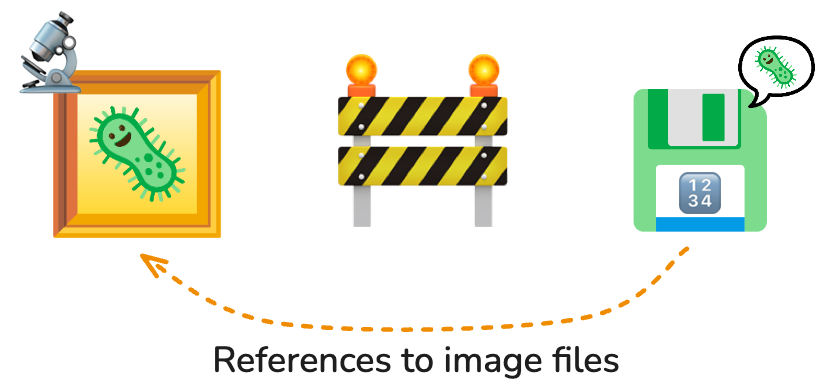
Images are often left behind from the data model, referenced but excluded from databases.

OME-Arrow brings images back into the story.
OME Arrow enables image data to be stored alongside metadata or derived data such as single-cell morphology features. Images in OME Arrow are composed of mutlilayer structs so they may be stored as values within tables. This means you can store, query, and build relationships on data from the same location using any system which is compatible with Apache Arrow (including Parquet) through common data interfaces (such as SQL and DuckDB).
Project focus
This package is intentionally dedicated to work at a per-image level and not large batch handling (though it may be used for those purposes by users or in other projects).
- For visualizing OME Arrow and OME Parquet data in Napari, please see the
napari-ome-arrowNapari plugin. - For more comprehensive handling of many images and features in the context of the OME Parquet format please see the
CytoDataFrameproject (and relevant example notebook).
Installation
Install OME Arrow from PyPI or from source:
# install from pypi
pip install ome-arrow

# install directly from source
pip install git+https://github.com/wayscience/ome-arrow.git
Quick start
See below for a quick start guide. Please also reference an example notebook: Learning to fly with OME-Arrow.
from ome_arrow import OMEArrow

# Ingest a tif image through a convenient OME Arrow class
# We can also ingest OME-Zarr or NumPy arrays.
oa_image = OMEArrow(
    data="your_image.tif"
)

# Access the OME Arrow struct itself
# (compatible with Arrow-compliant data storage).
oa_image.data

# Show information about the image.
oa_image.info()

# Display the image with matplotlib.
oa_image.view(how="matplotlib")

# Display the image with pyvista
# (great for ZYX 3D images; install extras: `pip install 'ome-arrow[viz]'`).
oa_image.view(how="pyvista")

# Export to OME-Parquet.
# We can also export OME-TIFF, OME-Zarr or NumPy arrays.
oa_image.export(how="ome-parquet", out="your_image.ome.parquet")

# Export to Vortex (install extras: `pip install 'ome-arrow[vortex]'`).
oa_image.export(how="vortex", out="your_image.vortex")
Contributing, Development, and Testing
Please see our contributing documentation for more details on contributions, development, and testing.
Related projects
OME Arrow is used or inspired by the following projects, check them out!
napari-ome-arrow: enables you to view OME Arrow and related images.nViz: focuses on ingesting and visualizing various 3D image data.CytoDataFrame: provides a DataFrame-like experience for viewing feature and microscopy image data within Jupyter notebook interfaces and creating OME Parquet files.coSMicQC: performs quality control on microscopy feature datasets, visualized using CytoDataFrames.


Download files
Download the file for your platform. If you're not sure which to choose, learn more about installing packages.
Source Distribution
Built Distribution
Filter files by name, interpreter, ABI, and platform.
If you're not sure about the file name format, learn more about wheel file names.
Copy a direct link to the current filters
File details
Details for the file ome_arrow-0.0.5.tar.gz.
File metadata
- Download URL: ome_arrow-0.0.5.tar.gz
- Upload date:
- Size: 35.9 MB
- Tags: Source
- Uploaded using Trusted Publishing? Yes
- Uploaded via: twine/6.1.0 CPython/3.13.7
File hashes
| Algorithm | Hash digest | |
|---|---|---|
| SHA256 |
43d6531dba4f4d8b06dcc0daa90c78c6cdc9a0be5a1ee649c21d7ec314e521ab
|
|
| MD5 |
d22cf53ea0126263db0f712e5f7be354
|
|
| BLAKE2b-256 |
7aa9ff04c9df1c4390489cf0b921672016fb3af1d223ddaaa61fa05cfe37eb44
|
Provenance
The following attestation bundles were made for ome_arrow-0.0.5.tar.gz:
Publisher:
publish-pypi.yml on WayScience/ome-arrow
-
Statement:
-
Statement type:
https://in-toto.io/Statement/v1 -
Predicate type:
https://docs.pypi.org/attestations/publish/v1 -
Subject name:
ome_arrow-0.0.5.tar.gz -
Subject digest:
43d6531dba4f4d8b06dcc0daa90c78c6cdc9a0be5a1ee649c21d7ec314e521ab - Sigstore transparency entry: 819895861
- Sigstore integration time:
-
Permalink:
WayScience/ome-arrow@cffe1e1a2b5943fecccc3d9687d1276a274e67fd -
Branch / Tag:
refs/tags/v0.0.5 - Owner: https://github.com/WayScience
-
Access:
public
-
Token Issuer:
https://token.actions.githubusercontent.com -
Runner Environment:
github-hosted -
Publication workflow:
publish-pypi.yml@cffe1e1a2b5943fecccc3d9687d1276a274e67fd -
Trigger Event:
release
-
Statement type:
File details
Details for the file ome_arrow-0.0.5-py3-none-any.whl.
File metadata
- Download URL: ome_arrow-0.0.5-py3-none-any.whl
- Upload date:
- Size: 34.8 kB
- Tags: Python 3
- Uploaded using Trusted Publishing? Yes
- Uploaded via: twine/6.1.0 CPython/3.13.7
File hashes
| Algorithm | Hash digest | |
|---|---|---|
| SHA256 |
d0579f698f089b50386e133e6131726e7076e5921b96745cf0e29b509099921d
|
|
| MD5 |
dbc6a79dde64b8b34b5b3e515d165cb0
|
|
| BLAKE2b-256 |
1eb3c902e99006e725ef03e4d61085dfea2e2241e6028ec50c199ce95ed44855
|
Provenance
The following attestation bundles were made for ome_arrow-0.0.5-py3-none-any.whl:
Publisher:
publish-pypi.yml on WayScience/ome-arrow
-
Statement:
-
Statement type:
https://in-toto.io/Statement/v1 -
Predicate type:
https://docs.pypi.org/attestations/publish/v1 -
Subject name:
ome_arrow-0.0.5-py3-none-any.whl -
Subject digest:
d0579f698f089b50386e133e6131726e7076e5921b96745cf0e29b509099921d - Sigstore transparency entry: 819895887
- Sigstore integration time:
-
Permalink:
WayScience/ome-arrow@cffe1e1a2b5943fecccc3d9687d1276a274e67fd -
Branch / Tag:
refs/tags/v0.0.5 - Owner: https://github.com/WayScience
-
Access:
public
-
Token Issuer:
https://token.actions.githubusercontent.com -
Runner Environment:
github-hosted -
Publication workflow:
publish-pypi.yml@cffe1e1a2b5943fecccc3d9687d1276a274e67fd -
Trigger Event:
release
-
Statement type:






