
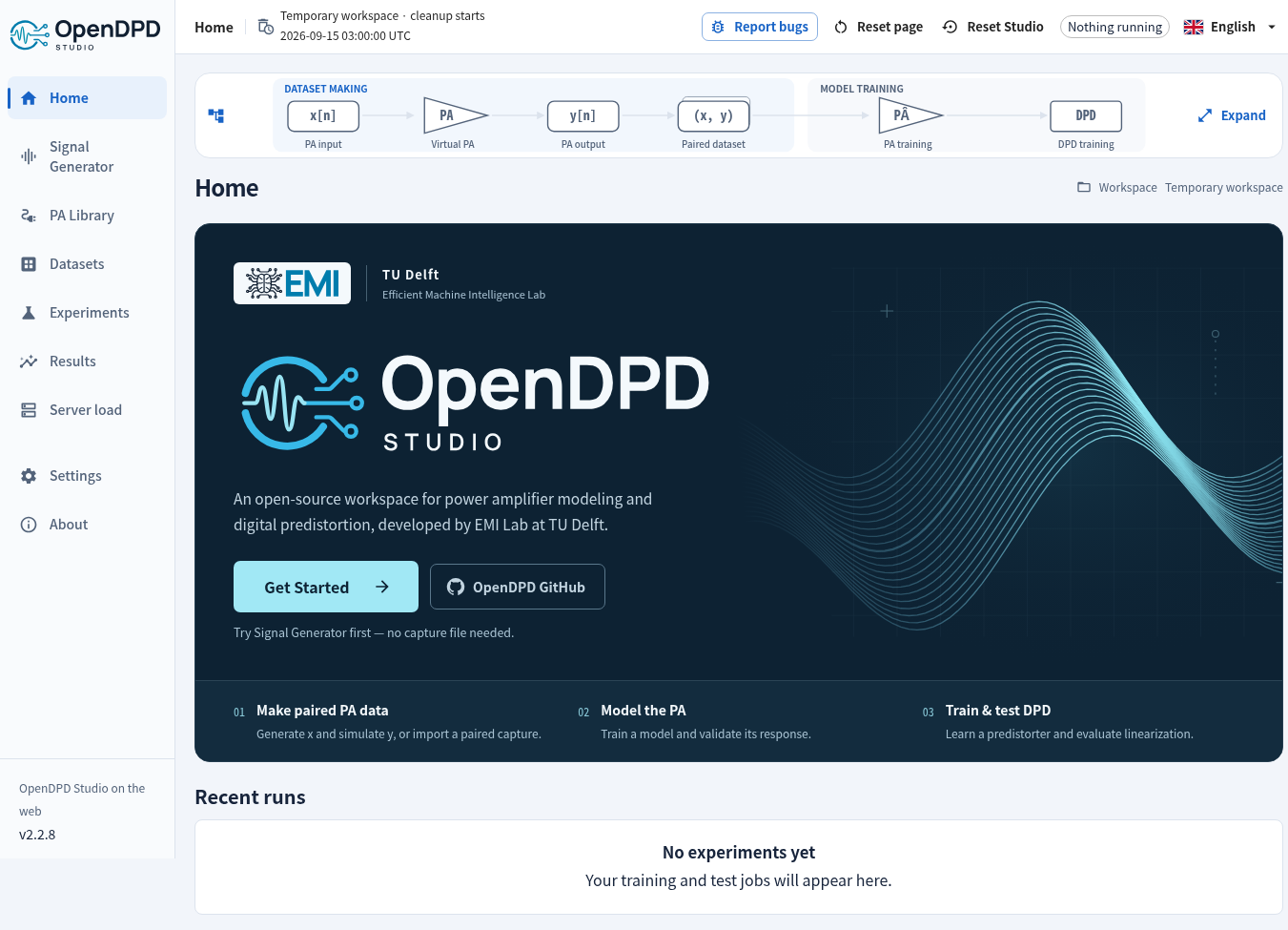
Try OpenDPD Studio in your browser →
No installation. Explore example data or upload your own CSV, train PA/DPD models on shared CUDA compute, and download your checkpoints. Temporary data and results are deleted within 24 hours.
OpenDPD


Model a power amplifier. Train a digital predistorter. Understand the result.
OpenDPD is a PyTorch framework for power amplifier (PA) modeling and digital predistortion (DPD), developed by the Efficient Machine Intelligence Lab at TU Delft. Use OpenDPD Studio in the browser or locally for a guided workflow, or automate experiments with the CLI and Python API. All three use the original OpenDPD training core.



Documentation · Studio walkthrough · Examples & Colab · Papers & citation
What's new
OpenDPD 2.2.3 adds an integrated Signal Generator with 20 presets, advanced OFDMA controls, I/Q export, PAPR and signal plots. Turn a generated waveform into a clearly labelled synthetic PA dataset, then train and test in the combined PA Model and DPD Model workspaces. Testing shows the exact dataset I/Q count.
See the 2.2.3 release notes and Signal Generator guide. Standard presets are uncoded engineering stimuli; Wi-Fi 8 is experimental. Local Studio also adds research comparisons, publication figures and reproduction, measurement sessions, Sweep Board, hardware cost evidence and optional dataset contribution PRs for human review.
- CUDA replay for supported native models reduces dispatch overhead while retaining the existing optimizer, precision, batches and scheduler.
- Quick/full training defaults are 10/150 epochs; plots reuse validation predictions once per epoch.
- See the 2.2.1 performance measurements and release notes.
- Guided experiments: explore built-in I/Q data, train and test PA/DPD models, and choose from the original backbone registry.
- Live feedback: separate epoch and batch progress bars, NMSE and other task metrics, live signal plots, reconnectable experiments and a Stop control.
- Download models while training: save the best checkpoint so far; after training, download the selected final model. Compare compatible runs and export reports.
- Browser and local workbench: nine interface languages, English by default, CUDA when available, touch-friendly plots and system light/dark themes.
Bring your own CSV: upload UTF-8 CSV with two complex columns or four real I/Q columns, up to 25 MiB and 1,000,000 paired samples. Every row is validated in quarantine before preview; rejected uploads are deleted. Code, package and checkpoint uploads are unavailable in the public app.
For a hosted installation, the public Studio deployment guide covers GitHub Pages, a Cloudflare Tunnel and isolated local VM compute, with temporary sessions and automatic file deletion within 24 hours.
Feature history · Verified platform status
Get started with Studio
Open the hosted Studio now, or install the packaged local app with Python 3.10–3.13:
python -m pip install "opendpd[gui]==2.2.3"
opendpd gui
The wheel includes the frontend; Node.js is not needed. For development from source, also install Git and Node.js 22.22+:
git clone https://github.com/lab-emi/OpenDPD.git
cd OpenDPD
python -m venv .venv
source .venv/bin/activate
python -m pip install -e ".[gui]"
npm --prefix frontend ci
npm --prefix frontend run build
opendpd gui
This opens Studio locally in your browser. For Windows, a native desktop window, GPU setup, or a core-only installation, see Installation.
Click Get Started → Try a built-in dataset → DPA_200MHz. Inspect the data and continue to your first experiment. Use Starting settings → Quick trial to check the pipeline, then choose Full training for a longer experiment. Quick trial defaults to 10 epochs; full training defaults to 150 epochs. Plots update once per epoch using validation results. Advanced settings offer an optional batch preview interval with a red warning because extra previews can severely slow training.
The PA → DPD workflow
| Step | What you do | What you learn |
|---|---|---|
| 1. Inspect data | Open paired PA input/output I/Q samples. | Sample rate, bandwidth, signal quality and data splits. |
| 2. Model the PA | Train a behavioral model, then test it on held-out data. | How closely the model predicts the measured PA response. |
| 3. Train DPD | Place a predistorter before the trained PA model. | Whether the simulated cascade becomes more linear. |
| 4. Test & export | Compare results and export the predistorted I/Q signal. | A PA input signal ready for a separate measurement experiment. |
A DPD result evaluated through a PA model is a simulation. Exported u = DPD(x) is the PA input; a physical PA measurement is needed to establish measured linearization performance. See the Studio walkthrough and measured DPD guide.
Choose your next step
| I want to… | Read |
|---|---|
| Run the same workspace experiments from a terminal | Headless CLI |
| Train from Python or try a notebook | Examples · API reference |
| Understand the original training pipeline and quantization | Training guide |
| Use my own I/Q measurements through Python or the CLI | Dataset formats · Import & preprocessing |
| Configure plots, animations and dashboards | Visualization guide |
| Compare models or reproduce a paper | Benchmark · Reproduction guide |
| Evaluate waveforms, streaming or hardware export | Advanced guides |
| Resolve installation or signal-metric questions | FAQ |
Contribute & cite
Contributions of models, tests and documentation are welcome. Start with CONTRIBUTING.md; see testing and how we maintain the docs.
If you use OpenDPD in research, cite the OpenDPD paper. BibTeX and related papers · CITATION.cff
Chang Gao — Project Leader · Yizhuo Wu — Leading Developer. Meet the team · EMI Lab
1 maintainer

Download files
Download the file for your platform. If you're not sure which to choose, learn more about installing packages.
Source Distribution
Built Distribution
Filter files by name, interpreter, ABI, and platform.
If you're not sure about the file name format, learn more about wheel file names.
Copy a direct link to the current filters
File details
Details for the file opendpd-2.2.3.tar.gz.
File metadata
- Download URL: opendpd-2.2.3.tar.gz
- Upload date:
- Size: 73.7 MB
- Tags: Source
- Uploaded using Trusted Publishing? Yes
- Uploaded via:
twine/7.0.0 CPython/3.13.14
File hashes
| Algorithm | Hash digest | |
|---|---|---|
| SHA256 |
4a607dee93633e7b13e86f45b7a74ddf7da9b392f1a910902c4f1b02686a30a4
|
|
| MD5 |
3cfd42a90f53cfb4742972eb528f49f0
|
|
| BLAKE2b-256 |
a88baa9b882610a65235c0a23909202e578ca204e54db7602859322efccaaae6
|
Provenance
The following attestation bundles were made for opendpd-2.2.3.tar.gz:
Publisher:
publish.yml on lab-emi/OpenDPD
-
Statement:
-
Statement type:
https://in-toto.io/Statement/v1 -
Predicate type:
https://docs.pypi.org/attestations/publish/v1 -
Subject name:
opendpd-2.2.3.tar.gz -
Subject digest:
4a607dee93633e7b13e86f45b7a74ddf7da9b392f1a910902c4f1b02686a30a4 - Sigstore transparency entry: 2820113786
- Sigstore integration time:
-
Permalink:
lab-emi/OpenDPD@69537fba1a6d72ff684eb815d291a1db3c16bac9 -
Branch / Tag:
refs/tags/v2.2.3 - Owner: https://github.com/lab-emi
-
Access:
public
-
Token Issuer:
https://token.actions.githubusercontent.com -
Runner Environment:
github-hosted -
Publication workflow:
publish.yml@69537fba1a6d72ff684eb815d291a1db3c16bac9 -
Trigger Event:
release
-
Statement type:
File details
Details for the file opendpd-2.2.3-py3-none-any.whl.
File metadata
- Download URL: opendpd-2.2.3-py3-none-any.whl
- Upload date:
- Size: 35.8 MB
- Tags: Python 3
- Uploaded using Trusted Publishing? Yes
- Uploaded via:
twine/7.0.0 CPython/3.13.14
File hashes
| Algorithm | Hash digest | |
|---|---|---|
| SHA256 |
13b87c5c5ec2b1ed861ed9b6efa4fb073b9105a52a5112fa45453a49f099b086
|
|
| MD5 |
ba38670161deeb3f39443aaa0d531e80
|
|
| BLAKE2b-256 |
bad7fdfb8fc8d78e5b6afdcfcf2fd490faf7a97d60abfa5eeff66eb71e44d973
|
Provenance
The following attestation bundles were made for opendpd-2.2.3-py3-none-any.whl:
Publisher:
publish.yml on lab-emi/OpenDPD
-
Statement:
-
Statement type:
https://in-toto.io/Statement/v1 -
Predicate type:
https://docs.pypi.org/attestations/publish/v1 -
Subject name:
opendpd-2.2.3-py3-none-any.whl -
Subject digest:
13b87c5c5ec2b1ed861ed9b6efa4fb073b9105a52a5112fa45453a49f099b086 - Sigstore transparency entry: 2820113894
- Sigstore integration time:
-
Permalink:
lab-emi/OpenDPD@69537fba1a6d72ff684eb815d291a1db3c16bac9 -
Branch / Tag:
refs/tags/v2.2.3 - Owner: https://github.com/lab-emi
-
Access:
public
-
Token Issuer:
https://token.actions.githubusercontent.com -
Runner Environment:
github-hosted -
Publication workflow:
publish.yml@69537fba1a6d72ff684eb815d291a1db3c16bac9 -
Trigger Event:
release
-
Statement type:














