
 OpenFocus
OpenFocus delivers focus stacking quality that rivals commercial-grade software, while staying fully open source and easy to extend.





📢 News
🎉 2026.10.04: v1.35 — smoother startup: opening a folder from the command line or app icon loads it directly (no import-mode prompt), re-opening the same folder reloads instead of duplicating frames, and crash recovery no longer stacks command-line folders on top of the restored session.
🎉 2026.10.03: v1.34 — quality release: 25+ fixes from a five-domain code review — restored the dead Japanese/Spanish language packs, fixed render double-click and 16-bit scale-bar crashes, made multi-page TIFF projects reopenable, stopped lossy WebP re-encoding and a ~1 GB per-update temp leak, and cut depth-map/tiling memory several-fold.
🎉 2026.09.30: v1.32 — deep stacks no longer crash the AI fusion with out-of-memory: tiling now engages on total stack size and the AI path adapts its tile/batch size to stack depth. Ships with a soak-test harness and a measured performance reference.
🎉 2026.09.30: v1.28–v1.31 — pip install openfocus (PyPI), publication-grade scale bars (µm/px auto-detected from ImageJ/OME-TIFF metadata, burned into every export), multi-page TIFF Z-stack input/output, crash auto-recovery, citable releases (Zenodo DOIs) — plus 30+ code-review fixes, most notably ECC registration composing its transforms in reversed order.
🎉 2026.09.29: v1.27 — 16-bit stacks no longer fuse to a black/blown-out image, in-app Update and Restart works again, tall/wide stacks stop crashing tiled fusion, and a dozen smaller fixes (cancellation, batch, projects, themes). v1.26 fixed the "I/O operation on closed file" render crash in windowed builds (#4).
🎉 2026.09.28: v1.21–v1.25 — portable mode, one-click in-app self-update, EXIF preservation, HEIC input, project files (.ofproj), built-in demo stack, sharpness curve, Japanese/Spanish interfaces.
Earlier milestones: v1.9–v1.20 — Wipe compare view, dark/light themes, compare-all-methods, quick preview, cancellable renders, 16-bit pipeline, registration cache, batch CLI, installer/DMG, CI automation. Full history in the Changelog.
⬇️ Download & Install
No setup needed — grab a build from the Releases page:
| Platform | File | Type |
|---|---|---|
| Windows 10/11 (64-bit) | OpenFocus-*-setup.exe |
Installer (recommended) |
| Windows 10/11 (64-bit) | OpenFocus-*-windows-x64.zip |
Portable (unzip and run) |
| macOS Apple Silicon (M1–M4) | OpenFocus-*-macos.dmg |
Disk image (drag to Applications) |
| macOS Apple Silicon (M1–M4) | OpenFocus-*-macos-arm64.zip |
Portable (unzip) |
The app is unsigned, so the first launch may show a security prompt:
- Windows: SmartScreen → "More info" → "Run anyway". The first start may take 30–60 s.
- macOS: right-click → Open, or run
xattr -cr /Applications/OpenFocus.appin Terminal.
Full details, including the portable mode and the log folder, are in the User Manual.
💻 Command Line Usage
Beyond the GUI, OpenFocus ships as a pip-installable CLI on PyPI — Windows, macOS and Linux, no Python GUI stack required:
pip install openfocus          # classical algorithms (guided filter, DCT, DTCWT, GFG-FGF)
pip install "openfocus[ai]"    # + the AI (StackMFF-V4) model, weights included
openfocus --input ./stack_folder --output ./result/fused.png
Examples:
# Fuse a folder of images with guided filter, no registration
openfocus -i ./stack_folder -o ./result/fused.png

# DTCWT with ECC registration, 8 threads
openfocus -i ./stack_folder -o ./result/fused.png -m dtcwt -a ecc -t 8

# AI fusion forced to CPU with a custom tile size
openfocus -i ./stack_folder -o ./result/fused.png -m stackmffv4 --cpu --tile-size 512

# Explicit file list instead of a folder; video files also work as input
openfocus -i img1.jpg img2.jpg img3.jpg -o fused.png -m gfgfgf

# Batch mode: fuse every folder into one output directory
openfocus --input ./stackA ./stackB --output-dir ./results
Exit codes: 0 success, 1 processing error, 2 usage error. Run openfocus --help for all options. From a source checkout, the same interface works as python main.py ….
📖 Documentation
- User Manual (English) — full feature guide: interface, workflows, wipe compare, settings, batch, CLI, troubleshooting
- 用户手册(中文) — 完整中文功能手册
- Changelog — release history and notable changes
- Performance & Large Stacks — soak-test throughput/memory reference and tuning guidance
- Build Commands — packaging from source with PyInstaller
🛠️ Building from Source
For contributors and platforms without pre-built packages:
conda create -n openfocus python=3.10
conda activate openfocus
pip install -r requirements.txt
python main.py
Packaging with PyInstaller: see docs/BUILD_COMMANDS.md.
Table of Contents
- ⬇️ Download & Install
- 💻 Command Line Usage
- 📖 Documentation
- 🛠️ Building from Source
- 🔭 Overview
- ✨ Highlights
- 🧪 Algorithms
- 📚 References
- 🤝 Contribution
- 📚 Citing OpenFocus
- 📄 License
- ⭐ Star History
🔭 Overview
OpenFocus is a PyQt6-based multi-focus registration and fusion workstation that delivers commercial-grade alignment and blending results. The project is fully open source (MIT License) and runs on CPU by default with optional GPU acceleration for the StackMFF V4 neural model.

✨ Highlights
- Beginner-Friendly: Plug-and-play workflows with unapologetically simple, guided operations.
- Flexible Processing Flows: Run fusion-only, registration-only, or combined registration + fusion pipelines depending on your workload.
- Wipe Compare View: Overlay any source frame and any result in one frame with a draggable divider and shared zoom — spot alignment errors at a glance.
- Batch Automation: Kick off batch jobs across multiple folders with live progress, cancellation, and automatic output organization.
- Headless CLI: Full pipeline from the command line with script-friendly exit codes.
- Annotation & Export Toolkit: Overlay labels, export GIF animations, drag results straight out of the app, and save stacks in JPG/PNG/BMP/TIFF.
- AI-Assisted Fusion: Ship with StackMFF V4 to unlock deep-learning-quality fusion alongside classic signal-processing methods.
- Depth Maps: Per-pixel focus-position maps from any fusion method's own measure, with customizable pseudo-color schemes (built-in palettes or your own color stops), overlay-on-result view, and 16-bit raw export.
- Remembers You: Settings, language, GPU preference and recently opened stacks persist across sessions; bilingual UI throughout.
🧪 Algorithms
Fusion Algorithms
- Guided Filter: Fast edge-preserving fusion that enhances contrast while suppressing noise.
- DCT Multi-Focus Fusion: Frequency-domain technique optimized for crisp detail recovery.
- Dual-Tree Complex Wavelet Transform (DTCWT): Multi-scale representation that preserves fine texture structures.
- GFG-FGF: GFG-FGF is based on a generalized four-neighborhood Gaussian gradient (GFG) operator combined with a fast guided filter (FGF).
- StackMFF V4: Pretrained deep model delivering state-of-the-art focus stacking quality.
Registration Algorithms
- Homography: Performs feature-based projective alignment using keypoint matching and RANSAC to handle global perspective transformations.
- ECC: Performs intensity-based alignment by maximizing the enhanced correlation coefficient for precise, sub-pixel registration.
License Notice: Every fusion/registration algorithm included comes from open-source research implementations. When using or redistributing them, please follow each algorithm’s original license terms in addition to the OpenFocus MIT license.
📚 References
- M. B. A. Haghighat, A. Aghagolzadeh, and H. Seyedarabi, "Multi-focus image fusion for visual sensor networks in DCT domain," Computers & Electrical Engineering, vol. 37, no. 5, pp. 789-797, 2011.
- J. J. Lewis, R. J. O'Callaghan, S. G. Nikolov, D. R. Bull, and N. Canagarajah, "Pixel- and region-based image fusion with complex wavelets," Information Fusion, vol. 8, no. 2, pp. 119-130, 2007.
- S. Li, X. Kang, and J. Hu, "Image fusion with guided filtering," IEEE Transactions on Image Processing, vol. 22, no. 7, pp. 2864-2875, 2013.
- 付宏语, 巩岩, 汪路涵, 等. 多聚焦显微图像融合算法[J]. Laser & Optoelectronics Progress, 2024, 61(6): 0618022-0618022-9.
🤝 Contribution
We welcome community contributions of all kinds:
- Issues: Report bugs, request features, or propose UX enhancements.
- Algorithm & Performance Work: Share new fusion/registration ideas, optimizations.
Bug reports or suggestions? Please open an issue so we can follow up quickly.
📚 Citing OpenFocus
If OpenFocus contributes to your research or work, please cite it — it makes the project visible to others who need it:
@software{xie_openfocus,
  author  = {Xie, Xinzhe},
  title   = {{OpenFocus}: An Open-Source Multi-Focus Image Fusion Workstation},
  year    = {2026},
  url     = {https://github.com/Xinzhe99/OpenFocus},
  doi     = {10.5281/zenodo.23050823},
  license = {MIT}
}
The repository's About sidebar has a Cite this repository button (generated from CITATION.cff). Every release is archived on Zenodo with a versioned DOI — the DOI above always resolves to the latest release; cite the specific version DOI when your work depends on a particular one.
If you publish images created with OpenFocus, a note such as "Created with OpenFocus – https://github.com/Xinzhe99/OpenFocus" is appreciated (not required).
📄 License
This project is released under the MIT License. Feel free to use, modify, and distribute within the terms of the license.
If you publish images created with OpenFocus, please consider adding a note such as:
Created with OpenFocus – https://github.com/Xinzhe99/OpenFocus
This is not mandatory, but highly appreciated.
If OpenFocus helps you, please consider leaving a ⭐ on the repository!
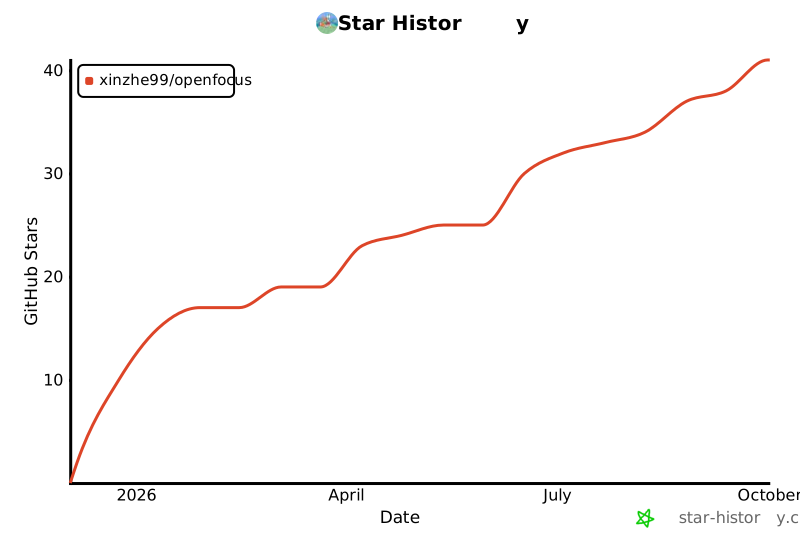
⭐ Star History
1 maintainer

Metadata
1 maintainer
Release files for openfocus 1.35
For a detailed explanation of source distributions (sdists) and built distributions (wheels), please see the package formats documentation.
Built distribution (wheel)
| File | Interpreter | ABI | Platform | Reset |
|---|---|---|---|---|
| openfocus-1.35-py3-none-any.whl | Python 3 | none | any | Details |
Release files / openfocus-1.35-py3-none-any.whl
| Download URL | openfocus-1.35-py3-none-any.whl |
|---|---|
| Size | 3.7 MB |
| Tags | Python 3 |
|
SHA-256 checksum How to use checksums |
65458f4d8586f20a0c8a1a0a6cfb98203924bb89d17f4ce5c258ce4be3005f26
|
|
BLAKE2b-256 checksum How to use checksums |
c6c1a2a6c51f7b3c0362c08b94832226a749b64f679d2f05a7133464c2d59b1e
|
| Upload date | |
|
Uploaded using Trusted Publishing? What is trusted publishing? |
No |
| Uploaded via |
twine/7.0.0 CPython/3.10.19
|














