

OpenFocus
Every pixel, its sharpest frame.
Ten fusion algorithms, five alignment choices and a source-locked retouch workspace for macro, microscopy and industrial stacks. 16-bit end to end, a headless CLI, and a UI in twelve languages.








Download · Docs · Changelog · DOI
English · 简体中文 · 日本語 · Español · Deutsch · Français · Русский · 한국어 · Português · Italiano · Nederlands · Polski

📢 News
Earlier releases are in the Changelog.
📸 If you publish images created with OpenFocus, please consider adding a note such as:
Created with OpenFocus — https://github.com/Xinzhe99/OpenFocus
This is not mandatory, but highly appreciated.
Features


Also in the box:
- Workflow — stack browser, sharpness curve, original-pixel zoom and loupe, ROI and reusable settings.
- Microscopy — 16-bit processing, TIFF Z-stacks, calibration and dust correction.
- Image formats — supported transparent PNG stacks and ICC profile preservation.
- Headless CLI — batch processing, reusable recipes, EXIF focus ordering, auto background and JSON output.
- Projects and recovery — session files, undo/redo and crash recovery.
- Languages — twelve UI languages with automatic locale detection.
- Memory — bounded frame/tile work, disk-backed intermediates and neural models loaded only when selected.
OpenFocus A, B and C are the stable fusion methods. To use the other fusion
methods, enable Experimental features in Advanced Settings or pass
--experimental to the headless CLI.
StackMFF V1/V2/V3 run with the bundled ONNX Runtime. Supported Windows x64 NVIDIA systems can install TensorRT and PyTorch CUDA from Settings → AI acceleration components. With GPU acceleration enabled, OpenFocus tries the applicable native engines, then an accelerated ONNX Runtime provider such as DirectML or CoreML, then CPU. Diagnostics record the engine used by the model. See GPU support.
Neural inference adapts spatial tile size to available resources while keeping all focal frames in each inference. Imported frames and alignment scratch can use disk-backed storage. Large stacks still require enough free temporary disk space and available memory for decoding, model workspaces and full-size output; they may be rejected when those resources are insufficient. StackMFF V2's spatial tiling is an approximation of whole-image inference and can change the result. See fusion methods.
JPEG/RAW display previews use embedded data when available. Processing and original-pixel inspection decode the source independently; a small preview never replaces the pixels used for fusion. Keep enough free RAM and temporary disk space for the selected source, processing workspace and full-size result.
⬇️ Install
The OpenFocus website offers stable desktop builds for Windows x64, macOS Apple Silicon and Linux x86-64. Extract the Linux archive and run OpenFocus/OpenFocus. Desktop updates use the stable channel by default. Enable beta updates in Advanced Settings or the welcome dialog to receive newer prereleases. Linux desktop updates are installed manually from the download page. Desktop downloads · Release history
On macOS (Apple Silicon) or Linux, install from a terminal. On Linux this
command installs the headless CLI; on macOS it installs the app in ~/Applications.
curl -fsSL https://openfocus.top/install.sh | sh
On Windows, run the installer from PowerShell:
irm https://openfocus.top/install.ps1 | iex
To download the Windows installer without running it:
curl.exe -fL https://openfocus.top/download/latest/windows-setup -o OpenFocus-setup.exe
For installation and first-launch help, see the user manual.
🤖 Agent integration
The desktop app starts a token-protected local agent channel automatically.
Use openfocus ctl for typed commands or generic UI actions against the live
window. Agents can load stacks, render, export, open and fill dialogs,
answer file pickers, send mouse/keyboard events and take screenshots.
The pip install openfocus package is headless. To use its ctl command
with a separately running desktop app, also install PyQt6 (pip install PyQt6).
The wheel cannot launch the desktop app; use the desktop build or a checkout.
- Skill:
skills/openfocus-control/SKILL.md - Protocol and command reference:
docs/AGENT_CONTROL_SPEC.md - End-to-end runner:
python tools/agent_gui_smoke.py --launch - Every-action sweep:
python tools/agent_action_sweep.py --launch
💻 Command Line Usage
Or install the CLI on Windows, macOS and Linux — the same pipeline, no GUI stack:
pip install openfocus
openfocus -i ./stack_folder -o ./result/fused.png
For unattended background replacement while retaining the original fusion and its missing-data map:
openfocus -i ./stack_folder -o ./result/fused.tif --auto-background auto --save-stacked --missing-data-map
Folder inputs use EXIF focus steps when every frame supplies them and the
near-to-far step direction is known; otherwise they keep natural filename order. Use --frame-order name to force filename order;
explicitly listed files retain their supplied order.
Recipes preserve native RAW conversion mode and batch output format. Run transient duplicate and alignment reports through direct CLI invocations.
See the CLI manual.
Community & Support
Questions, ideas or feedback? Join our Discord community. We reply as soon as we can; we're based in Beijing (UTC+8), so time differences may affect response times.
- Docs — User Manual (twelve languages) · Changelog · Performance · Fusion methods
- Privacy policy
- Citation — CITATION.cff; every release is archived on Zenodo (DOI)
- Feedback — open an issue for bugs, ideas and algorithm work
- Credits — each fusion/registration algorithm keeps its original research licence; StackMFF V3 lives at Xinzhe99/StackMFF-V3
WeChat: Scan to join the OpenFocus group or follow our official account.
| WeChat group | Official account |
|---|---|
 |
 |
Support OpenFocus: If you enjoy the software, you can buy us a coffee via Alipay in China or PayPal internationally. Include your username in the payment note and we will permanently acknowledge it in the project as a thank-you.
| Alipay · China | PayPal · International |
|---|---|
 |
 Scan or click to donate via PayPal |
License
The OpenFocus application is released under the MIT License. The retrained StackMFF V1/V2 wrappers and weights have separate StackMFF V3 License 1.0 terms, which restrict redistribution, inclusion in other projects and commercial use without the licensor's prior written permission. The bundled StackMFF V3 v2.0 snapshot remains MIT licensed. See the full third-party notices for provenance and terms.
Developing
Run from a checkout:
conda create -n openfocus python=3.10
conda activate openfocus
pip install -r requirements.txt
python main.py
Install the shared development tools and run the regression suite:
python -m pip install -r requirements-dev.txt
python -m pytest -q --timeout=90 --timeout-method=thread
On a headless host, set QT_QPA_PLATFORM=offscreen. CI uses these same dependency
files on Windows, macOS and Linux. A change to processing, cancellation or GUI
state also needs a real CLI/desktop smoke run; tests alone do not exercise the
packaged application.
Keep algorithm descriptors in core/algorithms.py, shared processing in
core/utils, and UI snapshots/dialog orchestration in the controllers. New
methods declare parameters, resource estimates and capabilities once; consumers
derive their choices from that descriptor. Preserve bit depth, source order,
cooperative cancellation and the admitted thread/RAM limits.
Packaging with PyInstaller: docs/BUILD_COMMANDS.md.
Adding a fusion or registration algorithm: CONTRIBUTING.md. The extensibility specification defines the shared registration, parameter, execution and persistence contracts.
⭐ Star History
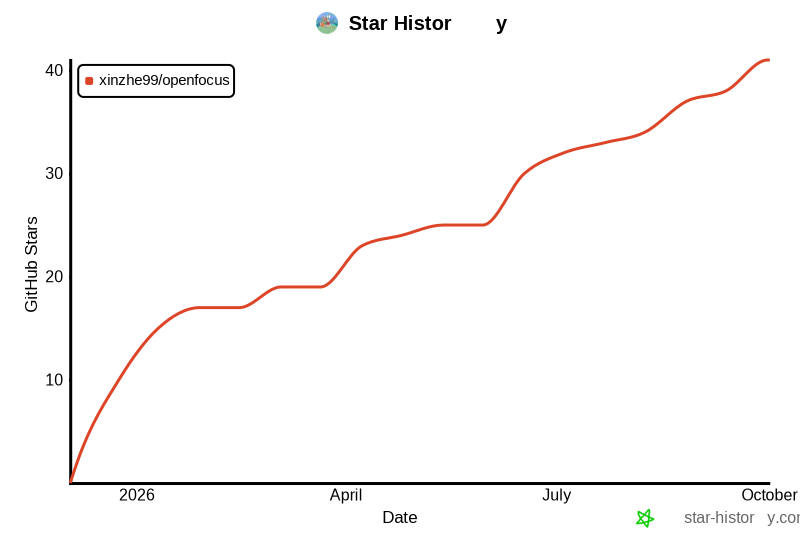
1 maintainer

Metadata
1 maintainer
Release files for openfocus 2.0.0
For a detailed explanation of source distributions (sdists) and built distributions (wheels), please see the package formats documentation.
Source distribution (sdist)
| File | Size | Uploaded | Provenance | Actions |
|---|---|---|---|---|
| openfocus-2.0.0.tar.gz | 5.9 MB | Without provenance | Details for openfocus-2.0.0.tar.gz |
Built distribution (wheel)
| File | Interpreter | ABI | Platform | Actions Reset |
|---|---|---|---|---|
| openfocus-2.0.0-py3-none-any.whl | Python 3 | none | any | Details for openfocus-2.0.0-py3-none-any.whl |
Total release size: 10.9 MB
Release files / openfocus-2.0.0.tar.gz
| Download URL | openfocus-2.0.0.tar.gz |
|---|---|
| Size | 5.9 MB |
| Tags | Source |
|
SHA-256 checksum How to use checksums |
1706d84e84e491b1d88b5e3f9690a6b759faf197bfba69ac22927ec140d6fef4
|
|
BLAKE2b-256 checksum How to use checksums |
2f8b346156a32bb4b1803b3cffc7f61c309daea980d188b3c4fdf54b9b8c912d
|
| Upload date | |
|
Uploaded using Trusted Publishing? What is trusted publishing? |
No |
| Uploaded via |
twine/7.0.0 CPython/3.14.4
|
Release files / openfocus-2.0.0-py3-none-any.whl
| Download URL | openfocus-2.0.0-py3-none-any.whl |
|---|---|
| Size | 5.1 MB |
| Tags | Python 3 |
|
SHA-256 checksum How to use checksums |
26ec597e194dc8fc701b647ee31e1e2ea69f0add1ec89c7861152215254e9d07
|
|
BLAKE2b-256 checksum How to use checksums |
f6e87957eb94ab87b5cffce332a18458a30b5dcb1a0bca54b7da21d4e4f5c0a2
|
| Upload date | |
|
Uploaded using Trusted Publishing? What is trusted publishing? |
No |
| Uploaded via |
twine/7.0.0 CPython/3.14.4
|
Security for openfocus 2.0.0
Provenance
Provenance describes where a file came from. On PyPI, provenance is shared via attestations, which provide a verifiable record of the build or publishing details. View details, limitations and caveats.
No provenance found
None of the files in this release were uploaded with provenance metadata.
A note on package security
PyPI is a repository for distributing packages, not a service for auditing them. While third-party security researchers and our staff do their best to detect and remove malicious packages, PyPI cannot guarantee the quality, security or suitability of any given package.
To learn more about protecting yourself from malicious actors, visit our package security documentation.














