
English · 简体中文 · 日本語 · Español · Deutsch · Français · Русский · 한국어 · Português · Italiano · Nederlands · Polski
 OpenFocus
OpenFocus delivers focus stacking quality that rivals commercial-grade software, while staying fully open source and easy to extend.






📢 News
Earlier releases are in the Changelog.
⬇️ Download & Install
No setup needed — grab a build from the Releases page:
| Platform | File | Type |
|---|---|---|
| Windows 10/11 (64-bit) | OpenFocus-*-setup.exe |
Installer (recommended) |
| Windows 10/11 (64-bit) | OpenFocus-*-windows-x64.zip |
Portable (unzip and run) |
| macOS Apple Silicon (M1–M4) | OpenFocus-*-macos.dmg |
Disk image (drag to Applications) |
| macOS Apple Silicon (M1–M4) | OpenFocus-*-macos-arm64.zip |
Portable (unzip) |
The app is unsigned, so the first launch may show a security prompt:
- Windows: SmartScreen → "More info" → "Run anyway". The first start may take 30–60 s.
- macOS: right-click → Open, or run
xattr -cr /Applications/OpenFocus.appin Terminal.
Full details, including the portable mode and the log folder, are in the User Manual.
💻 Command Line Usage
Beyond the GUI, OpenFocus ships as a pip-installable CLI on PyPI — Windows, macOS and Linux, no Python GUI stack required:
pip install openfocus          # everything: all 8 methods incl. the AI model,
                               # HEIC and camera-RAW input
openfocus --input ./stack_folder --output ./result/fused.png
The AI model, its pretrained weights, HEIC decoding and camera-RAW decoding
are all part of that single install — there are no extras to choose from. The
neural method is the default, so a plain pip install openfocus is a complete
install; nothing reports "AI unavailable" afterwards.
One caveat: dtcwt (the DTCWT method) ships only as source and has no wheels
for Python 3.13+, so it is installed on 3.10–3.12 and skipped on newer
interpreters. Every other method works everywhere; on 3.13 the DTCWT entry
stays disabled with an explanatory tooltip.
Examples:
# Fuse a folder of images with guided filter, no registration
openfocus -i ./stack_folder -o ./result/fused.png

# DTCWT with ECC registration, 8 threads
openfocus -i ./stack_folder -o ./result/fused.png -m dtcwt -a ecc -t 8

# AI fusion forced to CPU with a custom tile size
openfocus -i ./stack_folder -o ./result/fused.png -m stackmffv3 --cpu --tile-size 512

# Explicit file list instead of a folder; video files also work as input
openfocus -i img1.jpg img2.jpg img3.jpg -o fused.png -m gfgfgf

# Batch mode: fuse every folder into one output directory
openfocus --input ./stackA ./stackB --output-dir ./results
Exit codes: 0 success, 1 processing error, 2 usage error. Run openfocus --help for all options. From a source checkout, the same interface works as python main.py ….
📖 Documentation
- User Manual — full feature guide (interface, workflows, wipe compare, settings, batch, CLI, troubleshooting) in twelve languages: English · 中文 · 日本語 · Español · Deutsch · Français · Русский · 한국어 · Português · Italiano · Nederlands · Polski
- Changelog — release history and notable changes
- Performance & Large Stacks — soak-test throughput/memory reference and tuning guidance
- Build Commands — packaging from source with PyInstaller
- Algorithm Parity — what matches Helicon Focus behaviourally, and what does not yet
🛠️ Building from Source
For contributors and platforms without pre-built packages:
conda create -n openfocus python=3.10
conda activate openfocus
pip install -r requirements.txt
python main.py
Packaging with PyInstaller: see docs/BUILD_COMMANDS.md.
Table of Contents
- ⬇️ Download & Install
- 💻 Command Line Usage
- 📖 Documentation
- 🛠️ Building from Source
- 🔭 Overview
- ✨ Highlights
- 🧪 Algorithms
- 📚 References
- 🤝 Contribution
- 📚 Citing OpenFocus
- 📄 License
- ⭐ Star History
🔭 Overview
OpenFocus is a PyQt6-based multi-focus registration and fusion workstation that delivers commercial-grade alignment and blending results. The project is fully open source (MIT License) and runs on CPU by default with optional GPU acceleration for the StackMFF V3 neural model.

AI fusion: StackMFF V3
The default fusion method classifies every pixel by its most probable source frame. Input is a real 10-frame macro stack of a PCB; the focus sweeps across the board between frames.

All ten frames differ in which part is sharp - frames 01-05 hold the switch and its lettering, 06-10 are defocused. The fused result has to keep the sharp version of every region:

Compared with Guided Filter on the same registered stack, the AI result keeps the letter edges crisper and the board surface cleaner. Both crops come from the same region of the same stack (Laplacian sharpness 27.1 vs 28.5):

On a synthetic stack with known ground truth it leads every fusion method on both PSNR and SSIM, and leaves fewer ghost pixels than any classical method:

Benchmark reproducible with python tools/synthetic_benchmark.py --noise 3.
✨ Highlights
- Eight fusion methods — four classical plus OpenFocus A/B/C, with three registration modes (fast similarity, ECC, homography).
- Focus-stack workflow — stack browser, wipe compare, depth maps, source-locked retouch workspace with provenance and frame slider, batch processing, quick preview, and side-by-side method comparison.
- Microscopy-ready — 16-bit end to end, µm/px from TIFF metadata, dust-map flat-field correction, publication scale bars, textured OBJ export.
- Headless CLI — the same pipeline as
openfocus, with batch mode,--dry-run,--resumeand JSON output for scripting. - Projects and recovery —
.ofprojsessions, crash auto-recovery, undo/redo, per-method settings remembered across restarts. - Twelve UI languages — English, 中文, 日本語, Español, Deutsch, Français,
Русский, 한국어, Português, Italiano, Nederlands, Polski. Auto-detected from
the system locale; a new language is one
locales_<code>.pyfile. Every language is checked for clipped labels bytools/lang_ui_audit.py. - Light on memory — the neural stack is loaded only when the neural method is used, so a classical-method session idles around 110 MB instead of 260 MB.
🧪 Algorithms
Fusion Algorithms
- Guided Filter: Fast edge-preserving fusion (Li et al., 2013).
- DCT Multi-Focus Fusion: Block-wise DCT variance with consistency verification — the fastest method.
- Dual-Tree Complex Wavelet Transform (DTCWT): Multi-scale, multi-orientation fusion with one consistent decision per pixel and level.
- GFG-FGF: Gaussian-like four-neighbourhood gradient operator + fast guided filter (Fu et al., 2024), well suited to microscopy.
- StackMFF V3: Pretrained deep model that classifies every pixel by its most probable source frame, with soft (probability-weighted) and hard (per-pixel frame pick) outputs (GPU optional).
- OpenFocus A / B / C: Variance-weighted average, variance depth-map pick, and Laplacian-pyramid fusion.
Registration Algorithms
- OpenFocus (fast): Bounded similarity alignment (translation + rotation + scale) with brightness equalization and auto-crop — sub-second per frame.
- ECC: Intensity-based alignment by maximizing the enhanced correlation coefficient for precise, sub-pixel registration.
- Homography: Feature-based projective alignment (SIFT + RANSAC) for global perspective changes.
License Notice: Every fusion/registration algorithm included comes from open-source research implementations. When using or redistributing them, please follow each algorithm’s original license terms in addition to the OpenFocus MIT license.
📚 References
- M. B. A. Haghighat, A. Aghagolzadeh, and H. Seyedarabi, "Multi-focus image fusion for visual sensor networks in DCT domain," Computers & Electrical Engineering, vol. 37, no. 5, pp. 789-797, 2011.
- J. J. Lewis, R. J. O'Callaghan, S. G. Nikolov, D. R. Bull, and N. Canagarajah, "Pixel- and region-based image fusion with complex wavelets," Information Fusion, vol. 8, no. 2, pp. 119-130, 2007.
- S. Li, X. Kang, and J. Hu, "Image fusion with guided filtering," IEEE Transactions on Image Processing, vol. 22, no. 7, pp. 2864-2875, 2013.
- 付宏语, 巩岩, 汪路涵, 等. 多聚焦显微图像融合算法[J]. Laser & Optoelectronics Progress, 2024, 61(6): 0618022-0618022-9.
- X. Xie, StackMFF V3: Order-Invariant Focus Stacking via Pixel-Wise Source Classification, 2026. Code, pretrained weights and benchmark: github.com/Xinzhe99/StackMFF-V3.
🤝 Contribution
We welcome community contributions of all kinds:
- Issues: Report bugs, request features, or propose UX enhancements.
- Algorithm & Performance Work: Share new fusion/registration ideas, optimizations.
If you use the AI fusion mode, please also cite the underlying method: StackMFF V3.
Bug reports or suggestions? Please open an issue so we can follow up quickly.
📚 Citing OpenFocus
If OpenFocus contributes to your research or work, please cite it — it makes the project visible to others who need it:
@software{xie_openfocus,
  author  = {Xie, Xinzhe},
  title   = {{OpenFocus}: An Open-Source Multi-Focus Image Fusion Workstation},
  year    = {2026},
  url     = {https://github.com/Xinzhe99/OpenFocus},
  doi     = {10.5281/zenodo.23050823},
  license = {MIT}
}
The repository's About sidebar has a Cite this repository button (generated from CITATION.cff). Every release is archived on Zenodo with a versioned DOI — the DOI above always resolves to the latest release; cite the specific version DOI when your work depends on a particular one.
If you publish images created with OpenFocus, a note such as "Created with OpenFocus – https://github.com/Xinzhe99/OpenFocus" is appreciated (not required).
📄 License
This project is released under the MIT License. Feel free to use, modify, and distribute within the terms of the license.
If OpenFocus helps you, please consider leaving a ⭐ on the repository!
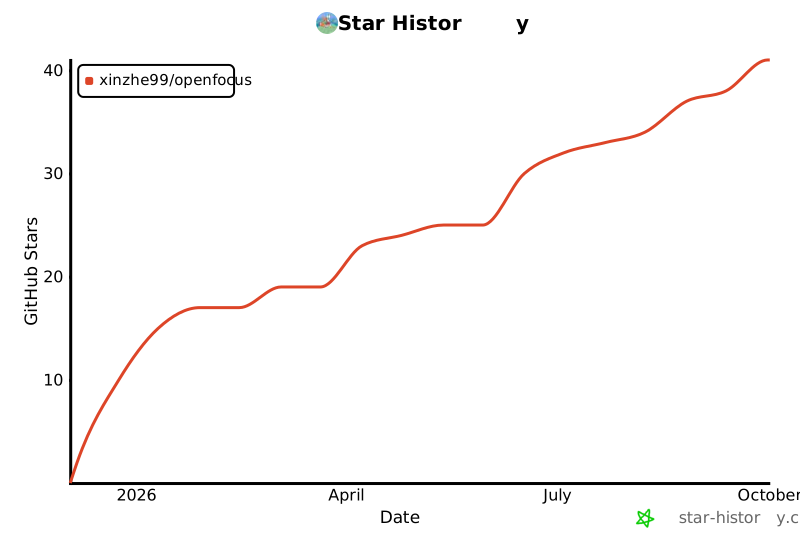
⭐ Star History
1 maintainer

Metadata
1 maintainer
Release files for openfocus 1.68.0
For a detailed explanation of source distributions (sdists) and built distributions (wheels), please see the package formats documentation.
Source distribution (sdist)
| File | Size | Uploaded | Provenance | |
|---|---|---|---|---|
| openfocus-1.68.0.tar.gz | 1.2 MB | Without provenance | Details |
Built distribution (wheel)
| File | Interpreter | ABI | Platform | Reset |
|---|---|---|---|---|
| openfocus-1.68.0-py3-none-any.whl | Python 3 | none | any | Details |
Total release size: 2.3 MB
Release files / openfocus-1.68.0.tar.gz
| Download URL | openfocus-1.68.0.tar.gz |
|---|---|
| Size | 1.2 MB |
| Tags | Source |
|
SHA-256 checksum How to use checksums |
44a72cf35e36540129e43f3f0cb9b293a655ae3d846cff62817a309d74d92ca9
|
|
BLAKE2b-256 checksum How to use checksums |
37a99f3ed5884e6efa1dd3d2f63c3015410653ed8dfa0bb04f464f508318b6f5
|
| Upload date | |
|
Uploaded using Trusted Publishing? What is trusted publishing? |
No |
| Uploaded via |
twine/7.0.0 CPython/3.12.3
|
Release files / openfocus-1.68.0-py3-none-any.whl
| Download URL | openfocus-1.68.0-py3-none-any.whl |
|---|---|
| Size | 1.1 MB |
| Tags | Python 3 |
|
SHA-256 checksum How to use checksums |
c9be2b1e8d1a4c3521c3459b86696c5e71f1f9d47c89fead05f5ab46c60343b8
|
|
BLAKE2b-256 checksum How to use checksums |
fdbeadd901d7eeec0af5516f1c8bd4873743e70c95fad0e3b58aa3bfbd89f04a
|
| Upload date | |
|
Uploaded using Trusted Publishing? What is trusted publishing? |
No |
| Uploaded via |
twine/7.0.0 CPython/3.12.3
|
Security for openfocus 1.68.0
Provenance
Provenance describes where a file came from. On PyPI, provenance is shared via attestations, which provide a verifiable record of the build or publishing details. View details, limitations and caveats.
No provenance found
None of the files in this release were uploaded with provenance metadata.
A note on package security
PyPI is a repository for distributing packages, not a service for auditing them. While third-party security researchers and our staff do their best to detect and remove malicious packages, PyPI cannot guarantee the quality, security or suitability of any given package.
To learn more about protecting yourself from malicious actors, visit our package security documentation.














