
 OpenFocus
OpenFocus delivers focus stacking quality that rivals commercial-grade software, while staying fully open source and easy to extend.





📢 News
2026.10.15 · v1.52–v1.53 — retouch brush & a quality pass. New Retouch tool (
Ctrl+T): paint pixels from a source frame onto the result to fix halos — it auto-picks the sharpest frame under the brush. DTCWT rebuilt (+5 dB on the ground-truth benchmark), GFG-FGF now follows its paper (#5) and no longer drops small in-focus objects. Smoother workflow: no modal popup after every render, live progress, optional load-scale prompt, per-method kernel memory, Ctrl+S saves the selected output.
2026.10.14 · v1.50–v1.51 — dust-map flat-field fixes, in-place background updates with per-version release notes.
2026.10.13 · v1.39–v1.49 — the Helicon Focus era. OpenFocus A/B/C (variance-weighted average, variance depth-map pick, Laplacian pyramid) reverse-engineered and verified against the original binary: 99.5% depth-map agreement, ~1% MAE on real stacks. Plus a fast bounded-similarity alignment (translation + rotation + scale), dust-map flat-field correction, per-pixel depth maps for every index-deciding method, an alignment-only mode, and single-choice dropdowns for all algorithm picking.
Earlier: v1.28–v1.37 — pip CLI, scale bars, multi-page TIFF, crash recovery, background updates, undo/redo · v1.21–v1.27 — portable mode, self-update, .ofproj, 16-bit pipeline, JA/ES · v1.9–v1.20 — wipe compare, themes, compare-all, quick preview. Full history in the Changelog.
⬇️ Download & Install
No setup needed — grab a build from the Releases page:
| Platform | File | Type |
|---|---|---|
| Windows 10/11 (64-bit) | OpenFocus-*-setup.exe |
Installer (recommended) |
| Windows 10/11 (64-bit) | OpenFocus-*-windows-x64.zip |
Portable (unzip and run) |
| macOS Apple Silicon (M1–M4) | OpenFocus-*-macos.dmg |
Disk image (drag to Applications) |
| macOS Apple Silicon (M1–M4) | OpenFocus-*-macos-arm64.zip |
Portable (unzip) |
The app is unsigned, so the first launch may show a security prompt:
- Windows: SmartScreen → "More info" → "Run anyway". The first start may take 30–60 s.
- macOS: right-click → Open, or run
xattr -cr /Applications/OpenFocus.appin Terminal.
Full details, including the portable mode and the log folder, are in the User Manual.
💻 Command Line Usage
Beyond the GUI, OpenFocus ships as a pip-installable CLI on PyPI — Windows, macOS and Linux, no Python GUI stack required:
pip install openfocus          # all 8 fusion methods (4 classical + Helicon-derived OpenFocus A/B/C)
pip install "openfocus[ai]"    # + the AI (StackMFF-V4) model, weights included
pip install "openfocus[raw]"   # + camera RAW input (rawpy / LibRaw)
openfocus --input ./stack_folder --output ./result/fused.png
Examples:
# Fuse a folder of images with guided filter, no registration
openfocus -i ./stack_folder -o ./result/fused.png

# DTCWT with ECC registration, 8 threads
openfocus -i ./stack_folder -o ./result/fused.png -m dtcwt -a ecc -t 8

# AI fusion forced to CPU with a custom tile size
openfocus -i ./stack_folder -o ./result/fused.png -m stackmffv4 --cpu --tile-size 512

# Explicit file list instead of a folder; video files also work as input
openfocus -i img1.jpg img2.jpg img3.jpg -o fused.png -m gfgfgf

# Batch mode: fuse every folder into one output directory
openfocus --input ./stackA ./stackB --output-dir ./results
Exit codes: 0 success, 1 processing error, 2 usage error. Run openfocus --help for all options. From a source checkout, the same interface works as python main.py ….
📖 Documentation
- User Manual (English) — full feature guide: interface, workflows, wipe compare, settings, batch, CLI, troubleshooting
- 用户手册(中文) — 完整中文功能手册
- Changelog — release history and notable changes
- Performance & Large Stacks — soak-test throughput/memory reference and tuning guidance
- Build Commands — packaging from source with PyInstaller
🛠️ Building from Source
For contributors and platforms without pre-built packages:
conda create -n openfocus python=3.10
conda activate openfocus
pip install -r requirements.txt
python main.py
Packaging with PyInstaller: see docs/BUILD_COMMANDS.md.
Table of Contents
- ⬇️ Download & Install
- 💻 Command Line Usage
- 📖 Documentation
- 🛠️ Building from Source
- 🔭 Overview
- ✨ Highlights
- 🧪 Algorithms & Benchmark
- 📚 References
- 🤝 Contribution
- 📚 Citing OpenFocus
- 📄 License
- ⭐ Star History
🔭 Overview
OpenFocus is a PyQt6-based multi-focus registration and fusion workstation that delivers commercial-grade alignment and blending results. The project is fully open source (MIT License) and runs on CPU by default with optional GPU acceleration for the StackMFF V4 neural model.

✨ Highlights
- Beginner-Friendly: Plug-and-play workflows with unapologetically simple, guided operations.
- Flexible Processing Flows: Run fusion-only, registration-only, or combined registration + fusion pipelines depending on your workload.
- Wipe Compare View: Overlay any source frame and any result in one frame with a draggable divider and shared zoom — spot alignment errors at a glance.
- Batch Automation: Kick off batch jobs across multiple folders with live progress, cancellation, and automatic output organization.
- Headless CLI: Full pipeline from the command line with script-friendly exit codes.
- Retouch Brush: Fix halos or wrongly picked details by painting from a source frame — the brush auto-picks the frame that is sharpest under the cursor; soft edges, undo/redo, 16-bit safe.
- Annotation & Export Toolkit: Overlay labels, scale bars, export GIF animations and multi-page TIFF stacks, drag results straight out of the app, and save in JPG/PNG/WebP/BMP/TIFF (16-bit preserved end to end).
- AI-Assisted Fusion: Ship with StackMFF V4 to unlock deep-learning-quality fusion alongside classic signal-processing methods.
- Depth Maps: Per-pixel focus-position maps from any fusion method's own measure, with customizable pseudo-color schemes (built-in palettes or your own color stops), overlay-on-result view, and 16-bit raw export.
- Microscopy-Ready: 16-bit pipeline, µm/px calibration from TIFF metadata, dust-map flat-field correction, publication scale bars.
- Remembers You: Settings, language, GPU preference, per-method parameters and recently opened stacks persist across sessions; crash auto-recovery; English, 中文, 日本語 and Español UI.
🧪 Algorithms
Fusion Algorithms
- Guided Filter: Fast edge-preserving fusion (Li et al., 2013).
- DCT Multi-Focus Fusion: Block-wise DCT variance with consistency verification — the fastest method.
- Dual-Tree Complex Wavelet Transform (DTCWT): Multi-scale, multi-orientation fusion with one consistent decision per pixel and level.
- GFG-FGF: Gaussian-like four-neighbourhood gradient operator + fast guided filter (Fu et al., 2024), well suited to microscopy.
- StackMFF V4: Pretrained deep model (GPU optional).
- OpenFocus A / B / C: The Helicon Focus method family (weighted average / depth-map pick / pyramid), reverse-engineered and verified against the original software's output.
Registration Algorithms
- OpenFocus (fast): Bounded similarity alignment (translation + rotation + scale) with brightness equalization and auto-crop — sub-second per frame.
- ECC: Intensity-based alignment by maximizing the enhanced correlation coefficient for precise, sub-pixel registration.
- Homography: Feature-based projective alignment (SIFT + RANSAC) for global perspective changes.
Benchmark
tools/synthetic_benchmark.py defocuses a detailed texture along a known depth map into a 16-frame stack, so every method can be scored against the true all-in-focus image (higher PSNR is better; oracle = best possible per-pixel frame pick; CPU, 1024×768):
| Method | Clean (dB) | Sensor noise σ=3 (dB) | Small near objects (dB) | Time |
|---|---|---|---|---|
| oracle pick | 43.7 | 37.5 | 34.9 | – |
| StackMFF V4 | 42.9 | 35.5 | 34.7 | 9 s |
| OpenFocus C | 41.7 | 37.0 | 34.3 | 1.0 s |
| OpenFocus B | 41.0 | 36.7 | 34.0 | 0.3 s |
| GFG-FGF | 40.9 | 36.7 | 34.4 | 0.8 s |
| Guided Filter | 40.3 | 36.7 | 34.4 | 0.6 s |
| DCT | 40.1 | 36.4 | 33.3 | 0.1 s |
| DTCWT | 39.4 | 36.1 | 33.9 | 8 s |
OpenFocus A (weighted average) is a deliberately soft look and is not built for this test. Reproduce with python tools/synthetic_benchmark.py [--noise 3] [--scene small].
OpenFocus vs. Helicon Focus
| OpenFocus | Helicon Focus 8 | |
|---|---|---|
| Price / license | Free, MIT, source available | Commercial (Lite/Pro/Premium) |
| Platforms | Windows, macOS, CLI on Linux | Windows, macOS |
| Fusion methods | 8 (incl. Helicon's A/B/C family, AI model) | 3 (A/B/C) |
| Retouch brush | ✓ with sharpest-frame auto-pick | ✓ |
| Alignment | 3 methods (similarity, ECC, homography) | 1 |
| Depth maps | ✓ for every index-deciding method, 16-bit export | ✓ |
| One-click compare of all methods (wipe view) | ✓ | render each method separately |
| Command line | ✓ (pip install openfocus, Linux too) |
✓ (paid editions) |
| Batch, dust map, scale bar, 16-bit, multi-page TIFF | ✓ | ✓ |
| Camera RAW input | ✓ (LibRaw, 16-bit) | ✓ |
| 3D model export, camera/rail control | – | ✓ |
License Notice: Every fusion/registration algorithm included comes from open-source research implementations. When using or redistributing them, please follow each algorithm’s original license terms in addition to the OpenFocus MIT license.
📚 References
- M. B. A. Haghighat, A. Aghagolzadeh, and H. Seyedarabi, "Multi-focus image fusion for visual sensor networks in DCT domain," Computers & Electrical Engineering, vol. 37, no. 5, pp. 789-797, 2011.
- J. J. Lewis, R. J. O'Callaghan, S. G. Nikolov, D. R. Bull, and N. Canagarajah, "Pixel- and region-based image fusion with complex wavelets," Information Fusion, vol. 8, no. 2, pp. 119-130, 2007.
- S. Li, X. Kang, and J. Hu, "Image fusion with guided filtering," IEEE Transactions on Image Processing, vol. 22, no. 7, pp. 2864-2875, 2013.
- 付宏语, 巩岩, 汪路涵, 等. 多聚焦显微图像融合算法[J]. Laser & Optoelectronics Progress, 2024, 61(6): 0618022-0618022-9.
🤝 Contribution
We welcome community contributions of all kinds:
- Issues: Report bugs, request features, or propose UX enhancements.
- Algorithm & Performance Work: Share new fusion/registration ideas, optimizations.
Bug reports or suggestions? Please open an issue so we can follow up quickly.
📚 Citing OpenFocus
If OpenFocus contributes to your research or work, please cite it — it makes the project visible to others who need it:
@software{xie_openfocus,
  author  = {Xie, Xinzhe},
  title   = {{OpenFocus}: An Open-Source Multi-Focus Image Fusion Workstation},
  year    = {2026},
  url     = {https://github.com/Xinzhe99/OpenFocus},
  doi     = {10.5281/zenodo.23050823},
  license = {MIT}
}
The repository's About sidebar has a Cite this repository button (generated from CITATION.cff). Every release is archived on Zenodo with a versioned DOI — the DOI above always resolves to the latest release; cite the specific version DOI when your work depends on a particular one.
If you publish images created with OpenFocus, a note such as "Created with OpenFocus – https://github.com/Xinzhe99/OpenFocus" is appreciated (not required).
📄 License
This project is released under the MIT License. Feel free to use, modify, and distribute within the terms of the license.
If OpenFocus helps you, please consider leaving a ⭐ on the repository!
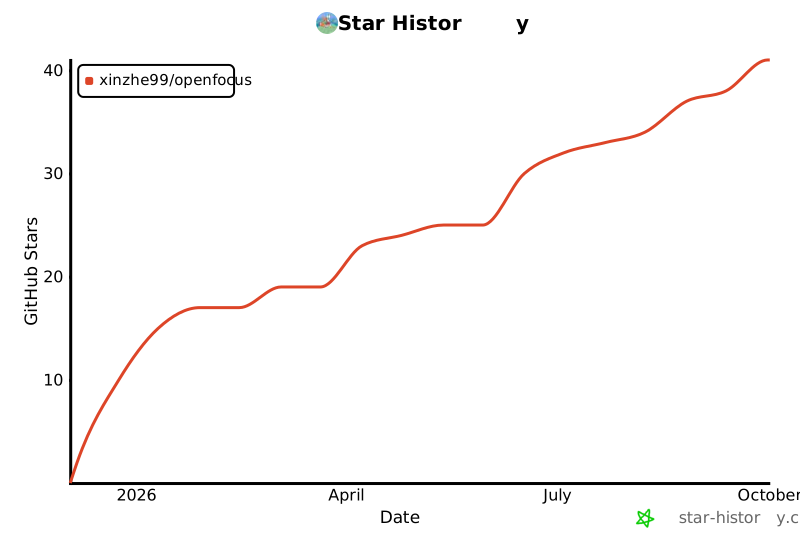
⭐ Star History
1 maintainer

Metadata
1 maintainer
Release files for openfocus 1.54
For a detailed explanation of source distributions (sdists) and built distributions (wheels), please see the package formats documentation.
Source distribution (sdist)
| File | Size | Uploaded | |
|---|---|---|---|
| openfocus-1.54.tar.gz | 3.8 MB | Details |
Built distribution (wheel)
| File | Interpreter | ABI | Platform | Reset |
|---|---|---|---|---|
| openfocus-1.54-py3-none-any.whl | Python 3 | none | any | Details |
Total release size: 7.5 MB
Release files / openfocus-1.54.tar.gz
| Download URL | openfocus-1.54.tar.gz |
|---|---|
| Size | 3.8 MB |
| Tags | Source |
|
SHA-256 checksum How to use checksums |
76739dd476149cc310704a98dfe65b714c7494fd9c6fcbee0c507e588948351d
|
|
BLAKE2b-256 checksum How to use checksums |
87d5e7765254ead4a189ea21da5dbd523a47f1e20188d373e2094ef080b62fd8
|
| Upload date | |
|
Uploaded using Trusted Publishing? What is trusted publishing? |
No |
| Uploaded via |
twine/7.0.0 CPython/3.12.3
|
Release files / openfocus-1.54-py3-none-any.whl
| Download URL | openfocus-1.54-py3-none-any.whl |
|---|---|
| Size | 3.7 MB |
| Tags | Python 3 |
|
SHA-256 checksum How to use checksums |
b12a2c3f917c508bd12a98cf0a9e02ae3d4e9a2a4e3f68530a1ffdb1c23ecb27
|
|
BLAKE2b-256 checksum How to use checksums |
2364e4ede21510a310a68956d3cec7acb2378941841fb41c71acfc3485dcee8e
|
| Upload date | |
|
Uploaded using Trusted Publishing? What is trusted publishing? |
No |
| Uploaded via |
twine/7.0.0 CPython/3.12.3
|














