

OpenFocus
Every focus plane. One all-in-focus image.
Eight fusion algorithms, three registration modes and a source-locked retouch workspace for macro, microscopy and industrial stacks. 16-bit end to end, a headless CLI, and a UI in twelve languages.








Download · Docs · Changelog · DOI
English · 简体中文 · 日本語 · Español · Deutsch · Français · Русский · 한국어 · Português · Italiano · Nederlands · Polski

📢 News
Earlier releases are in the Changelog.
Features


Also in the box:
- Focus-stack workflow — stack browser, sharpness curve, quick preview, ROI render, and per-method settings remembered across restarts.
- Microscopy-ready — 16-bit end to end, µm/px from TIFF metadata, dust-map flat-field correction, multi-page TIFF Z-stacks, textured OBJ export.
- Headless CLI — the same pipeline as
openfocus, with batch mode,--dry-run,--resumeand JSON output for scripting. - Projects and recovery —
.ofprojsessions, crash auto-recovery, undo/redo across stack edits and annotations. - Twelve UI languages — English, 中文, 日本語, Español, Deutsch, Français,
Русский, 한국어, Português, Italiano, Nederlands, Polski. Auto-detected from
the system locale; a new language is one
locales_<code>.pyfile. - Light on memory — the neural stack is loaded only when the neural method is used, so a classical-method session idles around 110 MB instead of 260 MB.
⬇️ Install
No setup needed — grab a build from the Releases page:
| Platform | File | Type |
|---|---|---|
| Windows 10/11 (64-bit) | OpenFocus-*-setup.exe |
Installer (recommended) |
| Windows 10/11 (64-bit) | OpenFocus-*-windows-x64.zip |
Portable (unzip and run) |
| macOS Apple Silicon (M1–M4) | OpenFocus-*-macos.dmg |
Disk image (drag to Applications) |
| macOS Apple Silicon (M1–M4) | OpenFocus-*-macos-arm64.zip |
Portable (unzip) |
The app is unsigned, so the first launch may show a security prompt: Windows SmartScreen → "More info" → "Run anyway" (the first start may take 30–60 s); macOS right-click → Open, or run xattr -cr /Applications/OpenFocus.app in Terminal.
💻 Command Line Usage
Or install the CLI on Windows, macOS and Linux — the same pipeline, no GUI stack:
pip install openfocus
openfocus -i ./stack_folder -o ./result/fused.png
The AI model, its weights, HEIC and camera-RAW decoding are all in that single install. dtcwt is skipped on Python 3.13+, where the DTCWT entry stays disabled with a tooltip.
Community & Support
- Docs — User Manual (twelve languages) · Changelog · Performance · Algorithm parity
- Citation — CITATION.cff; every release is archived on Zenodo (DOI)
- Feedback — open an issue for bugs, ideas and algorithm work
- Credits — each fusion/registration algorithm keeps its original research licence; StackMFF V3 lives at Xinzhe99/StackMFF-V3
Developing
Run from a checkout:
conda create -n openfocus python=3.10
conda activate openfocus
pip install -r requirements.txt
python main.py
Packaging with PyInstaller: docs/BUILD_COMMANDS.md.
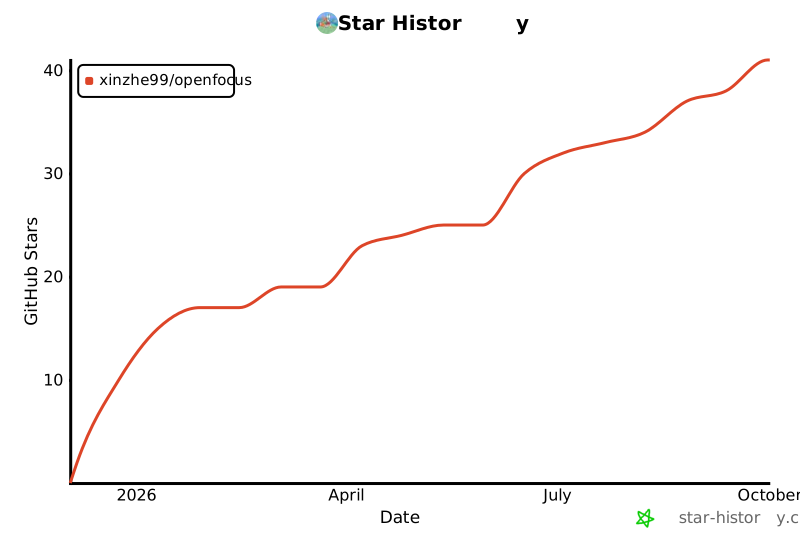
⭐ Star History
1 maintainer

Metadata
1 maintainer
Release files for openfocus 1.69.0
For a detailed explanation of source distributions (sdists) and built distributions (wheels), please see the package formats documentation.
Source distribution (sdist)
| File | Size | Uploaded | Provenance | |
|---|---|---|---|---|
| openfocus-1.69.0.tar.gz | 1.2 MB | Without provenance | Details |
Built distribution (wheel)
| File | Interpreter | ABI | Platform | Reset |
|---|---|---|---|---|
| openfocus-1.69.0-py3-none-any.whl | Python 3 | none | any | Details |
Total release size: 2.3 MB
Release files / openfocus-1.69.0.tar.gz
| Download URL | openfocus-1.69.0.tar.gz |
|---|---|
| Size | 1.2 MB |
| Tags | Source |
|
SHA-256 checksum How to use checksums |
4eca192375981cb9d6edea53537c0d9e1761dc386a97a80ab9d6a90d9da57898
|
|
BLAKE2b-256 checksum How to use checksums |
7c0714d8b0889749a4bed2a2aff5ae7e12c6db37afc6951c5041f5c0a973dcc5
|
| Upload date | |
|
Uploaded using Trusted Publishing? What is trusted publishing? |
No |
| Uploaded via |
twine/7.0.0 CPython/3.12.3
|
Release files / openfocus-1.69.0-py3-none-any.whl
| Download URL | openfocus-1.69.0-py3-none-any.whl |
|---|---|
| Size | 1.1 MB |
| Tags | Python 3 |
|
SHA-256 checksum How to use checksums |
7fd489a46561a90e0814bb599fdc2fbf08b9c71c689faf54d747862589bbe3ea
|
|
BLAKE2b-256 checksum How to use checksums |
f1ff6def9c77d5502488f0ef3165929a89e443352cf3e223e9fc7d7762ff1ced
|
| Upload date | |
|
Uploaded using Trusted Publishing? What is trusted publishing? |
No |
| Uploaded via |
twine/7.0.0 CPython/3.12.3
|
Security for openfocus 1.69.0
Provenance
Provenance describes where a file came from. On PyPI, provenance is shared via attestations, which provide a verifiable record of the build or publishing details. View details, limitations and caveats.
No provenance found
None of the files in this release were uploaded with provenance metadata.
A note on package security
PyPI is a repository for distributing packages, not a service for auditing them. While third-party security researchers and our staff do their best to detect and remove malicious packages, PyPI cannot guarantee the quality, security or suitability of any given package.
To learn more about protecting yourself from malicious actors, visit our package security documentation.














