

OpenFocus
Every focus plane. One all-in-focus image.
Ten fusion algorithms, three registration modes and a source-locked retouch workspace for macro, microscopy and industrial stacks. 16-bit end to end, a headless CLI, and a UI in twelve languages.








Download · Docs · Changelog · DOI
English · 简体中文 · 日本語 · Español · Deutsch · Français · Русский · 한국어 · Português · Italiano · Nederlands · Polski

📢 News
Earlier releases are in the Changelog.
📸 If you publish images created with OpenFocus, please consider adding a note such as:
Created with OpenFocus — https://github.com/Xinzhe99/OpenFocus
This is not mandatory, but highly appreciated.
Features
AI fusion: StackMFF V3The default method classifies every pixel by its most probable source frame with a neural network. On the same registered stack it keeps letter edges crisper and surfaces cleaner than Guided Filter (Laplacian sharpness 27.1 vs 28.5), and it leads every method on PSNR and SSIM against synthetic ground truth — with fewer ghost pixels than any classical algorithm. [StackMFF V3 →](https://github.com/Xinzhe99/StackMFF V3) · Benchmark → |
|
Wipe compareDrag the divider across a frame and the fused result to see exactly what the blend changed — alignment drift, haloed edges and lost detail are visible at a glance, at any zoom. |
|
Method comparisonRender every method once, inspect them side by side at a shared crop, then adopt the winner as a new output or copy its parameters back to the main window. |
|
Depth map & 3DPer-pixel focus position from five focus measures, with research colour maps, physical Z calibration from TIFF metadata, and a textured OBJ export of the surface. |
|
Source-locked retouchPaint from the frames that actually produced the result: shared zoom and pan, a source-frame slider, soft brush, restore brush, whole-stroke undo and a "not exported" guard for new pixels. |
|
Batch processingPoint it at a folder of stacks, choose a method and a destination, and walk away. Align-only runs write one folder per stack; fusion runs write the fused image and list exactly that. |
|
Publication scale barsCalibrated from TIFF metadata or typed in, drawn with the real font at the real length, and burned into every export — single images, stacks, multi-page TIFF, GIF and batch output alike. A bar that cannot fit legibly says so instead of printing a length it does not draw. |
|
Captions and labelsKeep a managed list of captions, each with its own scope (source, aligned
stack or a specific output), frame range and style. The preview and every
export use the same target and frame number, so |
|
Agent-drivableEvery window, widget and menu is addressable over a token-protected local channel: an agent loads a stack, renders, retouches, compares, solves depth, exports and answers dialogs — by typed command, by widget path, or with real mouse and keyboard events. No screen scraping or OCR is required; the channel starts with the desktop app. |
|


Also in the box:
- Focus-stack workflow — stack browser, sharpness curve, quick preview, ROI render, and per-method settings remembered across restarts.
- Microscopy-ready — 16-bit end to end, µm/px from TIFF metadata, dust-map flat-field correction, multi-page TIFF Z-stacks, textured OBJ export.
- Headless CLI — the same pipeline as
openfocus, with batch mode,--dry-run,--resumeand JSON output for scripting. - Agent-drivable — a token-protected local channel drives the live GUI (typed pipeline commands plus generic widget/menu/mouse/keyboard control), with a skill, a 14-check smoke runner and a full menu-action sweep.
- Projects and recovery —
.ofprojsessions, crash auto-recovery, undo/redo across stack edits and annotations. - Twelve UI languages — English, 中文, 日本語, Español, Deutsch, Français,
Русский, 한국어, Português, Italiano, Nederlands, Polski. Auto-detected from
the system locale; a new language is one
locales/<code>.pyfile. - Light on memory — the neural stack is loaded only when the neural method is used, so a classical-method session idles around 110 MB instead of 260 MB.
⬇️ Install
No setup needed — grab a build from the Releases page:
| Platform | File | Type |
|---|---|---|
| Windows 10/11 (64-bit) | OpenFocus-*-setup.exe |
Installer (recommended) |
| Windows 10/11 (64-bit) | OpenFocus-*-windows-x64.zip |
Portable (unzip and run) |
| macOS Apple Silicon (M1–M4) | OpenFocus-*-macos.dmg |
Disk image (drag to Applications) |
| macOS Apple Silicon (M1–M4) | OpenFocus-*-macos-arm64.zip |
Portable (unzip) |
The app is unsigned, so the first launch may show a security prompt: Windows SmartScreen → "More info" → "Run anyway" (the first start may take 30–60 s); macOS right-click → Open, or run xattr -cr /Applications/OpenFocus.app in Terminal.
🤖 Agent integration
The desktop app starts a token-protected local agent channel automatically.
Use openfocus ctl for typed commands or generic UI actions against the live
window. Agents can load stacks, render, export, open and fill dialogs,
answer file pickers, send mouse/keyboard events and take screenshots.
- Skill:
skills/openfocus-control/SKILL.md - Protocol and command reference:
docs/AGENT_CONTROL_SPEC.md - End-to-end runner:
python tools/agent_gui_smoke.py --launch - Every-action sweep:
python tools/agent_action_sweep.py --launch
💻 Command Line Usage
Or install the CLI on Windows, macOS and Linux — the same pipeline, no GUI stack:
pip install openfocus
openfocus -i ./stack_folder -o ./result/fused.png
The AI model, its weights, HEIC and camera-RAW decoding are all in that single install. dtcwt is skipped on Python 3.13+, where the DTCWT entry stays disabled with a tooltip.
Community & Support
- Docs — User Manual (twelve languages) · Changelog · Performance · Fusion methods
- Citation — CITATION.cff; every release is archived on Zenodo (DOI)
- Feedback — open an issue for bugs, ideas and algorithm work
- Credits — each fusion/registration algorithm keeps its original research licence; StackMFF V3 lives at Xinzhe99/StackMFF
License
The OpenFocus application is released under the MIT License.
StackMFF series exception. The StackMFF fusion algorithms — currently StackMFF V3 and any future state-of-the-art editions — remain the property of the OpenFocus project, which retains all rights to the StackMFF series. You may use them as part of OpenFocus for your own images and internal work. Copying, porting or migrating these algorithms into another open-source project requires prior written permission.
Developing
Run from a checkout:
conda create -n openfocus python=3.10
conda activate openfocus
pip install -r requirements.txt
python main.py
Packaging with PyInstaller: docs/BUILD_COMMANDS.md.
Adding a fusion or registration algorithm: CONTRIBUTING.md. The extensibility specification defines the shared registration, parameter, execution and persistence contracts.
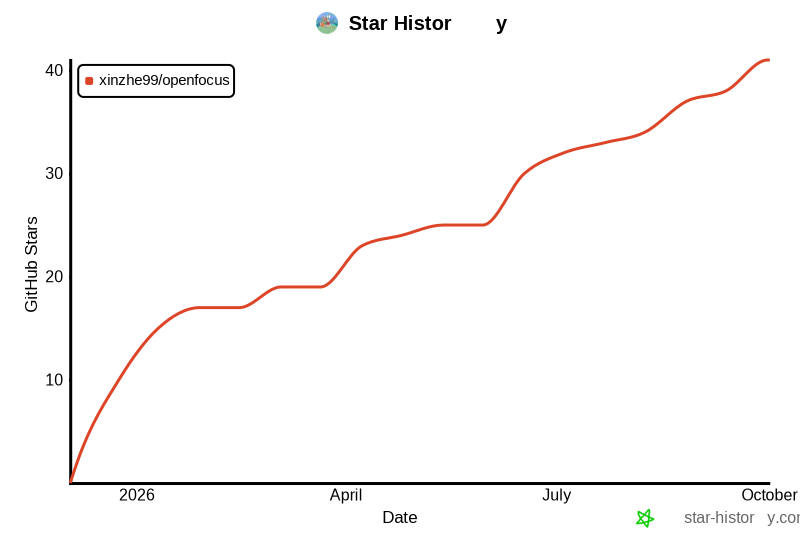
⭐ Star History
1 maintainer

Metadata
1 maintainer
Release files for openfocus 1.74.0
For a detailed explanation of source distributions (sdists) and built distributions (wheels), please see the package formats documentation.
Source distribution (sdist)
| File | Size | Uploaded | Provenance | Actions |
|---|---|---|---|---|
| openfocus-1.74.0.tar.gz | 24.0 MB | Without provenance | Details for openfocus-1.74.0.tar.gz |
Built distribution (wheel)
| File | Interpreter | ABI | Platform | Actions Reset |
|---|---|---|---|---|
| openfocus-1.74.0-py3-none-any.whl | Python 3 | none | any | Details for openfocus-1.74.0-py3-none-any.whl |
Total release size: 47.9 MB
Release files / openfocus-1.74.0.tar.gz
| Download URL | openfocus-1.74.0.tar.gz |
|---|---|
| Size | 24.0 MB |
| Tags | Source |
|
SHA-256 checksum How to use checksums |
daf678b22f6c45ae2dc812f438f2f317e4daaf8e4e7a0922d3a719d9cb70fcda
|
|
BLAKE2b-256 checksum How to use checksums |
1dec0a2e90bfdfb5fc689472dae33d58301ad4b0e488db46af842515a99e4de2
|
| Upload date | |
|
Uploaded using Trusted Publishing? What is trusted publishing? |
No |
| Uploaded via |
twine/7.0.0 CPython/3.14.4
|
Release files / openfocus-1.74.0-py3-none-any.whl
| Download URL | openfocus-1.74.0-py3-none-any.whl |
|---|---|
| Size | 23.9 MB |
| Tags | Python 3 |
|
SHA-256 checksum How to use checksums |
58c8b5759baa0c5d88c9bd1d1ed763e3568c16653a2dcd77bdcae2f9e6193515
|
|
BLAKE2b-256 checksum How to use checksums |
8b411ba37a6204e08aa5cebd17223245356dca7e532bcbadc5812f56fa90acfd
|
| Upload date | |
|
Uploaded using Trusted Publishing? What is trusted publishing? |
No |
| Uploaded via |
twine/7.0.0 CPython/3.14.4
|
Security for openfocus 1.74.0
Provenance
Provenance describes where a file came from. On PyPI, provenance is shared via attestations, which provide a verifiable record of the build or publishing details. View details, limitations and caveats.
No provenance found
None of the files in this release were uploaded with provenance metadata.
A note on package security
PyPI is a repository for distributing packages, not a service for auditing them. While third-party security researchers and our staff do their best to detect and remove malicious packages, PyPI cannot guarantee the quality, security or suitability of any given package.
To learn more about protecting yourself from malicious actors, visit our package security documentation.














