
Transcribe (whisper) and translate (gpt) voice into LRC file.

Project description
Open-Lyrics




Open-Lyrics is a Python library that transcribes audio with
faster-whisper, then translates/polishes the text
into .lrc subtitles with LLMs such as
OpenAI and Anthropic.
Key Features
- Audio preprocessing to reduce hallucinations (loudness normalization and optional noise suppression).
- Context-aware translation to improve translation quality. Check prompt for details.
- Lean translation mode for token-efficient translation with mixed-model support (e.g. cheap MT model + larger CR model).
- Check here for an overview of the architecture.
Installation ⚙️
-
Install CUDA and cuDNN according to https://opennmt.net/CTranslate2/installation.html to enable
faster-whisper.faster-whisperalso needs cuBLAS installed.For Windows Users (click to expand)
(Windows only) You can download the libraries from Purfview's repository:
Purfview's whisper-standalone-win provides the required NVIDIA libraries for Windows in a single archive. Decompress the archive and place the libraries in a directory included in the
PATH. -
Add LLM API keys (recommended for most users:
OPENROUTER_API_KEY):- Add your OpenAI API key to environment variable
OPENAI_API_KEY. - Add your Anthropic API key to environment variable
ANTHROPIC_API_KEY. - Add your Google API Key to environment variable
GOOGLE_API_KEY. - Add your OpenRouter API key to environment variable
OPENROUTER_API_KEY.
- Add your OpenAI API key to environment variable
-
Install ffmpeg and add
bindirectory to yourPATH. -
Install from PyPI:
pip install openlrc
or install directly from GitHub:
pip install git+https://github.com/zh-plus/openlrc
-
(Optional) If you need noise suppression (
noise_suppress=True), install the full extras which includes torch and DeepFilterNet:pip install 'openlrc[full]'
If you want to route translation through LiteLLM, install the LiteLLM extra:
pip install 'openlrc[litellm]'
Lightweight Imports
OpenLRC keeps several package-root APIs lightweight to import.
The following imports are guaranteed not to eagerly load heavyweight runtime dependencies such as
torch, spacy, faster-whisper, tiktoken, or lingua:
import openlrc
from openlrc import LRCer
from openlrc import TranscriptionConfig, TranslationConfig
from openlrc import ModelConfig, ModelProvider, list_chatbot_models
This is useful when you only need configuration objects, model metadata, or the LRCer type itself
without immediately starting transcription or language-processing work.
Heavy dependencies are loaded only when the corresponding features are first used. For example:
faster-whisperis loaded when transcription is first needed.torchanddf.enhanceare loaded when noise suppression is used.spacyis loaded when sentence segmentation or related NLP helpers are used.tiktokenis loaded when token counting is used.linguais loaded when language detection helpers are used.
[!NOTE] The base
pip install openlrcdoes not include torch or DeepFilterNet. These are only installed withpip install 'openlrc[full]'and are only needed for noise suppression (noise_suppress=True).
Usage 🐍
Python code
from openlrc import LRCer, ModelConfig, ModelProvider, TranscriptionConfig, TranslationConfig

if __name__ == '__main__':
    lrcer = LRCer()

    # Single file
    lrcer.run('./data/test.mp3',
              target_lang='zh-cn')  # Generate translated ./data/test.lrc with default translate prompt.

    # Multiple files
    lrcer.run(['./data/test1.mp3', './data/test2.mp3'], target_lang='zh-cn')
    # Note we run the transcription sequentially, but run the translation concurrently for each file.

    # Path can contain video
    lrcer.run(['./data/test_audio.mp3', './data/test_video.mp4'], target_lang='zh-cn')
    # Generate translated ./data/test_audio.lrc and ./data/test_video.srt

    # Use glossary to improve translation
    lrcer = LRCer(translation=TranslationConfig(glossary='./data/aoe4-glossary.yaml'))

    # To skip translation process
    lrcer.run('./data/test.mp3', target_lang='en', skip_trans=True)

    # Change asr_options or vad_options (see openlrc.defaults for details)
    vad_options = {"threshold": 0.1}
    lrcer = LRCer(transcription=TranscriptionConfig(vad_options=vad_options))
    lrcer.run('./data/test.mp3', target_lang='zh-cn')

    # Enhance the audio using noise suppression (requires openlrc[full], consumes more time).
    lrcer.run('./data/test.mp3', target_lang='zh-cn', noise_suppress=True)

    # Change the translation model
    lrcer = LRCer(translation=TranslationConfig(
        chatbot=ModelConfig(provider=ModelProvider.ANTHROPIC, name='claude-3-sonnet-20240229')
    ))
    lrcer.run('./data/test.mp3', target_lang='zh-cn')

    # Clear temp folder after processing done
    lrcer.run('./data/test.mp3', target_lang='zh-cn', clear_temp=True)

    # Use a custom OpenAI-compatible endpoint
    lrcer = LRCer(
        translation=TranslationConfig(
            chatbot=ModelConfig(
                provider=ModelProvider.OPENAI,
                name='gpt-4.1-nano',
                base_url='https://example.com/v1',
                api_key='token',
            )
        )
    )

    # Route through LiteLLM (requires openlrc[litellm])
    lrcer = LRCer(translation=TranslationConfig(
        chatbot=ModelConfig(provider=ModelProvider.LITELLM, name='openai/gpt-4o')
    ))

    # Bilingual subtitle
    lrcer.run('./data/test.mp3', target_lang='zh-cn', bilingual_sub=True)

    # Lean translation mode (token-efficient, simplified prompts)
    lrcer = LRCer(translation=TranslationConfig(translate_mode='lean'))
    lrcer.run('./data/test.mp3', target_lang='zh-cn')

    # Lean mode with mixed-model architecture (separate CR and translation models)
    from openlrc.agents import create_chatbot
    from openlrc.translate import LeanTranslator

    mt_bot = create_chatbot(ModelConfig(
        provider=ModelProvider.OPENAI, name='your-mt-model',
        base_url='http://localhost:8000/v1', api_key='token',
    ))
    cr_bot = create_chatbot(ModelConfig(
        provider=ModelProvider.OPENAI, name='your-cr-model',
        base_url='http://localhost:8001/v1', api_key='token',
    ))
    translator = LeanTranslator(chatbot=mt_bot, cr_chatbot=cr_bot, enable_cr=True)
    translations = translator.translate(['Hello', 'World'], 'en', 'zh')
LRCer supports the context manager protocol, which automatically closes
the underlying LLM connections when the block exits:
with LRCer() as lrcer:
    lrcer.run(['./data/file1.mp3', './data/file2.mp3'], target_lang='zh-cn')
# Connections are closed automatically here.
This is recommended when processing multiple files, as the LLM connection
pool is shared across all files within the same LRCer instance.
Check more details in Documentation.
Glossary
Add glossary to improve domain specific translation. For example aoe4-glossary.json:
{
  "aoe4": "帝国时代4",
  "feudal": "封建时代",
  "2TC": "双TC",
  "English": "英格兰文明",
  "scout": "侦察兵"
}
lrcer = LRCer(translation=TranslationConfig(glossary='./data/aoe4-glossary.json'))
lrcer.run('./data/test.mp3', target_lang='zh-cn')
To keep TranslationConfig serialization-friendly, save in-memory glossary data to
a JSON file and pass the file path via TranslationConfig(glossary=...).
Pricing 💰
pricing data from OpenAI and Anthropic
| Model Name | Pricing for 1M Tokens (Input/Output) (USD) |
Cost for 1 Hour Audio (USD) |
|---|---|---|
gpt-3.5-turbo |
0.5, 1.5 | 0.01 |
gpt-4o-mini |
0.5, 1.5 | 0.01 |
gpt-4-0125-preview |
10, 30 | 0.5 |
gpt-4-turbo-preview |
10, 30 | 0.5 |
gpt-4o |
5, 15 | 0.25 |
claude-3-haiku-20240307 |
0.25, 1.25 | 0.015 |
claude-3-sonnet-20240229 |
3, 15 | 0.2 |
claude-3-opus-20240229 |
15, 75 | 1 |
claude-3-5-sonnet-20240620 |
3, 15 | 0.2 |
gemini-1.5-flash |
0.175, 2.1 | 0.01 |
gemini-1.0-pro |
0.5, 1.5 | 0.01 |
gemini-1.5-pro |
1.75, 21 | 0.1 |
deepseek-chat |
0.18, 2.2 | 0.01 |
Note the cost is estimated based on the token count of the input and output text. The actual cost may vary due to the language and audio speed.
Recommended translation model
For English audio, we recommend deepseek-chat, gpt-4o-mini, or gemini-1.5-flash.
For non-English audio, we recommend claude-3-5-sonnet-20240620.
How it works
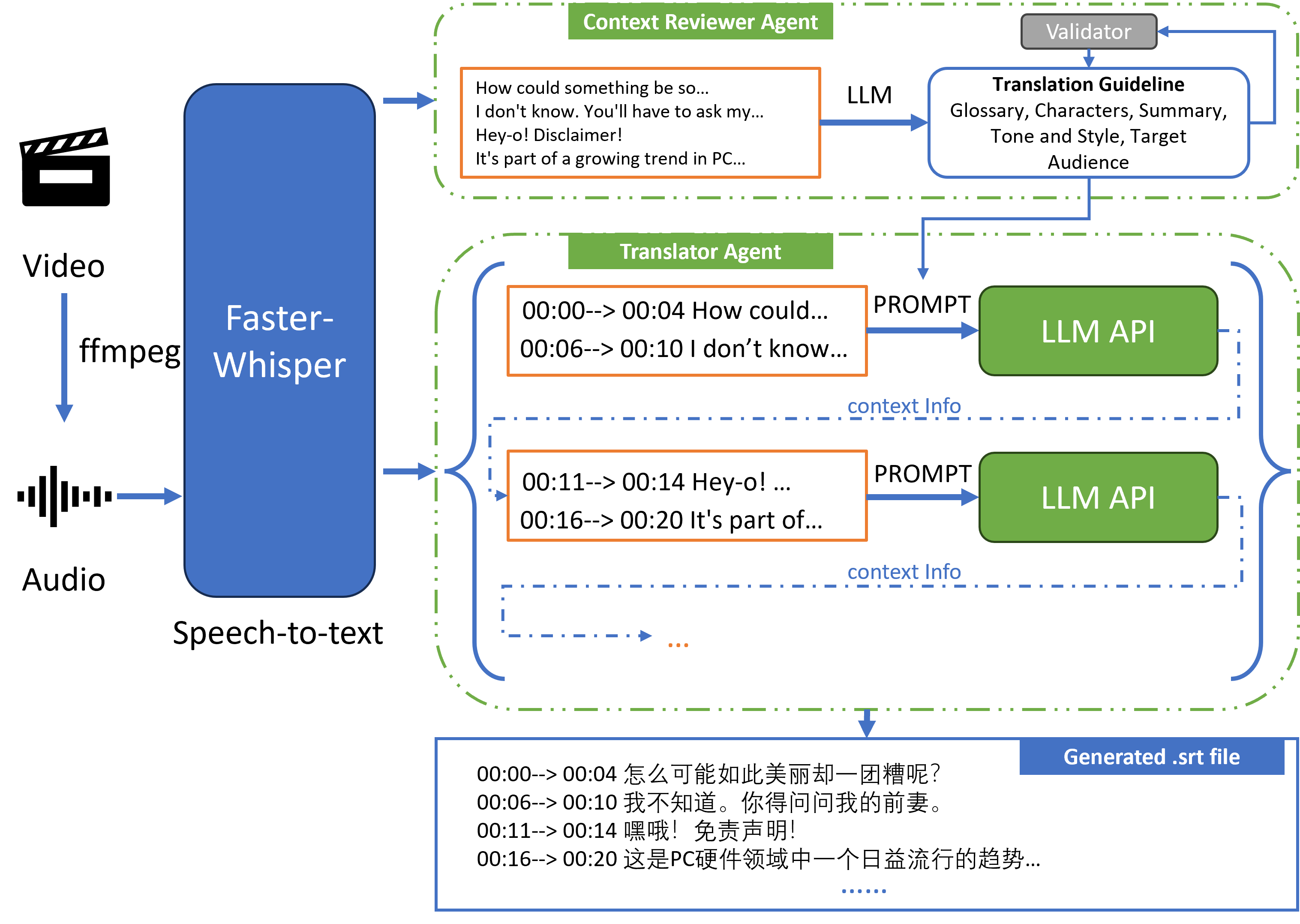
To maintain context between translation segments, the process is sequential for each audio file.
Development Guide
This project uses uv for package management.
Install uv with the standalone installer:
On macOS and Linux
curl -LsSf https://astral.sh/uv/install.sh | sh
On Windows
powershell -ExecutionPolicy ByPass -c "irm https://astral.sh/uv/install.ps1 | iex"
Install dependencies
uv venv
uv sync
Code quality checks
Before committing, please make sure the following checks pass locally:
# Lint
uv run ruff check openlrc/ tests/

# Format
uv run ruff format --check openlrc/ tests/
# To auto-fix formatting:
# uv run ruff format openlrc/ tests/

# Type check
uv run pyright openlrc/
For live translation testing as a developer (and for CI usage), set:
export OPENLRC_TEST_LLM_API_KEY="your-api-key"
export OPENLRC_TEST_LIVE_API=1
See tests/conftest.py for all configurable environment variables
(e.g. OPENLRC_TEST_LLM_BASE_URL to point at a local vLLM instance).
Build and publish a release
Use uv end-to-end for release builds and publishing:
# Build source and wheel distributions
uv build

# Validate the generated metadata before uploading
uvx twine check dist/*

# Publish to PyPI
# Preferred for local publishing:
uv publish
#
# Or publish with an explicit token:
# uv publish --token <pypi-token>
If you prefer GitHub Actions publishing, configure PyPI trusted publishing for this repository and push a version tag such as v1.7.0a1.
Todo
- [Efficiency] Batched translate/polish for GPT request (enable contextual ability).
- [Efficiency] Concurrent support for GPT request.
- [Translation Quality] Make translate prompt more robust according to https://github.com/openai/openai-cookbook.
- [Feature] Automatically fix json encoder error using GPT.
- [Efficiency] Asynchronously perform transcription and translation for multiple audio inputs.
- [Quality] Improve batched translation/polish prompt according to gpt-subtrans.
- [Feature] Input video support.
- [Feature] Multiple output format support.
- [Quality] Speech enhancement for input audio.
- [Feature] Preprocessor: Voice-music separation.
- [Feature] Align ground-truth transcription with audio.
- [Quality] Use multilingual language model to assess translation quality.
- [Efficiency] Add Azure OpenAI Service support.
- [Quality] Use claude for translation.
- [Feature] Add local LLM support.
- [Feature] Multiple translate engine (Anthropic, Microsoft, DeepL, Google, etc.) support.
- [Feature] Build a electron + fastapi GUI for cross-platform application.
- [Feature] Web-based streamlit GUI.
- Add fine-tuned whisper-large-v2 models for common languages.
- [Feature] Add custom OpenAI & Anthropic endpoint support.
- [Feature] Add local translation model support (e.g. SakuraLLM).
- [Quality] Construct translation quality benchmark test for each patch.
- [Quality] Split subtitles using LLM (ref).
- [Quality] Trim extra long subtitle using LLM (ref).
- [Others] Add transcribed examples.
- Song
- Podcast
- Audiobook
Credits
- https://github.com/guillaumekln/faster-whisper
- https://github.com/m-bain/whisperX
- https://github.com/openai/openai-python
- https://github.com/openai/whisper
- https://github.com/machinewrapped/gpt-subtrans
- https://github.com/MicrosoftTranslator/Text-Translation-API-V3-Python
- https://github.com/streamlit/streamlit
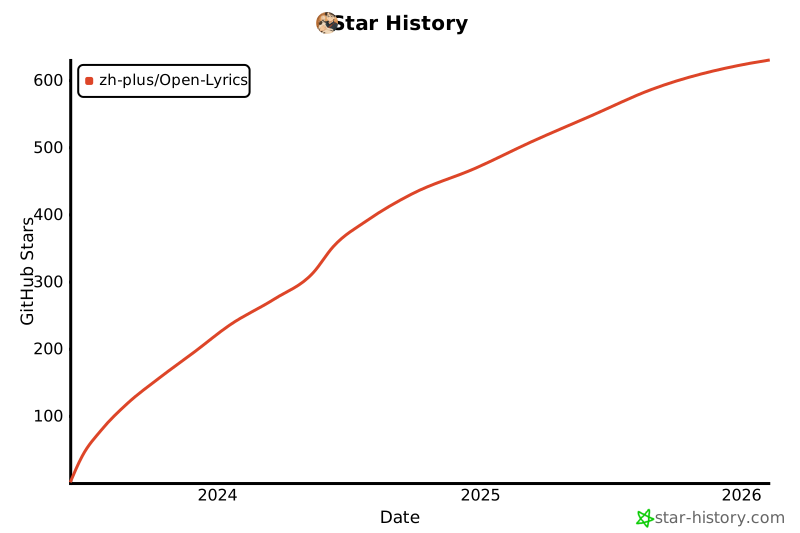
Star History
Citation
@book{openlrc2024zh,
	title = {zh-plus/openlrc},
	url = {https://github.com/zh-plus/openlrc},
	author = {Hao, Zheng},
	date = {2024-09-10},
	year = {2024},
	month = {9},
	day = {10},
}
Release history Release notifications | RSS feed


Download files
Download the file for your platform. If you're not sure which to choose, learn more about installing packages.
Source Distribution
Built Distribution
Filter files by name, interpreter, ABI, and platform.
If you're not sure about the file name format, learn more about wheel file names.
Copy a direct link to the current filters
File details
Details for the file openlrc-1.7.0a1.tar.gz.
File metadata
- Download URL: openlrc-1.7.0a1.tar.gz
- Upload date:
- Size: 78.0 kB
- Tags: Source
- Uploaded using Trusted Publishing? No
- Uploaded via: uv/0.10.9 {"installer":{"name":"uv","version":"0.10.9","subcommand":["publish"]},"python":null,"implementation":{"name":null,"version":null},"distro":null,"system":{"name":null,"release":null},"cpu":null,"openssl_version":null,"setuptools_version":null,"rustc_version":null,"ci":null}
File hashes
| Algorithm | Hash digest | |
|---|---|---|
| SHA256 |
469feef59998cdb2841f24bf5372eb4558460c18c55281d44f7f2008cd383975
|
|
| MD5 |
d4d64078fc6cf7ca5fd8753d60e74ab3
|
|
| BLAKE2b-256 |
6a33e912b7aadb600f357ca50887817e1835e21f87750e149aaf9d26a610ff1d
|
File details
Details for the file openlrc-1.7.0a1-py3-none-any.whl.
File metadata
- Download URL: openlrc-1.7.0a1-py3-none-any.whl
- Upload date:
- Size: 82.8 kB
- Tags: Python 3
- Uploaded using Trusted Publishing? No
- Uploaded via: uv/0.10.9 {"installer":{"name":"uv","version":"0.10.9","subcommand":["publish"]},"python":null,"implementation":{"name":null,"version":null},"distro":null,"system":{"name":null,"release":null},"cpu":null,"openssl_version":null,"setuptools_version":null,"rustc_version":null,"ci":null}
File hashes
| Algorithm | Hash digest | |
|---|---|---|
| SHA256 |
96a94e1f7d6de442dee0ea99c83160f2d52af65921d0b95821a89697bb5ea03a
|
|
| MD5 |
9fc1c525abe8b2f2f006c972d5dd89bf
|
|
| BLAKE2b-256 |
d66204198fd4317ab989c30df2c4cfa485b47e89a7457d165f1b82d16b680c73
|






