
Model Activation Visualizer

Project description
+===========================================================================+
|          _____                    _____                    _____          |
|         /\    \                  /\    \                  /\    \         |
|        /::\____\                /::\    \                /::\____\        |
|       /::::|   |               /::::\    \              /:::/    /        |
|      /:::::|   |              /::::::\    \            /:::/    /         |
|     /::::::|   |             /:::/\:::\    \          /:::/    /          |
|    /:::/|::|   |            /:::/__\:::\    \        /:::/____/           |
|   /:::/ |::|   |           /::::\   \:::\    \       |::|    |            |
|  /:::/  |::|___|______    /::::::\   \:::\    \      |::|    |     _____  |
| /:::/   |::::::::\    \  /:::/\:::\   \:::\    \     |::|    |    /\    \ |
|/:::/    |:::::::::\____\/:::/  \:::\   \:::\____\    |::|    |   /::\____\|
|\::/    / ~~~~~/:::/    /\::/    \:::\  /:::/    /    |::|    |  /:::/    /|
| \/____/      /:::/    /  \/____/ \:::\/:::/    /     |::|    | /:::/    / |
|             /:::/    /            \::::::/    /      |::|____|/:::/    /  |
|            /:::/    /              \::::/    /       |:::::::::::/    /   |
|           /:::/    /               /:::/    /        \::::::::::/____/    |
|          /:::/    /               /:::/    /          ~~~~~~~~~~          |
|         /:::/    /               /:::/    /                               |
|        /:::/    /               /:::/    /                                |
|        \::/    /                \::/    /                                 |
|         \/____/                  \/____/                                  |
+===========================================================================+
Getting started
If uv is installed:
uv run --with openmav mav
or
uv run --with git+https://github.com/attentionmech/mav mav --model gpt2 --prompt "hello mello"
Without uv:
- Set up and activate a virtual environment
- Install the package:
pip install git+https://github.com/attentionmech/mav
- Run:
mav --model gpt2 --prompt "hello mello"
Locally from scratch
- git clone https://github.com/attentionmech/mav
- cd mav
- Set up and activate a virtual environment
- Install the package:
pip install .
- Run:
mav --model gpt2 --prompt "hello mello"
You can replace gpt2 with other Hugging Face models for example:
meta-llama/Llama-3.2-1BHuggingFaceTB/SmolLM-135M
Demos
Explanation
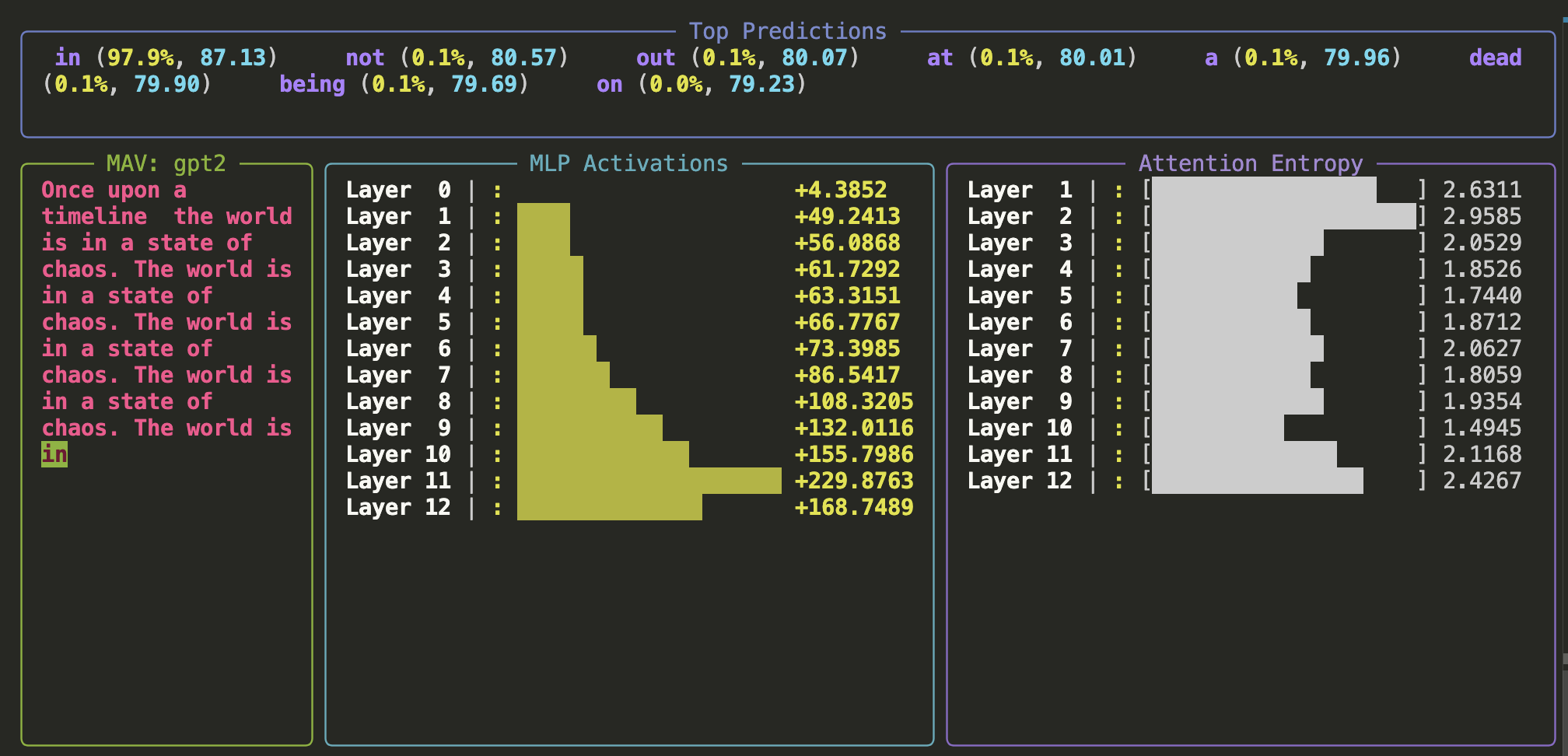
At every point in prediction, multiple next tokens are possible, each with a different confidence level. The tokens and the numbers near them represent these probabilities.
Layer-wise Activations
Activations are numerical values representing the forward pass through the network during inference. Each layer (or block) in GPT-style models typically consists of:
- An MLP sub-block
- An attention sub-block
For the MLP sub-block, we plot the L2 norm of activations per layer. Other metrics like average or max exist but don’t provide as much intuitive insight.
Attention Sub-block
For the attention sub-block, we measure entropy. In transformer architectures, attention determines how tokens influence one another. The entropy value gives a rough indication of how widely the attention is spread:
- Low entropy → Sharp token-to-token relationships
- High entropy → A broader, more diffused attention span
These are just intuitive explanations—it's best to study these concepts from multiple sources to build a solid understanding.
Contributing
IMP NOTE: The design is not good for scaling it right now to multiple backends, and stuff which i am planning.. so your pull requests will have to wait for sometime
please raise PRs to dev branch.
Release history Release notifications | RSS feed


Download files
Download the file for your platform. If you're not sure which to choose, learn more about installing packages.
Source Distribution
Built Distribution
Filter files by name, interpreter, ABI, and platform.
If you're not sure about the file name format, learn more about wheel file names.
Copy a direct link to the current filters
File details
Details for the file openmav-0.0.3.tar.gz.
File metadata
- Download URL: openmav-0.0.3.tar.gz
- Upload date:
- Size: 7.7 kB
- Tags: Source
- Uploaded using Trusted Publishing? No
- Uploaded via: twine/6.1.0 CPython/3.13.2
File hashes
| Algorithm | Hash digest | |
|---|---|---|
| SHA256 |
dbffcaa67adbf29893fab8b275404311738115780e1fe0375c2bd4931554c232
|
|
| MD5 |
cdb7d5ba9456f407e8096d147592184f
|
|
| BLAKE2b-256 |
7f243aeec50a22f635b1a19e0757a1f255511149d03365944bed6c20ba4219d1
|
File details
Details for the file openmav-0.0.3-py3-none-any.whl.
File metadata
- Download URL: openmav-0.0.3-py3-none-any.whl
- Upload date:
- Size: 7.8 kB
- Tags: Python 3
- Uploaded using Trusted Publishing? No
- Uploaded via: twine/6.1.0 CPython/3.13.2
File hashes
| Algorithm | Hash digest | |
|---|---|---|
| SHA256 |
4d024041e436f07d21e549f8d99f19f52ec71896c58c562d67fe5faac0258b0d
|
|
| MD5 |
a75ebbdbdade7ce0a85af300df5d386a
|
|
| BLAKE2b-256 |
d16415bee0b950a19bc6a5e5f33ac554bad5948b6d1f3e54e2d4b30e3a217400
|






