
OpenTab
Your AI coding tools keep a tab. OpenTab opens it.
See where your coding agents spent their tokens, time, and money.








OpenTab brings the history your tools already keep into one interactive browser. Follow a busy month into a project, a session, its subagents, and individual turns. See what filled the context window. Compare the same token usage at another model's prices.
Works with Claude Code, Codex, OpenCode, Copilot, and more. Runs locally, in your terminal or web browser. No account, no telemetry, and your agents' history stays read-only.
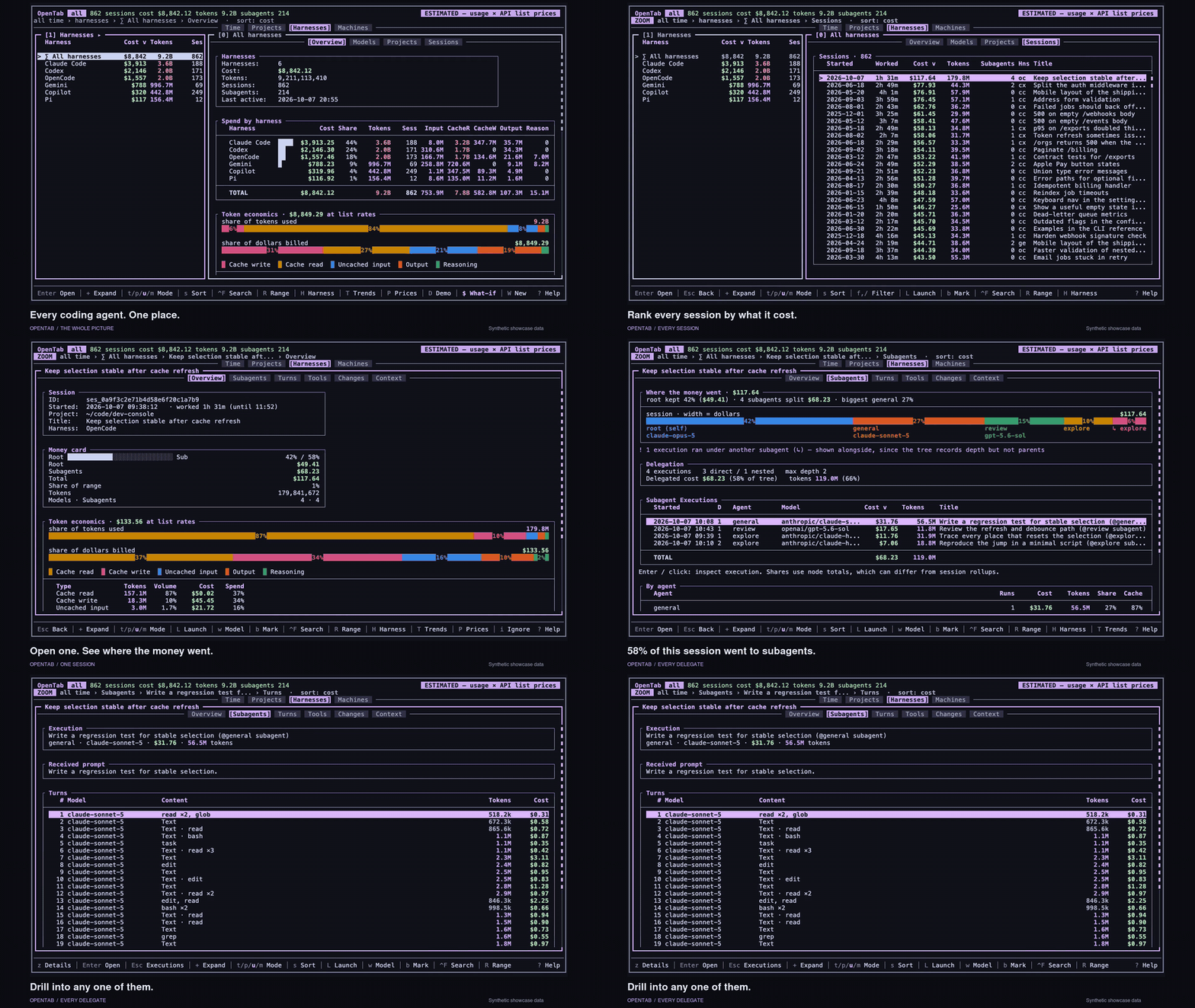
Follow one session. Then zoom out. Walk one session from cost to subagents, tool calls, file changes and context, then every machine and the browser. Synthetic showcase data; click for the full 73-second video.
Try it on your own history
pipx install opentab-ai
opentab
OpenTab discovers supported tools' local records and brings them together automatically. Start with a recent day, open Sessions, and pick one you remember. Press Enter to drill in, Esc to step back, and ? for the keys that work where you are. The mouse works too.
On a subscription? You can still explore your usage: OpenTab starts with clearly labeled
API-equivalent estimates for tokens that have no recorded cost. $ switches to
recorded spend. How the money works.
Python 3.9+ · macOS · Linux · WSL · native Windows.
More ways to install and upgrade
The PyPI package is opentab-ai; the command is opentab.
brew install hamidi-dev/tap/opentab         # Homebrew (macOS / Linux)
pip install --user opentab-ai               # pip
curl -fsSL https://opentab.hamidi.dev/install.sh | bash
Upgrade with pipx upgrade opentab-ai, brew upgrade opentab, or
pip install -U --user opentab-ai.
The runtime uses Python's standard library, with windows-curses added automatically
on native Windows. Windows & WSL setup.
New here? Read the Quick start. Prefer a browser? Run
opentab web. Showing someone your screen? opentab --demo. A tool missing?
opentab doctor. opentab --help is the quick guide. Automating it? See
Programmatic access for JSON commands and the local MCP server.
Follow the work behind the numbers
Follow an expensive session down to the turn
Pick a day on the spend heatmap, open its sessions, sort by cost, and follow the largest one. Subagents shows how its cost splits between the main agent and its delegates. Turns lists prompts and the steps after them with tokens and cost; on supported tools you can read a turn's recorded narration, reasoning and exact tool calls. Tools groups usage by tool and MCP server. Sessions · Keys
Understand why token counts and costs tell different stories
A large token count is only the beginning. Token economics puts each token type's share of the volume beside its share of the cost at API list rates: uncached input, output, reasoning, cache reads, and cache writes.
See how much of your usage is cached, and which token types account for the money. Drill into a model within a month or project, or in Trends over the active date range, to see its own economics and the sessions that used it, ranked by that model's contribution.
See what filled the context window
The Context view follows the window as it grows, marks compactions, and estimates what went into it: tool results, call arguments, assistant text, prompts, and more. See when the context shrank and what it grew back to.

Two compactions, and the context fills again. The curve shows when; the breakdown shows what was sent. Anonymized demo data.
Session lists also show Worked time where the records support it: the agent's working bursts, with idle waits for your next prompt removed.
Put another model's prices against your actual usage
Press w, choose a model, and open a session. Compare the list-price cost of the
models it used with the cost of those same tokens at your chosen model's rates. Sessions
with subagents also show the target price beside each agent's usage.
Explore models you've used or the full bundled catalog. P compares model and
provider rates using your token mix, including cache usage, and lets you pin a
shortlist. Both sides of a session comparison use list rates; it holds token usage fixed
and makes no prediction about another model's output quality or how many tokens it would use.
Detail views depend on what each tool records. Compare support below.
Built to be poked at
Move between daily, weekly and monthly trends, a calendar heatmap, and rankings of models, providers, projects and tools. Follow a chart into the sessions behind it, filter as you type, and change the date range.
- Find your way back. Bookmark sessions, add notes, and reopen supported sessions in
their original tool with
L, or useopentab launchfor an fzf picker. Sessions - Scope and filter. Filters
- See file edits. The Changes tab shows the edits a session recorded (OpenCode and GitHub Copilot). Changes
- Make it yours. 30 themes, remappable keys, remembered preferences, CSV export. Configuration · Keys
Watch the full narrated tour on YouTube
Search past conversations
Find what you discussed across local OpenCode, Claude Code, Codex, Hermes, pi and
omp sessions with Ctrl-F, the CLI or MCP. It is keyword search over recorded
user/assistant text. It is off until you enable it: building the index stores
conversation text in plaintext on your machine, and you must opt in explicitly.
Setup, limits, and clearing the index ·
MCP configuration
In your terminal. In your browser. In one file.
opentab web                        # open the live browser on localhost
opentab --html report.html          # write a self-contained report
opentab --demo --html demo.html    # anonymize it for sharing
opentab web --html full.html --include-details  # bundle Turns, Tools and Context
The web browser shares the TUI's navigation, themes, trends, and model comparisons. The live version fetches Turns, Tools, and Context on demand where supported. The HTML export packages the overview and comparison views into one file you can open offline, with no server or dependencies. Links to months, days, and sessions let someone open the part you want to show them.

Keep exploring in the browser. The same history, with familiar keys and clickable tables.
Turn traces and personal notes are absent from web reports unless you export with
--include-details, which embeds retained prompts. Web browser & exports
Every machine, one tab
Your laptop, workstation, and remote box can all contribute to the same view.
opentab pull gathers usage summaries over SSH, with no background agent or listening
service and no raw traces in summaries. SSH setup and managing machines
Live prices in your sidebar
Keep an eye on a session while it runs. herdr-opentab puts each running agent's cost beside it in the Herdr sidebar, subagents included.
For your own status bar or script, opentab cost "$PWD" prints the latest session's
cost for that project. opentab --goto "$PWD" opens that session for inspection.
See the Herdr integration
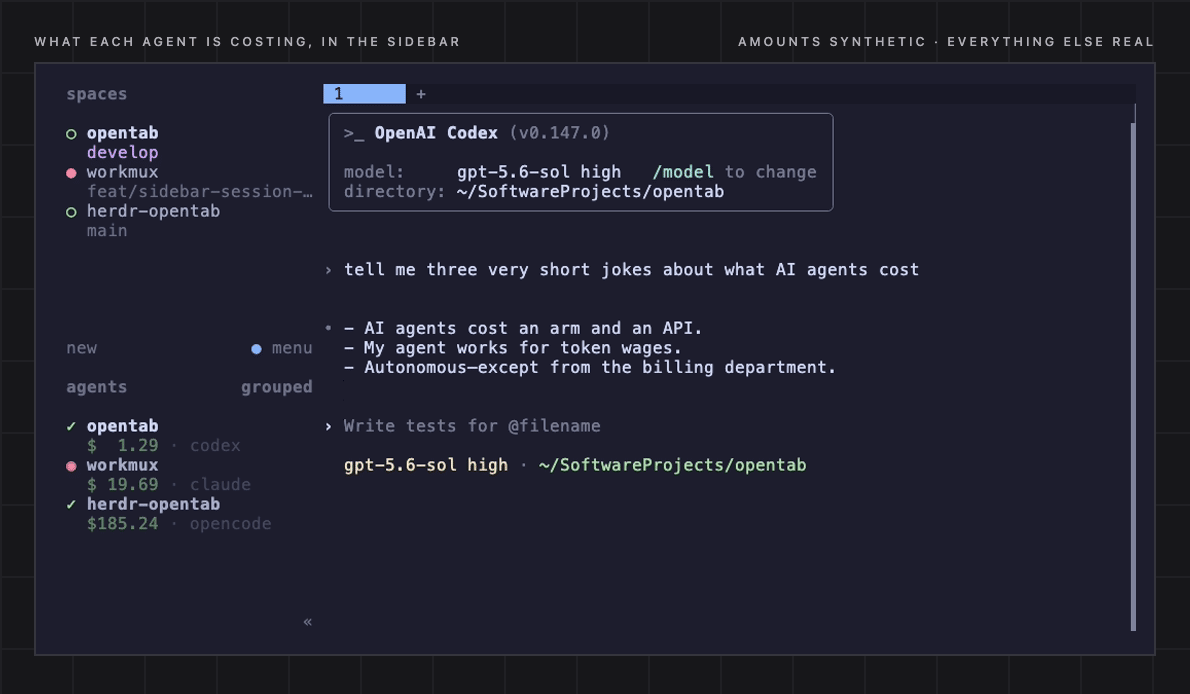
Amounts synthetic, everything else real.
The tools it reads
OpenCode · Claude Code · Codex CLI · GitHub Copilot (CLI and Copilot Chat in VS Code) · pi-agent · omp · OpenClaw · zaly · Gemini CLI · Antigravity · Hermes · and CSV/JSONL logs of your own API requests.
Use H to switch tools live, or opentab --harness NAME to start with one.
What each tool's records support on top (recorded vs estimated cost, subagent tree, Turns, Trace, Tools, Context) is a per-tool capability table in the sources guide.
Capability table, data locations, setup, and the CSV/JSONL schema. Some tools need setup,
such as Copilot CLI's opt-in telemetry export; opentab doctor helps you find the gaps.
About the money
Recorded spend comes from your tools' own records. A subscription session can record
millions of tokens and $0.00 of per-token cost; your subscription is billed elsewhere.
API-equivalent estimates add list-price costs for that unpriced usage. This view is
on by default and your choice is remembered; $ toggles it. Model rates ship in a
bundled models.dev catalog, so ordinary browsing works offline. Refresh them when you
choose with r in the P price table or opentab --refresh-models.
Estimates help you compare usage. Your provider's invoice may include subscriptions, discounts, credits, or markups that local records cannot tell OpenTab about. Pricing explained.
FAQ
Does any of this leave my machine?
Local browsing needs no cloud service or account and sends no telemetry. Your agents' files are opened read-only; OpenTab writes its own preferences, notes, caches, and the exports you request.
You control transfers: remote pulls fetch summaries from machines you choose, a price refresh fetches the models.dev catalog, and exports go wherever you put them. The live web browser binds to localhost by default. Privacy details.
Can I show it without exposing my project names and prompts?
Use opentab --demo, or D in-app, to anonymize titles, paths, prompt text, and
absolute spend/token numbers in memory. The shape of the data stays real. Demo mode
never writes those changes back to your history or saves your browsing state.
opentab --demo --html demo.html creates an anonymized report. You can also choose
which categories to scramble; demo mode details.
How do I keep a longer history?
Claude Code deletes local transcripts after 30 days by default, and Gemini CLI's
default retention removes chat recordings older than 30 days on launch. Once the
source record disappears, its usage disappears from OpenTab too. OpenTab warns about
these settings; opentab doctor reports them.
For long history:
- Claude Code: add
"cleanupPeriodDays": 3650to$CLAUDE_CONFIG_DIR/settings.json(default~/.claude/settings.json). - Gemini CLI: set
"general": {"sessionRetention": {"enabled": false}}in~/.gemini/settings.json, merging it with any existinggeneralsettings.
My tool isn't supported. Can I still use OpenTab?
If it can log API requests, point OpenTab at a CSV or JSONL of them. Turns, Tools, and Context become available when the log carries the relevant optional fields. Request log schema.
For another native integration, open an issue describing the tool and its record format.
Something looks off?
Run opentab doctor. It reports which tools it found, why others are missing, and
what to fix, along with terminal support and the price catalog. It diagnoses without
repairing or reading transcript content.
Full documentation · Troubleshooting · Windows & WSL
Development
CI runs Ruff, unit tests, and ShellCheck. CONTRIBUTING.md covers setup, checks, and commit conventions; Architecture explains the code.
License
MIT — see LICENSE.
1 maintainer

Metadata
1 maintainer
Release files for opentab-ai 1.32.0
For a detailed explanation of source distributions (sdists) and built distributions (wheels), please see the package formats documentation.
Source distribution (sdist)
| File | Size | Uploaded | Provenance | Actions |
|---|---|---|---|---|
| opentab_ai-1.32.0.tar.gz | 1.6 MB | With provenance | Details for opentab_ai-1.32.0.tar.gz |
Built distribution (wheel)
| File | Interpreter | ABI | Platform | Actions Reset |
|---|---|---|---|---|
| opentab_ai-1.32.0-py3-none-any.whl | Python 3 | none | any | Details for opentab_ai-1.32.0-py3-none-any.whl |
Total release size: 2.5 MB
Release files / opentab_ai-1.32.0.tar.gz
| Download URL | opentab_ai-1.32.0.tar.gz |
|---|---|
| Size | 1.6 MB |
| Tags | Source |
|
SHA-256 checksum How to use checksums |
75c2638ba15d9f5ba308f58c504f83907ae9fe599a8e15c5f929a0114b99b17f
|
|
BLAKE2b-256 checksum How to use checksums |
de0ac3d8ed12d98928caeea75c3172d0b35e390140479401f66453495d1e20e6
|
| Upload date | |
|
Uploaded using Trusted Publishing? What is trusted publishing? |
Yes |
| Uploaded via |
twine/7.0.0 CPython/3.13.16
|
Provenance
Provenance describes where a file came from. On PyPI, provenance is shared via attestations, which provide a verifiable record of the build or publishing details. View details, limitations and caveats.


PyPI Publish Attestation
PyPI verified that this artifact, at this checksum, originated from the publisher listed below.
Signed by GitHub Actions, verified by PyPI on Oct 23, 2026.
Transparency logRelease files / opentab_ai-1.32.0-py3-none-any.whl
| Download URL | opentab_ai-1.32.0-py3-none-any.whl |
|---|---|
| Size | 953.9 kB |
| Tags | Python 3 |
|
SHA-256 checksum How to use checksums |
1c4a0575a636b9f71e185fe18d37835a56ed27c1d8b264855da81c36beeb3e03
|
|
BLAKE2b-256 checksum How to use checksums |
f7f3e9f21704feb7c5818f76e133f3244e99aabc4682c1d9da6947f9446acb92
|
| Upload date | |
|
Uploaded using Trusted Publishing? What is trusted publishing? |
Yes |
| Uploaded via |
twine/7.0.0 CPython/3.13.16
|
Provenance
Provenance describes where a file came from. On PyPI, provenance is shared via attestations, which provide a verifiable record of the build or publishing details. View details, limitations and caveats.
PyPI Publish Attestation
PyPI verified that this artifact, at this checksum, originated from the publisher listed below.
Signed by GitHub Actions, verified by PyPI on Oct 23, 2026.
Transparency logSecurity for opentab-ai 1.32.0
Provenance
Provenance describes where a file came from. On PyPI, provenance is shared via attestations, which provide a verifiable record of the build or publishing details. View details, limitations and caveats.
Full provenance
Both files in this release have been uploaded with provenance metadata.
Attestation for opentab_ai-1.32.0.tar.gz
PyPI Publish Attestation
PyPI verified that this artifact, at this checksum, originated from the publisher listed below.
Signed by GitHub Actions, verified by PyPI on Oct 23, 2026.
Transparency logA note on package security
PyPI is a repository for distributing packages, not a service for auditing them. While third-party security researchers and our staff do their best to detect and remove malicious packages, PyPI cannot guarantee the quality, security or suitability of any given package.
To learn more about protecting yourself from malicious actors, visit our package security documentation.














