
An order-flow-driven synthetic market simulator.
Verified details
These details have been verified by PyPIProject links
GitHub Statistics
Maintainers

Project description
orderwave



Order-flow-driven synthetic market simulation for Python, with built-in visualization.
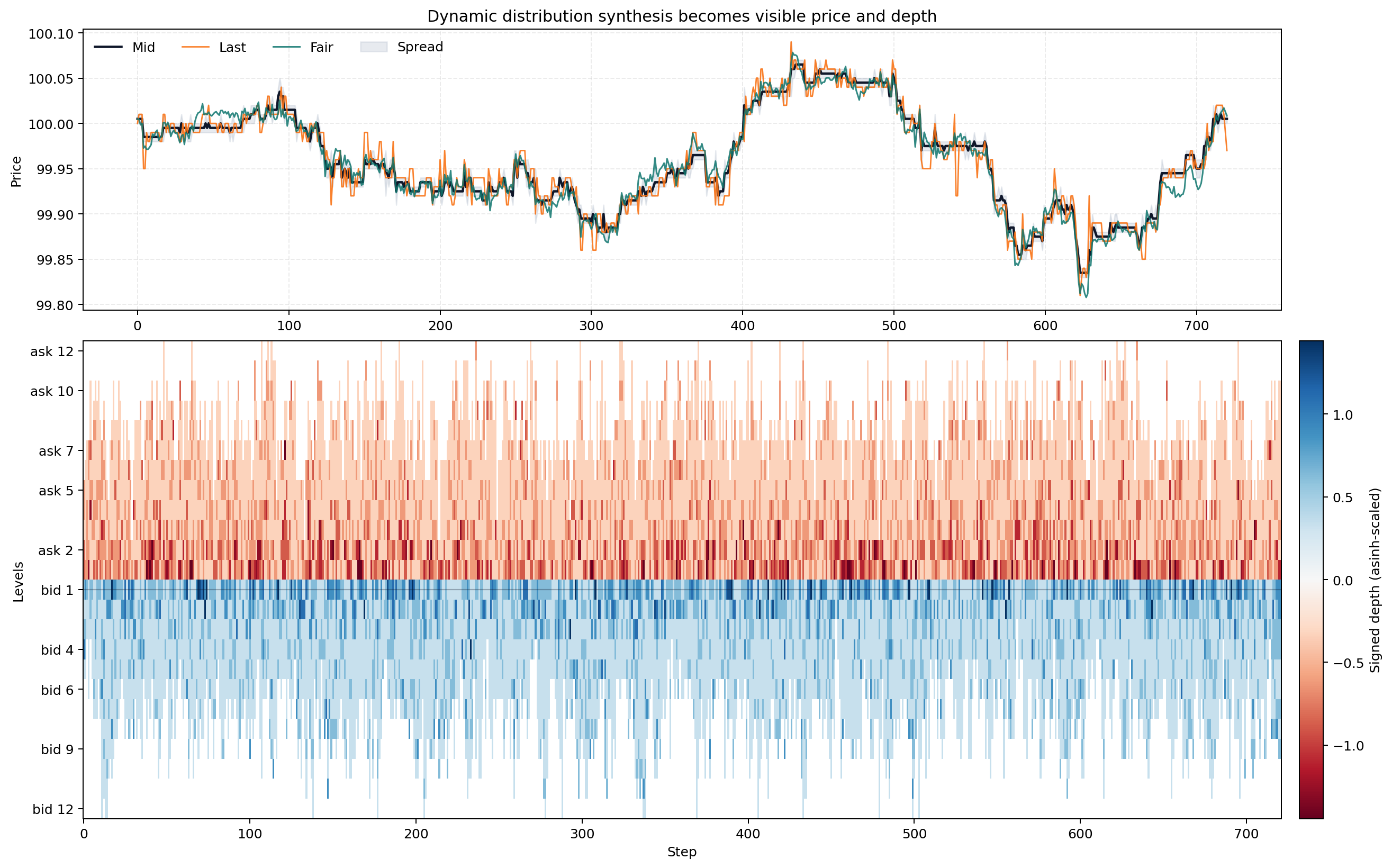
orderwave does not random-walk price directly. It simulates a sparse aggregate limit order book, participant-conditioned limit flow, marketable flow, cancellations, latent meta-orders, exogenous shocks, and session-aware state changes, then lets price emerge from those book mechanics. The same Market object can render the path, the current book snapshot, and realism-oriented diagnostics without extra plotting glue.
English Docs | 한국어 README | 한국어 문서
Why orderwave
- Minimal public entry point:
from orderwave import Market - Price changes only as a consequence of book mechanics
- Hidden fair value, session clock, shocks, and meta-orders bias flow without directly overwriting price
- Same seed, same path
- Built-in figures for overview, current book, and diagnostics
- Thin public event history plus optional latent debug history
Installation
pip install orderwave
For local development:
pip install -e .[dev]
Quick Start
from orderwave import Market

market = Market(seed=42, config={"preset": "trend"})
market.gen(steps=1_000)

snapshot = market.get()
history = market.get_history()
events = market.get_event_history()
debug = market.get_debug_history()
overview = market.plot()
book = market.plot_book()
diagnostics = market.plot_diagnostics()

print(snapshot["session_phase"], snapshot["mid_price"], snapshot["best_bid"], snapshot["best_ask"])
print(history.tail())
print(events.tail())
print(debug.tail())

overview.savefig("orderwave-overview.png")
For lighter long runs where you only need summary history, visible book snapshots, and trade strength:
fast_market = Market(seed=7, config={"preset": "balanced", "logging_mode": "history_only"})
fast_market.gen(steps=10_000)
summary = fast_market.get_history()
figure = fast_market.plot()
Performance Measurement
Use the single performance runner when you want a quick throughput check plus a full vs history_only logging comparison.
python scripts/measure_performance.py --preset balanced --seeds 20 --steps 20000 --outdir artifacts/performance
The runner writes:
performance_metrics.csvperformance_summary.csvperformance_logging_modes.csvperformance_summary.md
Validation Sweep
The repository also includes a longer-form validation runner that executes the full synthetic market-state validation plan: baseline preset sweeps, knob sensitivity, reproducibility checks, and long-run soak tests.
python scripts/validate_orderwave.py --baseline-steps 20000 --baseline-seeds 20 --jobs 4 --outdir artifacts/validation
The runner writes:
validation_summary.mdrun_metrics.csvpreset_summary.csvsensitivity_summary.csvinvariant_failures.csvacceptance_decision.mddiagnostics_<preset>_<seed>.png
API Surface
| API | Purpose |
|---|---|
step() |
Run one micro-batch and return the latest snapshot |
gen(steps=n) |
Run n micro-batches and return the latest snapshot |
get() |
Return the current snapshot |
get_history() |
Return compact pandas.DataFrame history |
get_event_history() |
Return the applied event log as a pandas.DataFrame |
get_debug_history() |
Return event-aligned latent debug history for advanced inspection |
plot() |
Render price, spread, trade strength, and visible-book heatmap |
plot_book() |
Render the current order book on a real price axis |
plot_diagnostics() |
Render session, excitation, imbalance, spread/volatility, resiliency, and occupancy diagnostics |
Advanced configuration is available through orderwave.config.MarketConfig.
logging_mode="history_only" keeps summary history plus overview/book plotting data, but disables get_event_history(), get_debug_history(), and plot_diagnostics().
Built-in Visualization
All plotting methods return matplotlib.figure.Figure and leave save/show control to the caller.
plot()renders the main overview: price, spread, execution-only trade strength, and signed visible-depth heatmapplot_book()renders the current order book on a real price axisplot_diagnostics()renders session phase profile, imbalance lead, market-flow excitation, spread-volatility coupling, depletion resiliency, and regime or shock occupancy
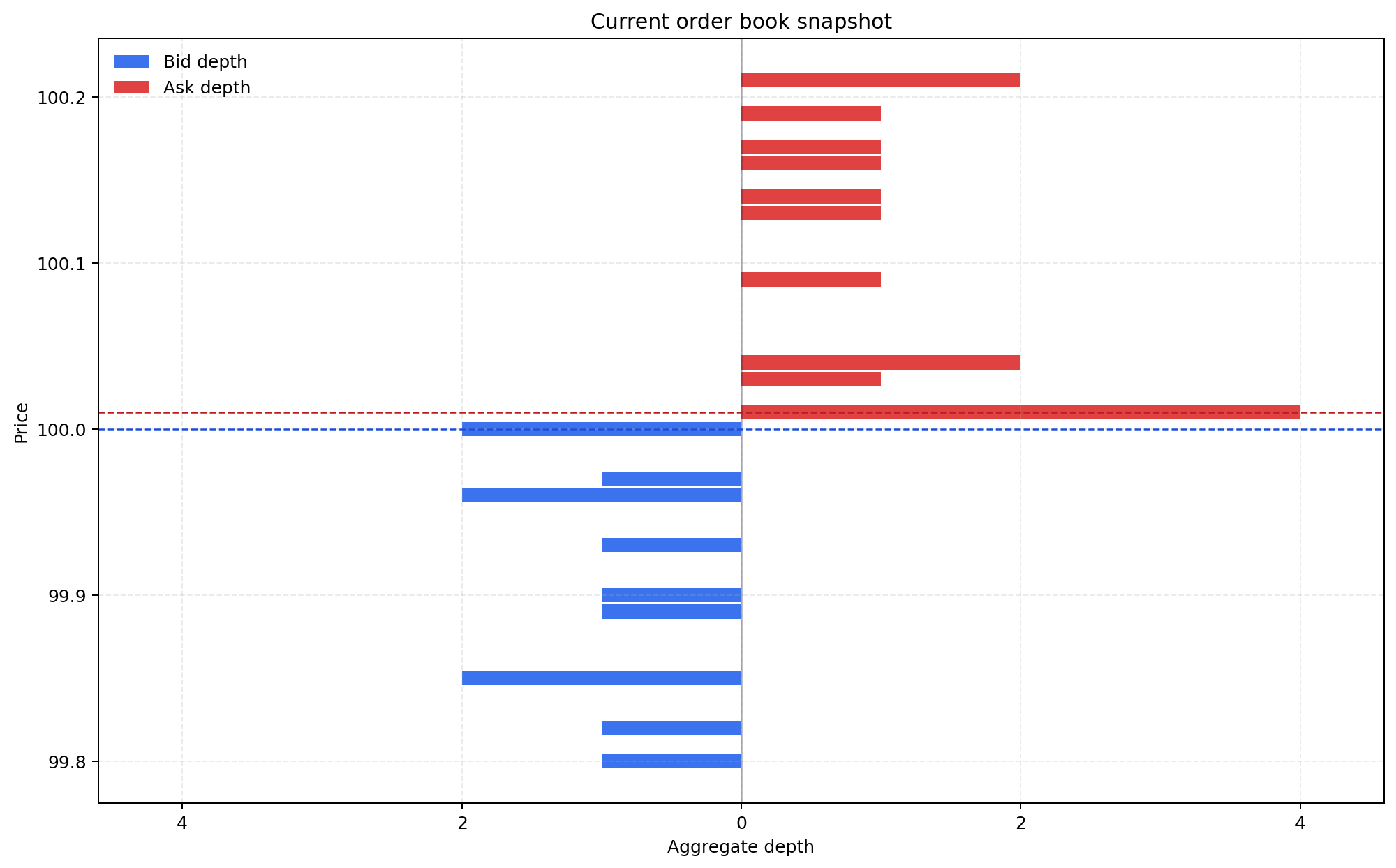
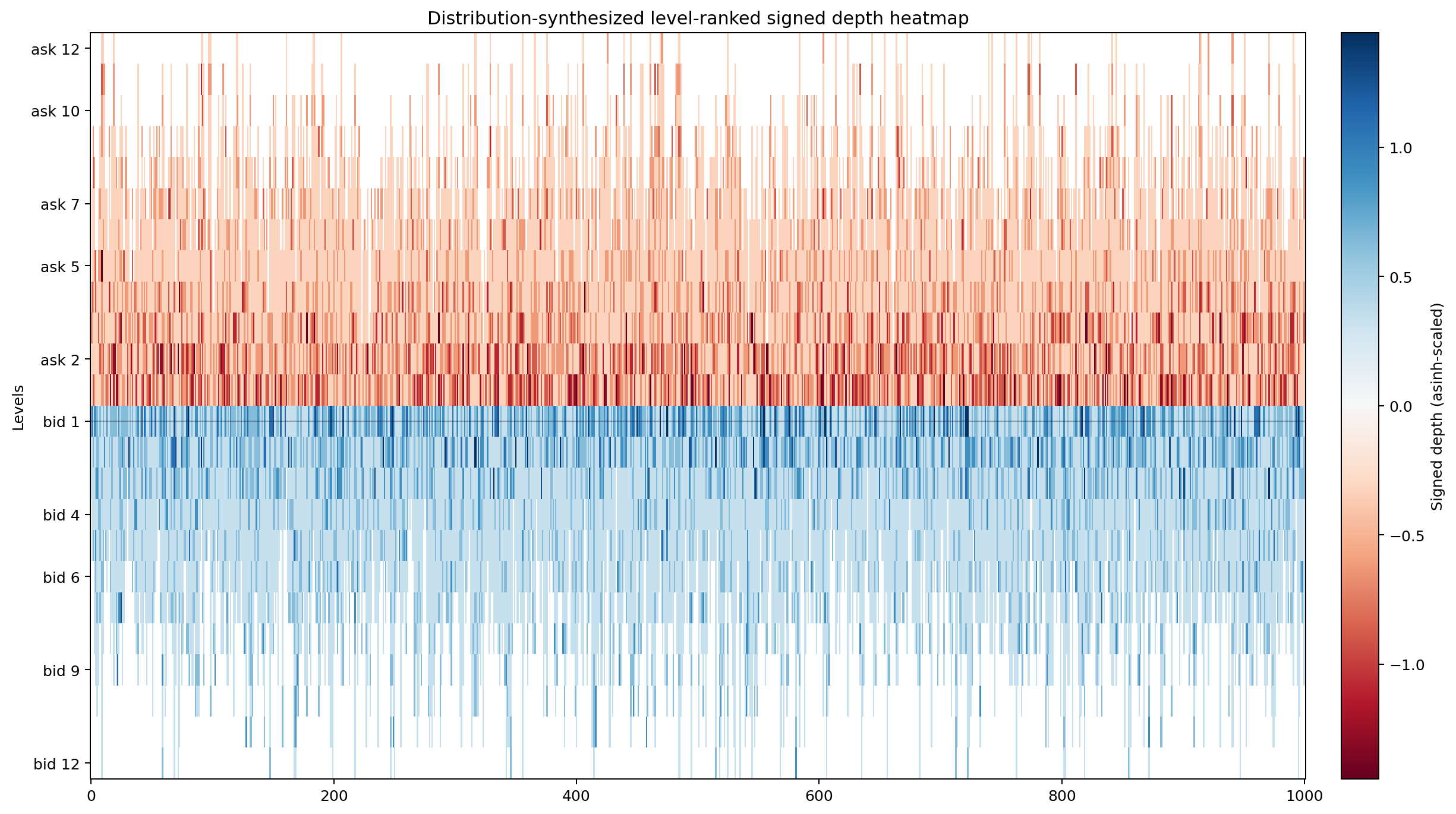
The overview heatmap keeps signed depth. Ask liquidity is red, bid liquidity is blue, 0 maps to a light gray midpoint, and missing levels render as blank background instead of black cells.
Presets At A Glance
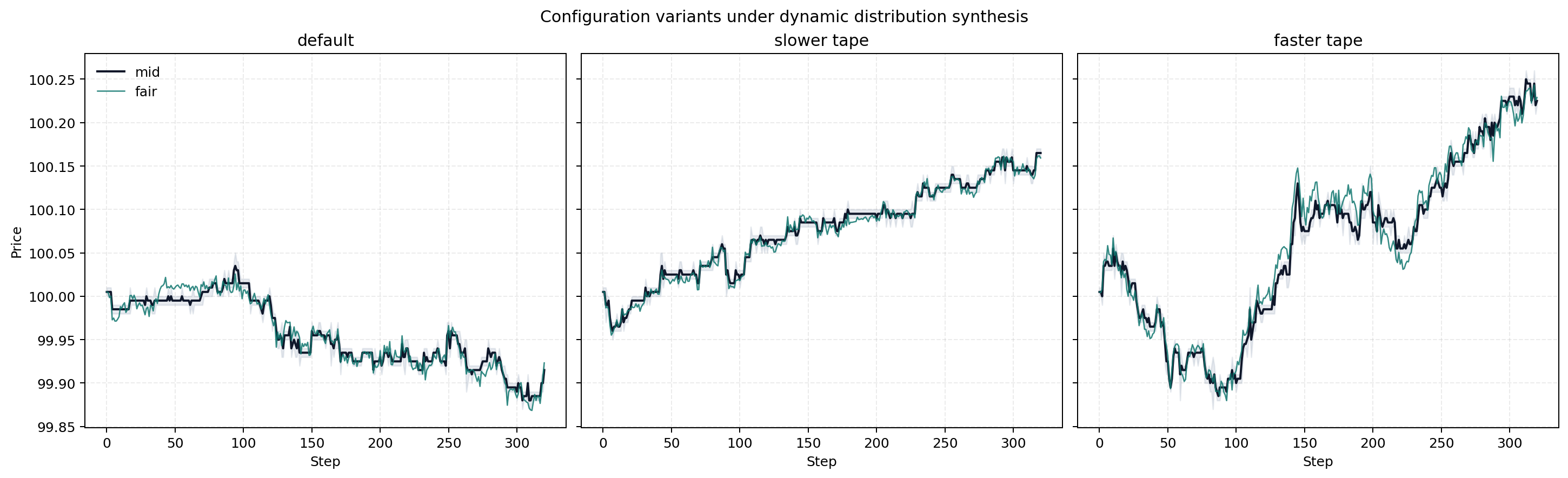
balanced, trend, and volatile reuse the same public API while shifting spread behavior, flow pressure, cancellation pressure, and hidden fair-price dynamics.
Core Semantics
Market.get() returns a compact dictionary with session clock fields, prices, spread, visible depth, aggressive volume, trade strength, depth imbalance, and regime.
trade_strength is an execution-only signed imbalance. It is computed from an EWMA of realized aggressor buy and sell volume, so quote-only book changes do not move it.
Important distinction:
mid_pricecan move when quotes improve, cancel, or get depletedlast_priceonly changes when a trade actually executesday,session_step, andsession_phaseexpose the synthetic intraday clock
Core guarantees:
- Price is never random-walked directly
- Quote improvement, best-quote depletion, and market execution are the only price-moving mechanisms
- Visible history starts at
step == 0with the seeded initial book - Applied limit, market, and cancel events are available through
get_event_history() - Participant type, meta-order progress, burst state, and shock state are available through
get_debug_history() - Aggregate depth is modeled without exposing per-order FIFO complexity in v1
Docs
Project details
Verified details
These details have been verified by PyPIProject links
GitHub Statistics
Maintainers
Release history Release notifications | RSS feed


Download files
Download the file for your platform. If you're not sure which to choose, learn more about installing packages.
Source Distribution
Built Distribution
Filter files by name, interpreter, ABI, and platform.
If you're not sure about the file name format, learn more about wheel file names.
Copy a direct link to the current filters
File details
Details for the file orderwave-0.4.4.tar.gz.
File metadata
- Download URL: orderwave-0.4.4.tar.gz
- Upload date:
- Size: 65.6 kB
- Tags: Source
- Uploaded using Trusted Publishing? Yes
- Uploaded via: twine/6.1.0 CPython/3.13.7
File hashes
| Algorithm | Hash digest | |
|---|---|---|
| SHA256 |
5ff7d25041b3552985799703bfe4ce526217df57c3eb570029b2eed6dc08caf6
|
|
| MD5 |
7d4877784aa14c9e7d28aead63c81197
|
|
| BLAKE2b-256 |
2a91a4be589eb4e1fe037c79df4a836238739091831034de5e1a999691ec74d0
|
Provenance
The following attestation bundles were made for orderwave-0.4.4.tar.gz:
Publisher:
workflow.yml on smturtle2/quoteflow
-
Statement:
-
Statement type:
https://in-toto.io/Statement/v1 -
Predicate type:
https://docs.pypi.org/attestations/publish/v1 -
Subject name:
orderwave-0.4.4.tar.gz -
Subject digest:
5ff7d25041b3552985799703bfe4ce526217df57c3eb570029b2eed6dc08caf6 - Sigstore transparency entry: 1058920747
- Sigstore integration time:
-
Permalink:
smturtle2/quoteflow@2b3ba4396e3ffc1afaf4786178f62ddab6be5aac -
Branch / Tag:
refs/tags/v0.4.4 - Owner: https://github.com/smturtle2
-
Access:
public
-
Token Issuer:
https://token.actions.githubusercontent.com -
Runner Environment:
github-hosted -
Publication workflow:
workflow.yml@2b3ba4396e3ffc1afaf4786178f62ddab6be5aac -
Trigger Event:
release
-
Statement type:
File details
Details for the file orderwave-0.4.4-py3-none-any.whl.
File metadata
- Download URL: orderwave-0.4.4-py3-none-any.whl
- Upload date:
- Size: 60.2 kB
- Tags: Python 3
- Uploaded using Trusted Publishing? Yes
- Uploaded via: twine/6.1.0 CPython/3.13.7
File hashes
| Algorithm | Hash digest | |
|---|---|---|
| SHA256 |
3e88ea9f3ffd1c6fceb7fd53d1d00c3b2b9a67d28c156f55efc1c3d2bf36961f
|
|
| MD5 |
09c65356b31464e845af5571c1b06dc1
|
|
| BLAKE2b-256 |
6befaaa7252f266ea903d39bbae9006e0ab1494ce4518e5c378e0cca5709e6e9
|
Provenance
The following attestation bundles were made for orderwave-0.4.4-py3-none-any.whl:
Publisher:
workflow.yml on smturtle2/quoteflow
-
Statement:
-
Statement type:
https://in-toto.io/Statement/v1 -
Predicate type:
https://docs.pypi.org/attestations/publish/v1 -
Subject name:
orderwave-0.4.4-py3-none-any.whl -
Subject digest:
3e88ea9f3ffd1c6fceb7fd53d1d00c3b2b9a67d28c156f55efc1c3d2bf36961f - Sigstore transparency entry: 1058920828
- Sigstore integration time:
-
Permalink:
smturtle2/quoteflow@2b3ba4396e3ffc1afaf4786178f62ddab6be5aac -
Branch / Tag:
refs/tags/v0.4.4 - Owner: https://github.com/smturtle2
-
Access:
public
-
Token Issuer:
https://token.actions.githubusercontent.com -
Runner Environment:
github-hosted -
Publication workflow:
workflow.yml@2b3ba4396e3ffc1afaf4786178f62ddab6be5aac -
Trigger Event:
release
-
Statement type:






