
Thin MCP server for OrionBelt Semantic Layer — delegates to REST API
Verified details
These details have been verified by PyPIProject links
GitHub Statistics
Maintainers

Project description

OrionBelt Semantic Layer MCP
Thin MCP server that delegates to the OrionBelt Semantic Layer REST API









A thin MCP server that delegates all business logic to the OrionBelt Semantic Layer REST API via HTTP. No embedded engine — pure API pass-through.
Architecture
The OrionBelt Semantic Layer platform has two deployment modes. This MCP server supports both:
- Standalone — Deploy the OrionBelt Semantic Layer API anywhere (Cloud Run, Docker, localhost) and point this MCP server at it via
API_BASE_URL. - Hosted — Connect to the public Cloud Run deployment with zero local setup (see Hosted MCP Server below).
┌────────────┐       ┌──────────────────────────────────────────────────────┐
│ LLM Client │       │                OrionBelt Platform                    │
│            │       │                                                      │
│  Claude,   │──MCP──│──> server.py  ──HTTP /v1──>  Semantic Layer REST API │
│  Cursor,   │       │    (FastMCP                   (FastAPI: parse OBML,  │
│  any MCP   │       │     + httpx)                   validate, compile     │
│  client    │       │                                to SQL)               │
└────────────┘       └──────────────────────────────────────────────────────┘
- No business logic — all tool calls delegate to the REST API (v1 endpoints)
- Dual-mode — auto-detects single-model or multi-model API mode at startup
- Auto-session management — creates an API session on first tool call, caches the ID (multi-model mode)
- 15 tools (single-model mode) or 19 tools (multi-model mode) for querying (QueryObject), execution, batch, discovery, composability (ACR), examples, diagrams, RDF/SPARQL, OSI export, and OBML reference + JSON schemas. (20 distinct tools exist in total; the API mode selects which subset is active — they overlap in 14 — and no client ever sees all 20 at once.) The visible surface is narrowed further in the design-time phase and when query execution is disabled (see Design-time vs run-time tool switching)
- 4 prompts + 2 resources for OBML / OBSQL reference and usage guidance
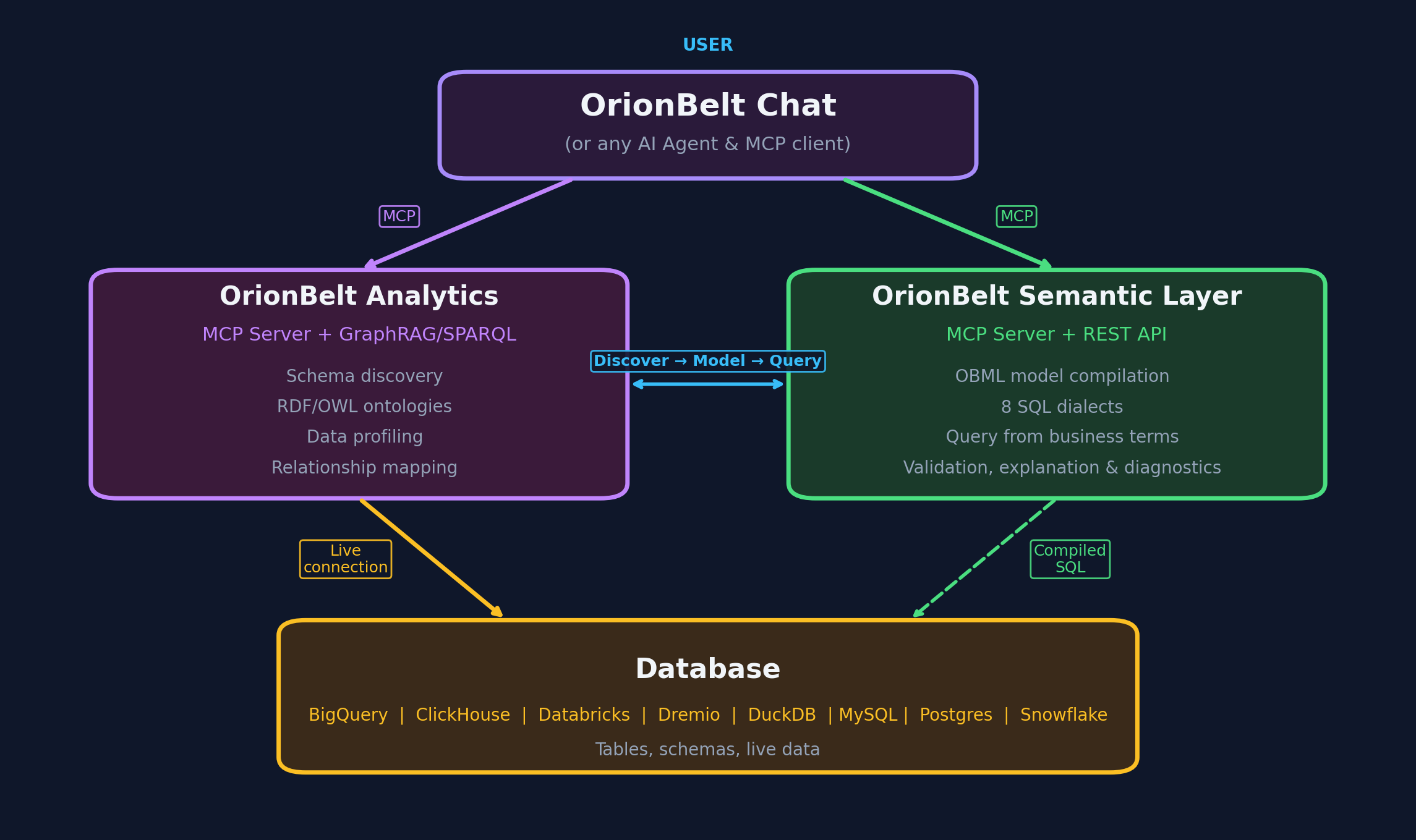
Live Demo
A public demo of the OrionBelt Semantic Layer API is available at:
API endpoint:
https://orionbelt.ralforion.com— Swagger UI | ReDoc | Gradio UI
Set API_BASE_URL=https://orionbelt.ralforion.com in your .env file to use it (see .env.example).
Installation
uv sync
For development (includes pytest, respx, ruff):
uv sync --all-groups
Usage
stdio (default)
uv run server.py
HTTP transport
MCP_TRANSPORT=http uv run python server.py
MCP client configuration
Add to your MCP client config (e.g. claude_desktop_config.json):
{
  "mcpServers": {
    "orionbelt": {
      "command": "uv",
      "args": ["run", "python", "server.py"],
      "cwd": "/path/to/orionbelt-semantic-layer-mcp"
    }
  }
}
Configuration
Environment variables or .env file (pydantic-settings). See .env.example for defaults.
| Variable | Default | Description |
|---|---|---|
API_BASE_URL |
— (required) | OrionBelt Semantic Layer REST API URL |
API_KEY |
— (unset) | API credential; required only when the API runs with AUTH_MODE=api_key |
API_KEY_HEADER |
X-API-Key |
Header the credential is sent in; must match the API's API_KEY_HEADER |
MCP_TRANSPORT |
stdio |
stdio, http, or sse |
MCP_SERVER_HOST |
localhost |
Bind host for HTTP/SSE |
MCP_SERVER_PORT |
9000 |
Bind port for HTTP/SSE |
LOG_LEVEL |
INFO |
Logging level |
API_TIMEOUT |
30 |
HTTP timeout in seconds |
Tools
Model lifecycle
| MCP Tool | Description |
|---|---|
get_obml_reference() |
Returns the full OBML format specification |
load_model(model? | osi_yaml?, dedup=True) |
Parse, validate, and store a model (returns health + model_load). Pass model (OBML JSON) or osi_yaml (OSI YAML, converted to OBML server-side) |
describe_model(model_id) |
Inspect data objects, dimensions, measures, metrics |
remove_model(model_id) |
Remove a model from the current session |
list_models() |
List all models loaded in the current session |
export_model_to_osi(model_id, ...) |
Export a loaded model as OSI YAML |
Model discovery
| MCP Tool | Description |
|---|---|
find_artefacts(model_id, query?, kind?, name?) |
Look up artefacts. With query → fuzzy, ranked search (resolve a vague term: exact / synonym / fuzzy). Without query → exact, deterministic lookup (all artefacts, one kind, or one named artefact, full records) |
explain_artefact(model_id, name) |
Explain lineage of a dimension, measure, or metric |
list_examples(model_id, intent?) |
List authored example queries (filterable by intent tag) |
get_example(model_id, name) |
Get one example with query + compiled SQL preview |
get_join_graph(model_id) |
Return the join graph as an adjacency list |
find_composables(query_json?, anchors?, anchor_type?, model_id?) |
ACR — given an in-progress query or named anchor(s), return the dimensions/measures/metrics that still compose into a valid, fanout-free result (plus CFL candidates). Guaranteed to compile |
Query, execution & diagrams
| MCP Tool | Description |
|---|---|
execute_query(...) |
Compile and execute a QueryObject, returning SQL + rows |
run_batch(queries, ...) |
One-shot: load a model + run N queries in parallel |
get_model_diagram(model_id) |
Generate a Mermaid ER diagram for a loaded model |
Semantic graph (RDF / SPARQL)
| MCP Tool | Description |
|---|---|
get_model_graph(model_id) |
Return the model as OBSL-Core RDF (Turtle) |
query_model_graph_by_sparql(query, ...) |
Run a read-only SPARQL query (SELECT / ASK) |
References
| MCP Tool | Description |
|---|---|
get_obml_reference() |
OBML (model authoring) grammar reference |
get_json_schema(name) |
JSON Schema for obml (model) or query (QueryObject) |
Utilities
| MCP Tool | Description |
|---|---|
list_dialects() |
List available SQL dialects and capabilities |
Design-time vs run-time tool switching
The server presents a phase-scoped tool surface: instead of listing all
all tools at once, it shows only the tools that make sense for where you are in
the model lifecycle. About half the tools are meaningless until a model is
loaded (execute_query, describe_model, find_artefacts, …) and the rest are
about authoring or reference (get_obml_reference, get_json_schema,
list_dialects). Splitting them keeps the surface small and prevents a
whole class of error — calling a query tool with no model loaded.
Three buckets, swapped by phase
Tools fall into three buckets. The visible surface is a swap at the load/unload transition, not additive — the run phase does not show the design/reference tools:
| Bucket | Listed when | Tools |
|---|---|---|
| Always | always (both phases) | load_model, remove_model (transition verbs — stay available in the run phase so a second model can be loaded mid-session, up to max_models_per_session); run_batch (self-contained one-shot — loads/references a model inline, so it needs no prior session state); get_json_schema (QueryObject/OBML schemas — needed in both phases) |
| Design-only | only when no model loaded | get_obml_reference, list_dialects |
| Run-only | only when a model is loaded | describe_model, get_model_diagram, find_artefacts, explain_artefact, execute_query, list_examples, get_example, get_model_graph, get_join_graph, find_composables, query_model_graph_by_sparql, list_models, export_model_to_osi |
                       load_model  (returns "re-list" signal)
   ┌─────────────────┐ ────────────────────────────────▶ ┌───────────────┐
   │ design phase    │                                   │ run phase     │
   │ always + design │ ◀───────────────────────────────  │ always + run  │
   └─────────────────┘  remove_model (last model) / TTL  └───────────────┘
                        expiry — back to design phase
So design phase → always + design-only, run phase → always + run-only. Design/reference tools are hidden once a model is loaded, keeping the run surface focused on querying.
Re-listing
The MCP tools/list response is filtered to the active phase. Because the
stateless MCP spec makes push notifications (notifications/tools/list_changed)
unreliable, transitions are pull-based: load_model (design → run) and
remove_model (run → design, once no models remain) return a short signal
telling the client to re-list its tools and pick up the swapped surface.
Guard against premature calls
If a client calls a run-only verb while still in the design phase (e.g. a stale host that hasn't re-listed yet), the server returns a structured error rather than an opaque failure:
No model loaded — '
execute_query' is a run-time tool and is not available yet. Callload_modelfirst, then re-list tools.
Capability gating (orthogonal to phase)
Separately from lifecycle phase, a tool can be hidden because the server is
configured not to support it. The execution tool execute_query is gated on
the API's query_execute capability: when the server runs compile-only it is
dropped from tools/list and calling it returns a structured error. This
composes with phase — a verb is listed only if its phase is active and its
capability is enabled. The mechanism is a general capability registry, so
future "the server can't do X here" flags hide their tools the same way.
Single-model mode
When the API runs in single-model mode a model is pre-loaded at startup, so
the server is permanently in the run-time phase — every applicable tool is
listed from the first request and there is no load_model step.
Note on caching hints. The
2026-07-28MCP spec addsttlMs/cacheScopehints ontools/list(SEP-2549). These are intentionally not set yet — the fields are a release candidate, and FastMCP's list-tools hook exposes only the tool list, not the result envelope. The explicit re-list signal above is the primary (and spec-recommended) transition mechanism in the meantime.
Supported SQL Dialects
postgres, snowflake, clickhouse, databricks, dremio, bigquery, duckdb
Workflow
- Get reference — call
get_obml_reference()to learn OBML syntax - Load model — call
load_model(model_yaml)to get amodel_id - Explore — call
describe_model(model_id)or use discovery tools (find_artefacts,explain_artefact) - Execute — call
execute_query(model_id, query_json='{"select": {"dimensions": [...], "measures": [...]}}')to compile and run SQL, returning rows (requiresQUERY_EXECUTE=trueon the API; seeget_json_schema("query")for the QueryObject shape)
Integration Guides
Use the OrionBelt Semantic Layer MCP server with popular AI agent frameworks and automation platforms:
| Framework | Transport | Guide |
|---|---|---|
| OpenAI Agents SDK | stdio, HTTP, SSE | docs/integrations/openai-agents-sdk.md |
| LangChain | stdio, HTTP | docs/integrations/langchain.md |
| Google ADK | stdio, HTTP, SSE | docs/integrations/google-adk.md |
| n8n | HTTP, SSE | docs/integrations/n8n.md |
| CrewAI | stdio, HTTP | docs/integrations/crewai.md |
Each guide includes quick-start examples, multi-agent patterns, and connection options for both the hosted demo and self-hosted deployments.
Development
# Run tests
uv run pytest

# Lint and format
uv run ruff check server.py
uv run ruff format server.py tests/

# Set up pre-commit hooks (recommended)
./scripts/setup-hooks.sh
Release Process
The release script (scripts/release.sh) includes comprehensive pre-flight checks to prevent issues like the v2.8.2 formatting problem:
- Code formatting check - Ensures
ruff formatpasses - Linting check - Ensures
ruff checkpasses - CI status check - Warns if CI is not green
- Test suite - Runs all tests
- Version consistency - Verifies version across files
- Changelog - Ensures changelog entry exists
Pre-commit hooks are available to catch issues early. Run ./scripts/setup-hooks.sh to install them.
Hosted MCP Server
A public hosted instance of this MCP server runs on Google Cloud Run, connected to the live OrionBelt Semantic Layer demo API. No local install, no API key.
Endpoint
https://orionbelt.ralforion.com/mcp
Streamable HTTP (MCP spec 2025-03-26). Stateful — clients should send the
initialize handshake and reuse the returned Mcp-Session-Id header.
Quick start with Claude Desktop
Claude Desktop's config schema accepts only stdio launchers — for a remote
MCP server, use the mcp-remote
stdio↔HTTP bridge (auto-fetched by npx, no manual install).
Edit ~/Library/Application Support/Claude/claude_desktop_config.json (macOS)
or %APPDATA%\Claude\claude_desktop_config.json (Windows) and add:
{
  "mcpServers": {
    "orionbelt": {
      "command": "npx",
      "args": [
        "mcp-remote",
        "https://orionbelt.ralforion.com/mcp",
        "--transport",
        "http"
      ]
    }
  }
}
Fully quit Claude Desktop (⌘Q on macOS — closing the window isn't enough) and reopen. The OrionBelt tools then appear in the tools menu.
Alternatively, in newer Claude Desktop builds: Settings → Connectors → Add
custom connector, paste the URL above. No file editing or npx required.
Why
mcp-remote? Claude Desktop'sclaude_desktop_config.jsonschema currently only validates stdio entries (command+args). A bare{"url": "…"}entry is rejected with "not valid MCP server configurations and were skipped".mcp-remoteruns a local stdio bridge that forwards to the HTTPS endpoint, so Claude Desktop sees a normal stdio server. Claude Code does support{"type": "url", "url": "…"}natively — see below.
Quick start with Claude Code
Add to .mcp.json in any repo (or ~/.config/claude-code/.mcp.json globally):
{
  "mcpServers": {
    "orionbelt": {
      "type": "url",
      "url": "https://orionbelt.ralforion.com/mcp"
    }
  }
}
Other MCP clients
Any client that supports Streamable HTTP transport (MCP spec 2025-03-26) can
point at the URL above. The endpoint accepts POST /mcp with
Accept: application/json, text/event-stream. See
tests/cloudrun/test_mcp_cloudrun.sh
for a stdlib-only Python smoke test that walks the full handshake.
Notes
- The hosted instance scales to zero when idle, so the first request after a cold period takes ~1–2 seconds longer.
- It connects to the public demo API at
https://orionbelt.ralforion.com— same data, same dialects, no authentication. Don't load production data through it. - For self-hosting, see the Installation section above and
the
Dockerfile.
License
Copyright 2025 RALFORION d.o.o.
Licensed under the Apache License, Version 2.0. See LICENSE for details.

Project details
Verified details
These details have been verified by PyPIProject links
GitHub Statistics
Maintainers
Release history Release notifications | RSS feed


Download files
Download the file for your platform. If you're not sure which to choose, learn more about installing packages.
Source Distribution
Built Distribution
Filter files by name, interpreter, ABI, and platform.
If you're not sure about the file name format, learn more about wheel file names.
Copy a direct link to the current filters
File details
Details for the file orionbelt_semantic_layer_mcp-2.17.0.tar.gz.
File metadata
- Download URL: orionbelt_semantic_layer_mcp-2.17.0.tar.gz
- Upload date:
- Size: 371.8 kB
- Tags: Source
- Uploaded using Trusted Publishing? Yes
- Uploaded via: twine/6.1.0 CPython/3.13.12
File hashes
| Algorithm | Hash digest | |
|---|---|---|
| SHA256 |
cc844f16794e1b99cb731fdcda0321b8e58eb9a560bb0cb38410547adef22dcb
|
|
| MD5 |
d3b23306f382350d6422e3e7566fc285
|
|
| BLAKE2b-256 |
d02098b2d4b98673d35444e762c3fdbe45eee047806fbd4d03e862d75bc6c56b
|
Provenance
The following attestation bundles were made for orionbelt_semantic_layer_mcp-2.17.0.tar.gz:
Publisher:
pypi-publish.yml on ralforion/orionbelt-semantic-layer-mcp
-
Statement:
-
Statement type:
https://in-toto.io/Statement/v1 -
Predicate type:
https://docs.pypi.org/attestations/publish/v1 -
Subject name:
orionbelt_semantic_layer_mcp-2.17.0.tar.gz -
Subject digest:
cc844f16794e1b99cb731fdcda0321b8e58eb9a560bb0cb38410547adef22dcb - Sigstore transparency entry: 1992920859
- Sigstore integration time:
-
Permalink:
ralforion/orionbelt-semantic-layer-mcp@6a52f898ee113b952b4ee2828c6a6edfe77c98d0 -
Branch / Tag:
refs/tags/v2.17.0 - Owner: https://github.com/ralforion
-
Access:
public
-
Token Issuer:
https://token.actions.githubusercontent.com -
Runner Environment:
github-hosted -
Publication workflow:
pypi-publish.yml@6a52f898ee113b952b4ee2828c6a6edfe77c98d0 -
Trigger Event:
push
-
Statement type:
File details
Details for the file orionbelt_semantic_layer_mcp-2.17.0-py3-none-any.whl.
File metadata
- Download URL: orionbelt_semantic_layer_mcp-2.17.0-py3-none-any.whl
- Upload date:
- Size: 44.4 kB
- Tags: Python 3
- Uploaded using Trusted Publishing? Yes
- Uploaded via: twine/6.1.0 CPython/3.13.12
File hashes
| Algorithm | Hash digest | |
|---|---|---|
| SHA256 |
f5b2c76e36a01a1838024fb2a034092ff7f4d474cf41a5b3b81ac088edf8eac2
|
|
| MD5 |
8ce72865a61079ab39ae586f8222ad13
|
|
| BLAKE2b-256 |
7c628e6073c15007cca5d5cf4e95a91c80623cc08902bb1630c4cb365a8c5713
|
Provenance
The following attestation bundles were made for orionbelt_semantic_layer_mcp-2.17.0-py3-none-any.whl:
Publisher:
pypi-publish.yml on ralforion/orionbelt-semantic-layer-mcp
-
Statement:
-
Statement type:
https://in-toto.io/Statement/v1 -
Predicate type:
https://docs.pypi.org/attestations/publish/v1 -
Subject name:
orionbelt_semantic_layer_mcp-2.17.0-py3-none-any.whl -
Subject digest:
f5b2c76e36a01a1838024fb2a034092ff7f4d474cf41a5b3b81ac088edf8eac2 - Sigstore transparency entry: 1992920976
- Sigstore integration time:
-
Permalink:
ralforion/orionbelt-semantic-layer-mcp@6a52f898ee113b952b4ee2828c6a6edfe77c98d0 -
Branch / Tag:
refs/tags/v2.17.0 - Owner: https://github.com/ralforion
-
Access:
public
-
Token Issuer:
https://token.actions.githubusercontent.com -
Runner Environment:
github-hosted -
Publication workflow:
pypi-publish.yml@6a52f898ee113b952b4ee2828c6a6edfe77c98d0 -
Trigger Event:
push
-
Statement type:






