
This release is a pre-release and may not be stable for production use.






OVOS-config
helper package to interact with the OVOS configuration
Configuration stack
OVOS merges several configuration files into a single configuration. They are loaded in the following order, with later layers overriding earlier ones:
| Layer | Path | Written by |
|---|---|---|
DefaultConfig |
bundled mycroft.conf |
OVOS (read only) |
DistributionConfig |
/usr/share/mycroft/mycroft.conf |
distribution/image maintainers (read only) |
SystemConfig |
/etc/mycroft/mycroft.conf |
system administrators (read only) |
AssistantConfig |
~/.config/mycroft/runtime.conf |
OVOS itself, at runtime |
UserConfig |
~/.config/mycroft/mycroft.conf |
the user |
So the effective priority is user > assistant > system > distribution > default.
AssistantConfig (runtime.conf) is the place for OVOS components (skills and
plugins, e.g. automatic location detection) to persist runtime changes. Keeping
these writes out of the user config means OVOS can never accidentally corrupt or
overwrite settings the user authored. Use update_assistant_config(config, bus)
to write to it programmatically.
Remote configuration (the old Mycroft Home /
mycroft.aibackend) has been removed.RemoteConfand theMycroft*-prefixed config classes remain as deprecated aliases and will be dropped in a future release.
Command Line usage
A small helper tool is included to quickly show, get or set config values
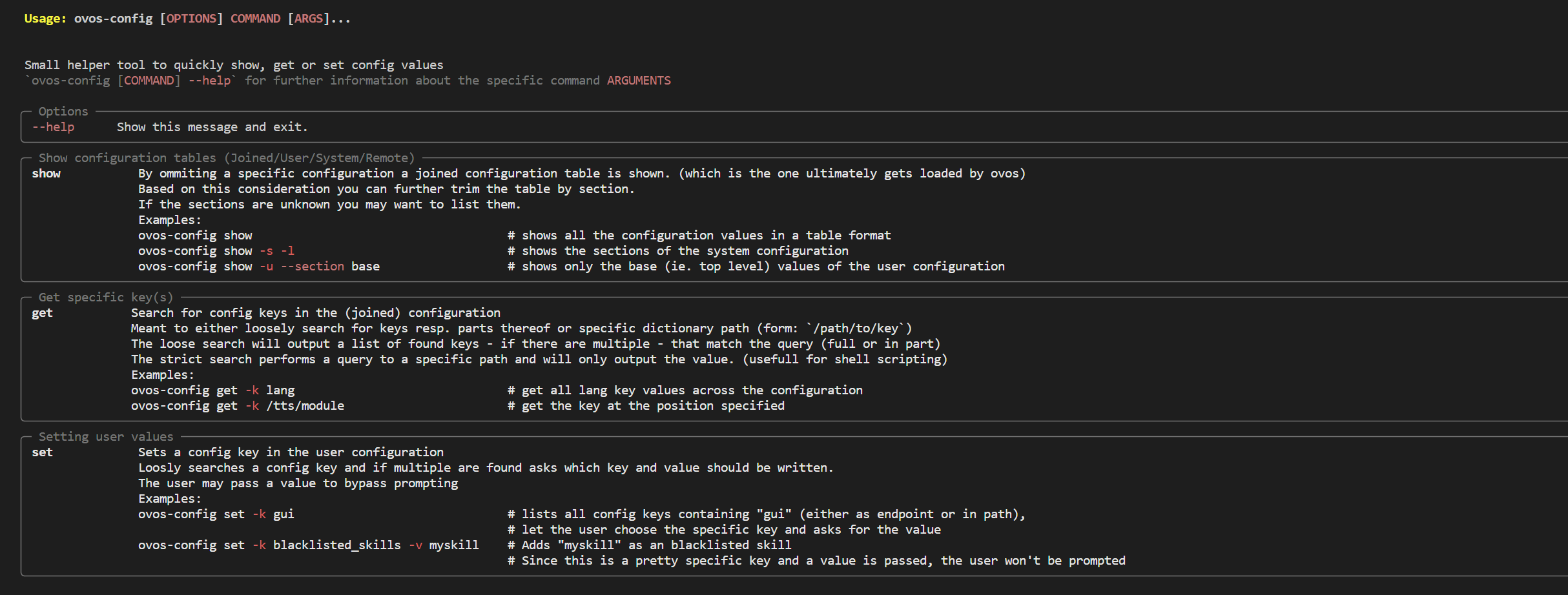
Quick rundown (cli):
-
ovos-config get-
Loose search (search a key or parts therof):
Given an entry of{'PHAL': { 'ovos-PHAL-plugin-system': { 'enabled': True }, 'ovos-PHAL-plugin-connectivity-events': { 'enabled': True }, ... }ovos-config get -k phalwould yield all PHAL entries and present it to the user (and the path where they were found) -
Strict search (search keys in a distinct location):
ovos-config get -k /PHAL/ovos-PHAL-plugin-system/enabledThis will output only the value or exit out if no key is found (root slash indicating a strict search)
-
-
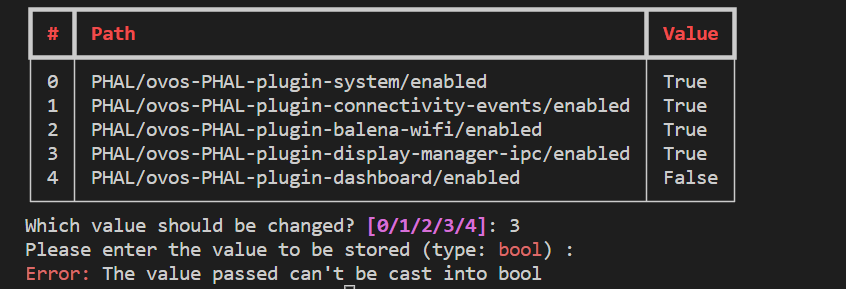
ovos-config set-
Searches loosely for keys containing the query string and presents a choice to the user to define a value
ovos-config set -k phalThe type is derived from the joined config and thus can be safely cast into the user conf.
Optionally a value (-v) can be sent as an argument.
-
-
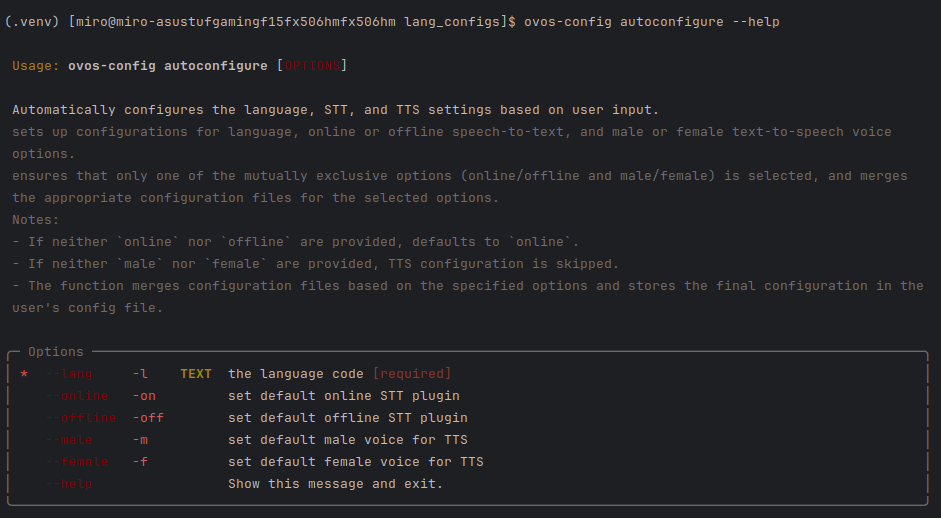
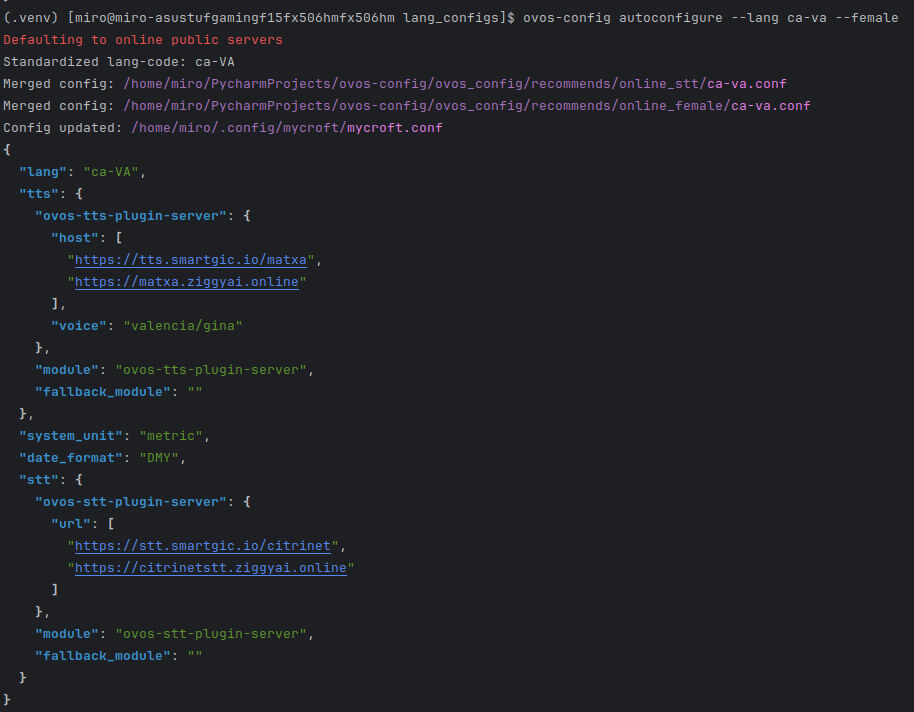
ovos-config autoconfigure
-
ovos-config show- Get a full table of either the joined, user (
-u), system (-s) or assistant (-a) configuration. This can be further refined by passing a--section, which can be listed withovos-config show -l
- Get a full table of either the joined, user (
2 maintainers


Download files
Download the file for your platform. If you're not sure which to choose, learn more about installing packages.
Source Distribution
Built Distribution
Filter files by name, interpreter, ABI, and platform.
If you're not sure about the file name format, learn more about wheel file names.
Copy a direct link to the current filters
File details
Details for the file ovos_config-3.1.0a1.tar.gz.
File metadata
- Download URL: ovos_config-3.1.0a1.tar.gz
- Upload date:
- Size: 44.6 kB
- Tags: Source
- Uploaded using Trusted Publishing? No
- Uploaded via:
twine/7.0.0 CPython/3.13.14
File hashes
| Algorithm | Hash digest | |
|---|---|---|
| SHA256 |
f0fc1fcda30b3751b2da3cfff1343e5b21eea927a33152bd892a8537fe7824ed
|
|
| MD5 |
795d9b099955427ca1360022b2a1abfe
|
|
| BLAKE2b-256 |
804aa673b61c841c62ed9311336089c261e82905536d4f37148527477032bb1d
|
File details
Details for the file ovos_config-3.1.0a1-py3-none-any.whl.
File metadata
- Download URL: ovos_config-3.1.0a1-py3-none-any.whl
- Upload date:
- Size: 79.7 kB
- Tags: Python 3
- Uploaded using Trusted Publishing? No
- Uploaded via:
twine/7.0.0 CPython/3.13.14
File hashes
| Algorithm | Hash digest | |
|---|---|---|
| SHA256 |
9c870732099c91ddeaaa18da4abd75b167d82afea75001b7f231974fb3f3aa8a
|
|
| MD5 |
72c39b0a5d6be024e3956df2591141cd
|
|
| BLAKE2b-256 |
1d2bbe3c5f67bcbe09c10d0ca73a348ab315a37621866d0cc05c39838cf6faf0
|














