
patchright-cli






Anti-detect browser automation CLI. Same command interface as Microsoft's playwright-cli but using Patchright (undetected Playwright fork) to bypass bot detection.
Install · Quick Start · Commands · Snapshots · Agent Integration
Highlights
| Feature | |
|---|---|
| 🛡️ | Bypasses Akamai, Cloudflare, and other anti-bot systems |
| 🚀 | Same command interface as playwright-cli — zero learning curve |
| 🤖 | Built for AI agents (Claude Code, Codex, etc.) with YAML snapshots |
| ⚡ | Daemon architecture — browser stays open between commands |
| 📦 | pip install / uvx — no Docker, no config files |
| 🔒 | Persistent profiles for maintaining login sessions |
Install
For LLM Agents
curl -s https://raw.githubusercontent.com/AhaiMk01/patchright-cli/main/docs/installation.md
# Recommended — always runs latest version, no install needed
uvx patchright-cli open https://example.com
Other install methods
# Via pip
pip install patchright-cli
patchright-cli open https://example.com
patchright-cli close

# Update
pip install --upgrade patchright-cli
From source:
git clone https://github.com/AhaiMk01/patchright-cli.git
cd patchright-cli
uv venv && uv pip install -e .
python -m patchright install chromium
Docker
A prebuilt image is available from GHCR:
docker pull ghcr.io/ahaimk01/patchright-cli:latest
By default the container runs patchright-cli directly, so it can be used for normal CLI commands:
docker run --rm ghcr.io/ahaimk01/patchright-cli:latest --help
docker run --rm ghcr.io/ahaimk01/patchright-cli:latest profile-list
Browser sessions live inside the container, so for a sequence of standalone CLI commands keep the same container running:
docker run --rm -it \
  --name patchright-cli \
  -v patchright-profiles:/root/.patchright-cli \
  --entrypoint /bin/sh \
  ghcr.io/ahaimk01/patchright-cli:latest

uv run patchright-cli open https://example.com --headless
uv run patchright-cli snapshot
uv run patchright-cli close
For MCP over stdio, set PATCHRIGHT_CLI_MODE=mcp-stdio and keep stdin attached. The volumes keep logins and output after the container exits:
docker run --rm -i \
  -e PATCHRIGHT_CLI_MODE=mcp-stdio \
  -v ./patchright:/patchright \
  -v patchright-profiles:/root/.patchright-cli \
  ghcr.io/ahaimk01/patchright-cli:latest
For a long-running MCP server over Streamable HTTP, set PATCHRIGHT_CLI_MODE=mcp-http:
docker run -d \
  --name patchright-mcp \
  -p 127.0.0.1:9090:9090 \
  -e PATCHRIGHT_CLI_MODE=mcp-http \
  -e PATCHRIGHT_CLI_MCP_TOKEN=replace-with-a-long-random-token \
  -v ./patchright:/patchright \
  -v patchright-profiles:/root/.patchright-cli \
  ghcr.io/ahaimk01/patchright-cli:latest
The HTTP MCP endpoint is then available at http://localhost:9090/mcp. The MCP server defaults to headless mode in the image and uses /patchright as its filesystem root. CLI commands inside the container still need --headless, since there is no display.
An example compose.yml is included in the repository:
PATCHRIGHT_CLI_MCP_TOKEN=replace-with-a-long-random-token docker compose up -d
Both examples publish the port on 127.0.0.1 only, but that alone doesn't stop a web page in your browser from reaching the server through DNS rebinding, so mcp-http refuses to start unless you pick one of three defences (see MCP Server for details): set PATCHRIGHT_CLI_MCP_TOKEN; set -e FASTMCP_HTTP_HOST_ORIGIN_PROTECTION=true so requests must be addressed to localhost, 127.0.0.1 or ::1, listing any other hostname or IP (a LAN address, a Compose service name) as a JSON array, for example -e FASTMCP_HTTP_ALLOWED_HOSTS='["patchright-mcp", "192.168.1.20"]'; or set -e FASTMCP_HTTP_HOST_ORIGIN_PROTECTION=false on purpose. A plain docker run -e PATCHRIGHT_CLI_MODE=mcp-http with neither variable exits with an error. The example compose.yml sets FASTMCP_HTTP_HOST_ORIGIN_PROTECTION: "false" so reverse-proxy and MCP hub setups keep working, which makes the token optional there: leave it out if your MCP client can't send an Authorization header. A reverse proxy with auth or an IP allowlist can stand in for the token. If you publish the port beyond loopback, protect it one of these ways: the endpoint gives full control of the browser and its saved logins.
Chrome sandbox
Patchright starts Chrome with --no-sandbox, so by default no Chrome process is sandboxed (chrome://sandbox lists every one as "Not Sandboxed", on Windows too). Set PATCHRIGHT_CLI_CHROME_SANDBOX=1 to launch Chrome with its sandbox instead. It is off by default.
The variable is read by the daemon, not by each CLI command. The CLI passes its environment on when it starts the daemon, so set it before the first open; a daemon that is already running keeps the setting it started with until you restart it (patchright-cli kill-all).
In Docker the image runs as root, and Chrome will not start as root with its sandbox on, so the switch also needs a non-root user (docker run --user ... with a writable HOME). Even then, Docker's default seccomp profile blocks the namespaces Chrome's Linux sandbox needs: measured on a GitHub Actions runner, as uid 1000 with the switch on, Chrome exits at launch ("Failed to move to new namespace ... Operation not permitted"). Leave the switch off in Docker; the image runs Chrome without its sandbox.
How the sandbox affects bot detection has not been measured.
Quick Start
# Launch undetected Chrome and navigate
patchright-cli open https://example.com

# Take a snapshot to see interactive elements with refs
patchright-cli snapshot

# Interact using refs from the snapshot
patchright-cli click e2
patchright-cli fill e5 "search query"
patchright-cli press Enter

# Take a screenshot
patchright-cli screenshot

# Close the browser
patchright-cli close
Architecture
graph LR
    A[CLI] -->|TCP:9321| B[Daemon]
    B -->|Patchright| C[Chrome]
| Component | Role |
|---|---|
Daemon (daemon.py) |
Long-running process managing browser sessions via Patchright. Auto-starts on first open. |
CLI (cli.py) |
Thin client — connects, sends command, prints result, disconnects. Browser stays open. |
Snapshot (snapshot.py) |
Playwright aria_snapshot() accessibility tree, annotated with sequential [ref=eN] handles for element targeting. |
Daemon token
The daemon only listens on 127.0.0.1, but any local process can reach that port, so every message must carry a secret token. On startup the daemon writes a fresh random token to ~/.patchright-cli/daemon-<port>.token (one file per port, so daemons on different ports coexist), before it starts listening, and deletes the file on a clean shutdown. The CLI (and the MCP server, which runs the CLI) reads the file for its --port and sends the token with each command; a message with a missing or wrong token is rejected and nothing runs.
- On Linux/macOS the file is created with mode
0600. On Windows, POSIX modes do not apply, so the file is created with its own protected ACL: one full-access entry for your user account and nothing inherited from~/.patchright-cli, whatever that directory grants. If the daemon cannot create the file that way it does not start. - A daemon holds
~/.patchright-cli/daemon-<port>.lockwhile it runs, so only one daemon per port ever writes that port's token; a second daemon started on the same port exits without touching it. The lock file stays after shutdown and is harmless (the OS releases the lock when the process exits). - Run the CLI as the same user, with the same home directory, as the daemon. In Docker the MCP server and daemon share a user and
HOME, so this holds. - An older CLI talking to a newer daemon gets an error saying the daemon requires an auth token: upgrade, or stop the daemon (
patchright-cli kill-allfrom the newer install, or end the process). A newer CLI talking to an older daemon finds no token file and sends none, which the older daemon accepts.
📖 Commands
Core
patchright-cli open [url]              # Launch browser
patchright-cli open --profile=work     # Named profile any session can use (logins persist)
patchright-cli open --headless         # Run headless
patchright-cli open --profile=./dir    # A value with / or \ is a profile directory
patchright-cli --tab <name> open <url> # Named tab: shared browser, own page/refs
patchright-cli open --mobile           # Emulate a generic mobile device (Pixel 7)
patchright-cli open --device="Pixel 5" # Emulate a specific Playwright device
patchright-cli goto <url>              # Navigate
patchright-cli click <ref>             # Click element
patchright-cli click <ref> right       # Right-click
patchright-cli click <ref> --modifiers=Alt,Shift
patchright-cli dblclick <ref>          # Double-click
patchright-cli dblclick <ref> --modifiers=Shift
patchright-cli fill <ref> <value>      # Fill text input
patchright-cli fill <ref> <value> --submit  # Fill and press Enter
patchright-cli type <text>             # Type via keyboard
patchright-cli type <text> --submit    # Type and press Enter
patchright-cli hover <ref>             # Hover over element
patchright-cli select <ref> <value>    # Select dropdown option
patchright-cli check <ref>             # Check checkbox
patchright-cli uncheck <ref>           # Uncheck checkbox
patchright-cli drag <from> <to>        # Drag and drop
patchright-cli snapshot                # Accessibility snapshot
patchright-cli snapshot -i             # Interactive elements only (recommended)
patchright-cli snapshot --depth=3      # Limit depth
patchright-cli snapshot --selector=CSS  # Snapshot a CSS-scoped subtree
patchright-cli snapshot <ref>          # Snapshot element subtree
patchright-cli snapshot --filename=f   # Save to custom path
patchright-cli find "text"             # Search snapshot for text
patchright-cli find --regex "a|b"      # Search by regex
patchright-cli find "text" --all       # Include text/paragraph nodes
patchright-cli find "text" --limit=50  # Cap hits (default 20)
patchright-cli eval <expr>             # Run JavaScript
patchright-cli eval --file=script.js   # Run JS from file
patchright-cli run-code <code>         # Run JS with return value
patchright-cli run-code --file=f.js    # Run JS from file
patchright-cli screenshot              # Page screenshot
patchright-cli screenshot --full-page  # Full scrollable page
patchright-cli screenshot <ref>        # Element screenshot
patchright-cli screenshot --filename=f # Save to custom path
patchright-cli screenshot --hires      # Capture at device pixel ratio
patchright-cli close                   # Close session
Navigation
patchright-cli go-back
patchright-cli go-forward
patchright-cli reload
patchright-cli wait 500                 # Wait a fixed number of milliseconds
patchright-cli wait --url="**/dashboard" # Wait for the URL to match (`*` never crosses a `/`)
patchright-cli wait-for <ref>           # Wait until an element is visible
patchright-cli wait-for <ref> --state=hidden
Keyboard / Mouse
patchright-cli press Enter
patchright-cli keydown Shift
patchright-cli keyup Shift
patchright-cli mousemove 150 300
patchright-cli mousedown [button]
patchright-cli mouseup [button]
patchright-cli mousewheel 0 100
Dialog
patchright-cli dialog-accept [text]    # Accept next alert/confirm/prompt
patchright-cli dialog-dismiss          # Dismiss next dialog
Upload / Resize
patchright-cli upload ./file.pdf       # Upload to first file input
patchright-cli upload ./file.pdf e5    # Upload to specific input
patchright-cli resize 1920 1080        # Resize viewport
Tabs
patchright-cli tab-list
patchright-cli tab-new [url]
patchright-cli tab-select <index>
patchright-cli tab-close [index]
State Persistence
patchright-cli state-save [file]       # Save cookies + localStorage
patchright-cli state-load <file>       # Restore saved state
Storage
# Cookies
patchright-cli cookie-list
patchright-cli cookie-list --domain=example.com
patchright-cli cookie-list --path=/api
patchright-cli cookie-get <name>
patchright-cli cookie-set <name> <value>
patchright-cli cookie-set <name> <value> --domain=example.com --httpOnly --secure
patchright-cli cookie-set <name> <value> --path=/ --sameSite=Lax --expires=1735689600
patchright-cli cookie-delete <name>
patchright-cli cookie-clear

# localStorage
patchright-cli localstorage-list
patchright-cli localstorage-get <key>
patchright-cli localstorage-set <key> <value>
patchright-cli localstorage-delete <key>
patchright-cli localstorage-clear

# sessionStorage
patchright-cli sessionstorage-list
patchright-cli sessionstorage-get <key>
patchright-cli sessionstorage-set <key> <value>
patchright-cli sessionstorage-delete <key>
patchright-cli sessionstorage-clear
Request Mocking
patchright-cli route "**/*.jpg" --status=404
patchright-cli route "https://api.example.com/**" --body='{"mock":true}'
patchright-cli route "**/*" --content-type=application/json --body='{"ok":true}'
patchright-cli route "**/*" --header=X-Custom:value
patchright-cli route "**/*" --remove-header=Content-Type
patchright-cli route-list
patchright-cli unroute "**/*.jpg"
patchright-cli unroute                 # Remove all routes
Tracing / Video / PDF
patchright-cli tracing-start
patchright-cli tracing-stop            # Saves .zip trace file
patchright-cli video-start             # Start video recording (CDP screencast)
patchright-cli video-stop              # Stop and save video (requires ffmpeg for .webm)
patchright-cli video-stop --filename=recording.webm
patchright-cli show --annotate          # Ask a human to mark up the page, wait for it
patchright-cli video-show-actions       # Annotate each action in the recording
patchright-cli video-hide-actions       # Stop annotating actions
patchright-cli pdf --filename=page.pdf
Network
patchright-cli network                 # Network request log
patchright-cli network --static        # Include static resources
patchright-cli network --clear         # Clear log after printing
patchright-cli network-state-set offline  # Simulate offline mode
patchright-cli network-state-set online   # Restore connectivity
DevTools
patchright-cli console                 # All console messages
patchright-cli console warning         # Filter by level
patchright-cli console --clear         # Clear after printing
Output
patchright-cli --raw eval --file=s.js  # Raw output (no page/snapshot decoration)
patchright-cli --raw snapshot > p.yml  # Pipe raw snapshot to file
Setup
patchright-cli install --skills # Auto-install skills for detected AI agents
Sessions
patchright-cli -s=mysession open https://example.com
patchright-cli -s=mysession click e6
patchright-cli -s=mysession close
patchright-cli list                    # List all sessions
patchright-cli close-all
patchright-cli kill-all
patchright-cli delete-data             # Delete the profile named after the session
patchright-cli profile-list           # Profiles, size, and which session uses each
patchright-cli profile-delete <name>  # Delete an idle named profile
patchright-cli --port=9322 open        # Custom daemon port
Agent Integration
Works with Claude Code, Cursor, Gemini CLI, Codex, and 40+ other agents.
# Install skill for all detected agents (recommended)
npx skills add AhaiMk01/patchright-cli
Other install methods
# Via patchright-cli itself
pip install patchright-cli
patchright-cli install --skills

# Or just tell your agent:
# "Install patchright-cli skill from https://raw.githubusercontent.com/AhaiMk01/patchright-cli/main/skills/patchright-cli/SKILL.md"
MCP server
MCP support is optional so the base CLI install stays small:
pip install 'patchright-cli[mcp]'

# stdio (default)
patchright-cli mcp

# Streamable HTTP (needs a token or an explicit Host/Origin choice, see below)
PATCHRIGHT_CLI_MCP_TOKEN=replace-with-a-long-random-token patchright-cli mcp --http --host=127.0.0.1 --port=8000

The HTTP endpoint is /mcp. Set PATCHRIGHT_CLI_MCP_TOKEN to require Authorization: Bearer <token> on every request, and always set it before binding to 0.0.0.0.
FastMCP's Host and Origin checks are off by default, so binding to 127.0.0.1 alone does not stop a web page from reaching a server without a token through DNS rebinding. patchright-cli mcp --http therefore refuses to start, whatever the bind host, unless PATCHRIGHT_CLI_MCP_TOKEN is set or FASTMCP_HTTP_HOST_ORIGIN_PROTECTION is set to a value FastMCP accepts (an empty value counts as unset). Pick one:
- Set
PATCHRIGHT_CLI_MCP_TOKEN. - Set
FASTMCP_HTTP_HOST_ORIGIN_PROTECTION=trueto accept only requests addressed tolocalhost,127.0.0.1or::1(421 otherwise) and reject foreignOriginheaders (403). To allow another hostname or IP, list it as a JSON array, for exampleFASTMCP_HTTP_ALLOWED_HOSTS='["mcp.lan"]'. - Set
FASTMCP_HTTP_HOST_ORIGIN_PROTECTION=falseon purpose, for example behind a reverse proxy with auth or an IP allowlist.
A reverse proxy with auth or an IP allowlist can stand in for the token. The stdio transport needs none of this.
One token covers one trust domain. Any client holding it can open, read or close any session by name, and patchright_kill_all closes them all. Clients that must not reach each other's browsers need separate servers, each with its own token. Two servers on one host share the daemon unless their PATCHRIGHT_CLI_MCP_DAEMON_PORT values differ, and they always share saved profiles in ~/.patchright-cli/profiles. For full separation, run each server in its own container or as a different OS user.
File paths passed to MCP tools (uploads, state and cookie files, screenshot/PDF/snapshot output, profile directories) must be absolute and beneath the MCP root, so a client cannot reach arbitrary host files. Outputs without a path land in <root>/output/, which browser_delete_output can clean up. patchright_eval and patchright_run_code still run arbitrary JavaScript in the page, so protect HTTP deployments regardless. The MCP server never loads a .patchright-cli/config.json, since clients can write files beneath the root; tool arguments carry every option.
URLs passed to patchright_open, patchright_goto and patchright_tab_new must be http, https or about:blank, so the browser cannot read local files through file:// (allowed again with PATCHRIGHT_CLI_MCP_UNRESTRICTED_FILESYSTEM=1). The server sends --web-only with every call, so the daemon holds the navigations it starts itself to the same rule (a link patchright_click follows, patchright_go_back, patchright_go_forward), also in a session you opened with the plain CLI, whose own commands stay unrestricted. A client can still read whatever such a session already shows, a file:// page included, so to keep your own CLI sessions out of reach give the server its own daemon with PATCHRIGHT_CLI_MCP_DAEMON_PORT. Sessions the server opens keep the option, and the daemon sends a frame in them that still lands on another scheme back to about:blank. The browser also stays off 169.254.0.0/16 and fe80::/10, where cloud metadata services hand out credentials: patchright_open, patchright_goto, patchright_tab_new and patchright_attach refuse those hosts (the proxy too), and a frame that still lands there through a redirect or a script is sent back to about:blank. Set PATCHRIGHT_CLI_MCP_BLOCK_NETWORKS=private to refuse every address that is not globally routable as well (loopback, RFC 1918, CGNAT, unique local), or none to turn the check off. It never intercepts requests, so the HTTP cache stays on, and in attach --context=host sessions it only checks URLs before navigating, leaving the Host's other pages alone. That also means it is not a hard boundary: images, fetch() and WebSockets are not checked (CORS still hides their responses from the page), and a DNS server that answers differently each time can get past it. For that, restrict the container's or host's outbound traffic.
| Variable | Default | Effect |
|---|---|---|
PATCHRIGHT_CLI_MCP_TOKEN |
unset (no auth) | Bearer token required by the HTTP transport |
PATCHRIGHT_CLI_MCP_ROOT |
working directory | Root that tool file paths must sit beneath |
PATCHRIGHT_CLI_MCP_UNRESTRICTED_FILESYSTEM |
unset | 1 drops the path check and enables patchright_install_skills |
PATCHRIGHT_CLI_MCP_HEADLESS |
unset (headed) | 1 makes patchright_open default to headless, for hosts without a display |
PATCHRIGHT_CLI_MCP_DAEMON_PORT |
9321 |
Daemon port the tools talk to |
PATCHRIGHT_CLI_MCP_BLOCK_NETWORKS |
link-local |
Address ranges the browser may not reach: link-local, private or none |
FASTMCP_HTTP_HOST_ORIGIN_PROTECTION |
unset (off) | true rejects requests whose Host is not loopback or allowed, and foreign Origins; without a token, HTTP mode needs it set to true or false |
FASTMCP_HTTP_ALLOWED_HOSTS |
unset | JSON array of extra hostnames the Host check accepts |
Skill docs
| File | Topic |
|---|---|
SKILL.md |
Main skill — commands, options, patterns |
snapshot-refs.md |
Snapshots, element refs, -i flag |
session-management.md |
Named sessions, profiles, CDP, dashboard |
request-mocking.md |
Route mocking, network state |
storage-state.md |
Cookies, localStorage, sessionStorage |
running-code.md |
eval, run-code, --file, stdin |
tracing.md |
Trace recording and debugging |
video-recording.md |
Video, codegen, screenshot, PDF |
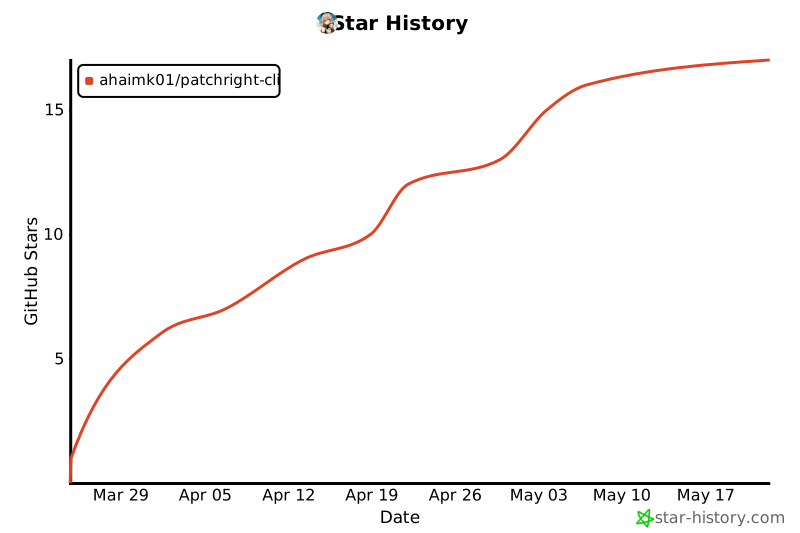
Star History
Differences from playwright-cli
patchright-cli aims for full command parity with Microsoft's playwright-cli. The following playwright-cli features are intentionally not implemented due to Patchright's architecture:
| Feature | Reason |
|---|---|
--browser=firefox/webkit/msedge |
Patchright only supports Chromium/Chrome. Anti-detect patches are Chrome-specific. |
--extension |
Browser extension connection not supported. Patchright uses CDP directly. |
install / install-browser |
Use python -m patchright install chromium instead. |
All other commands and options are fully supported.
Disclaimer
Credits
This project builds on the work of:
- Patchright by @Kaliiiiiiiiii-Vinyzu — the undetected Playwright fork that makes this possible. All anti-detect capabilities come from Patchright.
- playwright-cli by Microsoft — the original CLI that patchright-cli's command interface is modeled after.
- camoufox-cli by @Bin-Huang — inspiration for the CLI-first approach to anti-detect browser automation and the SKILL.md agent integration pattern.
License
Apache 2.0 — same as playwright-cli
1 maintainer

Metadata
1 maintainer
Release files for patchright-cli 0.9.0
For a detailed explanation of source distributions (sdists) and built distributions (wheels), please see the package formats documentation.
Source distribution (sdist)
| File | Size | Uploaded | Provenance | Actions |
|---|---|---|---|---|
| patchright_cli-0.9.0.tar.gz | 334.4 kB | Without provenance | Details for patchright_cli-0.9.0.tar.gz |
Built distribution (wheel)
| File | Interpreter | ABI | Platform | Actions Reset |
|---|---|---|---|---|
| patchright_cli-0.9.0-py3-none-any.whl | Python 3 | none | any | Details for patchright_cli-0.9.0-py3-none-any.whl |
Total release size: 442.3 kB
Release files / patchright_cli-0.9.0.tar.gz
| Download URL | patchright_cli-0.9.0.tar.gz |
|---|---|
| Size | 334.4 kB |
| Tags | Source |
|
SHA-256 checksum How to use checksums |
b5fd171ecba52f596f76ff83e76a1a6cba95761858aac6b7626c12d43df72718
|
|
BLAKE2b-256 checksum How to use checksums |
866570487a1813cf2c472e174b4d69f4fb9496800e8032c9badfa7885a713518
|
| Upload date | |
|
Uploaded using Trusted Publishing? What is trusted publishing? |
No |
| Uploaded via |
uv/0.13.6 {"installer":{"name":"uv","version":"0.13.6","subcommand":["publish"]},"python":null,"implementation":{"name":null,"version":null},"distro":{"name":"Ubuntu","version":"24.04","id":"noble","libc":null},"system":{"name":null,"release":null},"cpu":null,"openssl_version":null,"setuptools_version":null,"rustc_version":null,"ci":true}
|
Release files / patchright_cli-0.9.0-py3-none-any.whl
| Download URL | patchright_cli-0.9.0-py3-none-any.whl |
|---|---|
| Size | 107.9 kB |
| Tags | Python 3 |
|
SHA-256 checksum How to use checksums |
9705a38cdd67df2ff80344c03a3bf7cedd02fe781748ed973d47f3875513c042
|
|
BLAKE2b-256 checksum How to use checksums |
78a8bbf80472dc8d336551d4c77115a351fb4f2c453bc448a1c4cf462001ee44
|
| Upload date | |
|
Uploaded using Trusted Publishing? What is trusted publishing? |
No |
| Uploaded via |
uv/0.13.6 {"installer":{"name":"uv","version":"0.13.6","subcommand":["publish"]},"python":null,"implementation":{"name":null,"version":null},"distro":{"name":"Ubuntu","version":"24.04","id":"noble","libc":null},"system":{"name":null,"release":null},"cpu":null,"openssl_version":null,"setuptools_version":null,"rustc_version":null,"ci":true}
|
Security for patchright-cli 0.9.0
Provenance
Provenance describes where a file came from. On PyPI, provenance is shared via attestations, which provide a verifiable record of the build or publishing details. View details, limitations and caveats.
No provenance found
None of the files in this release were uploaded with provenance metadata.
A note on package security
PyPI is a repository for distributing packages, not a service for auditing them. While third-party security researchers and our staff do their best to detect and remove malicious packages, PyPI cannot guarantee the quality, security or suitability of any given package.
To learn more about protecting yourself from malicious actors, visit our package security documentation.














