
parse PDF files to docx

Project description
pdf2docx



- Parse text, table and layout from PDF file with
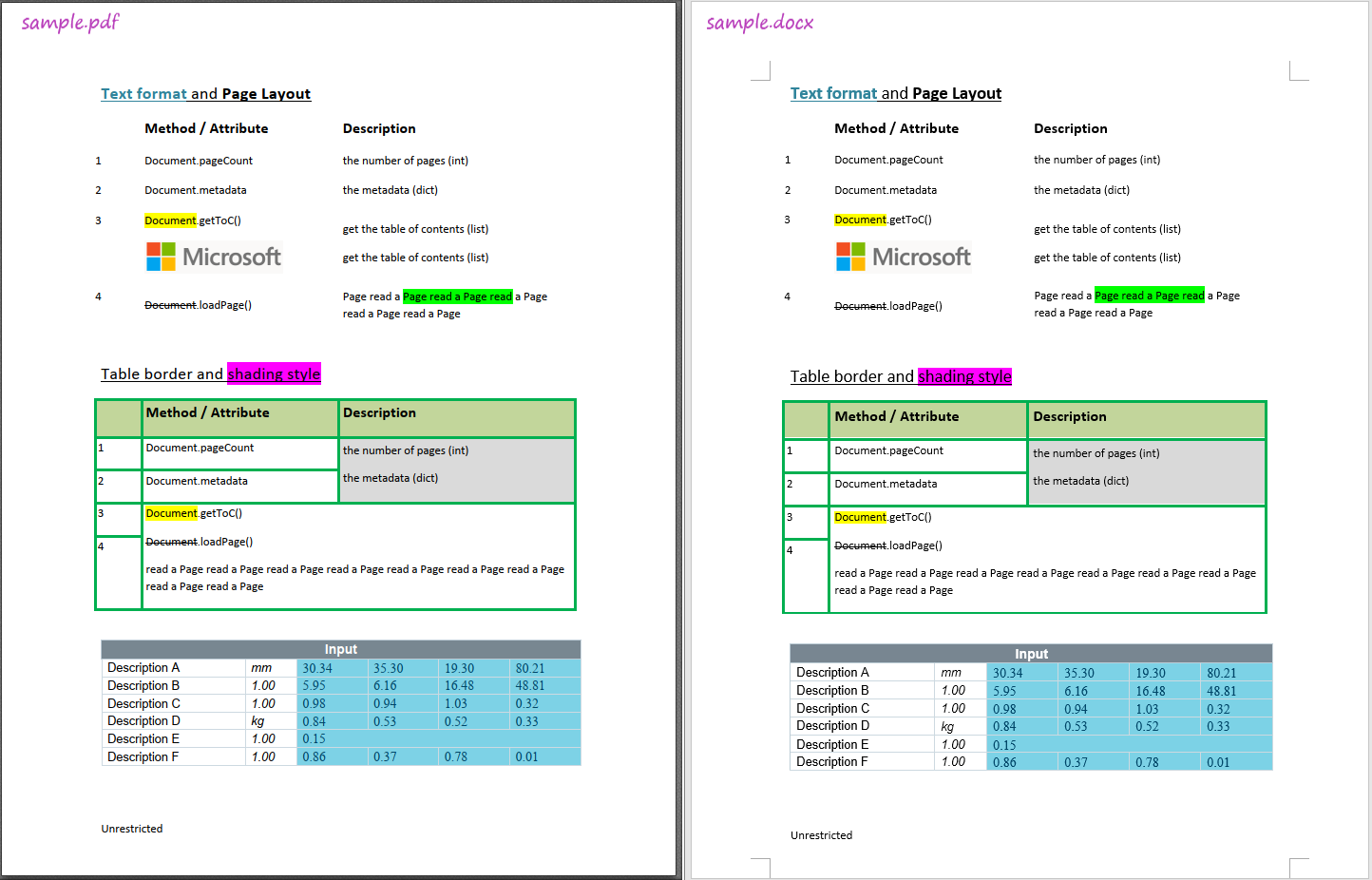
PyMuPDF - Generate docx with
python-docx
1 Features
- Parse and re-create text format
- font style, e.g. font name, size, weight, italic and color
- highlight, underline, strike-through converted from docx
- highlight, underline, strike-through applied from PDF annotations
- Parse and re-create list style
- Parse and re-create table
- border style, e.g. width, color
- shading style, i.e. background color
- merged cells
- Rebuild page layout in docx
- paragraph layout: horizontal and vertical spacing
- in-line image
It can also be used as a tool to extract table contents since both table content and format/style is parsed.
Limitations
- Text-based PDF file only
- Normal reading direction only
- horizontal paragraph/line/word
- no word transformation, e.g. rotation
- No floating images
- Full borders table only
2 Installation
From Pypi
$ pip install pdf2docx
From source code
Clone or download this project, and navigate to the root directory:
$ python setup.py install
Or install it in developing mode:
$ python setup.py develop
Uninstall
$ pip uninstall pdf2docx
3 Usage
By range of pages
$ pdf2docx test.pdf test.docx --start=5 --end=10
By page numbers
$ pdf2docx test.pdf test.docx --pages=5,7,9
$ pdf2docx --help

NAME
    pdf2docx - Run the pdf2docx parser

SYNOPSIS
    pdf2docx PDF_FILE DOCX_FILE <flags>

DESCRIPTION
    Run the pdf2docx parser

POSITIONAL ARGUMENTS
    PDF_FILE
        PDF filename to read from
    DOCX_FILE
        DOCX filename to write to

FLAGS
    --start=START
        first page to process, starting from zero
    --end=END
        last page to process, starting from zero
    --pages=PAGES
        range of pages

NOTES
    You can also use flags syntax for POSITIONAL ARGUMENTS
As a library
''' With this library installed with
    `pip install pdf2docx`, or `python setup.py install`.
'''

from pdf2docx.main import parse

pdf_file = '/path/to/sample.pdf'
docx_file = 'path/to/sample.docx'

# convert pdf to docx
parse(pdf_file, docx_file, start=0, end=1)
Or just to extract tables,
from pdf2docx.main import extract_tables

pdf_file = '/path/to/sample.pdf'

tables = extract_tables(pdf_file, start=0, end=1)
for table in tables:
    print(table)

# outputs
...
[['Input ', None, None, None, None, None],
['Description A ', 'mm ', '30.34 ', '35.30 ', '19.30 ', '80.21 '],
['Description B ', '1.00 ', '5.95 ', '6.16 ', '16.48 ', '48.81 '],
['Description C ', '1.00 ', '0.98 ', '0.94 ', '1.03 ', '0.32 '],
['Description D ', 'kg ', '0.84 ', '0.53 ', '0.52 ', '0.33 '],
['Description E ', '1.00 ', '0.15 ', None, None, None],
['Description F ', '1.00 ', '0.86 ', '0.37 ', '0.78 ', '0.01 ']]
4 Sample
Release history Release notifications | RSS feed


Download files
Download the file for your platform. If you're not sure which to choose, learn more about installing packages.
Source Distribution
pdf2docx-0.1.0.tar.gz
(404.0 kB
view details)
Built Distribution
Filter files by name, interpreter, ABI, and platform.
If you're not sure about the file name format, learn more about wheel file names.
Copy a direct link to the current filters
pdf2docx-0.1.0-py3-none-any.whl
(49.3 kB
view details)
File details
Details for the file pdf2docx-0.1.0.tar.gz.
File metadata
- Download URL: pdf2docx-0.1.0.tar.gz
- Upload date:
- Size: 404.0 kB
- Tags: Source
- Uploaded using Trusted Publishing? No
- Uploaded via: twine/3.2.0 pkginfo/1.5.0.1 requests/2.24.0 setuptools/47.1.1 requests-toolbelt/0.9.1 tqdm/4.47.0 CPython/3.8.3
File hashes
| Algorithm | Hash digest | |
|---|---|---|
| SHA256 |
cce11d37fa610243c7b4b1a13313466b9a2322d4d048bea999448178bc50369b
|
|
| MD5 |
e79c6225f5fe4291ebfed3473e5caac4
|
|
| BLAKE2b-256 |
ed0dbe4fc8a4ad72d218e4fbf2b9e47a6152a160ec02c8b5f1105a09a615c65c
|
File details
Details for the file pdf2docx-0.1.0-py3-none-any.whl.
File metadata
- Download URL: pdf2docx-0.1.0-py3-none-any.whl
- Upload date:
- Size: 49.3 kB
- Tags: Python 3
- Uploaded using Trusted Publishing? No
- Uploaded via: twine/3.2.0 pkginfo/1.5.0.1 requests/2.24.0 setuptools/47.1.1 requests-toolbelt/0.9.1 tqdm/4.47.0 CPython/3.8.3
File hashes
| Algorithm | Hash digest | |
|---|---|---|
| SHA256 |
0642c060f0ab8598af8da11a6b2165384d3af30f270b5c049235ae2f400b1645
|
|
| MD5 |
e14825e9ec1ba5c985e4c2b3fff6ca9c
|
|
| BLAKE2b-256 |
30a3b2f9e8b5f2ab9df3660670582cbee5b8207d43f1cb7011be77591bd63cb7
|






