
pdf2docx



- Parse text, table and layout from PDF file with
PyMuPDF - Generate docx with
python-docx
1 Features
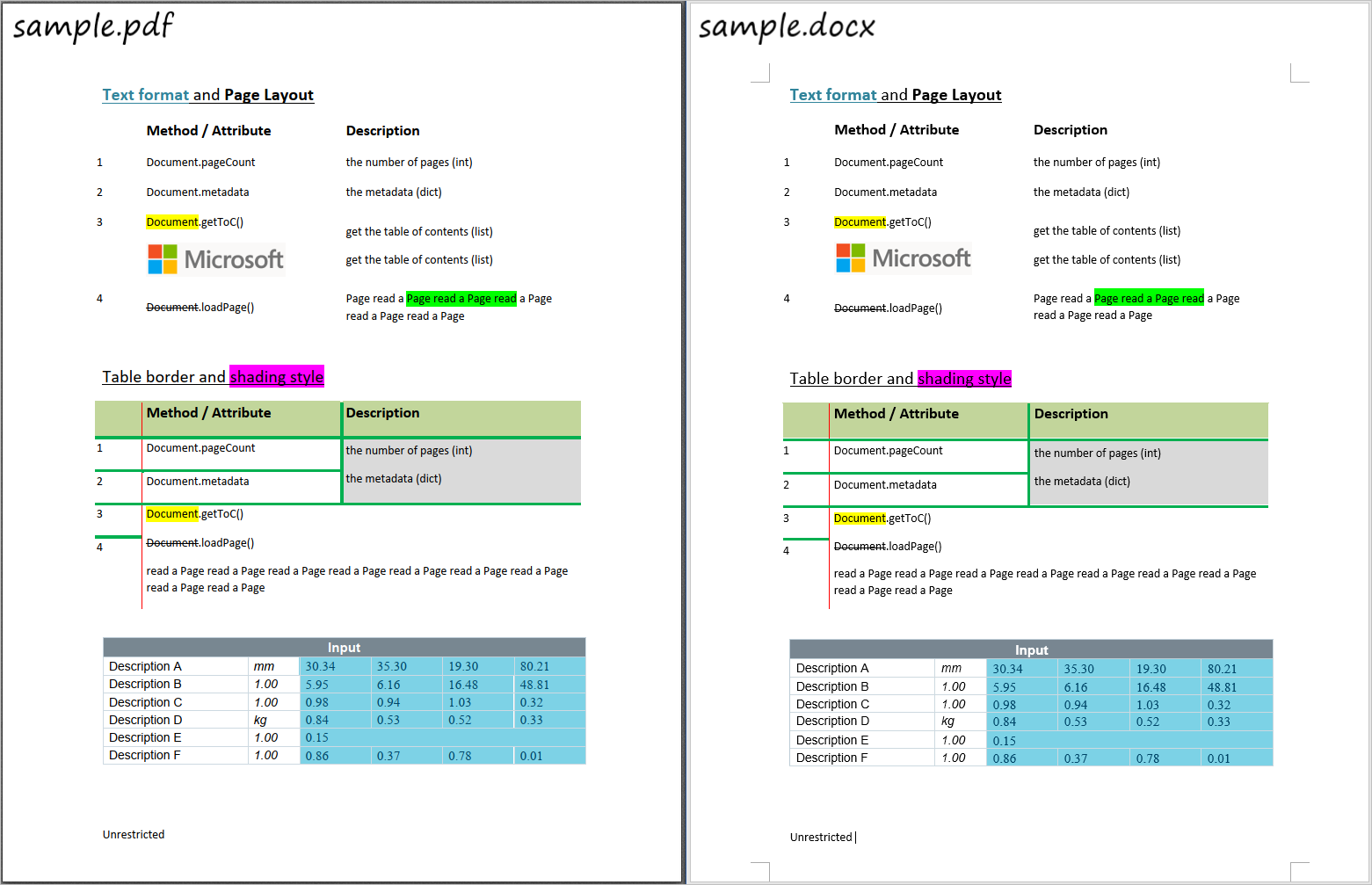
- Parse and re-create text format
- font style, e.g. font name, size, weight, italic and color
- highlight, underline, strike-through converted from docx
- highlight, underline, strike-through applied from PDF annotations
- Parse and re-create list style
- Parse and re-create table
- border style, e.g. width, color
- shading style, i.e. background color
- merged cells
- Rebuild page layout in docx
- paragraph layout: horizontal and vertical spacing
- in-line image
It can also be used as a tool to extract table contents since both table content and format/style is parsed.
Limitations
- Text-based PDF file only
- Normal reading direction only
- horizontal paragraph/line/word
- no word transformation, e.g. rotation
- No floating images
- Full borders table only
2 Installation
From Pypi
$ pip install pdf2docx
From source code
Clone or download this project, and navigate to the root directory:
$ python setup.py install
Or install it in developing mode:
$ python setup.py develop
Uninstall
$ pip uninstall pdf2docx
3 Usage
By range of pages
$ pdf2docx test.pdf test.docx --start=5 --end=10
By page numbers
$ pdf2docx test.pdf test.docx --pages=5,7,9
$ pdf2docx --help

NAME
    pdf2docx - Run the pdf2docx parser

SYNOPSIS
    pdf2docx PDF_FILE DOCX_FILE <flags>

DESCRIPTION
    Run the pdf2docx parser

POSITIONAL ARGUMENTS
    PDF_FILE
        PDF filename to read from
    DOCX_FILE
        DOCX filename to write to

FLAGS
    --start=START
        first page to process, starting from zero
    --end=END
        last page to process, starting from zero
    --pages=PAGES
        range of pages

NOTES
    You can also use flags syntax for POSITIONAL ARGUMENTS
As a library
''' With this library installed with
    `pip install pdf2docx`, or `python setup.py install`.
'''

from pdf2docx.main import parse

pdf_file = '/path/to/sample.pdf'
docx_file = 'path/to/sample.docx'

# convert pdf to docx
parse(pdf_file, docx_file, start=0, end=1)
Or just to extract tables,
from pdf2docx.main import extract_tables

pdf_file = '/path/to/sample.pdf'

tables = extract_tables(pdf_file, start=0, end=1)
for table in tables:
    print(table)

# outputs
...
[['Input ', None, None, None, None, None],
['Description A ', 'mm ', '30.34 ', '35.30 ', '19.30 ', '80.21 '],
['Description B ', '1.00 ', '5.95 ', '6.16 ', '16.48 ', '48.81 '],
['Description C ', '1.00 ', '0.98 ', '0.94 ', '1.03 ', '0.32 '],
['Description D ', 'kg ', '0.84 ', '0.53 ', '0.52 ', '0.33 '],
['Description E ', '1.00 ', '0.15 ', None, None, None],
['Description F ', '1.00 ', '0.86 ', '0.37 ', '0.78 ', '0.01 ']]
4 Sample
1 maintainer

Metadata
1 maintainer
Release files for pdf2docx 0.2.0
For a detailed explanation of source distributions (sdists) and built distributions (wheels), please see the package formats documentation.
Source distribution (sdist)
| File | Size | Uploaded | Provenance | Actions |
|---|---|---|---|---|
| pdf2docx-0.2.0.tar.gz | 405.7 kB | Without provenance | Details for pdf2docx-0.2.0.tar.gz |
Built distribution (wheel)
| File | Interpreter | ABI | Platform | Actions Reset |
|---|---|---|---|---|
| pdf2docx-0.2.0-py3-none-any.whl | Python 3 | none | any | Details for pdf2docx-0.2.0-py3-none-any.whl |
Total release size: 456.5 kB
Release files / pdf2docx-0.2.0.tar.gz
| Download URL | pdf2docx-0.2.0.tar.gz |
|---|---|
| Size | 405.7 kB |
| Tags | Source |
|
SHA-256 checksum How to use checksums |
9587366b392051549879f39d3a736d1bbb143c62d105521ede721796722475fc
|
|
BLAKE2b-256 checksum How to use checksums |
d7531960c67e476a293c3991f05aa778c46376627087b0fd408daba00d42733d
|
| Upload date | |
|
Uploaded using Trusted Publishing? What is trusted publishing? |
No |
| Uploaded via |
twine/3.2.0 pkginfo/1.5.0.1 requests/2.24.0 setuptools/49.2.0 requests-toolbelt/0.9.1 tqdm/4.48.0 CPython/3.8.4
|
Release files / pdf2docx-0.2.0-py3-none-any.whl
| Download URL | pdf2docx-0.2.0-py3-none-any.whl |
|---|---|
| Size | 50.8 kB |
| Tags | Python 3 |
|
SHA-256 checksum How to use checksums |
8c4a7da9ea5abd7bc00c9ff1efe2aadc22c68d46a101a8e40094bd64125bfbb5
|
|
BLAKE2b-256 checksum How to use checksums |
e305f741e2c6bee6284823486f98240ac0f108eb93e47556c01e23049f47ca88
|
| Upload date | |
|
Uploaded using Trusted Publishing? What is trusted publishing? |
No |
| Uploaded via |
twine/3.2.0 pkginfo/1.5.0.1 requests/2.24.0 setuptools/49.2.0 requests-toolbelt/0.9.1 tqdm/4.48.0 CPython/3.8.4
|
Security for pdf2docx 0.2.0
Provenance
Provenance describes where a file came from. On PyPI, provenance is shared via attestations, which provide a verifiable record of the build or publishing details. View details, limitations and caveats.
No provenance found
None of the files in this release were uploaded with provenance metadata.
A note on package security
PyPI is a repository for distributing packages, not a service for auditing them. While third-party security researchers and our staff do their best to detect and remove malicious packages, PyPI cannot guarantee the quality, security or suitability of any given package.
To learn more about protecting yourself from malicious actors, visit our package security documentation.














