
pdf2docx




- Parse layout (text, image and table) from PDF file with
PyMuPDF - Generate docx with
python-docx
Features
-
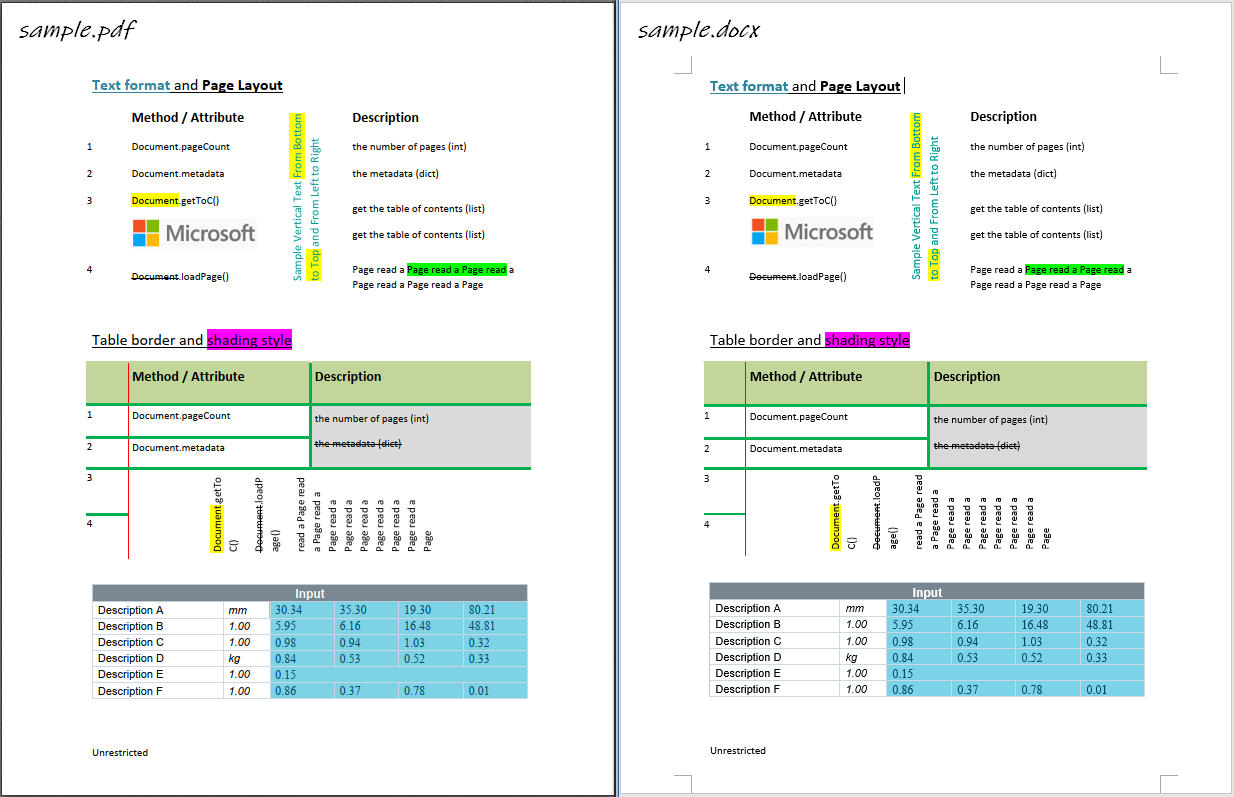
Parse and re-create paragraph
- text in horizontal/vertical direction: from left to right, from bottom to top
- font style, e.g. font name, size, weight, italic and color
- text format, e.g. highlight, underline, strike-through
- text alignment, e.g. left/right/center/justify
- paragraph layout: horizontal alignment and vertical spacing
- list style
- href link
-
Parse and re-create image
- in-line image
- image in Gray/RGB/CMYK mode
- transparent image
- floating image, i.e. picture behind text
-
Parse and re-create table
- border style, e.g. width, color
- shading style, i.e. background color
- merged cells
- vertical direction cell
- table with partly hidden borders
-
Parsing pages with multi-processing
It can also be used as a tool to extract table contents since both table content and format/style is parsed.
Limitations
- Text-based PDF file only
- Normal reading direction only
- horizontal/vertical paragraph/line/word
- no word transformation, e.g. rotation
Installation
From Pypi
$ pip install pdf2docx
From source code
Clone or download this project, and navigate to the root directory:
$ python setup.py install
Or install it in developing mode:
$ python setup.py develop
Uninstall
$ pip uninstall pdf2docx
Usage
pdf2docx can be used as either CLI or a library.
Command Line Interface
$ pdf2docx --help

NAME
    pdf2docx - Command line interface for pdf2docx.

SYNOPSIS
    pdf2docx COMMAND | -

DESCRIPTION
    Command line interface for pdf2docx.

COMMANDS
    COMMAND is one of the following:

     convert
       Convert pdf file to docx file.

     debug
       Convert one PDF page and plot layout information for debugging.

     table
       Extract table content from pdf pages.
- By range of pages
Specify pages range by --start (from the first page if omitted) and --end (to the last page if omitted). Note the page index is zero-based by default, but can turn it off by --zero_based_index=False, i.e. the first page index starts from 1.
$ pdf2docx convert test.pdf test.docx # all pages

$ pdf2docx convert test.pdf test.docx --start=1 # from the second page to the end

$ pdf2docx convert test.pdf test.docx --end=3 # from the first page to the third (index=2)

$ pdf2docx convert test.pdf test.docx --start=1 --end=3 # the second and third pages

$ pdf2docx convert test.pdf test.docx --start=1 --end=3 --zero_based_index=False # the first and second pages
- By page numbers
$ pdf2docx convert test.pdf test.docx --pages=0,2,4 # the first, third and 5th pages
- Multi-Processing
$ pdf2docx convert test.pdf test.docx --multi_processing=True # default count of CPU

$ pdf2docx convert test.pdf test.docx --multi_processing=True --cpu_count=4
Python Library
We can use either the Converter class or a wrapped method parse().
Converter
from pdf2docx import Converter

pdf_file = '/path/to/sample.pdf'
docx_file = 'path/to/sample.docx'

# convert pdf to docx
cv = Converter(pdf_file)
cv.convert(docx_file, start=0, end=None)
cv.close()
- Wrapped method
parse()
from pdf2docx import parse

pdf_file = '/path/to/sample.pdf'
docx_file = 'path/to/sample.docx'

# convert pdf to docx
parse(pdf_file, docx_file, start=0, end=None)
Or just to extract tables,
from pdf2docx import Converter

pdf_file = '/path/to/sample.pdf'

cv = Converter(pdf_file)
tables = cv.extract_tables(start=0, end=1)
cv.close()

for table in tables:
    print(table)

# outputs
...
[['Input ', None, None, None, None, None],
['Description A ', 'mm ', '30.34 ', '35.30 ', '19.30 ', '80.21 '],
['Description B ', '1.00 ', '5.95 ', '6.16 ', '16.48 ', '48.81 '],
['Description C ', '1.00 ', '0.98 ', '0.94 ', '1.03 ', '0.32 '],
['Description D ', 'kg ', '0.84 ', '0.53 ', '0.52 ', '0.33 '],
['Description E ', '1.00 ', '0.15 ', None, None, None],
['Description F ', '1.00 ', '0.86 ', '0.37 ', '0.78 ', '0.01 ']]
Sample
1 maintainer

Release files for pdf2docx 0.5.0
For a detailed explanation of source distributions (sdists) and built distributions (wheels), please see the package formats documentation.
Source distribution (sdist)
| File | Size | Uploaded | |
|---|---|---|---|
| pdf2docx-0.5.0.tar.gz | 2.0 MB | Details |
Built distribution (wheel)
| File | Interpreter | ABI | Platform | Reset |
|---|---|---|---|---|
| pdf2docx-0.5.0-py3-none-any.whl | Python 3 | none | any | Details |
Total release size: 2.1 MB
Release files / pdf2docx-0.5.0.tar.gz
| Download URL | pdf2docx-0.5.0.tar.gz |
|---|---|
| Size | 2.0 MB |
| Tags | Source |
|
SHA-256 checksum How to use checksums |
4fd5e2a135cb547d5f125ba7960d78283790d9a1bc11c277ff6eaf6ed6751624
|
|
BLAKE2b-256 checksum How to use checksums |
5febfee4c81620415edb7f26477ec260f448b1e98ac0336f1701b9f21a90ed90
|
| Upload date | |
|
Uploaded using Trusted Publishing? What is trusted publishing? |
No |
| Uploaded via |
twine/3.3.0 pkginfo/1.6.1 requests/2.25.1 setuptools/51.1.0 requests-toolbelt/0.9.1 tqdm/4.55.0 CPython/3.8.7
|
Release files / pdf2docx-0.5.0-py3-none-any.whl
| Download URL | pdf2docx-0.5.0-py3-none-any.whl |
|---|---|
| Size | 100.6 kB |
| Tags | Python 3 |
|
SHA-256 checksum How to use checksums |
bb138e4987dce600694e48c1db24046910696c96eaaedaa93ad73ac8b3d74544
|
|
BLAKE2b-256 checksum How to use checksums |
ae63ddc8dcb2142fc860951c5a46d234c38536545b53fa227f0403955963d4f0
|
| Upload date | |
|
Uploaded using Trusted Publishing? What is trusted publishing? |
No |
| Uploaded via |
twine/3.3.0 pkginfo/1.6.1 requests/2.25.1 setuptools/51.1.0 requests-toolbelt/0.9.1 tqdm/4.55.0 CPython/3.8.7
|














