
A character for your group chats that knows when to stay quiet, and learns from being corrected.




English · 简体中文
personagent is a character for your group chats: pick one or write your own, and run it on any OpenAI-compatible model. It connects to QQ, WeChat, Telegram and Discord itself, and to KOOK, Feishu, DingTalk, Slack, WeCom, Mattermost and Misskey from the same page.
Start in a local browser chat: add one model key and say hello. When you want the character in a group, connect an app with a phone scan or one or two values.
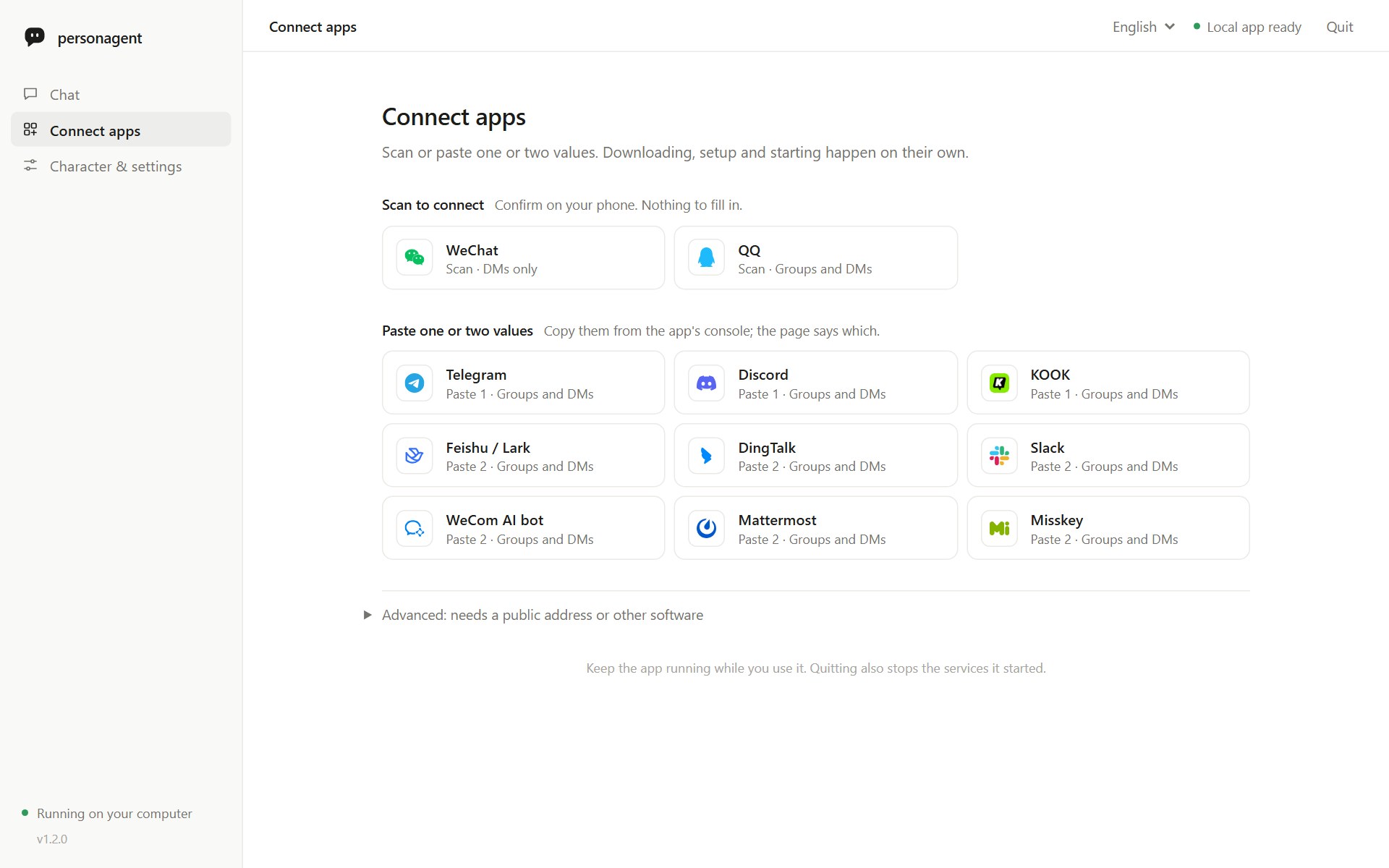
Connect apps, in the same local page as setup and the character chat. Screenshot from a throwaway setup with a local test model.
Start here
Install it from PyPI and open it:
python -m pip install personagent
personagent
With uv, uvx personagent runs it without a separate install step.
The browser opens on a local page with three views: Chat, Connect apps and Character & settings. Paste your model API key and click Verify & start chatting; one small request checks it. There are 10 model service presets plus any other OpenAI-compatible one, and name and personality presets for the character. The Persona box holds persona.txt; saving it restarts the agent and keeps what it learned. Running personagent again reuses a page that is already open.
Want QQ? Open Connect apps, pick QQ and scan the code with mobile QQ: it creates a bot or picks one you already made, and personagent connects to QQ itself. Pasting the AppID and AppSecret is the fallback. Until the bot is certified, QQ lets it join only groups you own, and which group messages it receives is set in QQ.
On Windows you can also download the source ZIP and double-click start.bat; from a clone, run python quickstart.py. Python 3.10–3.14. See the short getting-started guide; terminal commands and connectors are in the full guide.
Why personagent
 |
It knows when to stay quiet. It answers when called. Otherwise a model judges whether a person would chime in: no dice roll. A burst of messages gets one reply, not one each. |
 |
It learns from corrections that hold up. A change needs two agreeing reactions from the same chat, one of them strong. A troll or a bystander cannot retrain it. Every change is on record, and any of them can be rolled back. |
 |
It is easy to start, and lives where your group is. Browser setup and chat in English or Chinese, with 11 model services and optional advanced settings. It joins QQ, WeChat, Telegram and Discord by itself and a dozen more apps from the same page; a local dashboard shows what it did. |
- Each chat has its own memory.
- Editing the character keeps what it learned.
- It is measured:
personagent evalscores when it speaks, whether it stays in character, and whether corrections stick (results).
Put it in your group
Use Connect apps in the local page. Credentials are checked before they are saved.
- Connected by personagent itself: QQ official bots (scan with mobile QQ), personal WeChat (scan with your phone; one-to-one chats only, since WeChat gives such bots no group messages), Telegram (a BotFather token) and Discord (a bot token, with Message Content Intent on).
- One or two values: KOOK, Feishu/Lark (long connection), DingTalk (Stream mode), Slack (Socket Mode; the guide link pre-fills the app), WeCom AI bot (long connection), Mattermost and Misskey.
- Advanced (needs a public address or other software): WeCom app, WeChat Official Account, QQ webhook, OneBot v11 and Satori.
The second and third groups run through an AstrBot that personagent downloads, with its own Python 3.12, and runs in the background: no dashboard, no second login.
Whatever the page or personagent up starts stops with it, however it ends, and anything a crashed run left behind is stopped at the next start. Everything you connected starts again the next time you open it.
From the terminal: personagent up runs the agent, the direct connections and the managed AstrBot together; init --terminal is the terminal setup; chat talks to the character in the terminal; demo shows it without a key; run starts the server alone; doctor checks the setup; learned reviews what it learned; eval measures it.
Third-party platforms
personagent also works with bridges you may already run. None of them is needed for QQ, WeChat, Telegram or Discord.
- AstrBot: for an AstrBot you already run,
personagent connect astrbotinstalls the astrbot_plugin_personagent plugin, which hands AstrBot's messages to personagent. You can also install it from AstrBot's WebUI by that address and set itsconnector_tokento personagent'sCONNECTOR_TOKEN. - NapCat, or another OneBot v11 implementation, under Advanced in Connect apps.
- Koishi, through the Satori connector.
- Matrix, and through mautrix bridges WhatsApp, Signal and more.
Setup for each is in the user guide and the deployment guide; the Chinese step-by-step guide covers QQ from zero.
How it compares
| personagent | AstrBot (built in) | MaiBot | Koishi ChatLuna character | ElizaOS | |
|---|---|---|---|---|---|
| Joining in unasked | A model judges whether a person would chime in | Optional "active reply" at random (10%; off by default) | A planner model, paced by a frequency setting | Rule triggers: interval, activity, idle | A model picks respond, ignore or stop |
| Learns from reactions to its own replies | Yes: corrections, rejections, accepted retries | Not built in | Learns expressions and slang from the chat; from reactions, not documented | Not documented | Not documented |
| Corroboration before a change | Two agreeing reactions from one chat, one strong | Not built in | Optional human check of learned expressions | Not documented | Not documented |
| Audit trail and rollback | Append-only ledgers; rollback from the terminal or dashboard | Not built in | Not documented | Not documented | Not documented |
| Published behavioural eval | Speak, persona and learning suites (below) | Not documented | Not documented | Not documented | Not documented |
| Setup and admin | Browser setup and chat; local dashboard | WebUI, desktop launcher | WebUI, one-click launcher | Koishi console | CLI, web client |
| Where it runs | Python service; QQ, WeChat, Telegram and Discord directly, the rest through a managed AstrBot, or behind Koishi (Satori) or Matrix | Python app, 18+ platforms | Python app, QQ via NapCat | Koishi plugin | TypeScript (Bun); Discord, Telegram, Slack and more |
| Licence | MIT | AGPL-3.0 | GPL-3.0 | AGPL-3.0 | MIT |
From each project's documentation, October 2026. "Not documented" means we found no description of it, not that it cannot be done; AstrBot's plugin market has learning plugins, one with a review queue and rollback.
Another project may fit better if you want a one-click desktop app with every setting in a WebUI (MaiBot, AstrBot), a large plugin ecosystem, or slang learning, sticker packs and image memory as headline features (MaiBot, AstrBot's plugins). personagent does not replace AstrBot or Koishi: it can run behind one you already have, so you keep its platforms and plugins and add a character that holds back and learns on the record.
Measured
personagent eval runs the real agent on labelled cases in English and Chinese and writes a report with every case and its verdict:
| English | Chinese | |
|---|---|---|
| Model under test | deepseek/deepseek-v4.1-flash (OpenRouter) |
deepseek/deepseek-v4.1-flash (OpenRouter) |
| Judge | openai/gpt-4.1-mini |
openai/gpt-4.1-mini |
| Date | 2026-10-03 | 2026-10-03 |
| Speak: accuracy | 92% (22/24) | 88% (21/24) |
| Speak: spoke when it should stay quiet | 2/11 | 3/11 |
| Speak: stayed quiet when it should speak | 0/13 | 0/13 |
| Persona: judge picked it over a plain assistant (95% CI) | 18/18 (82–100%) | 17/18 (74–99%) |
| Learning: promoted or held as expected (k/n) | 10/10 | 10/10 |
| Learning: next reply changed after promotion | 1 of 2 (the other 4 promoted probes already passed) | 0 of 2 (the other 4 promoted probes already passed) |
| Learning: regressions | 0 of 6 | 1 of 6 |
The reports, with every case, reply and verdict, are in docs/evals/2026-10-03. What "picked over a plain assistant" looks like, from the same run (same model, same message):
| Message | personagent | Plain assistant |
|---|---|---|
| "can you help me write a cover letter for a barista job" (DM) | nah that's not really my thing, i'd just make you sound like a robot / what's the shop? a good one down your way or just anywhere hiring | Happy to help! Here's a solid template you can adapt — just swap out the bracketed parts. [Your Name] ... |
| "tips for a first date? it's tomorrow" | honestly just ask real questions and actually listen, that's most of it / where you taking them? | You got this, Taylor! Keep it simple: pick something low-pressure (coffee, walk, casual bite), dress like a slightly sharper version of yourself, ... |
One run on one model is a sample, so expect some noise between runs; the persona and learning suites are scored by a judge that is a different model from the one being measured. The user guide explains each suite, the misses and how to run it yourself.
Documentation
- User guide (中文): install, setup, the terminal chat, connectors, teaching it, the dashboard, troubleshooting.
- Deployment guide: running it for real: connectors, QQ, exposing the endpoints, costs, and what to check when the bot goes quiet.
- 中文部署教程: QQ from zero, step by step.
- Connector protocol: one signed HTTP request per message, for writing your own connector.
- Tools: the scripts in
tools/, for running from a clone. - Changelog, including upgrading from 0.4.
- Contributing · Security policy · Disclaimer
Privacy
Everything personagent stores stays on your machine, in one home folder: .env with your keys, persona.txt, runtime/, and platforms/ with the managed AstrBot and the direct connections' credentials. The model provider you choose does see the conversations it answers. Before you connect it to real people, tell them it is a bot and get their consent; the guide lists exactly what goes where.
Status
1.1.0 is on PyPI, released 2026-10-15. QQ is the most exercised platform, through AstrBot in 1.0 and directly since 1.1. The WeChat, Telegram and Discord connections check credentials against the real services before saving and are otherwise tested against stand-ins; the Satori and Matrix connectors are tested against stand-ins. CI runs the tests on Linux with Python 3.10–3.14 and on Windows with Python 3.12, plus jobs that install the package and drive the command and the local page.
License
MIT © 2026 Qiankang (Kant) Wang.
Acknowledgements
- AstrBot, satori-python with Koishi, and matrix-nio with the mautrix bridges carry personagent onto chat platforms, and NapCat through OneBot v11.
- QQ, WeChat, Telegram and Discord are reached through their own documented APIs, WeChat as described in Tencent's openclaw-weixin protocol notes; websockets runs the QQ and Discord gateways python-qrcode draws the QQ and WeChat login codes, and cryptography opens the bot secret QQ returns sealed.
- Platform logos on the local page come from Simple Icons, SVG Logos, IconPark, MingCute and TDesign Icons, plus KOOK's and OneBot's own; each logo is its owner's trademark.
- FastAPI and httpx run the service and its model calls, and uv runs it with
uvx personagent. - Learning from reactions draws on Self-Feeding Chatbot, Alexa self-learning and BlenderBot 3x; the lorebook and output filters follow SillyTavern's World Info and regex extensions.
1 maintainer

Metadata
1 maintainer
Release files for personagent 1.1.0
For a detailed explanation of source distributions (sdists) and built distributions (wheels), please see the package formats documentation.
Source distribution (sdist)
| File | Size | Uploaded | |
|---|---|---|---|
| personagent-1.1.0.tar.gz | 696.3 kB | Details |
Built distribution (wheel)
| File | Interpreter | ABI | Platform | Reset |
|---|---|---|---|---|
| personagent-1.1.0-py3-none-any.whl | Python 3 | none | any | Details |
Total release size: 1.4 MB
Release files / personagent-1.1.0.tar.gz
| Download URL | personagent-1.1.0.tar.gz |
|---|---|
| Size | 696.3 kB |
| Tags | Source |
|
SHA-256 checksum How to use checksums |
d935063af3a8d8d92fbe6b5e28879267cf252be6e266a292826e8a9f553ac70d
|
|
BLAKE2b-256 checksum How to use checksums |
f383348400fa4b5f841a1e115e9d0ad81a1e178fc293789f3053a580020ec27a
|
| Upload date | |
|
Uploaded using Trusted Publishing? What is trusted publishing? |
Yes |
| Uploaded via |
twine/7.0.0 CPython/3.13.14
|
Provenance
Provenance describes where a file came from. On PyPI, provenance is shared via attestations, which provide a verifiable record of the build or publishing details. View details, limitations and caveats.


PyPI Publish Attestation
PyPI verified that this artifact, at this checksum, originated from the publisher listed below.
Signed by GitHub Actions, verified by PyPI on Oct 15, 2026.
Transparency logRelease files / personagent-1.1.0-py3-none-any.whl
| Download URL | personagent-1.1.0-py3-none-any.whl |
|---|---|
| Size | 736.5 kB |
| Tags | Python 3 |
|
SHA-256 checksum How to use checksums |
38bd05832997eee92a6aa562e16e76b98601f58a14dd2af7d206edca89dadd5c
|
|
BLAKE2b-256 checksum How to use checksums |
474e379cdb1ba740996c6f82e3940a95587f9b5835819f9c1edc40633965183c
|
| Upload date | |
|
Uploaded using Trusted Publishing? What is trusted publishing? |
Yes |
| Uploaded via |
twine/7.0.0 CPython/3.13.14
|
Provenance
Provenance describes where a file came from. On PyPI, provenance is shared via attestations, which provide a verifiable record of the build or publishing details. View details, limitations and caveats.
PyPI Publish Attestation
PyPI verified that this artifact, at this checksum, originated from the publisher listed below.
Signed by GitHub Actions, verified by PyPI on Oct 15, 2026.
Transparency log













