
Personal Jarvis
Your computer becomes an AI agent.
Personal Jarvis is an open-source desktop app that connects your computer, AI models, tools, services, and specialized agents. Give it a task in chat or by voice. Jarvis can use the browser and desktop, call connected tools, delegate longer work, and bring the result back to one workspace.



See it in action
https://github.com/user-attachments/assets/9930ca95-5015-4ade-9a16-975c77d179fd
A real click-through of the app: every frame is recorded, waiting is sped up, and a few moments are zoomed in.
Want to try Personal Jarvis later? Star this repository to keep it handy.
Why it is different: Jarvis coordinates the tools you already have. A request can move from voice or chat to computer use, Codex or Claude Code, local or hosted models, plugins and MCP, or a background agent. Memory, agent learning, and routines provide context and recurring work. You can inspect actions, approvals, and output in the app. What runs depends on your setup, permissions, and the tools you connect.
Try it: Install on Windows, macOS, or Linux · Watch the real demo · Read the first-run guide
Install
Desktop downloads: Windows · macOS (Apple Silicon) · macOS (Intel) · Linux AppImage
Prefer the command line? Use the installer below.
Windows — PowerShell
irm https://raw.githubusercontent.com/PersonalJarvis/PersonalJarvis/main/install/install.ps1 | iex
macOS and Linux
curl -fsSL https://raw.githubusercontent.com/PersonalJarvis/PersonalJarvis/main/install/install.sh | bash
The installer checks Python 3.11+ and Git, offers to install missing prerequisites through the host package manager, installs the applicable desktop components, registers the desktop launcher, and opens the app. Language, wake phrase, and provider setup happen in the app. OS permissions and hardware capabilities affect voice and desktop control. Re-running the installer updates an existing installation.
After installation, open the desktop launcher or start the app from a terminal:
jarvis # full desktop
For a minimal server installation, use pip install personal-jarvis and
jarvis serve. Open the local address reported at startup; the default is
http://localhost:47821. Remote browser microphone access requires HTTPS.
See the headless deployment guide.
Manual pip/pipx installs on Intel macOS and Windows ARM64 also need the
native package index;
the recommended installer configures it automatically.
The idea is simple: one place on your computer where you say what you need, and it happens. You talk to Jarvis or type to it, and it works out whether to just answer, do something on your computer for you, or pass the job to an agent that keeps at it while you get on with your day. You can always see what it's doing, and it asks before it touches anything that matters.
It runs on your own machine with whichever model you like, local ones included, and it's free. There's no account to create, and nothing sends your data anywhere you didn't connect yourself.
One request, several ways to get it done
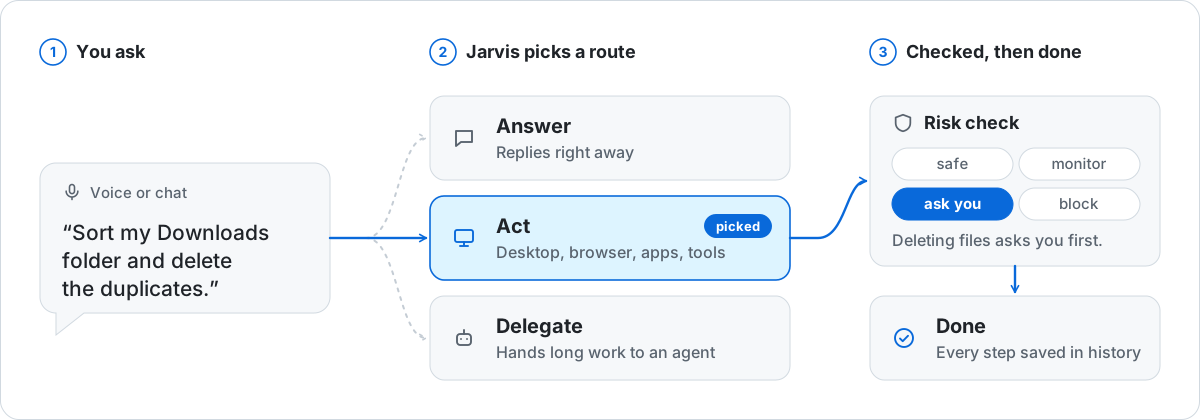
| Stage | What Jarvis connects |
|---|---|
| Ask | Start in chat or Voice Chat. Jarvis Voice separately dictates into other apps. |
| Act | Use the host desktop and browser through Computer Use, or call a connected plugin, skill, CLI, or MCP tool. |
| Delegate | Hand longer work to a background mission, a persistent specialist, or a Codex/Claude Code coding session when configured. Bounded parallel workers can split suitable work. |
| Keep context | Use the local wiki and private agent lessons; schedule routines for recurring tasks. |
| Review | Follow approvals and activity, then open the answer, file, or report in the conversation or Artifacts. |
The app runs on Windows, macOS, and Linux, with headless use for server-capable features. Desktop control needs a supported graphical session and OS permission. Local models and speech are optional; hosted providers and connected services receive the content required for their requests. See privacy and local data.
Start with chat or voice
Website · Docs · Getting started · How it works · Discord · X
Jarvis Agents
Build a team you can return to. Each agent has an identity, a direct conversation, standing instructions, and access to the tools you grant it. Pick a connected model or supported agent account for the work, and keep the conversations in one workspace.
- Talk directly to a specialist. Select an agent from the roster and continue its chat.
- Give it a standing brief. Configure its instructions, model access, and tools.
- Set up recurring work. Per-agent routines expose instructions, scheduling, and execution history.
- Inspect its work. Read messages and tool activity, and open produced files in Artifacts.
- Explore the world view. The workspace also has a visual map of the team.
Persistent agents and isolated coding missions have different lifecycles. Coding missions can use worktree isolation and critic review; an ordinary agent chat is not a new isolated worktree on every message. For suitable tasks, a mission can fan out to a bounded group of child workers. Each child has its own result; this is controlled delegation rather than an unlimited self-spawning swarm.
Agent guide · Agent learning · Routines
You need Windows, macOS or Linux, plus one API key from a supported provider or a local model. A microphone helps if you want to talk to it. You don't need a GPU; speech recognition and local models run fine on a normal machine, just slower.
first steps
- Go through the short setup in the app. Pick a language and a wake phrase of your own, like "Hey Nova", or use a keyboard shortcut instead.
- Connect a model. Add a key under Settings › API Keys, or set up a local one under Local models.
- Say your wake phrase and ask for something, for example "Plan a small project with me and ask what you need to know." After that, open a project folder in the Agentic IDE or create your first agent.
works with
- Models: OpenAI, Anthropic Claude, Google Gemini and Vertex AI, OpenRouter, NVIDIA, Ollama and any OpenAI-compatible local server, plus your Claude Code and Codex subscriptions.
- Speech: local Whisper, OpenAI, Gemini, Groq, Deepgram and OpenRouter for listening; Piper (local), ElevenLabs, Cartesia, Inworld, Gemini and OpenRouter voices for speaking.
- Coding agents: Claude Code, Codex, OpenCode, Kimi Code, GLM, Grok Build and Antigravity.
how it works
- Personal Jarvis is a desktop app with a local server behind it. The same server can run on its own, headless on a VPS, and you use it from the browser.
- Each request goes to the model you chose. Jarvis then decides whether to answer, use a tool, or hand the work to an agent.
- Every tool call passes a risk policy (safe, monitor, ask, block). You approve anything that could change your system, and every run is recorded so you can see what happened.
- Scripts and other agents reach the same app through the
jarvisCLI and a local API. CLI → · architecture →
docs
quick start · voice · dictation · agentic IDE · agents · providers · local models · plugins · MCP · CLI · server · architecture · troubleshooting
contribute
Start with a good first issue and your first contribution in 10 minutes. Questions and ideas go to discussions, security reports to SECURITY.md.
If you are an AI agent helping with this repository, read AGENTS.md first.
Panes have call signs so you can address a particular session through Jarvis: "Tell T1 to run the tests" or "What is T2 working on?" Return to the workspace to inspect output, respond to a prompt, or take over manually. A terminal becoming idle is not proof that its result is correct; inspect its changes and validation. You can also send one brief to several coding panes, with a delivery result for each pane. This is the coding workspace's parallel-agent path.
Sponsors are listed in SPONSORS.md.

license
Apache 2.0. Releases through 1.6.0 keep their original MIT license. See NOTICE and trademark guidance.
1 maintainer

Metadata
1 maintainer
Release files for personal-jarvis 2.6.0
For a detailed explanation of source distributions (sdists) and built distributions (wheels), please see the package formats documentation.
Source distribution (sdist)
| File | Size | Uploaded | |
|---|---|---|---|
| personal_jarvis-2.6.0.tar.gz | 24.1 MB | Details |
Built distribution (wheel)
| File | Interpreter | ABI | Platform | Reset |
|---|---|---|---|---|
| personal_jarvis-2.6.0-py3-none-any.whl | Python 3 | none | any | Details |
Total release size: 50.2 MB
Release files / personal_jarvis-2.6.0.tar.gz
| Download URL | personal_jarvis-2.6.0.tar.gz |
|---|---|
| Size | 24.1 MB |
| Tags | Source |
|
SHA-256 checksum How to use checksums |
440d0f8ab9bd9b62a206754d1160535112cccf1d435d0fbd1ed64b1a870e260f
|
|
BLAKE2b-256 checksum How to use checksums |
d8c2faa6907e5cabebb420e82315469dae50073a8e09ffeab3104c2fa6b7ae21
|
| Upload date | |
|
Uploaded using Trusted Publishing? What is trusted publishing? |
Yes |
| Uploaded via |
twine/7.0.0 CPython/3.13.14
|
Provenance
Provenance describes where a file came from. On PyPI, provenance is shared via attestations, which provide a verifiable record of the build or publishing details. View details, limitations and caveats.


PyPI Publish Attestation
PyPI verified that this artifact, at this checksum, originated from the publisher listed below.
Signed by GitHub Actions, verified by PyPI on Oct 2, 2026.
Transparency logRelease files / personal_jarvis-2.6.0-py3-none-any.whl
| Download URL | personal_jarvis-2.6.0-py3-none-any.whl |
|---|---|
| Size | 26.1 MB |
| Tags | Python 3 |
|
SHA-256 checksum How to use checksums |
39fddc27fdcc064231d0b23124bbb505635693d18e2ceb7592d84024782060fa
|
|
BLAKE2b-256 checksum How to use checksums |
5be17ac42b2fd4ded78ebe99afdde1be509237e3284d1629360f72647a78df72
|
| Upload date | |
|
Uploaded using Trusted Publishing? What is trusted publishing? |
Yes |
| Uploaded via |
twine/7.0.0 CPython/3.13.14
|
Provenance
Provenance describes where a file came from. On PyPI, provenance is shared via attestations, which provide a verifiable record of the build or publishing details. View details, limitations and caveats.
PyPI Publish Attestation
PyPI verified that this artifact, at this checksum, originated from the publisher listed below.
Signed by GitHub Actions, verified by PyPI on Oct 2, 2026.
Transparency log













