
Pexams: Python Exam Generation and Correction
Pexams is a library for generating beautiful multiple-choice exam sheets and automatically correcting them from scans using computer vision. It is similar to R/exams, but written in Python and using Playwright for high-fidelity PDF generation instead of LaTeX. It has the following advantages: it has more features, is faster, is easier to install, easier to customize, and it is much less prone to compilation errors than R/exams.
NOTE: This library is still in development and is not yet ready for production use. Although everything should work, there may be some bugs, missing features, or breaking changes in future versions.
AI4Exams ecosystem
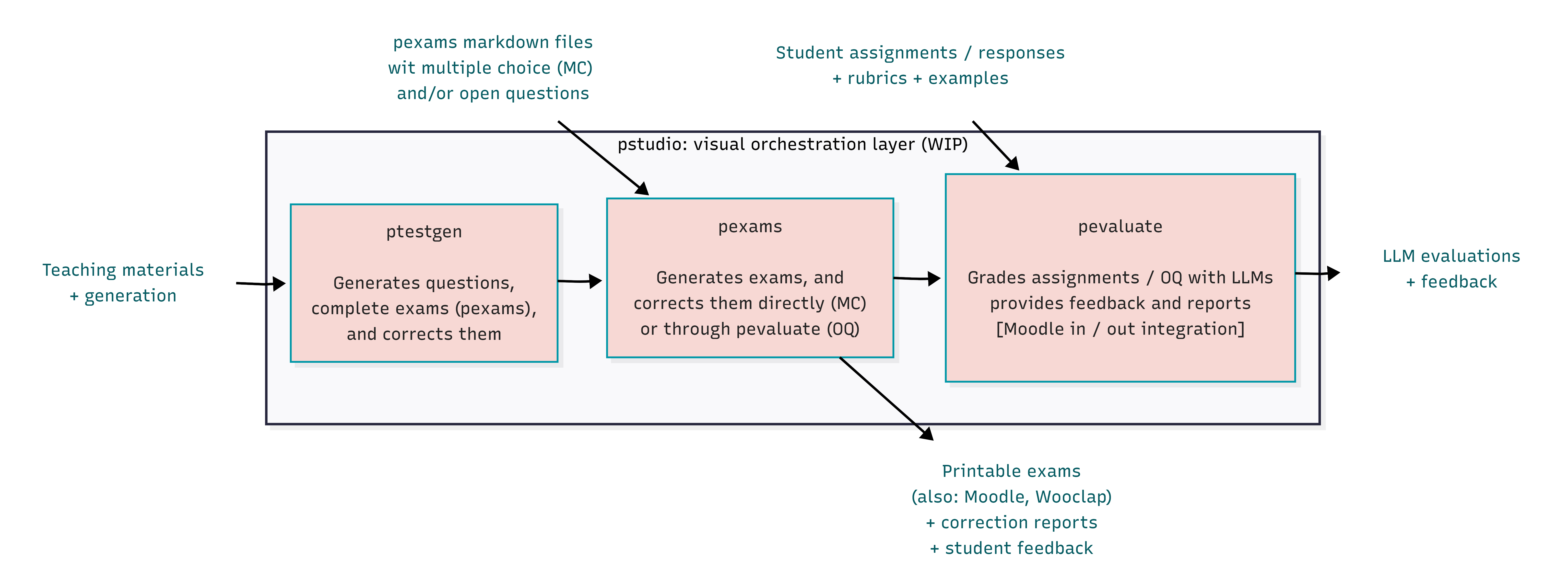
Pexams is part of the AI4Exams ecosystem together with ptestgen, pevaluate, and the planned pstudio visual orchestration layer.
Visual examples
You can view an example of a fully generated exam PDF here.
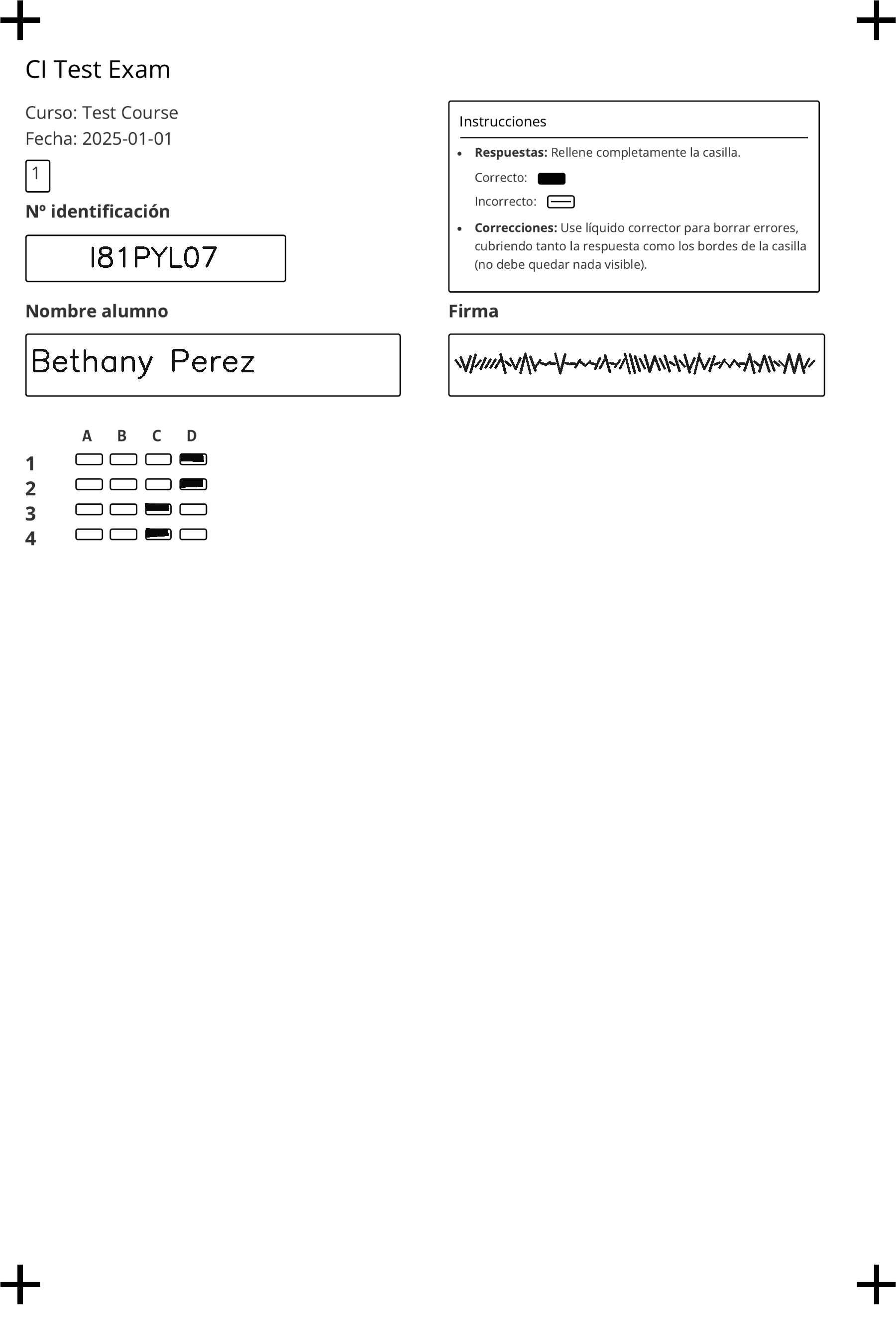
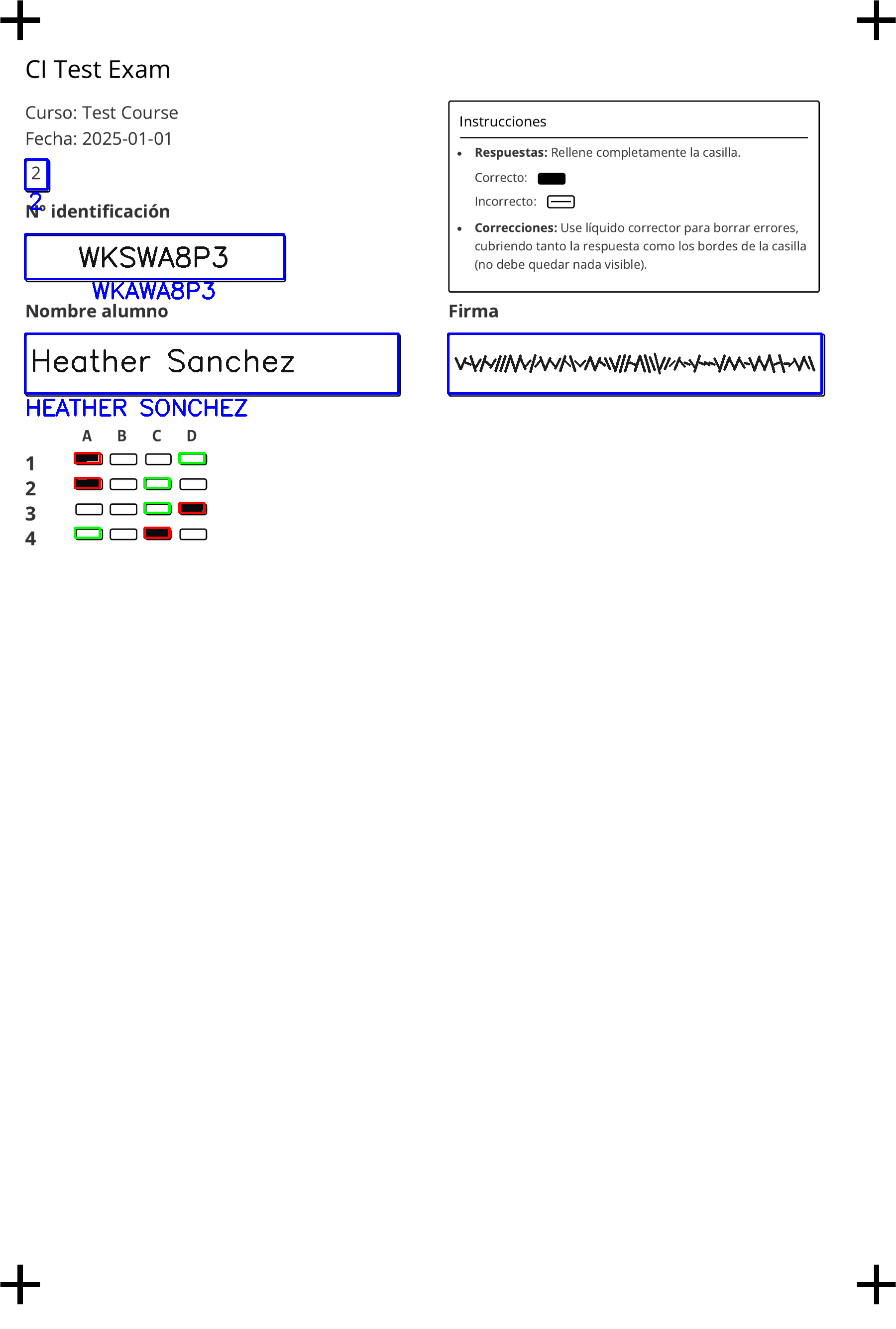
Below is an example of a simulated answer sheet and the annotated, corrected version that the library produces.
| Simulated Scan | Corrected Scan |
|---|---|
 |
 |
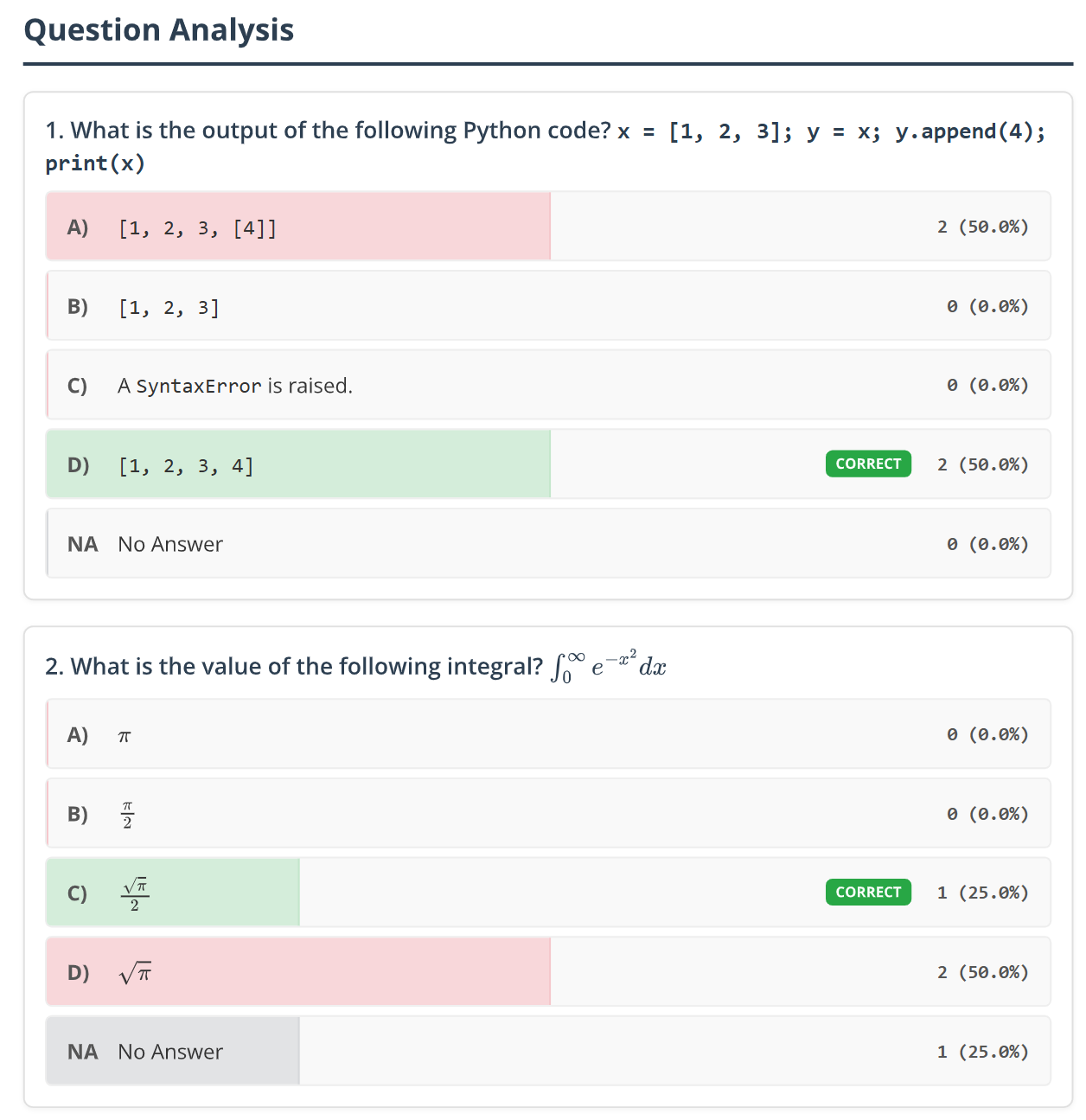
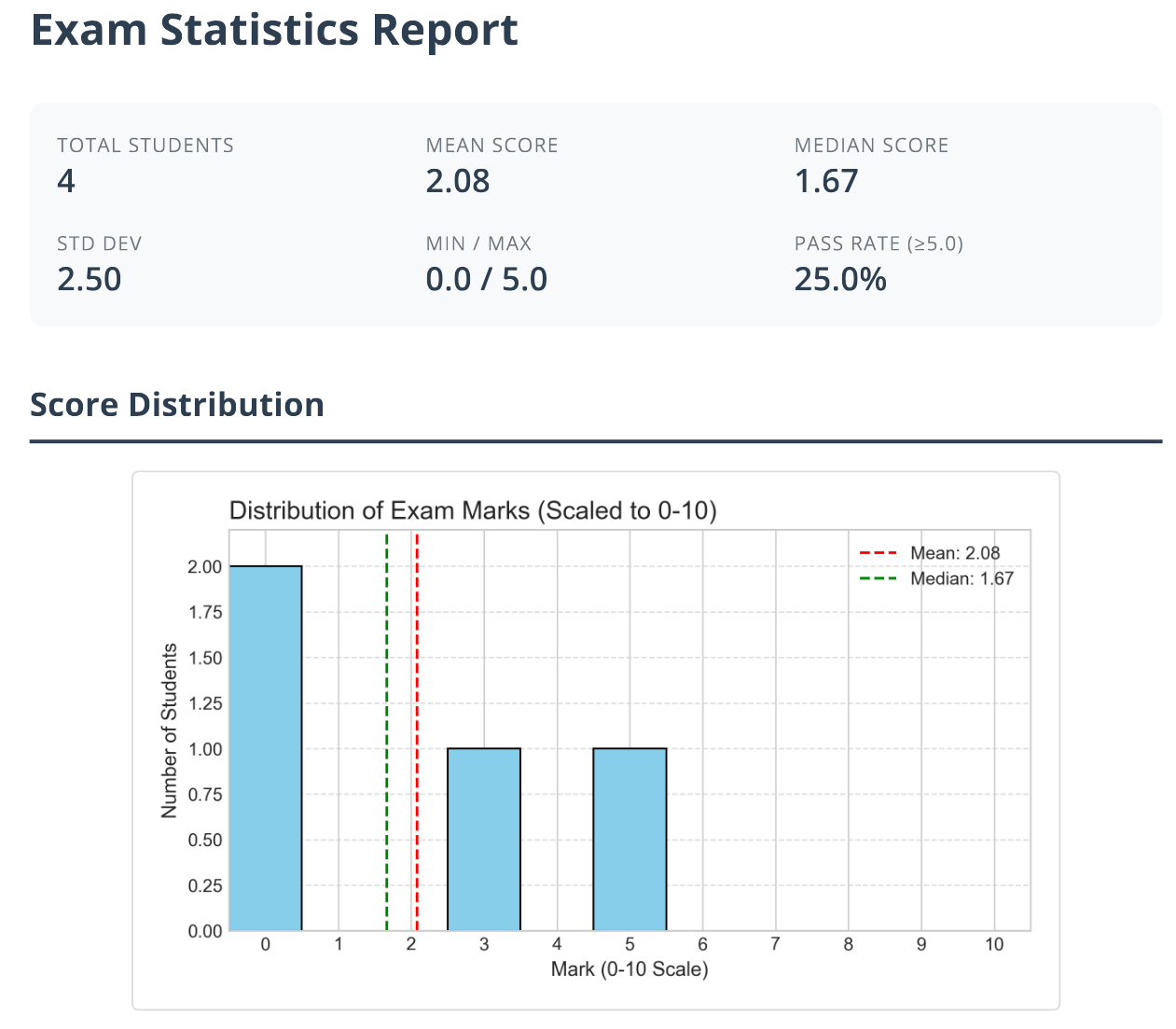
The analysis module generates a detailed statistical report (PDF) including answer distributions and mark histograms.
Features
Exam generation and Export
- Multiple exam models: Generate multiple unique exam models from a single source file, with automatic shuffling of questions and answers.
- Formats support:
- Input: Write questions in Markdown (preferred) or JSON.
- Export: Export questions to
rexams,wooclap,gift,moodle(xml), ormdformats.
- Rich content support: Write questions in Markdown and include:
- LaTeX equations: Seamlessly render math formulas using MathJax (
$...$). - Images: Embed images in your questions from local files.
- Code snippets: Include code snippets (`...`).
- LaTeX equations: Seamlessly render math formulas using MathJax (
- Customizable layout:
- Arrange questions in one, two, or three columns.
- Adjust the base font size to fit your needs.
- Customizable answer sheet:
- Student ID field is a single box for handwritten ID, using OCR.
- Internationalization support for exam labels (supported:
en,es,ca,de,fr,it,nl,pt,ru,zh,ja).
- High-fidelity PDFs: Uses Playwright to produce clean, modern, and reliable PDF documents from HTML/CSS.
Correction & analysis
- Automated correction: Correct exams from a single PDF containing all scans or from a folder of individual images.
- Online platform results: Ingest student answers exported from Wooclap or Moodle (CSV or XLSX) with
pexams correct-online, without needing any scanned sheets. Fuzzy question and answer matching ensures robustness against minor text differences. - Robust image processing: Uses
OpenCVwith fiducial markers for reliable, automatic perspective correction and alignment, theTrOCRvision transformer model for OCR of the student ID, name, and model ID, and custom position detection for the answers. - Detailed reports:
correction_results.csv: Detailed scores and answers for each student.question_stats.csv: Answer distribution statistics and original question IDs.stats_report.pdf: A comprehensive, beautifully formatted PDF report containing:- Summary statistics (Mean, Median, Pass Rate, etc.).
- Score distribution histogram.
- Detailed item analysis for each question with bar charts showing response distribution (correct / incorrect 1 / incorrect 2 / ... / blank).
- Insightful visualizations: Automatically produces plots for:
- Mark distribution: A histogram to assess overall student performance.
- Answer distribution: A horizontal bar plot to analyze performance on each question and identify potential issues.
- Flexible scoring: Easily void specific questions during the analysis if needed, either by removing it from the score calculation completely or by voiding it "nicely" (can only increase the score if the question is correct, otherwise the question is removed from the score calculation).
- Mark Filling & Fuzzy Matching: Automatically fill an input CSV/Excel file with student marks, matching students by ID with fuzzy matching (Levenshtein distance) support for robustness against OCR errors.
Development & testing
- Simulated scans: Automatically generate a set of fake, filled-in answer sheets to test the full correction and analysis pipeline.
- End-to-end testing: A simple
pexams testcommand runs a full generate-correct-analyze cycle using bundled sample data and testing exports/fuzzy matching. - Easy debugging: Keep the intermediate HTML files to inspect the exam content and layout before PDF conversion, by setting the
--log-level DEBUGflag.
Installation
The library has been tested on Python 3.11.
1. Install the library
You can install the library from PyPI:
pip install pexams
Alternatively, you can clone the repository and install it in editable mode, which is useful for development:
git clone https://github.com/OscarPellicer/pexams.git
cd pexams
pip install -e .
2. Install Playwright browsers
pexams uses Playwright to convert HTML to PDF. You need to download the necessary browser binaries by running:
playwright install chromium
This command only needs to be run once.
3. Install Poppler
You may also need to install Poppler, which is needed to convert PDFs to images during the correction phase and for generating simulated scans:
- Windows:
conda install -c conda-forge poppler(alternatively, you can download the Poppler binaries from the Poppler Windows repository) - macOS:
brew install poppler - Debian/Ubuntu:
sudo apt-get install poppler-utils
Quick start
The pexams test command provides a simple way to run a full cycle and see the library in action. It uses a bundled sample file and media to generate, correct, and analyze a sample exam.
pexams test --output-dir ./my_test_output
This will create a my_test_output directory containing the generated exams, simulated scans, correction results, and analysis plots.
Usage
1. The questions file (Markdown)
The preferred input format is a Markdown file (.md) with the following structure:
## question_id
> 
Question text...
* Correct answer
* Wrong answer 1
* Wrong answer 2
**Explanation:**
Optional explanation text...
Notes:
- The first answer in the list is treated as the correct one (it will be shuffled during exam generation).
- Images must be in a blockquote
> ![...]. - Question ID can be a string or integer.
- Per-question points can be set in the header with
{points=2.5}. - Per-question font size can be set with
{font_size=8pt}.
Mixed exams with open-answer questions
Open-answer questions are declared in the question header. The lines value reserves vertical space (7 mm per line, fractional values such as lines=8.5 are allowed); guide lines are hidden by default and can be enabled per question with show_lines=true.
## mc_1 {points=2 font_size=9pt}
What is the main purpose of regularization?
* To reduce overfitting
* To increase the number of parameters

## open_1 {type=open points=4 lines=10 show_lines=false font_size=10pt}
Explain why regularization can improve generalization.

**Expected answer:**
Regularization discourages overly complex models and can reduce overfitting.

**Rubric:**
2 points for model complexity, 1 for overfitting/generalization, 1 for train/validation contrast.
If an exam has no multiple-choice questions, there is nothing to mark on an answer sheet: the student header (title, model, ID, name and signature) is printed at the top of the first question page instead, which saves the answer sheet and the blank page after it. The header keeps the answer-sheet coordinates, so correction works in the same way.
Questions are laid out page by page with any number of columns (--columns 1|2|3): a question or open-answer box never crosses a page break, and every page carries its own four fiducial markers.
When correcting scans, pexams writes open_responses_index.csv and cropped open-answer images under open_responses/. These artifacts are intended for pevaluate exam-open.
2. CLI commands
pexams generate
Generates exam PDFs or exports questions to other formats.
pexams generate <input_file> --to <format> --output-dir <path> [OPTIONS]
Arguments:
input_file: (Positional) Path to the input file (Markdown or JSON).--to <format>: Output format. Options:pexams(default, PDF generation),rexams,wooclap,gift,md, ormoodle(xml).--output-dir <path>: Directory to save the output.
Common Options (for all formats):
--log-level <level>: Set the logging level (DEBUG, INFO, WARNING, ERROR).--shuffle-questions <int>: Seed for shuffling the order of questions (default: 42). If not set, questions keep their original order.--shuffle-answers <int>: Seed for shuffling the order of answers/options (default: 42).
Options for pexams format:
--num-models <int>: Number of different exam models to generate (default: 4).--exam-title <str>: Title of the exam (default: "Final Exam").--exam-course <str>: Course name for the exam (optional).--exam-date <str>: Date of the exam (optional).--columns <int>: Number of columns for the questions (1, 2, or 3; default: 1).--font-size <str>: Base font size for the exam (e.g., '10pt', '12px'; default: '10pt').--total-students <int>: Total number of students for mass PDF generation (default: 0).--extra-model-templates <int>: Number of extra template sheets (answer sheet only) to generate per model (default: 0).--lang <str>: Language for the answer sheet labels (e.g., 'en', 'es'; default: 'en').--keep-html: If set, keeps the intermediate HTML files used for PDF generation.--generate-fakes <int>: Generates a number of simulated scans with fake answers for testing the correction process (default: 0).--generate-references: If set, generates a reference scan with the correct answers marked for each model.--custom-header <str>: Markdown string or path to a Markdown file to insert before the questions (e.g., instructions).--mc-total-points <float>: Assign a total value to all multiple-choice questions and distribute it evenly. Do not combine this with per-question non-default MC points.--fill-answer-space: Grow the open-answer boxes of each page so they use the free space left at its bottom. Boxes with an explicitheight_mmkeep their size.
Comprehensive Example
pexams generate my_questions.md --output-dir ./generated_exam \
    --exam-title "Computer Systems - Midterm Exam" \
    --exam-course "Master in Computer Engineering" \
    --exam-date "2025-12-19" \
    --num-models 4 \
    --font-size "9pt" \
    --lang "es" \
    --columns 2 \
    --total-students 22 \
    --extra-model-templates 2 \
    --generate-fakes 1 \
    --generate-references \
    --keep-html \
    --custom-header "**Instructions:** Incorrect answers will be penalized by **-0.25 points** (a correct answer is +1 point). You are only allowed to have a pen, corrector fluid, and your ID card on top of the table."
pexams correct
Corrects scanned exams, runs analysis, and optionally fills marks into a student list.
pexams correct --input-path <path> --exam-dir <path> --output-dir <path> [OPTIONS]
Comprehensive Example:
pexams correct \
    --input-path ./generated_exam/simulated_scans \
    --exam-dir ./generated_exam \
    --output-dir ./generated_exam/correction_results \
    --input-csv ./grades.csv \
    --id-column "Student ID" \
    --mark-column "Midterm Mark" \
    --fuzzy-id-match 80 \
    --penalty 0.25 \
    --input-encoding "utf-8"
- The
--input-pathcan be a single PDF file or a folder of images (PNG, JPG). - The
--exam-dirmust contain theexam_model_*_questions.jsonfiles generated alongside the exam PDFs.
Mark Filling Arguments:
--input-csv <path>: Path to an input CSV/XLSX/TSV file containing student IDs.--id-column <name>: Column name in input file containing student IDs.--mark-column <name>: Column name to fill with marks (will be created if missing).--fuzzy-id-match <0-100>: Threshold for fuzzy matching of IDs (default 100 = exact match only).--name-match-threshold <0-100>: When--input-csvand--name-columnare provided, scanned exams are matched to the roster by OCR'd student name before analysis. If any scan cannot be matched,pexamswritesstudent_matches.csvand stops before producing named artifacts or reports.--use-llm-name-ocr: Use OpenRouter vision OCR for the student-name box before roster matching. By default, local OCR is used.--openrouter-name-model <model>: Model used by--use-llm-name-ocr(defaultgoogle/gemini-3.8-flash).--input-encoding <str>: Encoding of the input CSV file (defaultutf-8). Useful if you encounter encoding errors, in which case you can trylatin1orutf-8-sig.--input-sep <str>: Separator for the input CSV file (default,). If your CSV uses semicolons (common in Europe), pass--input-sep semior--input-sep ";".--output-decimal-sep <str>: Decimal separator for the output marks (default.). Use,if your locale requires comma decimals (e.g.,--output-decimal-sep ",").--simplify-csv: If set, the output CSV (*_with_marks.csv) will only keep the columns specified by--id-column,--name-column, and--mark-column. This is useful for creating a clean file for importing into a gradebook.--name-column <name>: Column name in input file containing student names. Required if--simplify-csvis used.
Scoring Arguments:
--penalty <float>: Score penalty for wrong answers (e.g.,0.33333). Default is0.0. Formula:score = correct_answers - (wrong_answers * penalty). Note thatwrong_answersdoes not include blank/unanswered questions.
Other Arguments:
--void-questions <str>: Comma-separated list of question numbers to exclude from scoring.--void-questions-nicely <str>: Comma-separated list of question IDs to void "nicely".--only-analysis: Skip the image processing step (OCR/OMR) and proceed directly to the analysis and grading phase using an existingcorrection_results.csv.
Manual Correction Workflow
If you find errors in the automatic correction (e.g., an incorrect student ID or a misread answer), you can manually fix them without re-running the time-consuming image processing.
- Open the
correction_results.csvfile in the output directory. - Manually edit the values (e.g., correct a student ID or change an answer from 'A' to 'B' or 'NA').
- Save the CSV file.
- Run the
correctcommand again with the--only-analysisflag.
pexams correct \
    --exam-dir ./generated_exam \
    --output-dir ./generated_exam/correction_results \
    --only-analysis \
    --penalty 0.25
This will re-read the corrected CSV, recalculate all scores (applying penalties, void questions, etc.), regenerate the plots, and update the final marks.
pexams moodle-feedback-zip
Creates a Moodle Assignment feedback-file ZIP from the corrected scans in scanned_pages/ plus the marks in final_marks.csv.
Upload the resulting ZIP in Moodle with Upload multiple feedback files in a zip / Penja múltiples fitxers de retroacció en un zip.
pexams moodle-feedback-zip \
    --moodle-csv "./Qualificacions-assignacio.csv" \
    --correction-dir ./generated_exam/correction_results \
    --feedback-mode zip \
    --output-zip ./generated_exam/moodle_feedback.zip
By default, ZIP mode generates one PDF feedback file per matched student. Pass --feedback-file-format png if you prefer the older PNG files.
You can also try an experimental CSV workflow that embeds the same PNG as a base64 data:image/png inside the Moodle feedback-comments column:
pexams moodle-feedback-zip \
    --moodle-csv "./Qualificacions-assignacio.csv" \
    --correction-dir ./generated_exam/correction_results \
    --feedback-mode csv \
    --output-csv ./generated_exam/moodle_feedback_base64.csv
Or generate both candidates at once:
pexams moodle-feedback-zip \
    --moodle-csv "./Qualificacions-assignacio.csv" \
    --correction-dir ./generated_exam/correction_results \
    --feedback-mode both \
    --output-zip ./generated_exam/moodle_feedback.zip \
    --output-csv ./generated_exam/moodle_feedback_base64.csv
The Moodle grading-table export is used to map students to Moodle's internal participant identifiers. pexams accepts explicit column names and also resolves common Catalan, Spanish, and English Moodle headers automatically. In Catalan Moodle exports, the usual columns are:
--participant-column "Identificador": values likeParticipant12744381; pexams extracts the numeric id.--id-column "Número ID": the real student ID, matched againstfinal_marks.csv.--name-column "Nom complet": shown in the generated feedback filename/header.
The ZIP entries are named like:
Full Name_12744381_assignfeedback_file_pexams_feedback_STUDENTID.pdf
That filename pattern is what Moodle's assignment feedback-file importer expects: it extracts the numeric participant id and the assignfeedback_file plugin name from the path. The command also writes <output>_manifest.csv so you can inspect which students were added, unmatched, or missing an image before uploading.
Important: this Moodle action uploads feedback files only. Grades still need to be uploaded through Moodle's grading worksheet or filled/imported separately, unless your Moodle workflow combines those steps.
Experimental CSV note: the base64 CSV mode writes HTML into Comentaris de retroacció. and fills Qualificació by default. Some Moodle sites strip data: image URLs from comments for security, so treat this as a trial path. If Moodle removes the image or rejects the CSV, use the ZIP mode for feedback files and the grading worksheet for marks.
Arguments:
--moodle-csv <path>: CSV/XLSX exported from the Moodle assignment grading table. Required.--correction-dir <path>: Directory containingfinal_marks.csvandscanned_pages/. Required.--feedback-mode <zip|csv|both>: Which output(s) to create. Default:zip.--output-zip <path>: ZIP file to create. Required forzipandboth.--output-csv <path>: CSV file to create for base64 mode. Default:<correction-dir>/moodle_feedback_base64.csv.--feedback-file-format <pdf|png>: File type inside the ZIP. Default:pdf.--images-dir <path>: Override the annotated images directory. Default:<correction-dir>/scanned_pages.--marks-csv <path>: Override the marks CSV. Default:<correction-dir>/final_marks.csv.--feedback-column <name>: Feedback comments column for CSV mode. Default:Comentaris de retroacció..--grade-column <name>: Grade column for CSV mode. Default:Qualificació; pass--grade-column ""to skip grade filling.--moodle-sep <str>and--moodle-encoding <str>: CSV separator and encoding. Use--moodle-sep semifor semicolon CSVs.--overwrite: Replace an existing output ZIP.
Recommended Scan Settings
For best results with the automatic correction, please use the following settings when scanning the answer sheets:
- Resolution: 300 DPI is recommended. Lower resolutions (e.g., 150 DPI) might work but are less reliable for OCR.
- Color Mode: Grayscale is highly recommended. Do NOT use "Black and White" (1-bit / Threshold) mode, as it destroys the details needed for accurate bubble detection and OCR. Color scans also work but produce larger files without significant benefit.
- Format: PDF (multi-page) or images (PNG/JPG).
pexams correct-online
Ingests student answers exported from an online platform (Wooclap or Moodle) and runs the same analysis and PDF report pipeline as pexams correct, without needing any scanned sheets.
pexams correct-online {wooclap,moodle} --input-file <questions.md> \
    --results <results.xlsx> \
    --output-dir <path> [OPTIONS]
How matching works:
For both platforms, answer text is matched to stored options via exact match first (case-insensitive), then Levenshtein fuzzy match as a fallback. A message is printed whenever fuzzy matching is used so you can verify mappings. For Wooclap, question column headers (Q1 - <text> (N pts)) are also matched to questions by text (exact then fuzzy).
pexams correct-online wooclap
Parses a Wooclap "Export to Excel" results file. Column headers must follow the format Q1 - <question text> (N pts). Answer cells are prefixed with V - (correct chosen) or X - (wrong chosen).
pexams correct-online wooclap \
    --input-file my_questions.md \
    --results wooclap_export.xlsx \
    --output-dir ./results \
    --fuzzy-threshold 80 \
    --penalty 0.0
Arguments:
--input-file <path>: Questions file (.mdor.json) used when exporting to Wooclap. Required.--results <path>: Wooclap results CSV or XLSX. Required.--output-dir <path>: Output directory. Required.--fuzzy-threshold <0–100>: Minimum similarity for fuzzy question matching. Default:80.--penalty <float>: Score penalty per wrong answer. Default:0.0.--encoding <str>: File encoding. Default: auto-detect.--sep <str>: CSV separator. Default: auto-detect.
pexams correct-online moodle
Parses a Moodle quiz "Responses" CSV or XLSX export. Answer columns are detected by locale-flexible regex (Resposta N, Respuesta N, Response N, etc.) and mapped positionally to questions by default.
pexams correct-online moodle \
    --input-file my_questions.md \
    --results moodle_responses.csv \
    --output-dir ./results \
    --penalty 0.0
Arguments:
--input-file <path>: Questions file (.mdor.json) used when exporting to Moodle. Required.--results <path>: Moodle results CSV or XLSX. Required.--output-dir <path>: Output directory. Required.--question-order <str>: Comma-separated 1-based question indices that mapsResposta 1toquestions[index-1], etc. Default: sequential order.--penalty <float>: Score penalty per wrong answer. Default:0.0.--encoding <str>: File encoding. Default: auto-detect.--sep <str>: CSV separator. Default: auto-detect.
Output files (same as pexams correct):
| File | Description |
|---|---|
correction_results.csv |
Per-student answer matrix |
question_stats.csv |
Per-question per-option answer counts |
final_marks.csv |
Student marks on a 0–10 scale |
mark_distribution_0_10.png |
Score histogram |
stats_report.pdf |
Full PDF report with per-question answer distribution |
pexams test
Runs a full generate/correct/analyze cycle using bundled sample data, and tests exports and fuzzy matching.
pexams test [OPTIONS]
Python API Usage
In addition to the CLI, you can use pexams as a Python library.
1. Generating Exams
To generate exams, use the pexams.generate_exams.generate_exams function.
from pexams import generate_exams
from pexams.schemas import PexamQuestion, PexamExam
from pexams.main import _load_and_prepare_questions

# You can load questions from a MD file
# questions = _load_and_prepare_questions("path/to/your/questions.md")

# Or define them manually
questions = [
    PexamQuestion(
        id="q1",
        text="What is 2+2?",
        options=[
            {"text": "4", "is_correct": True}, # First is correct
            {"text": "3", "is_correct": False},
        ]
    )
]

# Generate 2 exam models and save them in the ./my_exams directory
generate_exams.generate_exams(
    questions=questions,
    output_dir="./my_exams",
    num_models=2,
    exam_title="Quiz 1"
)
2. Correcting Exams
To correct exams, you first need to load the solutions that were generated, then call pexams.correct_exams.correct_exams.
from pexams import correct_exams, utils

exam_dir = "./my_exams" # The output from generate_exams
solutions_full, solutions_simple, max_score = utils.load_solutions(exam_dir)

correct_exams.correct_exams(
    input_path="./my_exams/simulated_scans", # Path to PDF or folder of images
    solutions_per_model=solutions_simple,
    output_dir="./correction_output",
    questions_dir=exam_dir
)
3. Analyzing Results
After correction, you can run the analysis using pexams.analysis.analyze_results.
from pexams import analysis

analysis.analyze_results(
    csv_filepath="./correction_output/correction_results.csv",
    exam_dir="./my_exams", # Automatically loads solutions
    output_dir="./correction_output"
)
4. Ingesting Online Platform Results (Wooclap / Moodle)
For online quizzes you can parse the platform export directly — no scanned sheets needed.
Use create_solutions_from_questions to build the solutions structure from the question list
instead of loading exam_model_*_questions.json files from disk.
from pexams import analysis, utils
from pexams.io.loader import load_and_prepare_questions
from pexams.io.online_results import parse_wooclap_results, parse_moodle_results

# Load the same questions file you used when exporting to Wooclap / Moodle
questions = load_and_prepare_questions("my_questions.md")

# Build the solutions structures (no JSON files required)
solutions_full, solutions_simple, max_score = utils.create_solutions_from_questions(questions)

# --- Wooclap ---
results_df = parse_wooclap_results(
    results_path="wooclap_export.xlsx",
    questions=questions,
    fuzzy_threshold=0.80,   # 0–1 ratio; a message is printed for fuzzy matches
)

# --- Moodle ---
# results_df = parse_moodle_results(
#     results_path="moodle_responses.csv",
#     questions=questions,
# )

import os
os.makedirs("./online_results", exist_ok=True)

# Save in the standard correction_results.csv format
results_df.to_csv("./online_results/correction_results.csv", index=False)

# Run the full analysis & PDF report pipeline
analysis.analyze_results(
    csv_filepath="./online_results/correction_results.csv",
    max_score=max_score,
    output_dir="./online_results",
    solutions_per_model=solutions_full,
)
Contributing
Pull requests are welcome! Please feel free to submit an issue or pull request.
Contact
oscar.pellicer at uv dot es
TODO
- Create a set of layouts allowing for more answers per question, or overall more questions (more compact), etc.
- Add cli argument to change the scoring system, such as using German grading (1-6) instead of the default 0-10, or using a 100-point scale instead of the default 0-10.
1 maintainer

Metadata
1 maintainer
Release files for pexams 0.13.0
For a detailed explanation of source distributions (sdists) and built distributions (wheels), please see the package formats documentation.
Source distribution (sdist)
| File | Size | Uploaded | Provenance | Actions |
|---|---|---|---|---|
| pexams-0.13.0.tar.gz | 159.5 kB | With provenance | Details for pexams-0.13.0.tar.gz |
Built distribution (wheel)
| File | Interpreter | ABI | Platform | Actions Reset |
|---|---|---|---|---|
| pexams-0.13.0-py3-none-any.whl | Python 3 | none | any | Details for pexams-0.13.0-py3-none-any.whl |
Total release size: 301.8 kB
Release files / pexams-0.13.0.tar.gz
| Download URL | pexams-0.13.0.tar.gz |
|---|---|
| Size | 159.5 kB |
| Tags | Source |
|
SHA-256 checksum How to use checksums |
818123f08feb69080e0452a56f4bee36e4e62c3c165fa8e4d71b1c40482ffcf6
|
|
BLAKE2b-256 checksum How to use checksums |
00f05894a4fff6059022150578ce2c98a9b1e02ccc2b6a4e5391c62019f19bfa
|
| Upload date | |
|
Uploaded using Trusted Publishing? What is trusted publishing? |
Yes |
| Uploaded via |
twine/7.0.0 CPython/3.13.14
|
Provenance
Provenance describes where a file came from. On PyPI, provenance is shared via attestations, which provide a verifiable record of the build or publishing details. View details, limitations and caveats.


PyPI Publish Attestation
PyPI verified that this artifact, at this checksum, originated from the publisher listed below.
Signed by GitHub Actions, verified by PyPI on Sep 30, 2026.
Transparency logRelease files / pexams-0.13.0-py3-none-any.whl
| Download URL | pexams-0.13.0-py3-none-any.whl |
|---|---|
| Size | 142.2 kB |
| Tags | Python 3 |
|
SHA-256 checksum How to use checksums |
e01bf89e1b464f61aeeaf005372a08d59aadc922b750a62a571452ee198776f2
|
|
BLAKE2b-256 checksum How to use checksums |
e911d12558a7bbd15a9d81599b86080f6baaa7e793152c4036630e48837951f6
|
| Upload date | |
|
Uploaded using Trusted Publishing? What is trusted publishing? |
Yes |
| Uploaded via |
twine/7.0.0 CPython/3.13.14
|
Provenance
Provenance describes where a file came from. On PyPI, provenance is shared via attestations, which provide a verifiable record of the build or publishing details. View details, limitations and caveats.
PyPI Publish Attestation
PyPI verified that this artifact, at this checksum, originated from the publisher listed below.
Signed by GitHub Actions, verified by PyPI on Sep 30, 2026.
Transparency logSecurity for pexams 0.13.0
Provenance
Provenance describes where a file came from. On PyPI, provenance is shared via attestations, which provide a verifiable record of the build or publishing details. View details, limitations and caveats.
Full provenance
Both files in this release have been uploaded with provenance metadata.
Attestation for pexams-0.13.0.tar.gz
PyPI Publish Attestation
PyPI verified that this artifact, at this checksum, originated from the publisher listed below.
Signed by GitHub Actions, verified by PyPI on Sep 30, 2026.
Transparency logA note on package security
PyPI is a repository for distributing packages, not a service for auditing them. While third-party security researchers and our staff do their best to detect and remove malicious packages, PyPI cannot guarantee the quality, security or suitability of any given package.
To learn more about protecting yourself from malicious actors, visit our package security documentation.














