
PhaseSweep
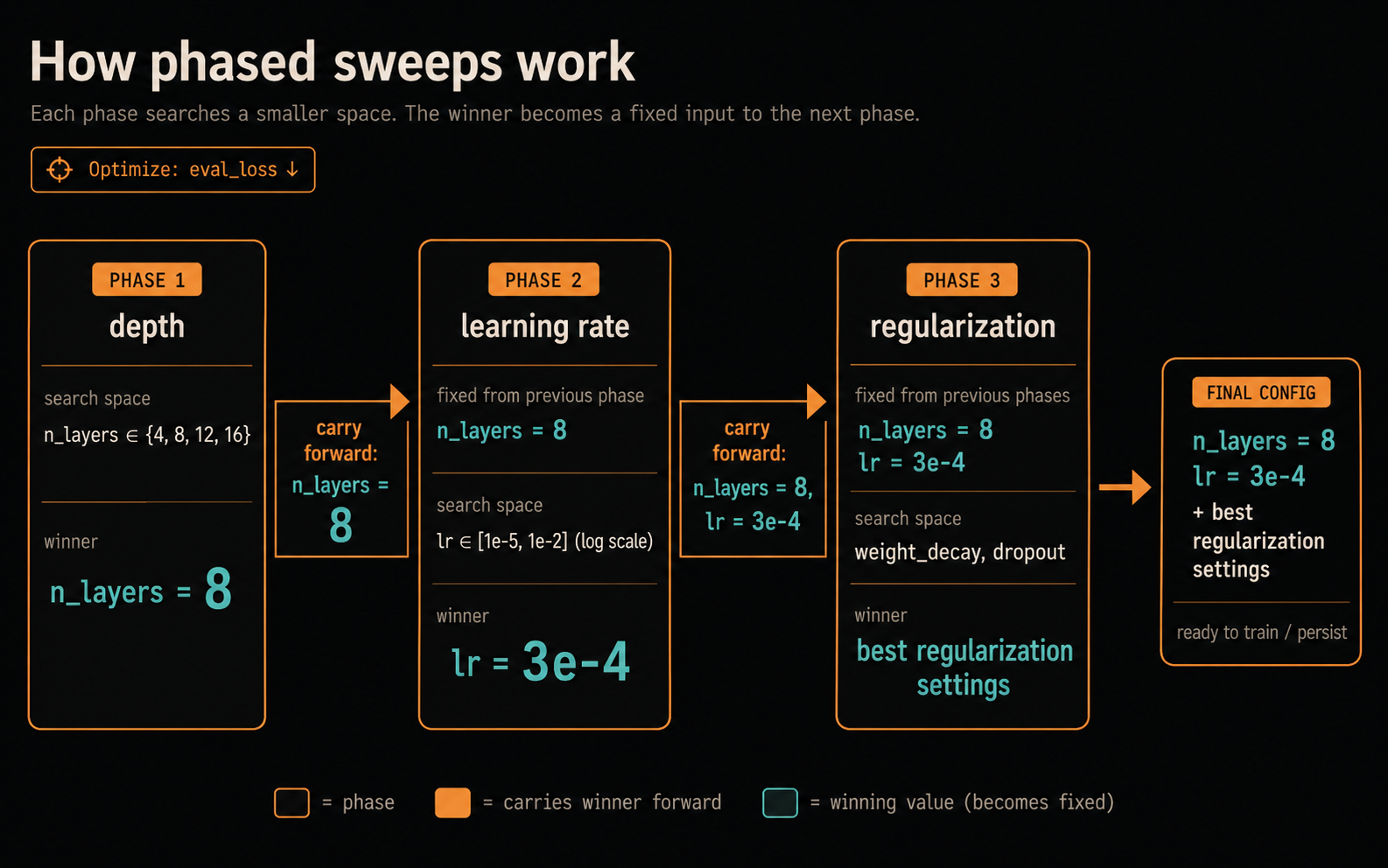
PhaseSweep runs phase-chained hyperparameter sweeps from one ordinary YAML file. That file contains your trainer configuration, the metric, and the search plan. PhaseSweep materializes the configured trainer input for every trial, decides what to try next, persists each phase winner, and carries selected values forward as fixed inputs to later phases.
This is useful when a full joint sweep is too expensive or hard to interpret. For example, choose architecture depth, then tune learning rate, then regularization. The configuration guide explains the inheritance model and its tradeoffs.
How it works
The starter.yaml that phasesweep init writes searches depth before learning rate (abridged; the generated file adds storage, provenance, execution settings, the metric extractor, and comments):
experiment: phasesweep_starter

# The trainer receives one complete generated YAML per trial.
trial_command: "python -m phasesweep.examples.fake_train --config {config_path}"

trainer_config:
  model:
    n_layers: 8
    dropout: 0.1
  optimizer:
    lr: 0.0003
    weight_decay: 0.05

metric:
  name: eval_loss
  goal: minimize

phases:
  - name: depth
    n_trials: 2
    sampler: { type: grid }
    search_space:
      model.n_layers: { type: categorical, choices: [6, 8] }

  - name: learning_rate
    inherits: [depth] # the winning model.n_layers is fixed here
    n_trials: 2
    sampler: { type: grid }
    search_space:
      optimizer.lr: { type: categorical, choices: [0.0001, 0.0003] }
The packaged fake trainer uses report_objective(...). Your own trainer can report through that helper, phasesweep report-objective from a shell, W&B, MLflow, ordinary JSON, or logs.
Install and try it
Requirements: Python 3.11+ and a Linux host for real runs. GPUs are optional.
PhaseSweep runs on one host. It drives Optuna's grid, random, TPE and CMA-ES samplers, keeps an Optuna journal as its ledger, and can run trials in parallel on that host's GPUs. It does not spread trials across machines or prune them early.
pip install phasesweep
phasesweep --version

mkdir phasesweep-demo && cd phasesweep-demo
phasesweep init                     # writes the starter template, starter.yaml
phasesweep validate starter.yaml    # checks it without launching anything
phasesweep run starter.yaml         # runs four tiny toy-trainer trials
phasesweep init never overwrites an existing file; phasesweep init --list shows the other templates.
The run log, runs/phasesweep_starter/run.log beside the config, shows the phase chaining (abridged to the trial commands, results and winners, without timestamps):
[depth/trial_0] python -m phasesweep.examples.fake_train --config .../trainer_config.yaml
phase=depth TRIAL trial=0 state=COMPLETE value=0.3 duration=0.8s (1/2 finished)
[depth/trial_1] python -m phasesweep.examples.fake_train --config .../trainer_config.yaml
phase=depth TRIAL trial=1 state=COMPLETE value=0.5 duration=0.7s (2/2 finished)
phase=depth WINNER trial=0 metric=0.3 params={'model.n_layers': 8}
[learning_rate/trial_0] python -m phasesweep.examples.fake_train --config .../trainer_config.yaml
phase=learning_rate TRIAL trial=0 state=COMPLETE value=0.3 duration=0.8s (1/2 finished)
[learning_rate/trial_1] python -m phasesweep.examples.fake_train --config .../trainer_config.yaml
phase=learning_rate TRIAL trial=1 state=COMPLETE value=0.413822 duration=0.8s (2/2 finished)
phase=learning_rate WINNER trial=0 metric=0.3 params={'optimizer.lr': 0.0003}
The depth winner's model.n_layers: 8 is injected into every learning_rate trial's complete YAML. Winners persist in the working directory, so you can inspect them any time (abridged):
phasesweep show-winners starter.yaml
# code revision: unknown (not a git work tree or git unavailable)
=== depth ===
# Compare two model depths before tuning the learning rate.
phase: depth
...
=== learning_rate ===
# Keep the winning depth fixed and compare two learning rates.
phase: learning_rate
metric:
  eval_loss: 0.3
  goal: minimize
trial_number: 0
params:
  optimizer.lr: 0.0003
effective_overrides:
  model.n_layers: 8
  optimizer.lr: 0.0003
...
Inspect recorded trials without launching work:
phasesweep status starter.yaml --trials
With persistent storage, rerun the same config after an interruption; interrupted trials rerun automatically. See continuation and reruns for recovering an aborted phase, --from-phase NAME and trial budgets, and inspection commands for status and result views.
Use your own trainer
Start from the template closest to your trainer. Choose its existing input interface: complete YAML, command-line flags, Hydra overrides, or nested JSON. phasesweep explain KEY prints the reference for one key; configuration errors name the relevant keys.
phasesweep run starter.yaml --dry-run previews commands without launching work. Check it before a real run; inspection commands explains inherited placeholders and preview limitations.
Set execution.cwd, env, and execution.inherit_env for the trainer's working directory and environment. validate and --dry-run print the launch contract so you can check it before training.
Choose an objective extractor for the trainer's output. For W&B, install the extra and follow the W&B setup:
pip install "phasesweep[wandb]"
For MLflow, install phasesweep[mlflow] and follow the MLflow guide. Use objective reporting when the checkpoint behind a value matters, and small-budget advice and repeats for noisy measurements.
Connect an agent
The optional MCP server connects an AI agent to experiments you have approved without exposing config or storage paths, trainer commands, environment values, or raw logs. Sampled winner values follow the catalog's visible_params policy. Follow the MCP setup to install the extra, review the catalog authority boundary, configure a client-owned connection, and verify the result; phasesweep mcp call runs one tool from a shell without a client.
Reference
- Configuration guide: Experiment YAML, search spaces, inheritance, noisy objectives and small budgets, repeats, gates, and objective extractors.
- Configuration reference: per-key types, defaults, valid values, interactions, and warnings.
phasesweep explainlists the top-level keys, andphasesweep explain 'phases[].sampler'prints one key, everything below it, and the section rules that govern it. - Minimal starting configuration: one local toy-trainer attempt; validate or run it from the checkout root.
- Runtime behavior: filesystem layout, locks, GPU leases, process supervision, fingerprints, and resume.
- MCP setup: installed-package agent onboarding and client-owned setup.
- MCP operator reference: catalog fields, tools, authorization, run state, and recovery.
- Toy experiment and MCP catalog: a checkout-local CLI example on the packaged fake trainer, plus an MCP catalog that keeps its state and outputs under
/tmp. - Tiny Decoder Enwik8 example: real-trainer integration.
- Durability invariants: the ordering rules the ledger, publication, and recovery paths must hold, and the test that owns each one.
- Development: source checkout, contributor setup, quality gates, and declined requests.

License
MIT. See LICENSE.
1 maintainer

Metadata
1 maintainer
Release files for phasesweep 0.3.10
For a detailed explanation of source distributions (sdists) and built distributions (wheels), please see the package formats documentation.
Source distribution (sdist)
| File | Size | Uploaded | Provenance | |
|---|---|---|---|---|
| phasesweep-0.3.10.tar.gz | 2.6 MB | With provenance | Details |
Built distribution (wheel)
| File | Interpreter | ABI | Platform | Reset |
|---|---|---|---|---|
| phasesweep-0.3.10-py3-none-any.whl | Python 3 | none | any | Details |
Total release size: 3.1 MB
Release files / phasesweep-0.3.10.tar.gz
| Download URL | phasesweep-0.3.10.tar.gz |
|---|---|
| Size | 2.6 MB |
| Tags | Source |
|
SHA-256 checksum How to use checksums |
b1422e6831de849b671a97c91633bcf609c262c0fe018d67818133f128352209
|
|
BLAKE2b-256 checksum How to use checksums |
f0078ccbba0c303290cb423457817ffc86495d1c16326a0ce5e3c21ca5c9657a
|
| Upload date | |
|
Uploaded using Trusted Publishing? What is trusted publishing? |
Yes |
| Uploaded via |
twine/6.1.0 CPython/3.13.13
|
Provenance
Provenance describes where a file came from. On PyPI, provenance is shared via attestations, which provide a verifiable record of the build or publishing details. View details, limitations and caveats.


PyPI Publish Attestation
PyPI verified that this artifact, at this checksum, originated from the publisher listed below.
Signed by GitHub Actions, verified by PyPI on Oct 23, 2026.
Transparency logRelease files / phasesweep-0.3.10-py3-none-any.whl
| Download URL | phasesweep-0.3.10-py3-none-any.whl |
|---|---|
| Size | 508.6 kB |
| Tags | Python 3 |
|
SHA-256 checksum How to use checksums |
93ae43039bdad152c336d6080c7aba12a5c678f5e6d364ab0e8498e6bbbaa10c
|
|
BLAKE2b-256 checksum How to use checksums |
ed6108127e073aca94c60625c192b6e14d3dfac4ab194ff23388f22dfe1539de
|
| Upload date | |
|
Uploaded using Trusted Publishing? What is trusted publishing? |
Yes |
| Uploaded via |
twine/6.1.0 CPython/3.13.13
|
Provenance
Provenance describes where a file came from. On PyPI, provenance is shared via attestations, which provide a verifiable record of the build or publishing details. View details, limitations and caveats.
PyPI Publish Attestation
PyPI verified that this artifact, at this checksum, originated from the publisher listed below.
Signed by GitHub Actions, verified by PyPI on Oct 23, 2026.
Transparency logSecurity for phasesweep 0.3.10
Provenance
Provenance describes where a file came from. On PyPI, provenance is shared via attestations, which provide a verifiable record of the build or publishing details. View details, limitations and caveats.
Full provenance
All 2 files in this release have been uploaded with provenance metadata.
Attestation for phasesweep-0.3.10.tar.gz
PyPI Publish Attestation
PyPI verified that this artifact, at this checksum, originated from the publisher listed below.
Signed by GitHub Actions, verified by PyPI on Oct 23, 2026.
Transparency logA note on package security
PyPI is a repository for distributing packages, not a service for auditing them. While third-party security researchers and our staff do their best to detect and remove malicious packages, PyPI cannot guarantee the quality, security or suitability of any given package.
To learn more about protecting yourself from malicious actors, visit our package security documentation.














