
English · 中文

Let AI agents see and drive a real iPhone from your Mac, over USB or Wi-Fi.


Install · Tools · Troubleshooting · Security
An MCP server for screenshots, on-screen text, taps, swipes, typing, buttons, apps and the clipboard on an iPhone connected to your Mac. Nothing to install on the phone, no jailbreak.
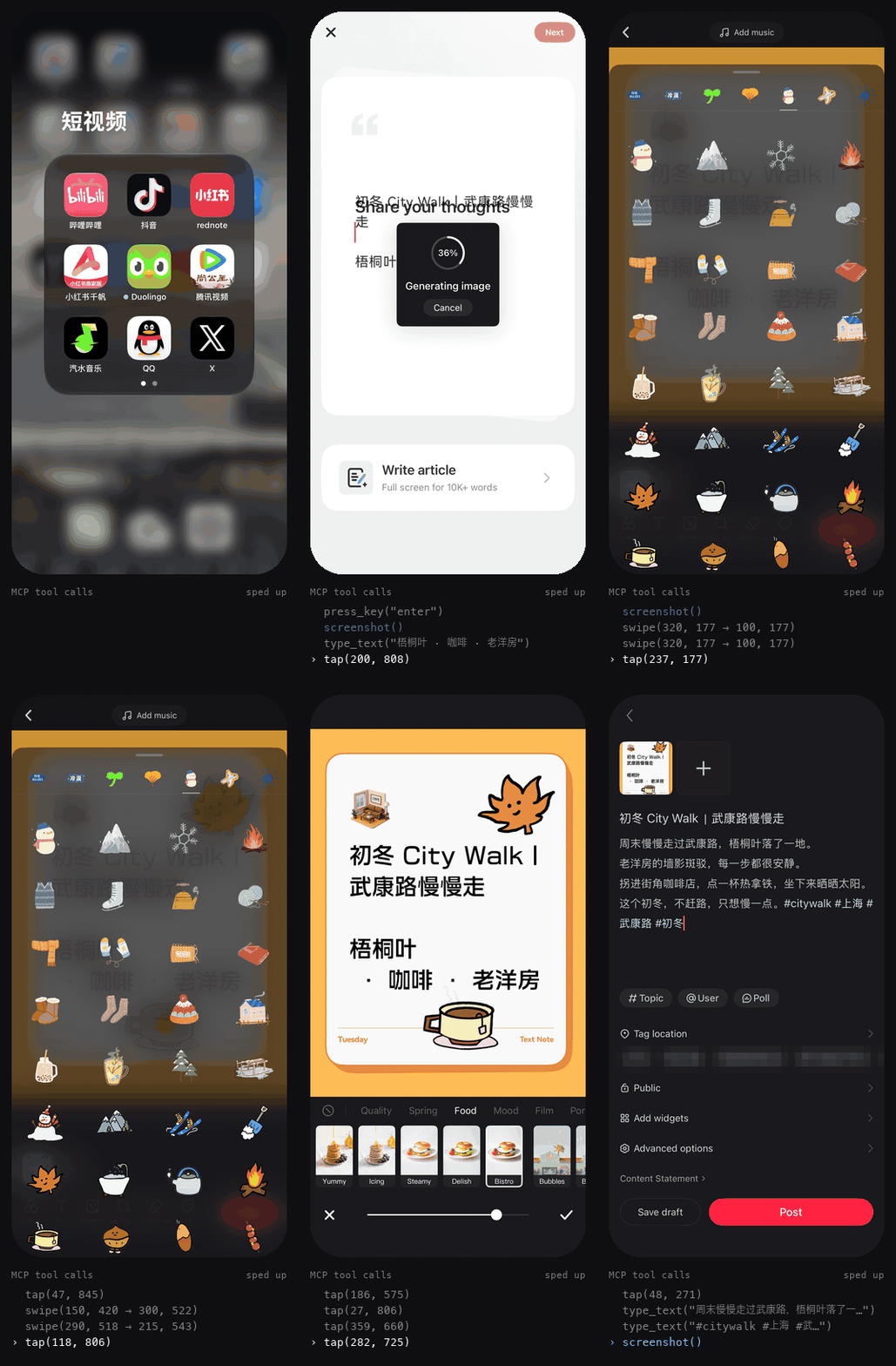 |
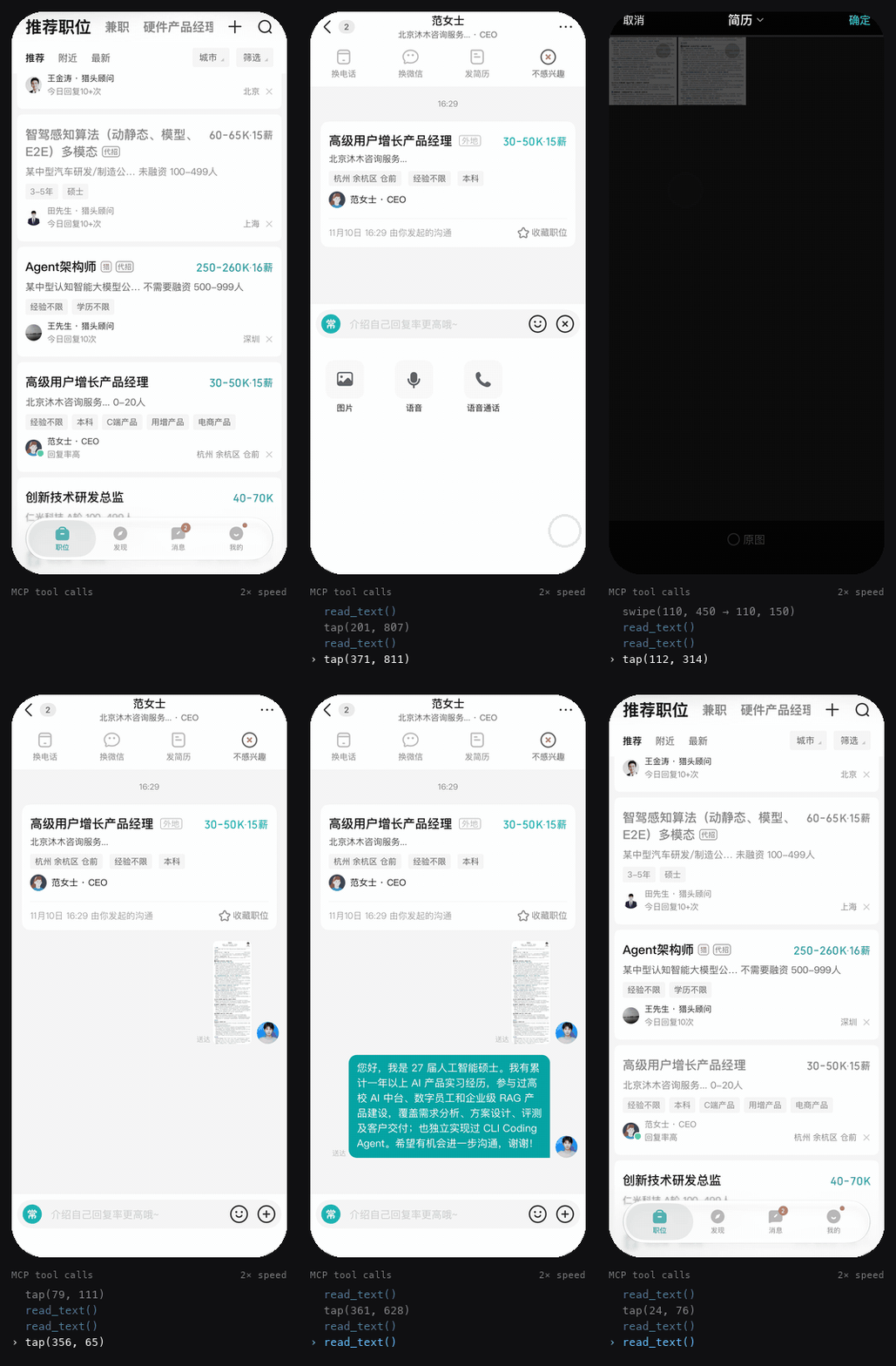 |
| An AI agent makes a rednote post: text card, template, stickers, filter, caption. It stops before Post. Sped up. | A script applies to a job in a recruiting app: read_text finds the buttons, tap presses them. 2× speed. |
Requirements
- A Mac with uv
- An iPhone on iOS 27 or later, with Developer Mode on
- A USB data cable (not a charge-only one) for the first setup. After that, Wi-Fi works too
Tested on an iPhone 17 Pro with iOS 27.2 and macOS 27.
Install
Let your agent install it
Paste this to your coding agent (Claude Code, Codex, Cursor…):
Install phonectl-mcp by following https://github.com/jiefeng-ai/phonectl-mcp#install-by-hand, then add it to your MCP config and take a screenshot of my phone to check it works. When I need to do something on the phone, tell me step by step and wait for me.
Install by hand
uv tool install phonectl-mcp
phonectl install-service   # runs the server at login on http://127.0.0.1:47321/mcp
phonectl doctor            # checks cable, trust, Developer Mode, disk image and server
install-service also creates an access token in ~/.config/phonectl/token. Then connect your client:
Claude Code
claude mcp add --scope user --transport http phone http://127.0.0.1:47321/mcp \
  --header "Authorization: Bearer $(cat ~/.config/phonectl/token)"
Cursor (~/.cursor/mcp.json) and other clients with streamable HTTP
{
  "mcpServers": {
    "phone": {
      "url": "http://127.0.0.1:47321/mcp",
      "headers": { "Authorization": "Bearer <contents of ~/.config/phonectl/token>" }
    }
  }
}
To check, ask your agent to take a screenshot of the phone.
After one setup over the cable, it also works over Wi-Fi while the phone and the Mac share a network.
All agents and scripts share this one server, since the phone takes a single control connection; let one agent drive at a time.
Tools
Coordinates are iOS points, the same as the pixels of the returned screenshot.
| Tool | What it does |
|---|---|
screenshot |
Captures the screen |
read_text |
Text on screen with positions, as JSON. Much cheaper than an image |
tap, long_press, swipe |
Touch. To scroll down, swipe upward |
type_text |
Types into the focused field. Non-ASCII text goes through the clipboard |
press_key |
A key or chord, such as enter or cmd+a |
press_button |
home, lock, volume-up, volume-down, mute, siri |
launch_app, list_apps |
Opens apps, finds bundle ids |
get_clipboard, set_clipboard |
The phone's clipboard |
status |
The server and the phone link |
Tools that act on the phone return a screenshot taken afterwards (screenshot=False skips it). Taps are not confirmed, so check that screenshot.
Troubleshooting
Run phonectl doctor first. It tells you which link is broken.
| Symptom | Fix |
|---|---|
| No iPhone found | Use a data cable, unlock the phone, replug |
| "Mac is not trusted" | Unlock the phone, replug, tap Trust |
| No Developer Mode switch | Open Xcode once with the phone connected; the switch appears under Settings › Privacy & Security |
| Screenshots fail (e.g. after the phone restarts) | Plug in the cable; phonectl doctor --fix mounts the developer disk image |
| Taps do nothing | Needs iOS 27+; keep the screen on and unlocked |
| Clients cannot connect | phonectl restart, then check ~/Library/Logs/phonectl.error.log. A 401 means the client's token differs from ~/.config/phonectl/token |
Security
- The server listens only on
127.0.0.1and rejects requests without the token. - An agent can do anything your finger can: send messages, pay, delete. Keep its instructions narrow and watch the screen. Use at your own risk; automating third-party apps may break their terms.
Settings
Environment variables (set them, then run phonectl install-service again; restart keeps the old values)
| Variable | Default | Meaning |
|---|---|---|
PHONECTL_UDID |
first connected iPhone | Which phone to use when several are connected |
PHONECTL_PORT |
47321 |
HTTP port (127.0.0.1 only) |
PHONECTL_TOKEN_FILE |
~/.config/phonectl/token |
Where the token is kept |
PHONECTL_SCALE |
3 |
Pixels per point; 2 on iPhone SE, XR, 11. Only affects screenshot size |
PHONECTL_OCR_LANGS |
zh-Hans,en-US |
read_text languages, in priority order |
PHONECTL_SETTLE |
0.6 |
Seconds to wait before the screenshot after an action |
PHONECTL_TOUCH_IDLE |
30 |
Idle seconds before the input stream closes (reopening takes ~0.6 s) |
PHONECTL_KEY_IDLE |
5 |
Seconds without a key before the virtual keyboard detaches, so the on-screen keyboard comes back |
PHONECTL_CALL_TIMEOUT |
15 |
Seconds to wait for the phone, on top of the gesture time |
PHONECTL_LOG |
WARNING |
Log level (INFO for the service); logs in ~/Library/Logs/phonectl*.log |
Other commands: phonectl restart (e.g. after uv tool upgrade phonectl-mcp). To remove: phonectl uninstall-service, uv tool uninstall phonectl-mcp, and delete ~/.config/phonectl.
Development
git clone https://github.com/jiefeng-ai/phonectl-mcp
cd phonectl-mcp
uv sync
uv run pytest
uv run phonectl install-service from the clone runs your working copy as the service.
License
MIT
1 maintainer

Metadata
1 maintainer
Release files for phonectl-mcp 0.1.2
For a detailed explanation of source distributions (sdists) and built distributions (wheels), please see the package formats documentation.
Source distribution (sdist)
| File | Size | Uploaded | Provenance | Actions |
|---|---|---|---|---|
| phonectl_mcp-0.1.2.tar.gz | 127.9 kB | With provenance | Details for phonectl_mcp-0.1.2.tar.gz |
Built distribution (wheel)
| File | Interpreter | ABI | Platform | Actions Reset |
|---|---|---|---|---|
| phonectl_mcp-0.1.2-py3-none-any.whl | Python 3 | none | any | Details for phonectl_mcp-0.1.2-py3-none-any.whl |
Total release size: 152.6 kB
Release files / phonectl_mcp-0.1.2.tar.gz
| Download URL | phonectl_mcp-0.1.2.tar.gz |
|---|---|
| Size | 127.9 kB |
| Tags | Source |
|
SHA-256 checksum How to use checksums |
ee63b8059607d8372b69d9bc551a70254dbc7f1ccdf3b538ee3b4f9bcf9fb7a4
|
|
BLAKE2b-256 checksum How to use checksums |
8829b202d8db7b57c5e106362d39c628b31af2d618ed0fcc7020f19b6407cb24
|
| Upload date | |
|
Uploaded using Trusted Publishing? What is trusted publishing? |
Yes |
| Uploaded via |
twine/7.0.0 CPython/3.13.16
|
Provenance
Provenance describes where a file came from. On PyPI, provenance is shared via attestations, which provide a verifiable record of the build or publishing details. View details, limitations and caveats.


PyPI Publish Attestation
PyPI verified that this artifact, at this checksum, originated from the publisher listed below.
Signed by GitHub Actions, verified by PyPI on Nov 11, 2026.
Transparency logRelease files / phonectl_mcp-0.1.2-py3-none-any.whl
| Download URL | phonectl_mcp-0.1.2-py3-none-any.whl |
|---|---|
| Size | 24.7 kB |
| Tags | Python 3 |
|
SHA-256 checksum How to use checksums |
18009896755fed025c249cdaa253e32155cf4c9f0dbafc3aacdc906cf854c1a0
|
|
BLAKE2b-256 checksum How to use checksums |
413f5d732c6b7222f90a1995d79ea0975f2cc2c88ce1a8289a65cf32b6bcaff5
|
| Upload date | |
|
Uploaded using Trusted Publishing? What is trusted publishing? |
Yes |
| Uploaded via |
twine/7.0.0 CPython/3.13.16
|
Provenance
Provenance describes where a file came from. On PyPI, provenance is shared via attestations, which provide a verifiable record of the build or publishing details. View details, limitations and caveats.
PyPI Publish Attestation
PyPI verified that this artifact, at this checksum, originated from the publisher listed below.
Signed by GitHub Actions, verified by PyPI on Nov 11, 2026.
Transparency logSecurity for phonectl-mcp 0.1.2
Provenance
Provenance describes where a file came from. On PyPI, provenance is shared via attestations, which provide a verifiable record of the build or publishing details. View details, limitations and caveats.
Full provenance
Both files in this release have been uploaded with provenance metadata.
Attestation for phonectl_mcp-0.1.2.tar.gz
PyPI Publish Attestation
PyPI verified that this artifact, at this checksum, originated from the publisher listed below.
Signed by GitHub Actions, verified by PyPI on Nov 11, 2026.
Transparency logA note on package security
PyPI is a repository for distributing packages, not a service for auditing them. While third-party security researchers and our staff do their best to detect and remove malicious packages, PyPI cannot guarantee the quality, security or suitability of any given package.
To learn more about protecting yourself from malicious actors, visit our package security documentation.














