
π-MetaboQC: a comprehensive and traceable workflow for automated quality assessment and preprocessing of LC-MS untargeted metabolomics data


π-MetaboQC is a traceable, adaptive Python workflow for quality control and preprocessing of LC-MS metabolomics feature-intensity matrices. It combines missingness-aware feature filtering, preservation-aware method selection, stage-wise quality assessment, and automated reporting for large, multi-batch studies. The project is distributed on PyPI as pi-metaboqc and exposes the Python package pimqc.
✨ Core Capabilities
-
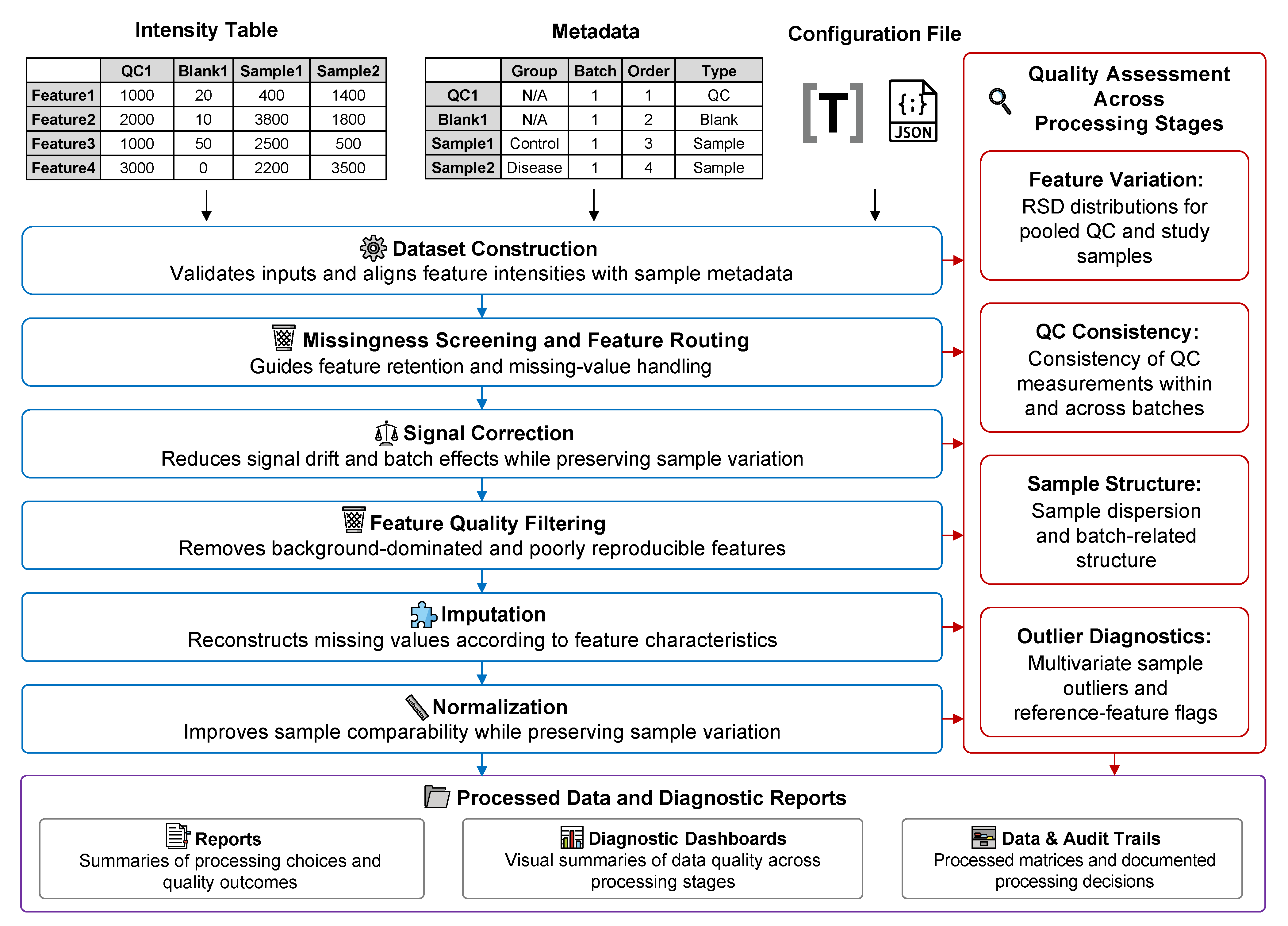
Matrix-level LC-MS metabolomics QC workflow: π-MetaboQC focuses on feature-intensity matrices from large, multi-batch metabolomics studies. It integrates dataset construction, missing-value triage, blank/QC filtering, signal correction, imputation, normalization, QA diagnostics, and report generation in a single reproducible workflow.
-
Python-native data model and method implementations: The core
MetaboIntobject inherits frompandas.DataFrame, allowing users to work with standard tabular operations while preserving pipeline metadata. Classical preprocessing methods that often require R dependencies, including quantile normalization, VSN, QRILC, BPCA, RUV-III, and WaveICA 2.0, are implemented or reconstructed in Python and checked against R reference implementations where applicable. -
Adaptive missing-value classification and imputation: High-missing-value features are routed through biological-group MNAR rescue, QC-level MNAR rescue, MAR eligibility checking, or exclusion. MAR candidates are compared using a GMM- and low-intensity-noise mask that reflects the greater dropout risk of low-abundance MS signals. Selection integrates total and low-intensity NRMSE with masked-value distribution fidelity and study-sample structure preservation.
-
Evidence- and preservation-aware adaptive selection:
AUTOmode uses a common design across correction, imputation, and normalization. Correction combines median and feature-wise QC-RSD improvements; imputation combines masked reconstruction and distribution fidelity; normalization combines QC RLE alignment, variance stabilization, and QC structure improvement. Each ranking also includes a study-sample structure-preservation guardrail. -
End-to-end quality assessment and traceability: QA dashboards are generated across pipeline stages to summarize feature retention, missing-value behavior, QC precision, batch correlation, PCA structure, outlier diagnostics, correction performance, imputation quality, and normalization effects. These outputs make the preprocessing trajectory inspectable rather than hidden behind a single final matrix.
-
Parallel computation and scalable execution: Computationally intensive steps, including feature-wise correction, model fitting, candidate evaluation, and large-matrix transformations, use
joblib,Numba, and vectorized Scientific Python routines where appropriate. The workflow is designed for clinical-scale cohorts while remaining runnable from notebooks, scripts, and command-line workflows. -
Automated reporting and publication-ready visualization: The pipeline records stage-level decisions, retained feature counts, selected methods, evaluation metrics, and diagnostic figures. Users can generate Brief or Comprehensive reports in Markdown, HTML, or PDF, while diagnostic plots are exported as editable SVG or PDF files for downstream inspection and manuscript preparation.
Correction and AUTO selection
Correction AUTO compares SERRF, RUV-III, WaveICA 2.0, QC-RLSC, robust QC-RLSC, and QC-SVR. QC-RFSC remains available when explicitly selected with base_est = "QC-RFSC", but is not evaluated by AUTO. QC-RLSC uses the Numba-accelerated LOESS fitter and supports optional Tukey-bisquare robust residual weighting through rlsc_robust and rlsc_robust_iterations. Standard and robust QC-RLSC share optional loess_degree, constrained-grid rlsc_span_selection, rlsc_span_grid, and rlsc_min_qc settings; defaults retain fixed-span linear LOESS.
📦 Installation
We strongly recommend installing π-MetaboQC (pi-metaboqc) within a Conda virtual environment using Miniforge (preferred), Miniconda, or Anaconda.
Generating high-fidelity HTML and PDF reports requires advanced graphical engines (pandoc, weasyprint, tinycss2 and librsvg). These tools depend on complex, system-level C libraries (e.g., GTK3, Pango) that are notoriously difficult to compile and configure via standard pip, particularly on Windows.
Conda effortlessly resolves these low-level dependencies. To guarantee maximum stability across all operating systems, please follow the Standard Installation guide below.
⚠️ Note: While we have integrated an automatic fallback download feature for missing dependencies, it has not been exhaustively tested across all edge cases. Proceeding with the Conda installation remains the most robust and officially supported approach.
Step 1: Create and Activate Conda Environment
conda create -n metaboqc python=3.13 pip -y
conda activate metaboqc
Step 2: Pre-install Graphical Engines (Recommended)
Install pandoc, weasyprint, tinycss2 and librsvg via conda-forge to ensure all necessary system graphical libraries are correctly linked before installing the Python package:
conda install -c conda-forge pandoc weasyprint tinycss2 librsvg -y
Step 3: Install pi-metaboqc
For standard users: Install the stable release directly from PyPI:
pip install pi-metaboqc
Alternatively, install the latest development version directly from GitHub:
pip install git+https://github.com/PHOENIXcenter/pi-metaboqc.git
For developers (Editable mode): If you plan to modify the source code or contribute to the project:
git clone https://github.com/PHOENIXcenter/pi-metaboqc.git
cd pi-metaboqc
pip install -e .
🚀 Quickstart & Tutorials
π-MetaboQC is designed for zero-friction deployment. You only need three files to trigger the fully automated pipeline: a sample metadata table, a raw intensity matrix, and a TOML or JSON configuration file.
We provide execution modalities for different use cases in the examples/ directory. For first-time users, we strongly recommend starting with the Interactive Notebook.
1. Interactive Notebook (Recommended for Onboarding)
Interactive Tutorial (interactive_tutorial.ipynb): An end-to-end Jupyter Notebook. This is the optimal way to experience π-MetaboQC. It allows you to step through the pipeline, visually inspect intermediate QA diagnostic dashboards, and intuitively grasp the core algorithmic logic.
Pre-rendered HTML Viewer: A zero-loading, fully rendered static webpage. This ensures all inline high-resolution plots and metrics are displayed instantly, bypassing any GitHub API rendering timeouts or file size limits.
2. Headless CLI Execution (For Production & Batch Processing)
For deployment on HPC clusters or integration into larger bioinformatics workflows, utilize our robust command-line interface script (run_pimqc.py).
# Navigate to the examples directory
cd examples

# Option A: Run out-of-the-box with bundled demo data
python run_pimqc.py

# Option B: Run with your own custom clinical cohort
python run_pimqc.py \
    --meta /path/to/your_meta.csv \
    --intensity /path/to/your_intensity.csv \
    --config /path/to/custom_params.toml \
    --outdir /path/to/output_directory

# Option C: Run in silent mode (For background processing)
python run_pimqc.py -q
⚠️ Troubleshooting Note for VS Code Users: When running the CLI script via the integrated terminal in Visual Studio Code, the IDE may occasionally fail to properly inherit full Conda environment variables. This prevents the PDF rendering engine from locating essential system-level C libraries (e.g., GTK3/Pango), causing the report generation to gracefully degrade and output an HTML report instead.
Resolution: You can bypass this by executing the script from a native system terminal (e.g., Anaconda Prompt, macOS Terminal). Alternatively, to permanently configure VS Code for seamless PDF rendering and resolve PowerShell restrictions, please refer to our VS Code Environment & Troubleshooting Guide.
📂 Project Structure
pi-metaboqc/
├── README.md
├── pyproject.toml
├── LICENSE
├── examples/
│   ├── interactive_tutorial.ipynb
│   └── run_pimqc.py
├── src/pimqc/
│   ├── core/                  # Core data model
│   ├── config/                # Configuration schema and resolution
│   ├── dataset/               # Dataset construction and diagnostics
│   ├── processing/            # Stage-specific analysis and visualization
│   │   ├── assessment/
│   │   ├── correction/
│   │   ├── filtering/
│   │   ├── imputation/
│   │   └── normalization/
│   ├── statistics/            # Metrics, PCA, and candidate selection
│   ├── visualization/         # Shared plotting infrastructure
│   ├── reporting/             # Report assembly and rendering
│   ├── templates/             # Markdown report templates
│   ├── resources/demo/        # Example tables and TOML/JSON configurations
│   └── pipeline.py            # Automated pipeline orchestrator
└── tests/                     # Unit and integration tests
*💡 Note on Configuration: The entire analytical workflow of π-MetaboQC is centrally governed by a
pipeline_parameters.tomlorpipeline_parameters.jsonfile. Users can fine-tune all analysis parameters exclusively through this file, without modifying any underlying Python code.
📖 Hands-on Case Study
To demonstrate the robustness, reproducibility, and correction efficacy of π-MetaboQC in real-world scenarios, we provide a dedicated case study repository.
The case study repository contains:
-
Diverse Real-World & Benchmark Datasets: Includes actual metabolomics datasets generated in-house and benchmark data from published tools. Both the originally downloaded raw datasets and the fully pre-processed versions are provided.
-
Transparent Data Preparation: We provide all data cleaning and formatting scripts used to convert raw matrices into the standardized input formats required by π-MetaboQC.
-
Highly Organized Project Structure: All ready-to-run data is systematically categorized by project under the
data/processed/directory. Each project directory is self-contained with its specific matrices, metadata, and a dedicatedpipeline_parameters.tomlconfiguration file. -
Project-Specific Analytical Notebooks: For every dataset, you will find a dedicated, interactive Jupyter Notebook that executes the complete π-MetaboQC analytical pipeline under the
scripts/evaluationdirectory, providing step-by-step demonstrations and embedded diagnostic visualizations.
We highly recommend new users start with the case study to familiarize themselves with the pipeline's configuration and capabilities.
🤝 Contributing & License
This project is licensed under the MIT License. Contributions, issues, and feature requests are welcome! Feel free to check the issues page.
1 maintainer

Metadata
1 maintainer
Release files for pi-metaboqc 1.2.0
For a detailed explanation of source distributions (sdists) and built distributions (wheels), please see the package formats documentation.
Source distribution (sdist)
| File | Size | Uploaded | |
|---|---|---|---|
| pi_metaboqc-1.2.0.tar.gz | 1.2 MB | Details |
Built distribution (wheel)
| File | Interpreter | ABI | Platform | Reset |
|---|---|---|---|---|
| pi_metaboqc-1.2.0-py3-none-any.whl | Python 3 | none | any | Details |
Total release size: 2.4 MB
Release files / pi_metaboqc-1.2.0.tar.gz
| Download URL | pi_metaboqc-1.2.0.tar.gz |
|---|---|
| Size | 1.2 MB |
| Tags | Source |
|
SHA-256 checksum How to use checksums |
8bd91948b7f7ed8cb13fe1a73c6dfcec5c12054f1f77fecbf13e688c26d2268a
|
|
BLAKE2b-256 checksum How to use checksums |
6fae3e0867546017685ebc695d291141f11d547815b887b5c3387b713867ebab
|
| Upload date | |
|
Uploaded using Trusted Publishing? What is trusted publishing? |
Yes |
| Uploaded via |
twine/7.0.0 CPython/3.13.14
|
Provenance
Provenance describes where a file came from. On PyPI, provenance is shared via attestations, which provide a verifiable record of the build or publishing details. View details, limitations and caveats.


PyPI Publish Attestation
PyPI verified that this artifact, at this checksum, originated from the publisher listed below.
Signed by GitHub Actions, verified by PyPI on Aug 8, 2026.
Transparency logRelease files / pi_metaboqc-1.2.0-py3-none-any.whl
| Download URL | pi_metaboqc-1.2.0-py3-none-any.whl |
|---|---|
| Size | 1.2 MB |
| Tags | Python 3 |
|
SHA-256 checksum How to use checksums |
e68517b614e8c0267ddc98ee7429a45f4c5df874c30619890bb082262436685e
|
|
BLAKE2b-256 checksum How to use checksums |
ef787cf4fd8ed404f623475e6dff532e2643612b40cf2445066e3f78330d1412
|
| Upload date | |
|
Uploaded using Trusted Publishing? What is trusted publishing? |
Yes |
| Uploaded via |
twine/7.0.0 CPython/3.13.14
|
Provenance
Provenance describes where a file came from. On PyPI, provenance is shared via attestations, which provide a verifiable record of the build or publishing details. View details, limitations and caveats.
PyPI Publish Attestation
PyPI verified that this artifact, at this checksum, originated from the publisher listed below.
Signed by GitHub Actions, verified by PyPI on Aug 8, 2026.
Transparency log













