
Plex MCP Server
A powerful Model-Context-Protocol (MCP) server for interacting with Plex Media Server. It provides a standardized JSON-based interface for automation, AI agents (like Claude), and custom integrations.
Features
- Standardized API: Unified JSON responses for all Plex operations.
- Multiple Transports: Supports
stdio, SSE (Server-Sent Events), and Streamable HTTP. - Comprehensive Control: Manage libraries, media, collections, playlists, clients, and users.
- Remote Ready: Built-in OAuth 2.1 support for integration with remote AI platforms like Claude.ai.
- Admin Tools: Access logs, monitor bandwidth, and run Butler tasks.
Installation
Option 1: Using uv (Recommended)
Run directly without installation:
uvx plex-mcp-server --transport stdio --plex-url http://your-server:32400 --plex-token your-token
Option 2: Install via pip
pip install plex-mcp-server
Option 3: Development / Source
git clone https://github.com/vladimir-tutin/plex-mcp-server.git
cd plex-mcp-server
pip install -e .
Configuration
Set your Plex server URL and Token using one of these methods:
1. Command Line Arguments
plex-mcp-server --plex-url "http://192.168.1.10:32400" --plex-token "ABC123XYZ"
2. Environment Variables (.env)
Create a .env file in the current directory or ~/.config/plex-mcp-server/.env:
PLEX_URL=http://localhost:32400
PLEX_TOKEN=your-authentication-token
MCP_OAUTH_ENABLED=false
or with OAuth Enabled
PLEX_URL=http://localhost:32400
PLEX_TOKEN=your-authentication-token
MCP_OAUTH_ENABLED=true
MCP_OAUTH_ISSUER=https://auth.example.com/application/o/plexmcp-oauth/
MCP_SERVER_URL=https://plexmcp.example.com
MCP_OAUTH_AUDIENCE=your-oauth-client-id   # optional, recommended
3. MCP Client Config
Example for Claude Desktop (%APPDATA%/Claude/claude_desktop_config.json):
{
  "mcpServers": {
    "plex": {
      "command": "uvx",
      "args": [
        "plex-mcp-server",
        "--transport",
        "stdio",
        "--plex-url",
        "http://your-server:32400",
        "--plex-token",
        "your-token"
      ]
    }
  }
}
Remote servers from stdio-only clients
If your client only supports launching a local stdio process, use
mcp-remote to connect it to a remote Plex MCP
server. Install Node.js (which provides npx) on the client machine, then use:
{
  "mcpServers": {
    "plex": {
      "command": "npx",
      "args": ["-y", "mcp-remote", "https://plexmcp.example.com/mcp"]
    }
  }
}
Use /mcp when the server runs with --transport streamable-http. For an SSE
deployment, use /sse instead. For plain HTTP on a trusted private network, append
"--allow-http" to the arguments. If OAuth is enabled, follow the bridge's
OAuth configuration instructions,
including any required client credentials and callback registration.
Clients with native remote HTTP support can connect directly to /mcp and do not
need Node.js, npx, or this bridge. The local stdio setup above also needs no bridge.
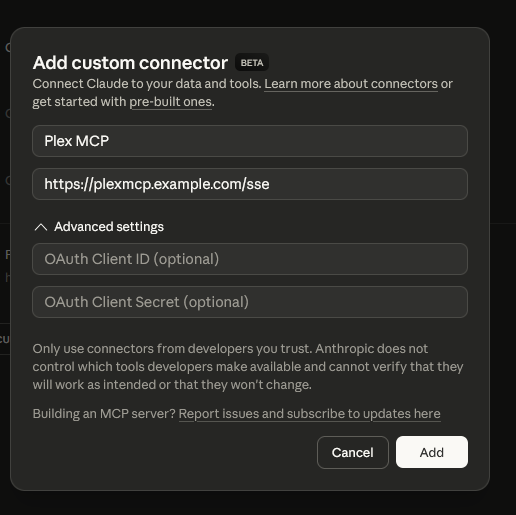
4. Claude Connector Installation
Go to https://claude.ai/settings/connectors and add a new connector with the following settings:
- Name: Plex MCP
- URL:
https://plexmcp.example.com/ssefor SSE, orhttps://plexmcp.example.com/mcpwhen running with--transport streamable-http. - If OAuth is enabled, enter your provider's Client ID and Client Secret in the advanced settings and complete sign-in.
Register Claude's callback in your OAuth provider: https://claude.ai/api/mcp/auth_callback.
See Remote Access & OAuth for provider and reverse-proxy configuration.
5. ChatGPT Connector Installation
Start the server with --transport streamable-http and make it reachable at a public HTTPS URL.
In ChatGPT's plugin settings, choose Add custom MCP server:
- Name: Plex MCP
- Server URL:
https://plexmcp.example.com/mcp - Authentication: OAuth if enabled on the server; otherwise None.
- For a confidential OAuth client, open Advanced OAuth settings and supply your provider's Client ID and Client Secret. These are separate from your Plex token.

The screenshot shows where to find the OAuth settings if your server requires them. It uses a placeholder server URL, so discovery fails in this example. Use your real server URL and the token endpoint authentication method required by your provider.
Register the exact ChatGPT callback URL with your OAuth provider. It can look like
https://chatgpt.com/connector/oauth/<callback-id>; use the value requested by your
connection, not the literal placeholder. Create the plugin, complete sign-in, and
refresh its tools. Test it by asking ChatGPT to list your Plex libraries.
If a reverse proxy uses browser-based login, allow the MCP endpoints (/mcp, plus
/sse and /messages/ if used), discovery endpoints, /authorize, and /token
through to the MCP server. With server OAuth enabled, the MCP server itself validates
the bearer token. See Remote Access & OAuth for the full setup.
The website plugin and a local Codex MCP entry are separate connections. For local Codex OAuth configuration, see the client setup instructions.
Command Reference
Library Module
Tools for exploring and managing your Plex libraries.
| Command | Description | Parameters |
|---|---|---|
library_list |
Lists all available libraries. | None |
library_get_stats |
Gets statistics (count, size, types) for a library. | library_name |
library_refresh |
Triggers a metadata refresh for a library. | library_name |
library_scan |
Scans a library for new files. | library_name |
library_get_details |
Gets detailed information about a library. | library_name |
library_get_recently_added |
Lists recently added items in a library. | library_name, limit: int |
library_get_contents |
Lists current library items with media IDs, filters, and pagination. | library_name, watched: bool, unwatched: bool, offset: int, limit: int, sort, genre, year, content_rating, director, actor, writer, resolution, network, studio |
To list watched movies currently in your library (rather than playback history):
{"library_name": "Movies", "watched": true, "offset": 0, "limit": 50}
Each result includes media_id (Plex's ratingKey) for looking up or deleting that
specific item. The default page size is 50; increase offset to retrieve later pages.
totalItems is the count matching the server-side filters, not just the current page.
Watch state belongs to the user represented by PLEX_TOKEN.
Movie results also include inProgress and progressPercent, based on Plex's
saved playback offset, even if the movie is absent from Continue Watching.
inProgress is true when that offset is positive; it does not mean the movie is
currently playing. progressPercent is the saved position as a percentage of
duration, rounded to one decimal and bounded to 0-100 (null if duration is unknown).
A movie with no saved position has inProgress: false and, when duration is known,
progressPercent: 0, even if it was previously watched.
These fields are independent of watched: a movie can be both watched and in
progress, for example during a rewatch. The watched and unwatched filters still
use Plex's watched state, not saved progress. For cleanup, inspect inProgress
as well as watched to avoid selecting movies with a saved playback position.
For TV libraries, watched=true includes partially watched shows with at least
one played episode. A show's returned watched flag is true only when all its
available episodes are played. watchStatus explicitly reports unwatched,
partial, or watched, and watchedEpisodeCount gives the played count alongside
episodeCount. Empty shows are reported as unwatched. For cleanup workflows,
check watchStatus == "watched" before considering an entire show for deletion;
the filter alone does not mean a show is complete.
unwatched=true uses Plex's unwatched filter; for shows, it can include partially
watched series with episodes remaining. Do not set both filters to true.
Media Module
Tools for searching, inspecting, and editing specific media items.
| Command | Description | Parameters |
|---|---|---|
media_search |
Search for media across all libraries. | query, library_name, content_type |
media_get_details |
Get comprehensive details for an item. | media_title, library_name, media_id |
media_edit_metadata |
Update tags, genres, summary, or title. | media_title, library_name, new_title, new_summary, new_rating, new_release_date, new_genre, remove_genre, new_director, new_studio, new_tags |
media_delete |
Remove an item from Plex. | media_title, library_name, media_id |
media_get_artwork |
Retrieve posters or background artwork. | media_title, library_name, art_type: str |
media_set_artwork |
Set artwork from a local path or URL. | media_title, library_name, poster_path, poster_url, background_path, background_url |
media_list_available_artwork |
List alternative artwork available for selection. | media_title, library_name, art_type |
Playlist Module
Manage your personal and shared playlists.
| Command | Description | Parameters |
|---|---|---|
playlist_list |
List all available playlists. | None |
playlist_get_contents |
List items contained in a playlist. | playlist_title, playlist_id |
playlist_create |
Create a new playlist from items. | title, items: List[str] |
playlist_delete |
Delete a playlist. | playlist_title, playlist_id |
playlist_add_to |
Add media items to a playlist. | playlist_title, items: List[str], playlist_id |
playlist_remove_from |
Remove specific items from a playlist. | playlist_title, items: List[str], playlist_id |
playlist_edit |
Change playlist title or summary. | playlist_title, new_title, new_summary, playlist_id |
playlist_upload_poster |
Upload a custom poster image. | playlist_title, image_path, playlist_id |
playlist_copy_to_user |
Share/Copy a playlist to another user. | playlist_title, username, playlist_id |
Collection Module
Organize movies and shows into collections.
| Command | Description | Parameters |
|---|---|---|
collection_list |
List collections in a specific library. | library_name |
collection_create |
Create a new collection. | library_name, title, items: List[str] |
collection_add_to |
Add items to an existing collection. | library_name, collection_title, items: List[str], collection_id |
collection_remove_from |
Remove items from a collection. | library_name, collection_title, items: List[str], collection_id |
collection_edit |
Edit collection metadata and settings. | collection_title, collection_id, library_name, new_title, new_sort_title, new_summary, new_content_rating, new_labels, add_labels, remove_labels, poster_path, poster_url, background_path, background_url, new_advanced_settings |
collection_delete |
Delete a collection. | collection_title, collection_id, library_name |
User Module
Information about the server owner and shared users.
| Command | Description | Parameters |
|---|---|---|
user_search_users |
Search for shared users. | search_term |
user_list_all_users |
List all users with types and IDs. | None |
user_get_info |
Detailed info for a specific user. | username |
user_get_on_deck |
Get "On Deck" items for a user. | username |
user_get_continue_watching |
Get partially watched items to resume. | limit: int |
user_get_watch_history |
Retrieve personal watch history. | username, limit, content_type, user_id |
user_get_statistics |
Watch progress and usage statistics. | time_period, username |
Sessions Module
Monitor real-time server activity.
| Command | Description | Parameters |
|---|---|---|
sessions_get_active |
Get currently playing items and clients. | None |
sessions_get_media_playback_history |
History for a specific media item. | media_title, library_name, media_id |
Server Module
Maintenance and administrative tools.
| Command | Description | Parameters |
|---|---|---|
server_get_plex_logs |
Retrieve lines from Plex logs. | num_lines, log_type, start_line, list_files, search_term |
server_get_info |
Basic server health and version info. | None |
server_get_bandwidth |
Bandwidth usage statistics. | timespan, lan |
server_get_current_resources |
CPU/Memory usage of the host/process. | None |
server_get_butler_tasks |
List scheduled maintenance tasks. | None |
server_get_alerts |
Listen for server notifications/alerts. | timeout |
server_run_butler_task |
Manually trigger a Butler task. | task_name |
server_empty_trash |
Empty trash for libraries. | library_name |
server_optimize_database |
Run database optimization. | None |
server_clean_bundles |
Clean up unused media bundles. | None |
Client Module
Control playback and navigation on Plex clients.
| Command | Description | Parameters |
|---|---|---|
client_list |
List all available playback clients. | include_details: bool, active_only: bool |
client_get_details |
Detailed info for a client. | client_name, client_id |
client_get_timelines |
Current playback state/trackers. | client_name, client_id |
client_start_playback |
Start playing a media item on a client. | media_title, client_name, rating_key, offset, library_name, use_external_player |
client_control_playback |
Play, Pause, Stop, Seek, Skip. | client_name, action, offset, client_id |
client_navigate |
Send remote control navigation commands. | client_name, command, client_id |
client_set_streams |
Changes audio or subtitle tracks. | client_name, audio_stream_id, subtitle_stream_id, client_id |
Streamable HTTP
Start the server with --transport streamable-http to expose /mcp:
plex-mcp-server --transport streamable-http --port 3001 --server-url https://plexmcp.example.com
Configure your client with https://plexmcp.example.com/mcp. This mode also keeps
the legacy /sse and /messages/ endpoints available for existing clients.
The default transport remains SSE; --transport stdio is also supported.
OAuth is optional on both HTTP transports. Enable it with --oauth-enabled or
MCP_OAUTH_ENABLED=true, using the issuer settings below. Without OAuth, anyone
who can reach the endpoints can call the tools; use an appropriate network boundary.
Both SSE and Streamable HTTP validate Host and Origin headers to block DNS-rebinding
attacks (a malicious web page driving your server through your browser). --server-url
(or MCP_SERVER_URL) permits your public hostname and origin even with OAuth disabled.
For additional proxy names, LAN addresses, or browser origins, set comma-separated
MCP_ALLOWED_HOSTS and MCP_ALLOWED_ORIGINS (e.g. MCP_ALLOWED_HOSTS=10.0.1.67:3002).
Loopback hosts are allowed by default. If a remote client gets 421 Invalid Host header,
add the hostname it connects with to one of these settings.
Remote Access & OAuth
The Plex MCP Server can be integrated with remote platforms like Claude.ai via SSE or Streamable HTTP and optional OAuth 2.1. This allows you to talk to your MCP server directly from the Claude interface from anywhere.
How it works
The MCP server acts as the OAuth front door: clients discover it via
/.well-known/oauth-protected-resource, are sent to /authorize (which redirects to
your identity provider), and exchange codes at /token (which the server proxies to the
provider). Clients therefore only ever need your MCP server URL plus the provider's
Client ID / Secret — they never talk to the provider directly. Access tokens are JWTs
validated against the provider's JWKS; the server checks signature, expiry, issuer, and
(optionally) audience on every request, on both SSE and Streamable HTTP.
1. Create an OAuth provider (Authentik example)
-
Providers → Create → OAuth2/OpenID Provider. Client type Confidential, signing key set (RS256). Note the Client ID and Client Secret.
-
Redirect URIs — add one entry per client you plan to use. These are the values seen in practice:
Client Redirect URI Claude.ai / Claude Desktop https://claude.ai/api/mcp/auth_callbackChatGPT connector https://chatgpt.com/connector/oauth/<connector-id>— shown in the connector dialogCodex CLI / local tools loopback, random port: regex ^http://127\.0\.0\.1:[0-9]+/callback/<callback-id>$Keep this list tight. A catch-all like
.*lets anyone who can get you to click a link capture an authorization code. -
Applications → Create, bind it to the provider, and bind an access policy (your user or group). Any Authentik user who can authorize this application gets full control of Plex — there are no per-user roles inside the MCP server.
-
Copy the provider's OpenID Configuration Issuer URL, e.g.
https://auth.example.com/application/o/plexmcp-oauth/(trailing slash included).
2. Configure the server
MCP_OAUTH_ENABLED=true
MCP_OAUTH_ISSUER=https://auth.example.com/application/o/plexmcp-oauth/
MCP_SERVER_URL=https://plexmcp.example.com
MCP_OAUTH_AUDIENCE=<Client ID>        # optional, recommended
or the equivalent flags: --oauth-enabled --oauth-issuer … --server-url … --oauth-audience ….
MCP_SERVER_URLmust be the public HTTPS URL clients reach; it also becomes the allowed Host/Origin for DNS-rebinding protection.MCP_OAUTH_AUDIENCEmakes the server reject tokens minted for any other client of the same provider. Set it to the Client ID from step 1. Leaving it unset disables audience validation for compatibility with existing deployments.
3. Configure each client
Use the Client ID and Secret from step 1 and one of these URLs:
| Client | URL | Notes |
|---|---|---|
| Claude.ai / Claude Desktop | https://plexmcp.example.com/sse |
Claude probes with a Streamable HTTP POST first and falls back to SSE automatically |
| ChatGPT | https://plexmcp.example.com/mcp |
Authentication: OAuth, paste Client ID/Secret |
| Codex CLI | codex mcp add plex --url https://plexmcp.example.com/mcp --oauth-client-id <id> --oauth-client-secret <secret> |
opens a browser for login |
Clients configured with /mcp use Streamable HTTP; /sse uses the legacy transport.
Both are protected identically.
Discovery Endpoints
When OAuth is active, the following standard endpoints are exposed without authentication:
/.well-known/oauth-protected-resource/.well-known/oauth-authorization-server/authorize(redirects to the provider) and/token(proxied to the provider)
Response Formats
All tools return information in JSON format for consistent parsing.
Success Example
{
  "status": "success",
  "data": {
    "title": "Inception",
    "year": 2010,
    "rating": 8.8
  }
}
Error Example
{
  "status": "error",
  "message": "Library 'Missing' not found."
}
Multiple Matches
If an operation finds multiple items with the same name, it returns a list of specific identifiers:
[
  {
    "title": "The Office",
    "id": 123,
    "type": "show",
    "year": 2005
  },
  {
    "title": "The Office",
    "id": 456,
    "type": "show",
    "year": 1995
  }
]
Troubleshooting OAuth
- 401 Unauthorized: Ensure your
MCP_OAUTH_ISSUERexactly matches the issuer URL in your identity provider (including trailing slashes). IfMCP_OAUTH_AUDIENCEis set, it must equal the client ID your provider puts in the token'saudclaim. - Public URL:
MCP_SERVER_URLmust be reachable by the client (e.g., plexmcp.example.com) and should use HTTPS. - Redirect URI mismatch (provider error page after login): the client's callback isn't in the provider's redirect list — see the table in step 1. Use the exact callback requested by the client. For Codex, replace
<callback-id>in the example with the actual callback ID; only the loopback port should vary. - Client hangs after login / "Couldn't connect": check the server log for
Token validvsToken validation failed. A failure right after a successful/tokenusually meansMCP_OAUTH_AUDIENCEdoesn't match the token'saud— unset it to confirm, then set it to the Client ID. - First request slow: token validation caches discovery metadata until restart and caches JWKS for
MCP_OAUTH_JWKS_CACHE_TTLseconds (default 3600). After rotating signing keys in the provider, restart the server or wait for the cache to expire.
1 maintainer

Metadata
1 maintainer
Release files for plex-mcp-server 1.2.0
For a detailed explanation of source distributions (sdists) and built distributions (wheels), please see the package formats documentation.
Source distribution (sdist)
| File | Size | Uploaded | |
|---|---|---|---|
| plex_mcp_server-1.2.0.tar.gz | 80.1 kB | Details |
Built distribution (wheel)
| File | Interpreter | ABI | Platform | Reset |
|---|---|---|---|---|
| plex_mcp_server-1.2.0-py3-none-any.whl | Python 3 | none | any | Details |
Total release size: 152.5 kB
Release files / plex_mcp_server-1.2.0.tar.gz
| Download URL | plex_mcp_server-1.2.0.tar.gz |
|---|---|
| Size | 80.1 kB |
| Tags | Source |
|
SHA-256 checksum How to use checksums |
5a951d61c78d063a7f9e5515e4d1521de4c2676d3c51893e1782725f0328eda7
|
|
BLAKE2b-256 checksum How to use checksums |
de25dc328d2ba8e6f68aca6967f5d77c343f35ae797fa6ae304507dbb66eb38c
|
| Upload date | |
|
Uploaded using Trusted Publishing? What is trusted publishing? |
Yes |
| Uploaded via |
twine/7.0.0 CPython/3.13.14
|
Provenance
Provenance describes where a file came from. On PyPI, provenance is shared via attestations, which provide a verifiable record of the build or publishing details. View details, limitations and caveats.


PyPI Publish Attestation
PyPI verified that this artifact, at this checksum, originated from the publisher listed below.
Signed by GitHub Actions, verified by PyPI on Oct 12, 2026.
Transparency logRelease files / plex_mcp_server-1.2.0-py3-none-any.whl
| Download URL | plex_mcp_server-1.2.0-py3-none-any.whl |
|---|---|
| Size | 72.4 kB |
| Tags | Python 3 |
|
SHA-256 checksum How to use checksums |
d0847eda07aee250b84f93981e71d1d18220ec8b3713feb37f835b0beb7eb5bd
|
|
BLAKE2b-256 checksum How to use checksums |
060ec7ba6336da92fb28b9b26e5c8acf91fa611eb1e2fadcb6f0ef1f58cc1adf
|
| Upload date | |
|
Uploaded using Trusted Publishing? What is trusted publishing? |
Yes |
| Uploaded via |
twine/7.0.0 CPython/3.13.14
|
Provenance
Provenance describes where a file came from. On PyPI, provenance is shared via attestations, which provide a verifiable record of the build or publishing details. View details, limitations and caveats.
PyPI Publish Attestation
PyPI verified that this artifact, at this checksum, originated from the publisher listed below.
Signed by GitHub Actions, verified by PyPI on Oct 12, 2026.
Transparency log













