
This release is a pre-release and may not be stable for production use.
plr-ivoryos

PyLabRobot 1.0 in IvoryOS, with PyLabRobot's own steps.
PyLabRobot 1.0 drives each machine through a class of its own, whose methods are the machine's
operations: flex.left.aspirate(target, volume). plr-ivoryos puts those classes into IvoryOS
with no wrapper steps of its own: every step is a PyLabRobot method, with PyLabRobot's name,
arguments and defaults. What a form cannot fill in, a live PyLabRobot Well or Plate, is
written as text the way PyLabRobot writes it (assay_plate[A1:H1]) and read back when the step
runs. The worktable, and what is mounted on the robot, is a file rather than code, and in IvoryOS
NextGen the Labware panel shows it live and lets you build it by dragging.
Opentrons Flex
from plr_ivoryos.opentrons import Flex

flex = Flex(simulated=True)                              # PyLabRobot's Flex on a simulated robot
flex = Flex(host="10.0.0.5")                             # a real Flex over Ethernet
flex = Flex(serial_port="/dev/cu.usbmodem1201")          # over its USB-B port (plr-ivoryos[serial])

if __name__ == "__main__":
    import ivoryos_edge
    from plr_ivoryos.labware_view import plugin as labware_view
    ivoryos_edge.run(__name__, plugins=[labware_view])
In PyLabRobot a Flex is one object and each thing mounted on it is an object of its own:
flex.left and flex.right (a pipette on each mount), flex.head96 (the 96-channel head, which
takes both mounts) and flex.gripper. IvoryOS shows them the same way: the Flex is an instrument
with the robot's own steps (home, set_rail_lights, stop, ...), and each mounted thing is an
instrument too, named after it. In a deck that calls the Flex flex:
| Instrument | PyLabRobot | Its steps |
|---|---|---|
flex |
Flex |
home, set_status_bar, set_rail_lights, add_comment, wait_for_duration, move_axes_to, sync_tips_to_robot, labware_moved_off_deck, reload_labware, get_health, get_instruments, send_command, setup, stop; and load_liquid, read_volumes, tips_left, summary (not PyLabRobot's) |
flex_left, flex_right |
FlexHead1 or FlexHead8 |
every public method of the pipette's class: pick_up_tips, aspirate, dispense, mix, aspirate_container, drop_tips, discard_tips, touch_tip, probe_liquid_heights, blow_out, ... |
flex_head96 |
FlexHead96 |
the same, for the 96-channel head |
flex_gripper |
FlexGripper |
move_labware, grip, ungrip, open_jaw, move_to_position |
# PyLabRobot
await flex.left.pick_up_tips(tips.column(0))
await flex.left.aspirate_container(reservoir["A2"][0], 40)
await flex.left.dispense(plate["A1:H1"], 40)
await flex.gripper.move_labware(plate, "B2")

# plr-ivoryos (and an IvoryOS step each)
flex_left.pick_up_tips(target="tips[A1:H1]")
flex_left.aspirate_container(container="reservoir[A2]", volume=40)
flex_left.dispense(target="assay_plate[A1:H1]", volume=40)
flex_gripper.move_labware(resource="assay_plate", to_slot="B2")
The parts are found by IvoryOS NextGen through Flex.__ivoryos_instruments__(); from plain Python
they are flex.__ivoryos_instruments__()["left"]. Steps are synchronous: each blocks until the
robot is done.
PyLabRobot's own rules apply, because it is PyLabRobot doing it: an 8-channel pipette takes from a
single trough well with aspirate_container, not aspirate; a 50 µL pipette has no default flow
rate on a 200 µL tip; columns are counted from 0. Its error is what the step reports.
Simulation
simulated=True runs PyLabRobot's Flex unchanged against a simulated robot-server
(plr_ivoryos.opentrons.simulator): it answers the HTTP API the Flex speaks, so PyLabRobot sets up,
discovers what is mounted, uploads labware and sends every command a real run would, with its own
tip and volume tracking and its own refusals. What it does not check is the robot's own motion
planning. PyLabRobot 1.0.0b1 has no Flex simulator of its own.
The worktable is a file
What is mounted, what sits where, and what was put in it before the run:
{
  "deck_type": "FlexDeck",
  "equipment": {"left": "p1000_multi_flex", "right": "p50_single_flex", "gripper": true, "trash": "A3"},
  "resources": [
    {"name": "tips", "type": "flex_96_tiprack_200ul", "slot": "C1"},
    {"name": "reservoir", "type": "nest_12_troughplate_15000uL_Vb", "slot": "C2"},
    {"name": "assay_plate", "type": "cor_96_wellplate_360uL_Fb", "slot": "D2"}
  ],
  "liquids": [{"labware": "reservoir", "wells": "A1", "liquid": "buffer", "volume_ul": 14000}]
}
equipment: the pipette on each mount (p50_single_flex,p1000_single_flex,p50_multi_flex,p1000_multi_flex), orhead96(p1000_96,p200_96) instead of both, whether the gripper is fitted, and the slot of the trash bin. Each mounted thing becomes an instrument, so this has to be known when IvoryOS starts, before the robot is connected. When the file does not say, a simulated Flex starts with an 8-channel and a 1-channel 1000 µL pipette and a gripper, and a real one is asked once what it has (the answer is written to the file). Every time the robot is set up, what it reports is checked against the file, and a difference stops the first step, saying what differs.resources: any labware definition inpylabrobot.resources, placed byslot(A1 to D3, and the staging slots A4 to D4).liquids: what a person put on the worktable before the run. With tracking on (the default), an aspirate from a well nobody filled is refused; fill it here or with aload_liquidstep.
worktable is optional. Without it the file is worktable.json in the deck's data folder when
IvoryOS runs it (IVORYOS_DATA_DIR, which the desktop app sets), else in the working directory; a
relative path is in that folder too. A file that does not exist yet is not an error: the simulator
starts from a ready-made worktable (tips, a reservoir with buffer and dye, two plates), a real
robot from an empty one, and the file is written on the first change.
PyLabRobot 1.0.0b1 cannot read back its own saved Flex deck (FlexDeck refuses the size_x its
save writes), so unlike 0.2 there is no PyLabRobot copy of the worktable beside the file yet.
Wells as text
Where PyLabRobot takes Well, TipSpot or Container objects, a step takes the same thing written
as text, and where it takes a Plate, TipRack or other labware, its name:
| PyLabRobot takes | Write | Example |
|---|---|---|
| one well or tip spot | labware[A1] |
flex_right.aspirate(target="assay_plate[A1]", volume=20) |
several (Sequence[Well]) |
labware[A1:H1] |
flex_left.dispense(target="assay_plate[A1:H1]", volume=40) |
| a labware | its name | flex_left.mix(target="assay_plate", volume=50, column=0) |
| the trash | trash (the default) |
flex_left.discard_tips() |
Inside the brackets: A1, A1:H1 (down a column), A1:A12 (along a row), A1:H3 (a rectangle,
column by column, the order a multichannel head works in; PyLabRobot's plate["A1:B2"] goes
row by row), all, or several separated by commas. use_channels and other lists take
0, 1, 2 as well as a list; offset and pre_mix are PyLabRobot's own Coordinate and Mix.
In IvoryOS NextGen
The arguments are marked with Annotated[...] (plr_ivoryos.wells), the worktable is reported
through __ivoryos_labware__() and the mounted things through __ivoryos_instruments__(). IvoryOS
reads all three by duck typing; this package imports nothing from it. From that:
- wells are picked on a drawing of the plate, choosing the plate in the same picker;
- a well that is not on the plate is refused before a run starts;
- a batch step is given every row of its batch in one call: one spreadsheet row per sample,
batch size 8, and the 8-channel's
dispensegets eight wells at once; - the Labware panel shows the worktable live: what each well holds (by liquid), which tips are left, and the wells a step is working on.
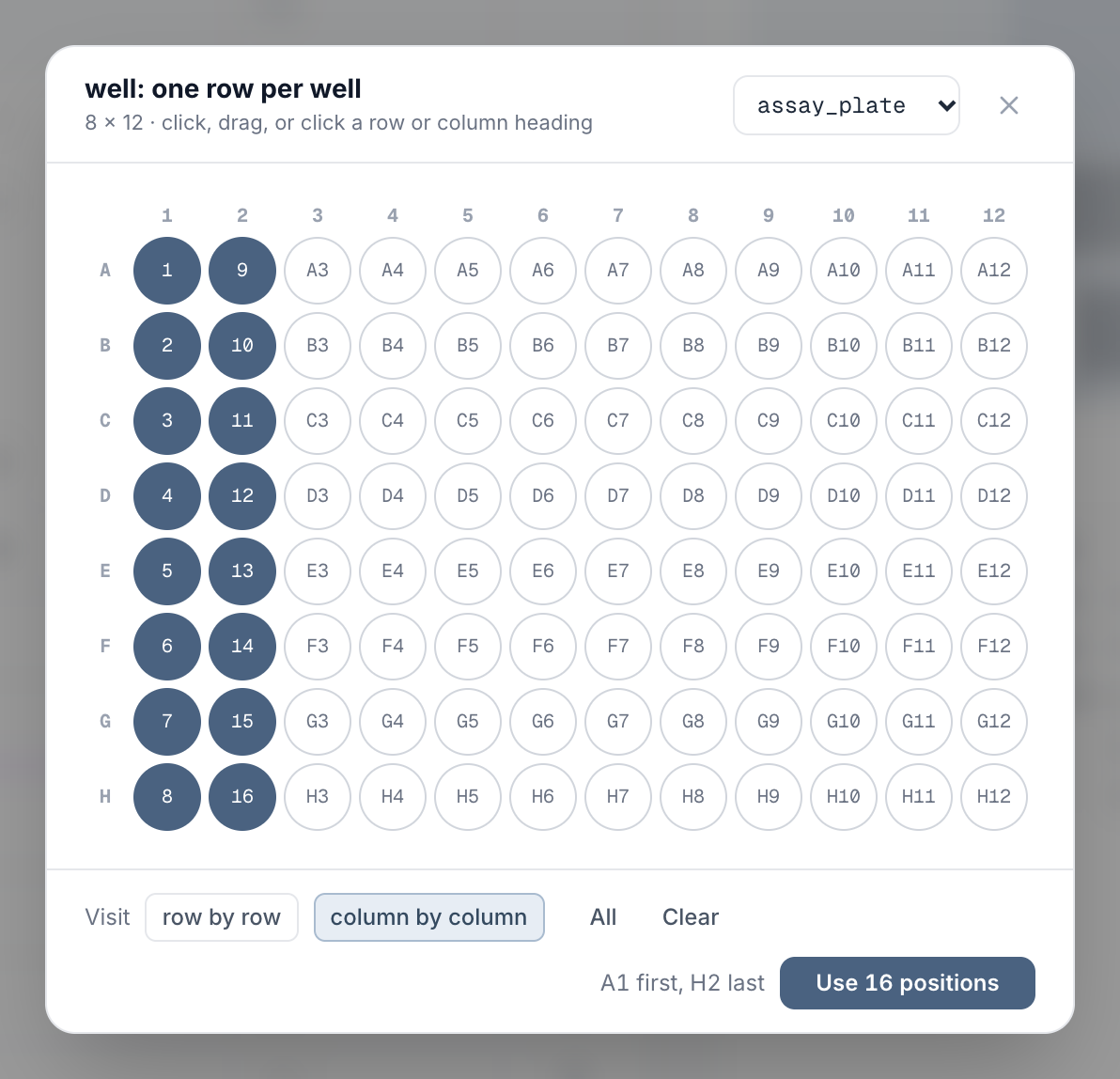
The original IvoryOS shows these arguments as text fields.
The Labware panel
"plugins": ["plr_ivoryos.labware_view:plugin"]
in a deck file (or ivoryos_edge.run(__name__, plugins=[plr_ivoryos.labware_view.plugin])) adds it
beside every page. Edit layout changes the worktable file as you go, with nothing to confirm:
- what is mounted: the pipette on each mount or the 96-channel head, the gripper, the trash slot;
- drag labware from PyLabRobot's catalogue (a Flex's own tip racks, and any plate, reservoir or tube rack) onto an empty slot; drag what is there to move it, × to take it off, rename it in the list;
- click a plate or reservoir, pick wells, and Fill them with a liquid and a volume: the
liquidsa run starts from; - Import a layout… takes a worktable file you already have; the one it replaces is kept as
worktable.before-import.json.
Steps offer added, moved or renamed labware, and changed equipment, once the deck restarts (the panel offers the restart). The panel is the only part of this package that imports IvoryOS, and only IvoryOS NextGen loads it.
Installation
pip install --pre plr-ivoryos            # 1.0.0b1, with PyLabRobot 1.0.0b1
pip install --pre "plr-ivoryos[serial]"  # a Flex over USB
Python 3.10 or newer. A Python environment holds one PyLabRobot, so every deck sharing one (the IvoryOS desktop app's decks do) uses the same plr-ivoryos and PyLabRobot.
How it works
bridge.pyreads each PyLabRobot method's signature and makes the step: same parameter names, kinds and defaults; wells and labware as text, marked for IvoryOS; dataclasses and plain values as they are. What it returns is made into plain data. A parameter of a type it cannot offer is left out when PyLabRobot has a default for it, and a method it cannot offer at all is listed inplr_ivoryos.opentrons.flex.SKIPPED(empty for the Flex).robot.pyis the worktable side of any robot: the file, the Labware panel's hooks and edits, readingplate[A1]as PyLabRobot objects, and running a step. PyLabRobot 1.0 tracks volumes but no longer which liquid, soliquids.pycompares the worktable before and after each step and moves liquids between wells and channels by that.- Async bridge: PyLabRobot is built on
asyncio, and a connection has to stay on the loop that opened it. Every step runs on one event loop on a background thread for the life of the process, so steps are ordinary synchronous calls, from IvoryOS or plain Python. The robot connects at the first step, so a deck starts with the robot switched off.
What changed in 1.0.0b1
- PyLabRobot 1.0 only. The 0.2
LiquidHandler, its worktables for the OT-2, Hamilton and Tecan robots, and the single-purpose devices (Scale,Pump,PlateReader,Sealer, ...) are gone: they wrapped PyLabRobot's older interfaces, which 1.0 keeps only aspylabrobot.legacy. Saved workflows using them need redoing. - The Opentrons Flex, its mounts and gripper as instruments, and a simulated Flex.
- No steps of this package's own design: no
transfer, no "next unused tips" from a bare rack name. Steps are PyLabRobot's.
License
MIT
1 maintainer

Metadata
1 maintainer
Release files for plr-ivoryos 1.0.0b1
For a detailed explanation of source distributions (sdists) and built distributions (wheels), please see the package formats documentation.
Source distribution (sdist)
| File | Size | Uploaded | Provenance | Actions |
|---|---|---|---|---|
| plr_ivoryos-1.0.0b1.tar.gz | 70.4 kB | Without provenance | Details for plr_ivoryos-1.0.0b1.tar.gz |
Built distribution (wheel)
| File | Interpreter | ABI | Platform | Actions Reset |
|---|---|---|---|---|
| plr_ivoryos-1.0.0b1-py3-none-any.whl | Python 3 | none | any | Details for plr_ivoryos-1.0.0b1-py3-none-any.whl |
Total release size: 135.6 kB
Release files / plr_ivoryos-1.0.0b1.tar.gz
| Download URL | plr_ivoryos-1.0.0b1.tar.gz |
|---|---|
| Size | 70.4 kB |
| Tags | Source |
|
SHA-256 checksum How to use checksums |
1c7d521a88c091313509654d3f3a4d54333cca114a6700da131b64297fff90a6
|
|
BLAKE2b-256 checksum How to use checksums |
c84f9f98e6026936e1a59821c52a5bbcab5fb0de05ea5d0a255676c1a8a79ae9
|
| Upload date | |
|
Uploaded using Trusted Publishing? What is trusted publishing? |
No |
| Uploaded via |
twine/7.0.0 CPython/3.13.16
|
Release files / plr_ivoryos-1.0.0b1-py3-none-any.whl
| Download URL | plr_ivoryos-1.0.0b1-py3-none-any.whl |
|---|---|
| Size | 65.2 kB |
| Tags | Python 3 |
|
SHA-256 checksum How to use checksums |
856650532a7139049be0a49421ccdc0d4e48595a389f972bdc5404e1dbd87eaf
|
|
BLAKE2b-256 checksum How to use checksums |
f1e36d69e17062a0a6a70950a1d8082a38232699237ddc5d06abf75fa6286f6d
|
| Upload date | |
|
Uploaded using Trusted Publishing? What is trusted publishing? |
No |
| Uploaded via |
twine/7.0.0 CPython/3.13.16
|
Security for plr-ivoryos 1.0.0b1
Provenance
Provenance describes where a file came from. On PyPI, provenance is shared via attestations, which provide a verifiable record of the build or publishing details. View details, limitations and caveats.
No provenance found
None of the files in this release were uploaded with provenance metadata.
A note on package security
PyPI is a repository for distributing packages, not a service for auditing them. While third-party security researchers and our staff do their best to detect and remove malicious packages, PyPI cannot guarantee the quality, security or suitability of any given package.
To learn more about protecting yourself from malicious actors, visit our package security documentation.














