

Image processing as Polars expressions: decode, transform and analyse images in a DataFrame column, in Rust, on every core, without a Python loop.






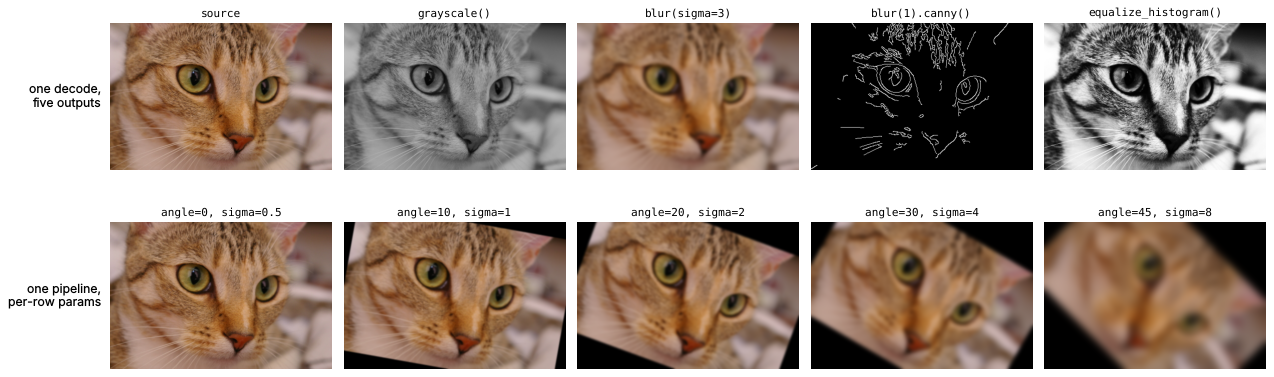
Every panel is computed by polars-cv from a CC0 photo
(scripts/make_readme_figure.py).
equalize_histogram() is a contrast stretch: it remaps intensities so they
spread evenly over 0–255.
Install
pip install polars-cv # or: uv add polars-cv
Wheels for Linux (x86_64, aarch64) and macOS (Apple silicon), CPython 3.11+, Polars 2.0+. Other platforms build from source with Rust 1.96+.
Quickstart
A Pipeline describes the work, .cv.pipe() applies it to a column, and
.sink() picks the output format.
from pathlib import Path

import polars as pl
from polars_cv import Pipeline

df = pl.DataFrame({"path": sorted(str(p) for p in Path("photos").glob("*.jpg"))})

pipe = (
    Pipeline()
    .source("file_path", allowed_roots=["photos"])
    .resize(height=224, width=224)
    .grayscale()
)
out = df.with_columns(gray=pl.col("path").cv.pipe(pipe).sink("tensor"))
Sources include image_bytes, local paths and s3:///gs:///az:///http(s)://
URLs. A path column is data, so reading it is default-deny: allowed_roots
names where it may read (allowed_roots=["*"] opts in to anywhere). Sinks
include tensor, array, list, png and jpeg. See
Sources
and Pipelines.
One decode, several outputs, per-row parameters
A folder of photos to centre-cropped 224×224 training tensors plus JPEG thumbnails. Each file is decoded once and feeds both outputs, and the crop box is computed per row from each image's header.
from pathlib import Path

import polars as pl
from polars_cv import Pipeline, Sink

df = pl.DataFrame({"path": sorted(str(p) for p in Path("photos").glob("*.jpg"))})
df = df.with_columns(pl.col("path").cv.image_info(allowed_roots=["photos"]).struct.unnest())  # header only

side = pl.min_horizontal("width", "height")  # a per-row value
img = pl.col("path").cv.pipe(
    Pipeline().source("file_path", dtype="u8", allowed_roots=["photos"])
)
x = img.pipe(
    Pipeline()
    .crop(top=(pl.col("height") - side) // 2, left=(pl.col("width") - side) // 2,
          height=side, width=side)
    .resize(height=224, width=224, filter="bilinear")
).alias("x")
thumb = img.pipe(Pipeline().resize_max(128)).alias("thumb")

out = df.with_columns(
    o=x.merge_pipe(thumb).sink({
        "x": Sink.array(shape=[224, 224, 3]),
        "thumb": Sink.jpeg(quality=85),
    })
).unnest("o")
batch = out["x"].to_numpy()  # (n_images, 224, 224, 3) uint8
Any parameter that does not change the output's rank, dtype or domain accepts a Polars expression. See Multi-output pipelines.
Branch, rejoin, optimise: cutting out the foreground
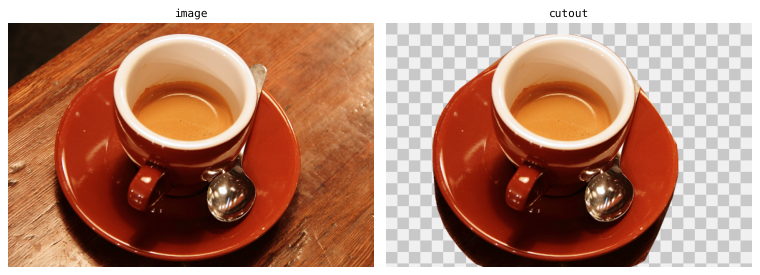
Pipelines compose into a graph. This one cuts a cup and saucer out of a photo with a transparent background: two cues find the china (bright pixels, and the saturated red that the brown table lacks), their union is traced to an outline, and the outline is rasterized back into an alpha channel for the photo.
from pathlib import Path

import polars as pl
from polars_cv import Pipeline

base = Pipeline().source("file_path", allowed_roots=["photos"]).resize_max(512)
img = pl.col("path").cv

# Two cues, each written as if it stood alone. The threshold is a column.
bright = img.pipe(base.grayscale().threshold(190))
saturated = img.pipe(
    base.to_hsv().channel_select(1).threshold(pl.col("min_saturation"))
)

# Rejoin: either cue, cleaned up and traced; keep the largest outline's hull.
outline = bright.maximum(saturated).pipe(
    Pipeline().morphology_open(ksize=5).extract_contours().largest().convex_hull()
)

# The outline as an anti-aliased alpha channel joined to the photo's colours.
photo = img.pipe(base)
alpha = outline.rasterize(shape=photo, supersample=4)
cutout = photo.channel_merge(alpha).alias("cutout")

expr = cutout.merge_pipe(outline.area().alias("area"))
paths = sorted(str(p) for p in Path("photos").glob("*.jpg"))
out = (
    pl.LazyFrame({"path": paths, "min_saturation": 210})
    .with_columns(o=expr.sink({"cutout": "png", "area": "native"}))
    .unnest("o")
    .collect()
)
expr.explain({"cutout": "png", "area": "native"}) prints the graph that
runs, with each op's planned dtype and shape; expr.show_graph(...) draws it
(that needs polars-cv[viz] and Graphviz's dot):
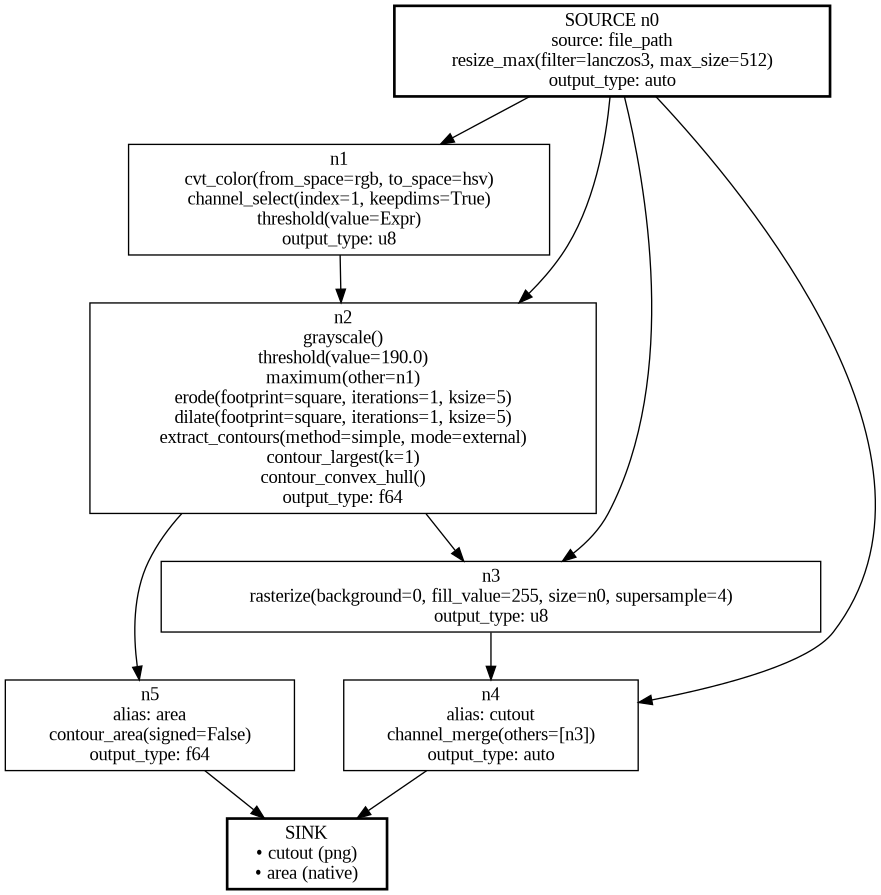
Written out, this is eight nodes with three decodes; it runs as six with one.
The optimiser computes each distinct value once: the three pipelines built from base share one read
and resize (node n0), and each linear run of steps that nothing else
reads becomes a single node, so the brightness threshold runs straight through
maximum to the hull in one (| marks the ops that run fused).
explain(..., optimized=False) shows the graph as written; the outputs are
byte for byte the same. The whole graph is
one Polars expression: it runs in the lazy and streaming engines, per row,
with min_saturation read from each row's column, and returns the PNG and the
outline's area together.
Why polars-cv
- Images are a column. Paths, bytes, labels, metadata and results sit in one
DataFrame, so filtering, joining and
group_byon image properties is plain Polars, not a second data structure kept in sync with a list of arrays. - Polars runs it. Pipelines are expressions: they run lazily, in the streaming engine for larger-than-memory data, with each call's rows spread over every core by Rust code. There is no Python per image.
- Parameters can be expressions. Crop boxes from annotations, sizes from metadata, thresholds from a lookup, evaluated per row.
Benchmarks
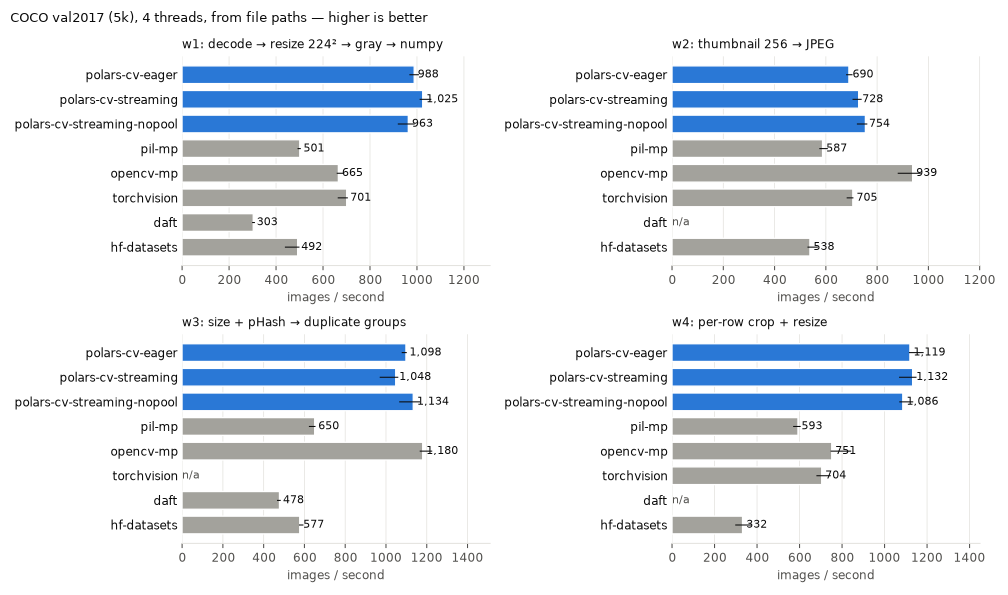
5,000 COCO val2017 images on 4 cores, against PIL, OpenCV (process pool),
torchvision (DataLoader), Daft and Hugging Face datasets. Each is written the
way its users would write it and checked against PIL's output before timing.
| Workload | polars-cv (streaming) | Fastest alternative | polars-cv speed-up | Peak memory, polars-cv vs that alternative |
|---|---|---|---|---|
| Decode → resize 224² → gray → NumPy | 1,025 img/s | torchvision 701 | 1.5× | 849 MiB vs 1,094 |
| Per-row crop box + per-row size | 1,132 img/s | OpenCV 751 | 1.5× | 686 MiB vs 2,238 |
| Size + pHash → duplicate groups | 1,048 img/s | OpenCV 1,180 | 0.89× | 143 MiB vs 120 |
| Thumbnail → JPEG | 728 img/s | OpenCV 939 | 0.78× | 250 MiB vs 194 |
polars-cv trails OpenCV on thumbnails because its JPEG encoder is slower than
libjpeg-turbo. Methodology, every table and the command to reproduce them are
in benchmarks/.
Which benchmark tree? benchmarks/ compares the published wheel against
other libraries; polars-cv/benchmarks/ measures the checkout for regressions.
See the split explained in benchmarks/README.md.
Checked against OpenCV, SciPy, NumPy, PIL and imagehash
875 reference tests hold 116 ops to an independent implementation (NumPy, OpenCV, SciPy, imagehash, matplotlib) or to a written definition, and all of them pass. Each test states what it compares and how close the outputs must be, and the parity report lists every comparison with its tolerance.
| Checked against | Tests passing | Ops |
|---|---|---|
| NumPy | 352 | 63 |
| Definition | 202 | 51 |
| OpenCV | 160 | 38 |
| Hand-computed | 48 | 21 |
| SciPy | 47 | 3 |
| imagehash | 23 | 1 |
| Python | 22 | 2 |
| matplotlib | 20 | 1 |
| Cross-check | 1 | 3 |
End to end, the benchmark holds every library to PIL's output before timing it. Mean / worst difference from PIL (0–255 levels, or hash bits):
| Workload (40 COCO images) | Unit | polars-cv | OpenCV | torchvision | Daft |
|---|---|---|---|---|---|
| decode → bilinear 224² → gray | levels | 0.17 / 2 | 4.18 / 127 | 0.66 / 2 | 1.19 / 23 |
| thumbnail → JPEG, re-decoded | levels | 2.00 / 4.32 | 5.70 / 12.27 | 0.03 / 0.44 | n/a |
| 64-bit pHash | bits | 0.15 / 2 | 33.62 / 44 | n/a | 0.50 / 2 |
| per-row crop + bilinear resize | levels | 0.16 / 2 | 4.78 / 136 | 0.00 / 1 | n/a |
OpenCV's larger gap is its INTER_LINEAR resize, which doesn't antialias when
downscaling, not a bug. polars-cv and Daft decode JPEGs with pure-Rust
decoders, so they differ from libjpeg-turbo by a level or two at chroma edges.
What's included
| Area | Examples |
|---|---|
| Resize & geometry | resize (incl. filter="area"), resize_max, resize_like, crop/crop_clip/crop_pad, pad, letterbox, rotate, flip, warp_affine |
| Colour & intensity | grayscale, to_hsv, to_lab, adjust_contrast, adjust_gamma, equalize_histogram |
| Filters & morphology | blur, sharpen, sobel, canny, convolve2d, median_filter/rank_filter, background_divide, erode/dilate (square or disk), distance_transform |
| Arithmetic | normalize/normalize_preset/normalize_percentile, cast, clamp, element-wise math, and add/blend/apply_mask between pipelines |
| Analysis | histogram, perceptual_hash, reduce/reduce_mean/max/percentile/…, reduce_masked, block_reduce, statistics(mask=), region_stats |
| Contours, points, boxes | extract_contours, area, iou, hausdorff_distance, pairwise_iou via .contour/.point/.bbox |
| Drawing | rasterize (anti-aliased), stroke, offset, smooth, union/intersection/difference, coordinate_grid, apply_lut palettes |
| Header metadata | .cv.image_info(), .cv.width(), .cv.height() without decoding |
The full list is in the operations guide and the API reference; the drawing guide builds the logo above from these ops.
Larger-than-memory data
Eager calls already use every core. For data that does not fit in memory, use
a LazyFrame: .collect() streams by default, and .collect_batches() hands
you one batch at a time.
from pathlib import Path

import polars as pl
from polars_cv import Pipeline

pipe = (
    Pipeline()
    .source("file_path", dtype="u8", allowed_roots=["photos"])
    .resize(height=64, width=64)
)
lf = pl.LazyFrame({"path": sorted(str(p) for p in Path("photos").glob("*.jpg"))})
for batch in (
    lf.select(x=pl.col("path").cv.pipe(pipe).sink("array", shape=[64, 64, 3]))
    .collect_batches(chunk_size=2)
):
    x = batch["x"].to_numpy()  # (rows, 64, 64, 3) uint8
Thread counts, morsel sizing and memory budgets are covered in Streaming & Scaling.
Project status
ℹ️ Note: This is a largely AI-developed project and still in its early stages. Use at your own discretion. What keeps it honest is the parity report: every op is checked in CI against an independent implementation.
polars-cv is 0.x, and there is no stable API until 1.0: a minor release may
break any of it. Breaking changes are
listed in the changelog,
each with a migration guide.
Pin a minor version (polars-cv~=0.42.0) if you depend on it.
Contributing
Bug reports, feature requests and pull requests are welcome; open work is
tracked in GitHub issues.
CONTRIBUTING.md
covers the development setup and workflow, and scripts/verify.sh runs every
check CI runs. Please report security issues privately, as described in
SECURITY.md.
Citation
If you use polars-cv in research, please cite the version you used:
@software{dar_polars_cv,
  author = {Dar, Hesham},
  title  = {polars-cv: Image processing as Polars expressions},
  url    = {https://github.com/heshamdar/polars-cv},
  year   = {2026}
}
Licensed under either of MIT or Apache-2.0, at your option.
1 maintainer

Metadata
1 maintainer
Release files for polars-cv 0.42.0
For a detailed explanation of source distributions (sdists) and built distributions (wheels), please see the package formats documentation.
Source distribution (sdist)
| File | Size | Uploaded | Provenance | Actions |
|---|---|---|---|---|
| polars_cv-0.42.0.tar.gz | 3.6 MB | With provenance | Details for polars_cv-0.42.0.tar.gz |
Built distributions (wheels)
| File | Interpreter | ABI | Platform | Actions Reset |
|---|---|---|---|---|
| polars_cv-0.42.0-cp311-abi3-manylinux2014_x86_64.manylinux_2_17_x86_64.whl | CPython 3.11 | abi3 | Linux glibc 2.17+ x86-64 | Details for polars_cv-0.42.0-cp311-abi3-manylinux2014_x86_64.manylinux_2_17_x86_64.whl |
| polars_cv-0.42.0-cp311-abi3-manylinux2014_aarch64.manylinux_2_17_aarch64.whl | CPython 3.11 | abi3 | Linux glibc 2.17+ ARM64 | Details for polars_cv-0.42.0-cp311-abi3-manylinux2014_aarch64.manylinux_2_17_aarch64.whl |
| polars_cv-0.42.0-cp311-abi3-macosx_11_0_arm64.whl | CPython 3.11 | abi3 | macOS 11.0+ ARM64 | Details for polars_cv-0.42.0-cp311-abi3-macosx_11_0_arm64.whl |
Total release size: 51.2 MB
Release files / polars_cv-0.42.0.tar.gz
| Download URL | polars_cv-0.42.0.tar.gz |
|---|---|
| Size | 3.6 MB |
| Tags | Source |
|
SHA-256 checksum How to use checksums |
132eca7c3fa140fce4fc81046b47a494fe9e61a5572ed07f01b674d133ce0d8c
|
|
BLAKE2b-256 checksum How to use checksums |
162b49a7cedb68d3776830e017ac379f01f0edf9f376747f3a5a25df096011c2
|
| Upload date | |
|
Uploaded using Trusted Publishing? What is trusted publishing? |
Yes |
| Uploaded via |
twine/7.0.0 CPython/3.13.16
|
Provenance
Provenance describes where a file came from. On PyPI, provenance is shared via attestations, which provide a verifiable record of the build or publishing details. View details, limitations and caveats.


PyPI Publish Attestation
PyPI verified that this artifact, at this checksum, originated from the publisher listed below.
Signed by GitHub Actions, verified by PyPI on Nov 16, 2026.
Transparency logRelease files / polars_cv-0.42.0-cp311-abi3-manylinux2014_x86_64.manylinux_2_17_x86_64.whl
| Download URL | polars_cv-0.42.0-cp311-abi3-manylinux2014_x86_64.manylinux_2_17_x86_64.whl |
|---|---|
| Size | 19.2 MB |
| Tags | CPython 3.11 Linux glibc 2.17+ x86-64 abi3 |
|
SHA-256 checksum How to use checksums |
aa033fe9efd5d341a74241caf58a818afd2f54e40b2280aa52e0322606a433e5
|
|
BLAKE2b-256 checksum How to use checksums |
50ab9d1d528a36bb4edcb1fa3ffdcd8c44b1135c00191e00e27fa1c8c6fe0d3e
|
| Upload date | |
|
Uploaded using Trusted Publishing? What is trusted publishing? |
Yes |
| Uploaded via |
twine/7.0.0 CPython/3.13.16
|
Provenance
Provenance describes where a file came from. On PyPI, provenance is shared via attestations, which provide a verifiable record of the build or publishing details. View details, limitations and caveats.
PyPI Publish Attestation
PyPI verified that this artifact, at this checksum, originated from the publisher listed below.
Signed by GitHub Actions, verified by PyPI on Nov 16, 2026.
Transparency logRelease files / polars_cv-0.42.0-cp311-abi3-manylinux2014_aarch64.manylinux_2_17_aarch64.whl
| Download URL | polars_cv-0.42.0-cp311-abi3-manylinux2014_aarch64.manylinux_2_17_aarch64.whl |
|---|---|
| Size | 14.0 MB |
| Tags | CPython 3.11 Linux glibc 2.17+ ARM64 abi3 |
|
SHA-256 checksum How to use checksums |
6f0dd74b7ef813d736f7acbbab57dcb828a6f5f0f7d56dcdd48d1ec92ff009af
|
|
BLAKE2b-256 checksum How to use checksums |
9815186beefdeb3f871929eb663f982f0509519e71ab9abbd85287a71d6a1ca0
|
| Upload date | |
|
Uploaded using Trusted Publishing? What is trusted publishing? |
Yes |
| Uploaded via |
twine/7.0.0 CPython/3.13.16
|
Provenance
Provenance describes where a file came from. On PyPI, provenance is shared via attestations, which provide a verifiable record of the build or publishing details. View details, limitations and caveats.
PyPI Publish Attestation
PyPI verified that this artifact, at this checksum, originated from the publisher listed below.
Signed by GitHub Actions, verified by PyPI on Nov 16, 2026.
Transparency logRelease files / polars_cv-0.42.0-cp311-abi3-macosx_11_0_arm64.whl
| Download URL | polars_cv-0.42.0-cp311-abi3-macosx_11_0_arm64.whl |
|---|---|
| Size | 14.5 MB |
| Tags | CPython 3.11 abi3 macOS 11.0+ ARM64 |
|
SHA-256 checksum How to use checksums |
7d1aed7edf4ceb8f0f3465203afd99c00a1c3f9ad601aa8c4e56022be5ce0b77
|
|
BLAKE2b-256 checksum How to use checksums |
60d6d102b3c0d0d389c21b216c4795097ba36cdd3519f48544492736d1300f8c
|
| Upload date | |
|
Uploaded using Trusted Publishing? What is trusted publishing? |
Yes |
| Uploaded via |
twine/7.0.0 CPython/3.13.16
|
Provenance
Provenance describes where a file came from. On PyPI, provenance is shared via attestations, which provide a verifiable record of the build or publishing details. View details, limitations and caveats.
PyPI Publish Attestation
PyPI verified that this artifact, at this checksum, originated from the publisher listed below.
Signed by GitHub Actions, verified by PyPI on Nov 16, 2026.
Transparency logSecurity for polars-cv 0.42.0
Provenance
Provenance describes where a file came from. On PyPI, provenance is shared via attestations, which provide a verifiable record of the build or publishing details. View details, limitations and caveats.
Full provenance
All 4 files in this release have been uploaded with provenance metadata.
Attestation for polars_cv-0.42.0.tar.gz
PyPI Publish Attestation
PyPI verified that this artifact, at this checksum, originated from the publisher listed below.
Signed by GitHub Actions, verified by PyPI on Nov 16, 2026.
Transparency logA note on package security
PyPI is a repository for distributing packages, not a service for auditing them. While third-party security researchers and our staff do their best to detect and remove malicious packages, PyPI cannot guarantee the quality, security or suitability of any given package.
To learn more about protecting yourself from malicious actors, visit our package security documentation.














