
probixi - Self-Calibrating (PROB)ab(I)listic Peak Detection for Serial (X)-Ray Crystallograph(I)c Data









probixi treats peakfinding as anomaly detection. Bragg signal is sparse, and the stream of frames is therefore mostly a sample of the detector's background. probixi learns that background at every pixel as frames arrive, whitens each frame against it, and reports the pixels the background does not explain. The peak contrast, peak prior, background blend, and detection threshold are calibrated on the data, and no parameter requires tuning. Each frame is then indexed, predicted, and integrated, with every peak weighted by its detection posterior.
Installing the Package
You can install via Pypi with pip:
pip install probixi
Or the latest development version with
pip install git+https://github.com/ryan-odea/probixi.git
Using probixi
The command line goes from raw frames to integrated reflections in one call. The Python API returns lazy streams whose results remain on the GPU until collected, and any stage can feed further torch processing.
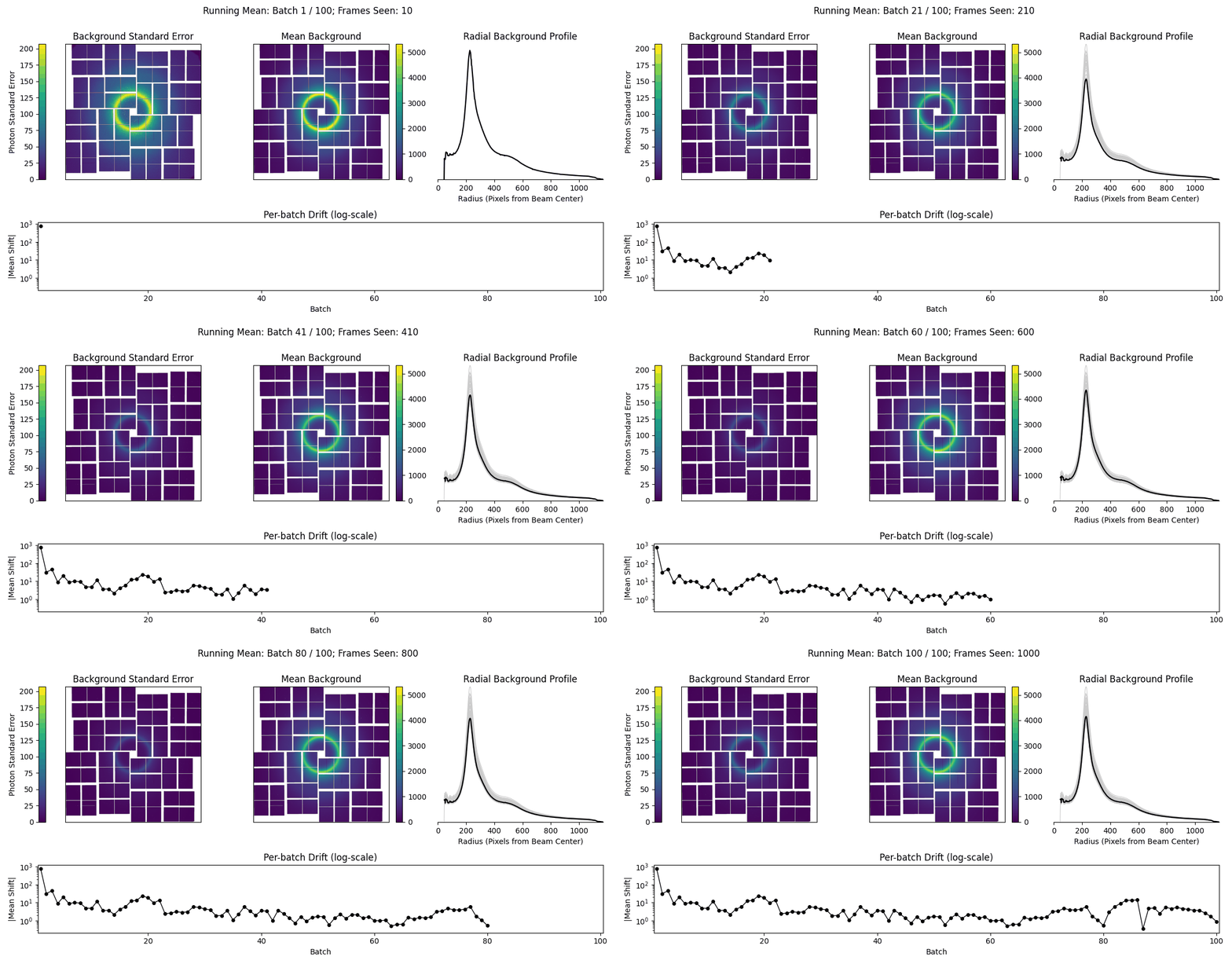
probixi calibrates on a set of seed frames before detection. --gif writes an animation of the noise model over those frames.
Via the CLI:
probixi -i files.lst -g myGeometry.geom -p myCell.cell -o stream.stream --device cuda --gif myNoiseModel.gif
Or with python:
import torch

from probixi import Probixi, DataOffloader

pipeline = Probixi(
    list_file="files.lst",
    geometry_file="myGeometry.geom",
    cell_file="myCell.cell",
    device=torch.device("cuda"),
)

pipeline.noise_diagnostics("myNoiseModel.gif", stop=32)
cal = pipeline.calibrate(n_seed=1636)
print(f"kappa={cal.kappa:.2f}  prior_peak={cal.prior_peak:.4f}  "
      f"threshold={pipeline.threshold_calibration.threshold:.2f}")

# Stream every frame through detect -> index -> predict + integrate. The stream
# is lazy and each result stays on the GPU until you touch it, so you can branch
# off any downstream processing with torch
with DataOffloader(
    "stream.stream",
    geometry=pipeline.geometry,
    cell=pipeline.target_cell,
    geometry_file="myGeometry.geom",
    files=pipeline.metadata.files,
) as off:
    for result in pipeline.index_stream(pipeline.frames(), batch_size=8):
        off.write(result)  # or: pipeline.index_stream(...).to_stream(off)
        print(f"frame {result.frame_index}: "
              f"{result.n_indexed}/{result.n_peaks} indexed (rmsd {result.rmsd:.4f})")
DuckDB output
The .stream format is convenient for interop with partialator, but querying a
run means re-parsing a large text file. probixi can instead write a
DuckDB database. Please note this may be the default in the future.
probixi -i files.lst -g myGeometry.geom -p myCell.cell -o run.duckdb --device cuda
Or with python:
stream = pipeline.index_stream(pipeline.frames(), batch_size=8)
stream.to_db(
    "run.duckdb",
    geometry=pipeline.geometry,
    cell=pipeline.target_cell,
    geometry_file="myGeometry.geom",
    files=pipeline.metadata.files,
)
The database holds run metadata as small tables (geometry, panels, cell) plus:
frames, keyed byframe_id(a hash offilename//event) with additional per-frame informationcrystals, one row per accepted lattice, with its cell, orientation, and fit statisticsreflections, the integrated Miller indices (h k l,I,sigma,peak,background,fs/ss, panel, resolution)peaks, the peak-search results per frame
Resolving indexing ambiguity
When the lattice symmetry is higher than the structure's point group, each crystal can
be indexed in more than one way. probixi-resolve clusters the crystals in a database
into the two choices and reindexes the ones on the wrong side. It is a torch/Triton implementation of
CrystFEL's ambigator, by Thomas White.
probixi-resolve -i run.duckdb -y 3 -w 321 -o detwinned.duckdb
Without -o the database is rewritten in place. Reindexing transforms reflections
h k l along with the matching crystals reciprocal axes and cell parameters, and
records every assignment in an ambiguity table. The same thing from python:
from probixi import Ambigator

amb = Ambigator("run.duckdb", symmetry="3", apparent="321")
result = amb.resolve()
print(f"{result.n_reindexed}/{len(result)} crystals reindexed")
amb.reindex(result, output="detwinned.duckdb")
Using probixi as only a peakfinder
If you prefer your own indexer, use probixi as a peakfinder only, through the CLI's --peaks-only flag or the Python API's peak_stream. The exported peaks also improve conventional indexers on strong data (see the vignettes).
Via the CLI:
probixi -i files.lst -g myGeometry.geom -o peaks.stream --peaks-only --device cuda
Or with python:
import torch

from probixi import Probixi, PeakOffloader

pipeline = Probixi(
    list_file="files.lst",
    geometry_file="myGeometry.geom",
    device=torch.device("cuda"),
)

# Calibrate the noise model + detection threshold on the seed frames, as usual.
pipeline.calibrate(n_seed=1636)

peaks = pipeline.peak_stream(pipeline.frames(), estimate_scale=False)
with PeakOffloader(
    "peaks.stream",
    geometry=pipeline.geometry,
    geometry_file="myGeometry.geom",
    files=pipeline.metadata.files,
) as off:
    for result in peaks:
        if len(result):       # skip blanks; export only frames with peaks
            off.write(result)
Dependencies
- python >= 3.9
- click
- h5py
- hdf5plugin
- numpy
- torch
- matplotlib
- pillow
- duckdb
Contributing
There are many different ways to contribute to further development of this tool. If you experience a bug or would like an additional feature, please open up a ticket.
If you would like to contribute actively by merging code, please open a PR with the following:
- Code is formatted with
isort, thenblack, followed by aruff --check. This will initiate on PR, so it might be best to check beforehand. - Docstrings are minimally on user-facing functions in
numpystyle. - Comments, or some explanation (in PR) for the additions, limited to the scope of the project. For a bug fix, the explanation belongs in the PR rather than in the code.
1 maintainer

Metadata
1 maintainer
Release files for probixi 0.8.3
For a detailed explanation of source distributions (sdists) and built distributions (wheels), please see the package formats documentation.
Source distribution (sdist)
| File | Size | Uploaded | Provenance | Actions |
|---|---|---|---|---|
| probixi-0.8.3.tar.gz | 17.4 MB | With provenance | Details for probixi-0.8.3.tar.gz |
Built distribution (wheel)
| File | Interpreter | ABI | Platform | Actions Reset |
|---|---|---|---|---|
| probixi-0.8.3-py3-none-any.whl | Python 3 | none | any | Details for probixi-0.8.3-py3-none-any.whl |
Total release size: 17.6 MB
Release files / probixi-0.8.3.tar.gz
| Download URL | probixi-0.8.3.tar.gz |
|---|---|
| Size | 17.4 MB |
| Tags | Source |
|
SHA-256 checksum How to use checksums |
b70b1d85a84539a2a77fd662a0631f7e4a1716bda301fd1a2719a70d5995c0e2
|
|
BLAKE2b-256 checksum How to use checksums |
45f4521eb0a69fd4e5436f799d5cfbc03be3dd1ef33620e61128c6b73ca10706
|
| Upload date | |
|
Uploaded using Trusted Publishing? What is trusted publishing? |
Yes |
| Uploaded via |
twine/7.0.0 CPython/3.13.14
|
Provenance
Provenance describes where a file came from. On PyPI, provenance is shared via attestations, which provide a verifiable record of the build or publishing details. View details, limitations and caveats.


PyPI Publish Attestation
PyPI verified that this artifact, at this checksum, originated from the publisher listed below.
Signed by GitHub Actions, verified by PyPI on Oct 20, 2026.
Transparency logRelease files / probixi-0.8.3-py3-none-any.whl
| Download URL | probixi-0.8.3-py3-none-any.whl |
|---|---|
| Size | 198.2 kB |
| Tags | Python 3 |
|
SHA-256 checksum How to use checksums |
39cdfafa5fa94492a896ebc49f02b95c9a382fb1934b7826c6da80b730cc237d
|
|
BLAKE2b-256 checksum How to use checksums |
7cf5d9d46055d1f31536fb8d580c771e1b22aa3933545a2bb35e4d42f081c037
|
| Upload date | |
|
Uploaded using Trusted Publishing? What is trusted publishing? |
Yes |
| Uploaded via |
twine/7.0.0 CPython/3.13.14
|
Provenance
Provenance describes where a file came from. On PyPI, provenance is shared via attestations, which provide a verifiable record of the build or publishing details. View details, limitations and caveats.
PyPI Publish Attestation
PyPI verified that this artifact, at this checksum, originated from the publisher listed below.
Signed by GitHub Actions, verified by PyPI on Oct 20, 2026.
Transparency logSecurity for probixi 0.8.3
Provenance
Provenance describes where a file came from. On PyPI, provenance is shared via attestations, which provide a verifiable record of the build or publishing details. View details, limitations and caveats.
Full provenance
Both files in this release have been uploaded with provenance metadata.
Attestation for probixi-0.8.3.tar.gz
PyPI Publish Attestation
PyPI verified that this artifact, at this checksum, originated from the publisher listed below.
Signed by GitHub Actions, verified by PyPI on Oct 20, 2026.
Transparency logA note on package security
PyPI is a repository for distributing packages, not a service for auditing them. While third-party security researchers and our staff do their best to detect and remove malicious packages, PyPI cannot guarantee the quality, security or suitability of any given package.
To learn more about protecting yourself from malicious actors, visit our package security documentation.














