
Binary Reader and Analysis Suite Software

Project description
BRASS (Binary Reader and Analysis Suite Software) 
A simple and extensible C++/Python library for reading and analyzing binary particle output files.
Features
- Blazingly fast (see performance)
- C++ binary file reader for particle data
- Plugin-style extensible analysis system (via registry macros)
- Histogramming utilities
- Developed primarily for Binary format used by SMASH (see https://theory.gsi.de/~smash/userguide/current/doxypage_output_binary.html)
Performance
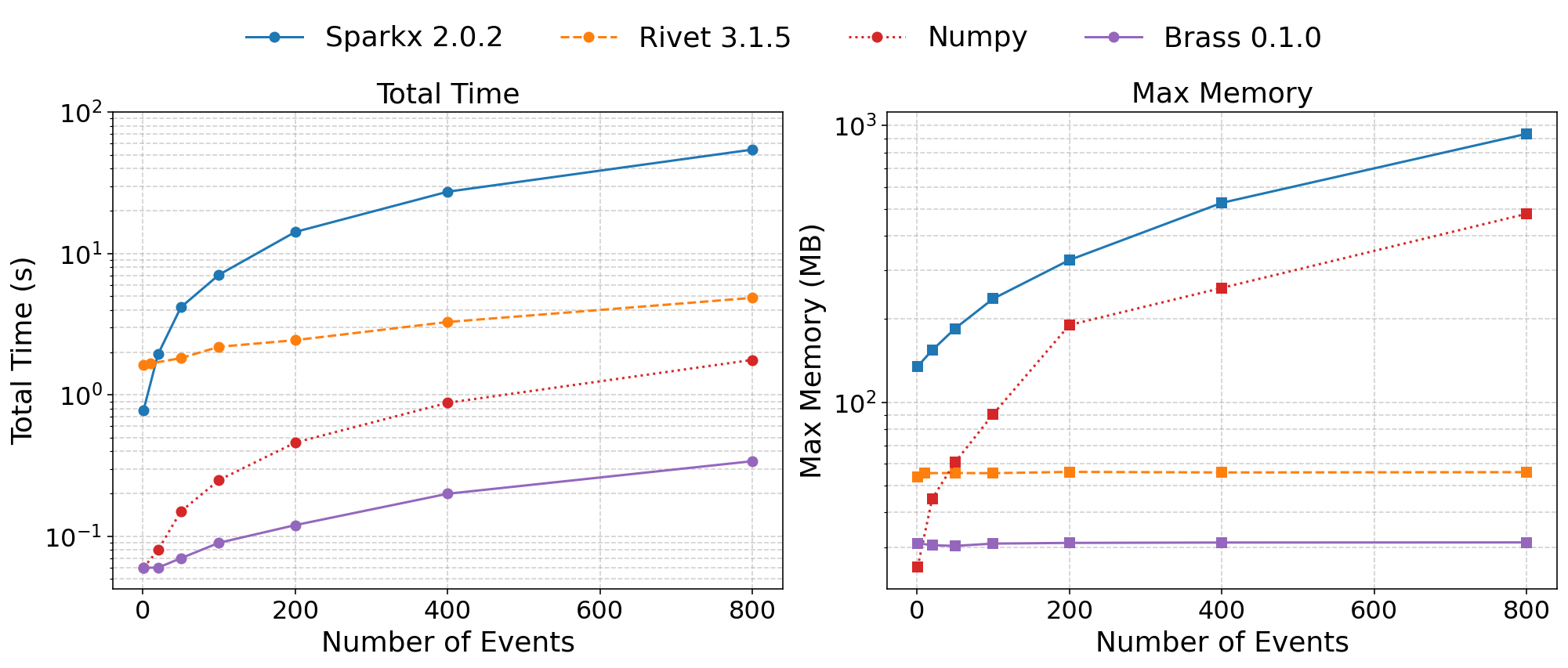
Performance benchmark based on rapidity distribution analyses implemented using each method.
NumPy and SPARXK read OSCAR files. Rivet reads a YODA file. BRASS reads a binary OSCAR2013-extended file.
NumPy uses numpy.loadtxt.
Build Instructions
in repository
pip install .
or from PyPI
pip install pybrass
Simplest Usage
from brass import BinaryReader, Accessor

QUANTITIES = ["p0", "px", "py", "pz", "pdg"]

class Example(Accessor):
    def on_particle_block(self, block):
        arrays = dict(self.gather_block_arrays(block, QUANTITIES))
        E = arrays["p0"]
        px = arrays["px"]
        py = arrays["py"]
        pz = arrays["pz"]
        pdg = arrays["pdg"]
        # do something with E, px, py, pz, pdg here

reader = BinaryReader("events.bin", QUANTITIES, Example())
reader.read()
brass-analyze
Command-line tool for running registered analyses on multiple SMASH run directories.
Usage
brass-analyze [OPTIONS] OUTPUT_DIR ANALYSIS_NAME
- OUTPUT_DIR — top directory containing run subfolders (
out-*by default) - ANALYSIS_NAME — name of a registered analysis (see
--list-analyses)
Options
--list-analyses List registered analyses and exit.
--pattern PATTERN Glob for run folders (default: out-*).
--keys KEY1 KEY2 ... Dotted keys from config for labeling runs (last segment used as name). Example: --keys Modi.Collider.Sqrtsnn General.Nevents
--results-subdir DIR Subdirectory to store results (default: data).
--strict-quantities Fail if Quantities differ across runs (default: warn and use first).
--load Load python files containing an analysis class registration
-v, --verbose Print detailed information.
--nproc NPROC Number of processes for multiprocessing (default: no multiprocessing).
Writing Analyses
import numpy as np
import brass as br
from pathlib import Path
from brass import HistND
import pickle


class Dndydmt:
    def __init__(self, y_edges, mt_edges, track_pdgs=None):
        self.y_edges = np.asarray(y_edges)
        self.mt_edges = np.asarray(mt_edges)

        # HistND expects a list of edges per dimension
        self.incl = HistND([self.mt_edges, self.y_edges])
        self.per_pdg: dict[int, HistND] = {}

        self.track = set(track_pdgs or [])
        self.n_events = 0

    def on_interaction_block(self, iblock, accessor, opts):
        pass

    def on_end_block(self, block, accessor, opts):
        pass

    def on_particle_block(self, block, accessor, opts):
        self.n_events += 1
        pairs = accessor.gather_block_arrays(block)
        cols = {k: v for k, v in pairs}
        E, pz, px, py, pdg = cols["p0"], cols["pz"], cols["px"], cols["py"], cols["pdg"]

        # avoid y NaN; clamp negative m^2
        msk = E > np.abs(pz)
        if not msk.any():
            return
        E, pz, px, py, pdg = E[msk], pz[msk], px[msk], py[msk], pdg[msk]

        pt = np.hypot(px, py)
        m2 = np.maximum(E * E - (px * px + py * py + pz * pz), 0.0)
        m = np.sqrt(m2)
        mt = np.hypot(pt, m)
        y = 0.5 * np.log((E + pz) / (E - pz))

        # inclusive histogram
        self.incl.fill(mt, y)

        # tracked pdgs
        if self.track:
            present_tracked = np.intersect1d(
                np.unique(pdg), np.fromiter(self.track, dtype=int)
            )
            for val in present_tracked:
                sel = pdg == val
                H = self.per_pdg.setdefault(
                    int(val), HistND([self.mt_edges, self.y_edges])
                )
                H.fill(mt, y, mask=sel)


    def to_state_dict(self):
        """Return picklable state for this analysis instance.

        brass will merge these dicts from different workers and pass
        the merged structure into `finalize(results)`.
        """
        return {
            "n_events": int(self.n_events),
            "incl": self.incl,
            "per_pdg": dict(self.per_pdg),
        }

    def finalize(self, results):
        """Post-merge normalization.

        `results` has the structure:
        {
          meta_key_1: {
            "dndydmt": {
               "n_events": ...,
               "incl": HistND,
               "per_pdg": {pdg: HistND, ...}
            },
            ...
          },
          meta_key_2: { ... },
          ...
        }
        """
        # bin widths (assumes uniform)
        dy = np.diff(self.y_edges)[0]
        dmt = np.diff(self.mt_edges)[0]

        for meta_key, analyses in results.items():
            d = analyses.get("dndydmt")
            if d is None:
                continue

            n_ev = max(int(d.get("n_events", 0)), 1)
            norm = n_ev * dy * dmt

            H_incl = d.get("incl")
            if isinstance(H_incl, HistND):
                H_incl.counts /= norm

            for H in d.get("per_pdg", {}).values():
                if isinstance(H, HistND):
                    H.counts /= norm

# --- Register analysis ---
edges_y = np.linspace(-4, 4, 31)
edges_mt = np.linspace(0.0, 3.5, 31)

br.register_python_analysis(
    "dndydmt",
    lambda: Dndydmt(
        edges_y,
        edges_mt,
        [
            2212, -2212,          # p, pbar
            211, -211,            # pi+, pi-
            321, -321,            # K+, K-
            3122, -3122,          # Lambda
            3212, -3212,          # Sigma0
            3312, -3312,          # Xi-
            3322, -3322,          # Xi0
            3334, -3334,          # Omega-
        ],
    ),
    {},
)
How Analyses Work
Each analysis plugin in BRASS subclasses the Analysis interface and is responsible for processing particle blocks and storing results.
Run an Analysis
import sys
import os
import argparse
import brass as br
import time
# 1) import your python analysis module so it registers itself
import dndydmt

# 2) Quantities must EXACTLY match what the file contains
QUANTITIES = [
    "t","x","y","z",
    "mass","p0","px","py","pz",
    "pdg","id","charge","ncoll",
    "form_time","xsecfac",
    "proc_id_origin","proc_type_origin","time_last_coll",
    "pdg_mother1","pdg_mother2",
    "baryon_number","strangeness"
]
def main():
    if len(sys.argv) < 2:
        print(f"Usage: {sys.argv[0]} /path/to/particles_oscar2013_extended.bin [outdir]")
        sys.exit(1)

    binfile = sys.argv[1]
    outdir  = sys.argv[2] if len(sys.argv) > 2 else "results_py"


    t0 = time.perf_counter()
    print(br.list_analyses())
    br.run_analysis(
        file_and_meta=[(binfile, "meta_key=1")],
        analysis_names=["dndydmt"],
        quantities=QUANTITIES,
        output_folder=outdir,
    )
    t1 = time.perf_counter()
    print(f"[PY] dndydpt_py elapsed: {t1-t0:.6f} s")

if __name__ == "__main__":
    main()
Merging by Metadata
When you run over multiple binary files, BRASS uses user-supplied metadata (like sqrt_s, projectile, target) to associate results with a merge key.
You define metadata like this:
 br.run_analysis(
        file_and_meta=[(binfile_A, "meta_key=1"),(binfile_B, "meta_key=1"),(binfile_C, "meta_key=2")],
        analysis_names=["dndydpt_py"],
        quantities=QUANTITIES,
        output_folder=outdir,
    )
This will call the merge_frommethod in Analysis class such that binfile_Aand binfile_Bwill be merged.


Download files
Download the file for your platform. If you're not sure which to choose, learn more about installing packages.
Source Distribution
Built Distribution
Filter files by name, interpreter, ABI, and platform.
If you're not sure about the file name format, learn more about wheel file names.
Copy a direct link to the current filters
File details
Details for the file pybrass-0.2.0.tar.gz.
File metadata
- Download URL: pybrass-0.2.0.tar.gz
- Upload date:
- Size: 1.2 MB
- Tags: Source
- Uploaded using Trusted Publishing? No
- Uploaded via: twine/6.2.0 CPython/3.12.7
File hashes
| Algorithm | Hash digest | |
|---|---|---|
| SHA256 |
f5f21fa564db5ad23c8176dd64c54e9c0f7f6a79add232d7afc2f1e29ee64c90
|
|
| MD5 |
556488c58c7633ea6fc6139650cf0e9d
|
|
| BLAKE2b-256 |
6c52f824629eecfa164486a4853dd7a4197ab16f00bff8d43a18daf29d2ab1d3
|
File details
Details for the file pybrass-0.2.0-cp312-cp312-macosx_14_0_arm64.whl.
File metadata
- Download URL: pybrass-0.2.0-cp312-cp312-macosx_14_0_arm64.whl
- Upload date:
- Size: 210.8 kB
- Tags: CPython 3.12, macOS 14.0+ ARM64
- Uploaded using Trusted Publishing? No
- Uploaded via: twine/6.2.0 CPython/3.12.7
File hashes
| Algorithm | Hash digest | |
|---|---|---|
| SHA256 |
55df1d04e1e34c900f4bbd680ad4416709c7ce07b89b6f6608c531533b408fe0
|
|
| MD5 |
1c6a50581c7f5fb8362b1244a7b4e3e4
|
|
| BLAKE2b-256 |
dd407bec4879be0527e1b2db49a6c94bbbe9a8ad2cadc8801ca5415d124ee20e
|






