
pygame-topdownengine






pygame-topdownengine is a 2.5D engine for top-down games, built on top of pygame-ce. It is designed to be highly modular, with most core systems being located in the monolithic GameObject class. The engine utilizes an OOP architecture for rapid prototyping and development.
Features
- Monolithic
GameObjectclass that contains all of the core systems. MobileObjectclass that allows for modular movement behavior.EnvObjectclass for environmental decorations or objects.VisualUtilsclass that allows for the easy manipulation of Surfaces.- Option to use either pixel-perfect or subpixel rendering.
- Robust 3D collision detection.
- Debug mode to render colliders during development.
- Basic lighting system.
- Customizable camera system.
- Integrated bare-bones UI system.
Quickstart
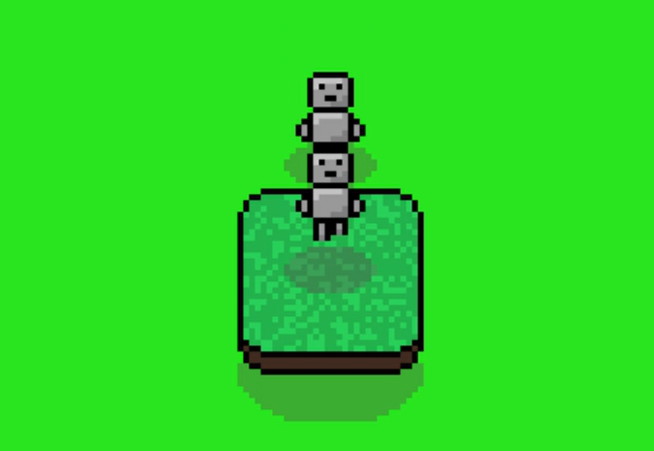
The player (a
MobileObject) jumping onto a collidable object (an EnvObject) while being chased by the enemy (another MobileObject).
This code makes a Player character, a secondary character that will attempt to follow the Player character, and a solid object the Player can collide with and jump over.
import topdownengine as tde
from topdownengine.mobile_object.controller import KeyboardInputController, MovementAIController
import pygame as pg
from topdownengine.ui import Button, UIContainer, Text

# Define an instance of the Game class
game = tde.Game(
    screen_width=900,
    screen_height=650,
    window_title="pygame-topdownengine Basic Usage Example",
    target_scale=3 # Add scale of three to make it more visible
)
game.bg_color = (40, 229, 30)

# Define main menu using a BaseScene instance + set the active scene to the main menu
game.scenes["menu"] = tde.BaseScene(game)
game.active_scene_key = "menu"

# Create the play button + header
font = tde.Font("Arial")
header = Text((450, 200), font, 50, "pygame-topdownengine", (255, 255, 255))

play_btn = Button((450, 350), on_click=lambda: setattr(game, "active_scene_key", "gameplay"))
play_btn.image = pg.Surface((150, 50))
play_btn.image.fill((50, 100, 100))
font.draw_text("PLAY", 75, 25, 40, play_btn.image, (255, 255, 255))

# Add the header + play button to the main menu
container = UIContainer()
container.add_ui_element(header)
container.add_ui_element(play_btn)
game.scenes["menu"].ui_containers.append(container)

# Define a MobileObject to be the Player + Enable Camera Tracking
player = tde.MobileObject(
    controller=KeyboardInputController(),
    animation_paths={
        "idle": tde.ASSETS_DIR / "example-player" / "idle.png",
        "walk": tde.ASSETS_DIR / "example-player" / "walk.png"
    }, frame_size=(16, 16), directional_anims=True
)
# game.camera = tde.SmoothTrackerCamera() # Uncomment to enable Smooth Tracking
game.camera.focus_game_object = player

# Define a MobileObject to follow the Player
enemy = tde.MobileObject(
    controller=MovementAIController(target_mobile_object=player),
    animation_paths=player.animation_paths, # Use same animations as the Player
    frame_size=(16, 16), directional_anims=True
)

# Define an EnvObject
env_object = tde.EnvObject(
    animation_paths={
        "idle": tde.ASSETS_DIR / "example-cliff.png"
    },
    frame_size=(32, 32), colliders=[pg.Rect(0, 0, 32, 32)]
)
env_object.position = pg.Vector2(100, 100)
env_object.obj_shadow = "32x16"

# Add them to the game object group
game.game_object_group.add(player, env_object, enemy)

# You can add subpixel rendering by uncommenting the below line of code.
# tde.GameObject.SUBPIXEL = True

# Run the game
game.run()
Installation
In order to install pygame-topdownengine, make sure Python and pip are both installed and in PATH. Then, run this command into your terminal:
pip install pygame-topdownengine
If you would like to view the documentation page on installation, which also has information about dependencies and virtual environments, click here.
License
This library is distributed under the MIT license, which can be found in the root of this repository under the LICENSE file.
The source files located in the examples subfolder are licensed under the Creative Commons Zero 1.0 Universal license, which can be found inside of examples/LICENSE.
The documentation (found in the docs subfolder) is also licensed under the Creative Commons Zero 1.0 Universal license, which can be found inside of docs/LICENSE.
1 maintainer

Metadata
1 maintainer
Release files for pygame-topdownengine 0.5.3
For a detailed explanation of source distributions (sdists) and built distributions (wheels), please see the package formats documentation.
Source distribution (sdist)
| File | Size | Uploaded | |
|---|---|---|---|
| pygame_topdownengine-0.5.3.tar.gz | 127.4 kB | Details |
Built distribution (wheel)
| File | Interpreter | ABI | Platform | Reset |
|---|---|---|---|---|
| pygame_topdownengine-0.5.3-py3-none-any.whl | Python 3 | none | any | Details |
Total release size: 157.8 kB
Release files / pygame_topdownengine-0.5.3.tar.gz
| Download URL | pygame_topdownengine-0.5.3.tar.gz |
|---|---|
| Size | 127.4 kB |
| Tags | Source |
|
SHA-256 checksum How to use checksums |
89299585c2fe75764636a8dfb3a4bd25ba408d4eface364ed03c0af1af0e07a3
|
|
BLAKE2b-256 checksum How to use checksums |
c14174e8b6aeef64b7bdbf8854a9428820a17aac4eee3886c16ed1c1be746a74
|
| Upload date | |
|
Uploaded using Trusted Publishing? What is trusted publishing? |
Yes |
| Uploaded via |
twine/6.1.0 CPython/3.13.14
|
Provenance
Provenance describes where a file came from. On PyPI, provenance is shared via attestations, which provide a verifiable record of the build or publishing details. View details, limitations and caveats.


PyPI Publish Attestation
PyPI verified that this artifact, at this checksum, originated from the publisher listed below.
Signed by GitHub Actions, verified by PyPI on Jul 24, 2026.
Transparency logRelease files / pygame_topdownengine-0.5.3-py3-none-any.whl
| Download URL | pygame_topdownengine-0.5.3-py3-none-any.whl |
|---|---|
| Size | 30.4 kB |
| Tags | Python 3 |
|
SHA-256 checksum How to use checksums |
3b5a0ee3d73b841625562a03e94124e7c885cdf7de47bc00a52f6d34bf5e272e
|
|
BLAKE2b-256 checksum How to use checksums |
13a97c1dd3f294357b2b8585f545d11655884663a6b34aac9b132d0e3c4f0847
|
| Upload date | |
|
Uploaded using Trusted Publishing? What is trusted publishing? |
Yes |
| Uploaded via |
twine/6.1.0 CPython/3.13.14
|
Provenance
Provenance describes where a file came from. On PyPI, provenance is shared via attestations, which provide a verifiable record of the build or publishing details. View details, limitations and caveats.
PyPI Publish Attestation
PyPI verified that this artifact, at this checksum, originated from the publisher listed below.
Signed by GitHub Actions, verified by PyPI on Jul 24, 2026.
Transparency log













