
pygame-topdownengine




pygame-topdownengine is a 2.5D engine for top-down games. It is designed to be highly modular, with most core systems being located in the easily extendible GameObject class. It is built on top of the pygame-ce package, which you can find here.
Features
GameObjectclass that contains all of the core systems.MobileObjectclass that allows for modular movement behavior.EnvObjectclass for environmental decorations or objects.- Built in
VisualUtilsclass that allows for the easy manipulation of Surfaces. - Option to use either pixel-perfect or subpixel rendering.
- Dynamic scale-setting for all
GameObjectinstances. - Robust 3D collision detection.
- Toggleable
Game.debugattribute to render colliders during development.
Quickstart
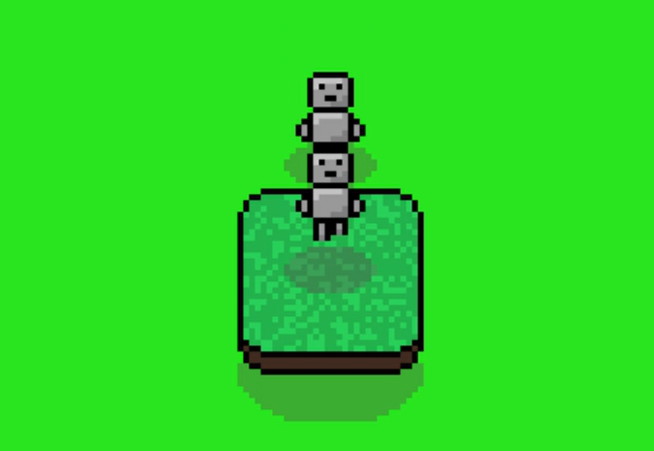
The player (a
MobileObject) jumping onto a collidable object (an EnvObject) while being chased by the enemy (another MobileObject).
This code makes a Player character, a secondary character that will attempt to follow the Player character, and a solid object the Player can collide with and jump over.
import topdownengine as tde
from topdownengine.mobile_object.controller import KeyboardInputController, MovementAIController
import pygame as pg
from topdownengine.ui import Button, UIContainer, Text

# Define an instance of the Game class
game = tde.Game(
    screen_width=900,
    screen_height=650,
    window_title="pygame-topdownengine Basic Usage Example",
    target_scale=3 # Add scale of three to make it more visible
)
game.bg_color = (40, 229, 30)

# Define main menu using a BaseScene instance + set the active scene to the main menu
game.scenes["menu"] = tde.BaseScene(game)
game.active_scene_key = "menu"

# Create the play button + header
font = tde.Font("Arial")
header = Text((450, 200), font, 50, "pygame-topdownengine", (255, 255, 255))

play_btn = Button((450, 350), on_click=lambda: setattr(game, "active_scene_key", "gameplay"))
play_btn.image = pg.Surface((150, 50))
play_btn.image.fill((50, 100, 100))
font.draw_text("PLAY", 75, 25, 40, play_btn.image, (255, 255, 255))

# Add the header + play button to the main menu
container = UIContainer()
container.add_ui_element(header)
container.add_ui_element(play_btn)
game.scenes["menu"].ui_containers.append(container)

# Define a MobileObject to be the Player + Enable Camera Tracking
player = tde.MobileObject(
    controller=KeyboardInputController(),
    animation_paths={
        "idle": tde.ASSETS_DIR / "example-player" / "idle.png",
        "walk": tde.ASSETS_DIR / "example-player" / "walk.png"
    }, frame_size=(16, 16), directional_anims=True
)
game.camera.focus_game_object = player

# Define a MobileObject to follow the Player
enemy = tde.MobileObject(
    controller=MovementAIController(target_mobile_object=player),
    animation_paths=player.animation_paths, # Use same animations as the Player
    frame_size=(16, 16), directional_anims=True
)

# Define an EnvObject
env_object = tde.EnvObject(
    animation_paths={
        "idle": tde.ASSETS_DIR / "example-cliff.png"
    },
    frame_size=(32, 32), colliders=[pg.Rect(0, 0, 32, 32)]
)
env_object.position = pg.Vector2(100, 100)
env_object.obj_shadow = "32x16"

# Add them to the game object group
game.game_object_group.add(player, env_object, enemy)

# You can add subpixel rendering by uncommenting the below line of code.
# tde.GameObject.SUBPIXEL = True

# Run the game
game.run()
Installation
In order to install pygame-topdownengine, make sure Python and pip are both installed and in PATH. Then, run this command into your terminal:
pip install pygame-topdownengine
If you would like to view the documentation page on installation, which also has information about dependencies and virtual environments, click here.
License
This library is distributed under the MIT license, which can be found in the root of this repository under the LICENSE file.
The source files located in the examples subfolder are licensed under the Creative Commons Zero 1.0 Universal license, which can be found inside of examples/LICENSE.
The documentation (found in the docs subfolder) is also licensed under the Creative Commons Zero 1.0 Universal license, which can be found inside of docs/LICENSE.
1 maintainer

Download files
Download the file for your platform. If you're not sure which to choose, learn more about installing packages.
Source Distribution
Built Distribution
Filter files by name, interpreter, ABI, and platform.
If you're not sure about the file name format, learn more about wheel file names.
Copy a direct link to the current filters
File details
Details for the file pygame_topdownengine-0.4.4.tar.gz.
File metadata
- Download URL: pygame_topdownengine-0.4.4.tar.gz
- Upload date:
- Size: 125.5 kB
- Tags: Source
- Uploaded using Trusted Publishing? Yes
- Uploaded via: twine/6.1.0 CPython/3.13.12
File hashes
| Algorithm | Hash digest | |
|---|---|---|
| SHA256 |
09d682942920c5632aa3d81d120942578081b3bb54058b5a010c0567873cdda6
|
|
| MD5 |
7602a874a308dd42f9eb7abd6d9a98a2
|
|
| BLAKE2b-256 |
e3e0354a5543f5fed5fe871cd9117b5c0be5fd921c298e795bec0adc498b5fcc
|
Provenance
The following attestation bundles were made for pygame_topdownengine-0.4.4.tar.gz:
Publisher:
release.yml on shaurya-sharma-dev/pygame-topdownengine
-
Statement:
-
Statement type:
https://in-toto.io/Statement/v1 -
Predicate type:
https://docs.pypi.org/attestations/publish/v1 -
Subject name:
pygame_topdownengine-0.4.4.tar.gz -
Subject digest:
09d682942920c5632aa3d81d120942578081b3bb54058b5a010c0567873cdda6 - Sigstore transparency entry: 2131682471
- Sigstore integration time:
-
Permalink:
shaurya-sharma-dev/pygame-topdownengine@4199c7359525f593dbc8ab506304c0b4e686b7cd -
Branch / Tag:
refs/tags/v0.4.4 - Owner: https://github.com/shaurya-sharma-dev
-
Access:
public
-
Token Issuer:
https://token.actions.githubusercontent.com -
Runner Environment:
github-hosted -
Publication workflow:
release.yml@4199c7359525f593dbc8ab506304c0b4e686b7cd -
Trigger Event:
push
-
Statement type:
File details
Details for the file pygame_topdownengine-0.4.4-py3-none-any.whl.
File metadata
- Download URL: pygame_topdownengine-0.4.4-py3-none-any.whl
- Upload date:
- Size: 29.6 kB
- Tags: Python 3
- Uploaded using Trusted Publishing? Yes
- Uploaded via: twine/6.1.0 CPython/3.13.12
File hashes
| Algorithm | Hash digest | |
|---|---|---|
| SHA256 |
c74594946f61f84fba6dee31ea142e0352f5ba41d1725881cf30ca7ee676d5d4
|
|
| MD5 |
a61a573bc927a442ad86428a884068ee
|
|
| BLAKE2b-256 |
7893eee66f6af6f3b4931837ef4e4964b9aa2a208ebb76b1aebe3ef7a86e24eb
|
Provenance
The following attestation bundles were made for pygame_topdownengine-0.4.4-py3-none-any.whl:
Publisher:
release.yml on shaurya-sharma-dev/pygame-topdownengine
-
Statement:
-
Statement type:
https://in-toto.io/Statement/v1 -
Predicate type:
https://docs.pypi.org/attestations/publish/v1 -
Subject name:
pygame_topdownengine-0.4.4-py3-none-any.whl -
Subject digest:
c74594946f61f84fba6dee31ea142e0352f5ba41d1725881cf30ca7ee676d5d4 - Sigstore transparency entry: 2131682921
- Sigstore integration time:
-
Permalink:
shaurya-sharma-dev/pygame-topdownengine@4199c7359525f593dbc8ab506304c0b4e686b7cd -
Branch / Tag:
refs/tags/v0.4.4 - Owner: https://github.com/shaurya-sharma-dev
-
Access:
public
-
Token Issuer:
https://token.actions.githubusercontent.com -
Runner Environment:
github-hosted -
Publication workflow:
release.yml@4199c7359525f593dbc8ab506304c0b4e686b7cd -
Trigger Event:
push
-
Statement type:







