
pyglobegl
anywidget wrapper for globe.gl with integrations with popular Python spatial packages.
📖 Full documentation: https://pyglobegl.pages.dev/
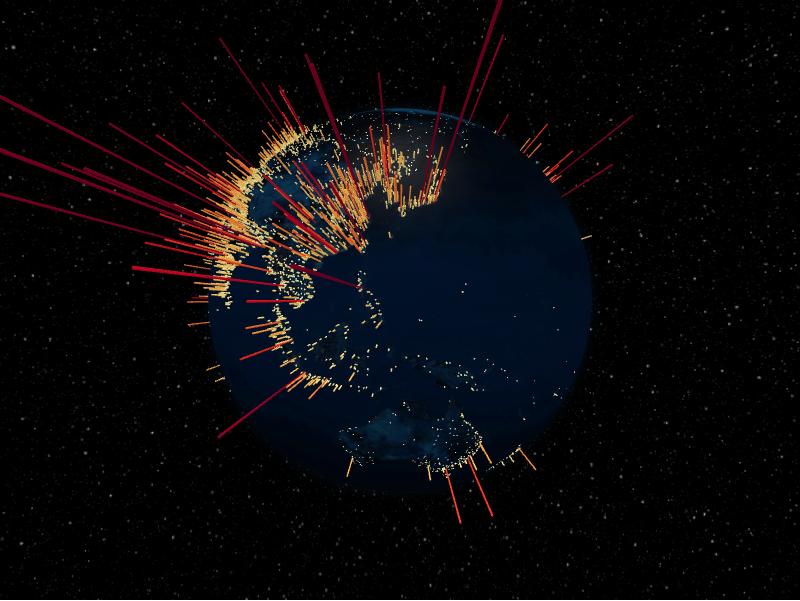
pyglobegl renders interactive WebGL globes in modern notebook environments
(Jupyter, JupyterLab, Colab, VS Code, marimo) and drives them from a friendly,
strongly typed Python API. It ships a prebuilt JupyterLab extension, so
pip install is all you need.
Installation
pip install pyglobegl
Optional spatial extras:
pip install "pyglobegl[geopandas]"     # GeoPandas + Pandera helpers
pip install "pyglobegl[movingpandas]"  # MovingPandas (includes GeoPandas)
See the installation guide for uv and extras details.
Quick start
from IPython.display import display

from pyglobegl import (
    GlobeConfig,
    GlobeLayerConfig,
    GlobeWidget,
    PointDatum,
    PointsLayerConfig,
)

points = [
    PointDatum(lat=0, lng=0, altitude=0.25, color="#ff0000", label="Center"),
    PointDatum(lat=15, lng=-45, altitude=0.12, color="#00ff00", label="West"),
]

config = GlobeConfig(
    globe=GlobeLayerConfig(
        globe_image_url="https://cdn.jsdelivr.net/npm/three-globe/example/img/earth-day.jpg"
    ),
    points=PointsLayerConfig(points_data=points),
)

display(GlobeWidget(config=config))
Layer data are typed Pydantic models (no dynamic accessor remapping), and defaults mirror globe.gl so omitted values still render predictably. See the quick start for more.
Layers & features
Each globe.gl layer is exposed as typed data models:
- Globe & images
- Points
- Arcs
- Polygons
- Paths
- Heatmaps
- Hex bin
- Hexed polygons
- Tiles
- Particles
- Rings
- Labels
Plus:
- Runtime updates & callbacks — update data and respond to hover/click after render
- Frontend Python callbacks
—
@frontend_pythonaccessors that run in the browser - GeoPandas helpers — build layer data straight from GeoDataFrames
- MovingPandas helpers — render trajectories as paths
Documentation
Contributing
Build Assets (Release Checklist)
cd frontend && pnpm run builduv build
UI Test Artifacts
- Canvas captures are saved under
ui-artifactsas{test-name}-pass-<timestamp>.pngor{test-name}-fail-<timestamp>.png. - Canvas comparisons use SSIM (structural similarity) with a fixed threshold
(currently
0.86).
1 maintainer

Metadata
1 maintainer
Release files for pyglobegl 0.9.2
For a detailed explanation of source distributions (sdists) and built distributions (wheels), please see the package formats documentation.
Source distribution (sdist)
| File | Size | Uploaded | |
|---|---|---|---|
| pyglobegl-0.9.2.tar.gz | 1.3 MB | Details |
Built distribution (wheel)
| File | Interpreter | ABI | Platform | Reset |
|---|---|---|---|---|
| pyglobegl-0.9.2-py3-none-any.whl | Python 3 | none | any | Details |
Total release size: 2.7 MB
Release files / pyglobegl-0.9.2.tar.gz
| Download URL | pyglobegl-0.9.2.tar.gz |
|---|---|
| Size | 1.3 MB |
| Tags | Source |
|
SHA-256 checksum How to use checksums |
748fed428f33f6efa09fc8cfc9a93b54a0b891d92d4ce7afa11c4f6b1e78f6fd
|
|
BLAKE2b-256 checksum How to use checksums |
eaae98c750418e661620467bc68bfa18dd34e9f36355b38b93f335adba9bd5ad
|
| Upload date | |
|
Uploaded using Trusted Publishing? What is trusted publishing? |
Yes |
| Uploaded via |
uv/0.12.21 {"installer":{"name":"uv","version":"0.12.21","subcommand":["publish"]},"python":null,"implementation":{"name":null,"version":null},"distro":{"name":"Ubuntu","version":"24.04","id":"noble","libc":null},"system":{"name":null,"release":null},"cpu":null,"openssl_version":null,"setuptools_version":null,"rustc_version":null,"ci":true}
|
Release files / pyglobegl-0.9.2-py3-none-any.whl
| Download URL | pyglobegl-0.9.2-py3-none-any.whl |
|---|---|
| Size | 1.3 MB |
| Tags | Python 3 |
|
SHA-256 checksum How to use checksums |
fe923399a3b9902bbd33923fd0ee0315f4fd8ed7f80d696f46564a21e28d6ae3
|
|
BLAKE2b-256 checksum How to use checksums |
6497c628124c4d0eac458c78c2f3cf862c89364b42955fe7cdd3bee0284f8e8a
|
| Upload date | |
|
Uploaded using Trusted Publishing? What is trusted publishing? |
Yes |
| Uploaded via |
uv/0.12.21 {"installer":{"name":"uv","version":"0.12.21","subcommand":["publish"]},"python":null,"implementation":{"name":null,"version":null},"distro":{"name":"Ubuntu","version":"24.04","id":"noble","libc":null},"system":{"name":null,"release":null},"cpu":null,"openssl_version":null,"setuptools_version":null,"rustc_version":null,"ci":true}
|














